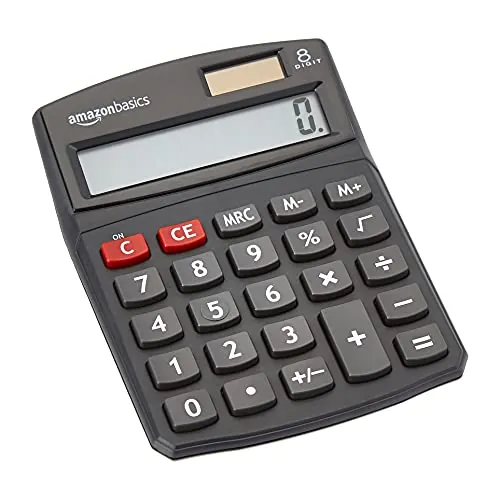
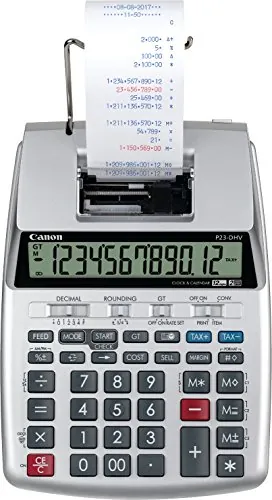
These are different calculator workflows. The Amazon Basics KC-760-8 is a compact, non-printing calculator with an 8-digit display, solar plus LR54 button-cell power, and familiar percent and memory keys. Canon’s P23-DHV-3 is a 12-digit desktop printing calculator: you can leave it in ON mode for display-only use or switch to PRINT when you need a paper record. Its decimal and rounding switches and Add mode are useful for repeated two-decimal addition or subtraction, but printing also means planning for a paper roll and CP-13 ink roller. Canon’s current U.S. page lists an AC-380 III adapter in the box while the manual calls the adapter optional, so verify the seller’s exact bundle. Neither source establishes calculation accuracy or a performance winner.
Your routine is quick, non-printing arithmetic and you want a compact 8-digit display with percent and memory keys. Its manual specifies solar and LR54 button-cell power. Check that the selected package and its included cell meet your needs; the manual does not establish battery runtime or calculation accuracy.
Choose Canon P23-DHV-3 Printing Calculator P23-DHV-3 (Canon part 2279C001)
You specifically need to keep a paper record of a calculation or want a larger 12-digit desktop display with selectable decimal and rounding controls. You can use ON mode for display-only work; PRINT mode produces a paper trail. Plan for roll paper and the CP-13 roller, and verify whether the exact offer includes the AC-380 III because Canon’s product page and manual differ on adapter inclusion.
If you need verified accounting or tax compliance, a tested accuracy claim, a current seller-verified accessory bundle, or a specific calculator color, these sources do not settle that requirement. Check the exact listing and current box contents before ordering; for regulated or business-critical calculations, choose equipment and procedures based on the applicable professional requirements rather than this feature comparison.
A basic non-printing calculator with an 8-digit display, percent and memory keys, solar power plus an LR54 button cell according to its exact-model manual. The current seller package was not separately inspected.
A 12-digit desktop printing calculator. Canon documents display-only ON mode, PRINT mode, currency conversion, selectable decimal/rounding settings and a 2-1/4-inch paper roll. Its U.S. page lists the AC-380 III adapter in the box; the manual treats an AC adapter as optional, and this exact Amazon offer was not inspected.
Model P23-DHV-3 (Canon part 2279C001) Amazon ASIN B0746VB8D9
Canon P23-DHV-3 Printing Calculator · Canon documents a PRINT mode that prints entries and results; the KC-760-8 manual describes a display calculator.
Amazon Basics KC-760-8 Desktop CalculatorNo print mechanism is documented in the KC-760-8 manual; the documented workflow is display-based arithmetic.
Canon P23-DHV-3 Printing CalculatorCanon provides ON (display only), PRINT and CONV modes; PRINT/CONV display and print entries/results.
The Canon is the choice when retaining a printed calculation trail is part of the desk routine. If a screen result is enough, the print system adds paper and ink-roller upkeep without serving that need.Sources for Do you need a paper record?
Amazon Basics KC-760-8 Desktop CalculatorThe manual documents percent and memory keys (M+, M−, MRC), with an 8-digit display.
Canon P23-DHV-3 Printing CalculatorCanon documents an Add mode with automatic two-decimal placement for addition/subtraction, a selectable 0–4 decimal setting and rounding choices.
For repeated amounts where you want the calculator to place two decimals automatically, Canon’s documented Add mode is a workflow-specific feature. Check the switch setting and exact manual before use; neither manual proves greater accuracy.Sources for Repeated additions and decimal handling
Amazon Basics KC-760-8 Desktop Calculator8-digit display in the KC-760-8 manual; compact desktop format for ordinary entry and review.
Canon P23-DHV-3 Printing Calculator12 effective digits and a larger desktop body; Canon lists approximately 9-1/2 × 7-1/4 × 2 inches in its manual.
Choose by the amount of displayed context and desk space you want, not an assumed accuracy difference. Measure the actual desk area if the Canon footprint matters.Sources for Display and desk setup
Amazon Basics KC-760-8 Desktop CalculatorSolar plus one LR54 button cell per the exact model manual; no paper supplies are documented.
Canon P23-DHV-3 Printing CalculatorCanon specifies four AA batteries for battery operation and uses a 2-1/4-inch roll plus a CP-13 roller when printing. Its current U.S. page lists an AC-380 III adapter, but the manual describes an adapter as optional.
The KC-760-8 avoids the printer consumables. For Canon, check the live bundle and decide whether you will run on batteries or a confirmed included adapter; keep replacement paper and the correct roller available if printing.Sources for Power and recurring supplies
The purchase decision is mainly about workflow. The KC-760-8 keeps the job to keypad entry and an 8-digit screen. The P23-DHV-3 adds paper output, a larger 12-digit display, and physical settings for decimal handling. If you never retain calculations on paper, the Canon’s printer is extra equipment to feed and maintain. If a printed trail matters, the Amazon Basics manual does not document a printer alternative.
Think of a routine such as adding several amounts and keeping the result with a work sheet. On the Canon, its documented Add mode can place two decimal digits automatically for addition and subtraction, while PRINT mode can produce a paper record. The source describes calculator behavior, not a tested bookkeeping result. If you only need to add figures and read the total, the KC-760-8’s documented memory and percent keys may be enough; there is no need to buy paper supplies for an unused printer.
Canon specifies 2-1/4-inch (57 mm) wide paper and a CP-13 roller for printing. Its U.S. product page lists an AC-380 III adapter with the calculator, roll and manual, but the manual treats the adapter as optional. Verify the selected offer before expecting an adapter in the box. The Canon manual also describes four AA batteries as a power option. The KC-760-8 manual instead specifies solar power plus an LR54 button cell.
These manufacturer materials describe features and setup, not tested accuracy, speed, battery life or durability. The current Amazon offer contents were not inspected. Canon’s product page and manual differ on whether the AC adapter is included, so verify the selected bundle. Canon’s product title says “white,” while other retailer color details conflict; confirm the finish on the exact listing.
Solar plus one LR54 (LR1130) button cell, as specified in the exact-model manual. Source
Canon P23-DHV-3 Printing Calculator
Display and print modes
12 effective digits. ON mode displays without printing; PRINT and CONV modes print as well as display. Source
Paper and ink
Uses a 2-1/4 in (57 mm) wide paper roll; Canon specifies a CP-13 ink roller for replacement. Source
Documented box contents
Canon U.S. currently lists the calculator, AC-380 III adapter, paper roll and user manual. The manual separately labels the AC adapter optional; verify the selected seller bundle. Source
Before you buy
Before buying, decide whether your normal calculation ends with a screen result or needs a paper record. The Canon can display without printing in ON mode; use PRINT only when the paper trail is wanted.
For repeated addition/subtraction using two decimal places, Canon documents an Add mode that places two decimals automatically. Confirm the selected decimal and rounding switches before starting a batch; do not treat the switch as a guarantee of accounting correctness.
If choosing the Canon, include the 2-1/4-inch paper roll and CP-13 roller in your setup plan. Canon’s page lists an AC-380 III adapter in the box, while the manual calls the adapter optional; verify the exact Amazon offer before relying on it.
If choosing the KC-760-8, its exact-model manual specifies solar plus an LR54/LR1130 button cell and documents percent and memory keys. This guide does not estimate runtime or verify the current seller package.
Canon’s color information is inconsistent across listings. Check the exact seller listing and finish before buying; the current offer contents and delivered color were not independently verified.
Can the Canon P23-DHV-3 be used without printing every calculation?
Yes. Canon’s manual distinguishes ON mode, which displays without printing, from PRINT mode. You can use the display-only mode when no paper record is needed and switch to PRINT when you want one.Canon P23-DHV-3 (USA) instruction manual
What supplies should I plan for if I print with the Canon?
This guide compares the U.S. Amazon Basics KC-760-8 (ASIN B08DRS8MNF) with the Canon P23-DHV-3 (part 2279C001; ASIN B0746VB8D9) using manufacturer documentation. Canon’s U.S. product page lists the AC-380 III adapter as included, while its manual describes an AC adapter as optional; confirm what the selected offer contains. Canon’s product title says “white,” but other listing color information conflicts, so check the finish before buying. This is not a hands-on comparison of accuracy, speed, battery life or durability.