
Products compared
Amazon
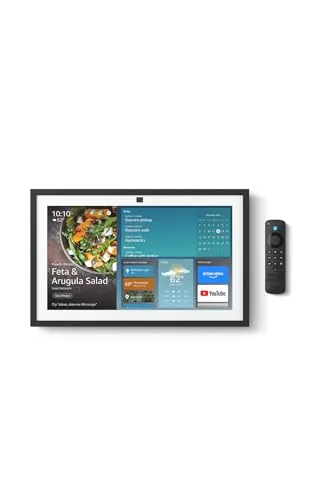
Amazon Echo Show 15 (2nd Gen) 15.6-inch Smart Display
Black Echo Show 15 (2nd Generation), model CP38RE. Amazon’s exact product page identifies the 2nd-generation display and lists built-in Fire TV, widgets and smart-home controls.
Model CP38RE
Amazon ASIN B0C5DPSW5Y
Amazon
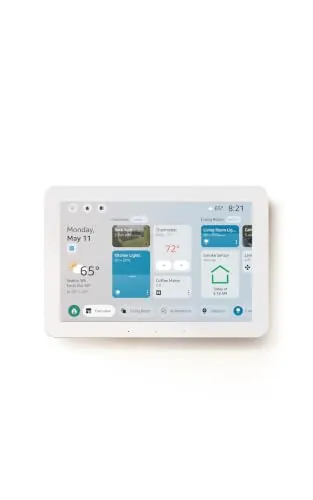
Amazon Echo Hub 8-inch Smart Home Control Panel
White Echo Hub, model G6A87E. Amazon’s product listing identifies an 8-inch smart-home control panel with a dashboard for devices, camera widgets, groups and routines.
Model G6A87E
Amazon ASIN B0BCR7M9KX
Differences that matter
Sources for Controls and connected-device prerequisites
Sources for Optional stands, cable routes and paid media
Let the screen's daily job decide
Echo Show 15 (2nd Gen), model CP38RE, is the larger shared-screen option: Amazon lists a 15.6-inch Full HD display, home widgets, Fire TV and smart-home controls by voice or touch. Its screen can be used in landscape or portrait. The Alexa Voice Remote is included for Fire TV content; Amazon says it does not control widgets.
Echo Hub, model G6A87E, is an 8-inch touch control panel. Amazon's dashboard guide describes arranging widgets, device groups, camera views and routines. Both can handle smart-home functions, so choose Show 15 for its household and entertainment mix or Hub for a compact control-first screen.
Check device, account and service requirements before counting on a control
Amazon’s standard power-adapter setup uses Wi-Fi and an Amazon account. If you plan a PoE installation for Echo Hub, check the separate network and accessory requirements. A dashboard or voice-control claim still depends on your device and the functions it exposes to Alexa. Amazon's Echo Hub help says compatible devices should be linked to the same Alexa account; some third-party products need their own app and an Alexa skill, and certain categories or scenes do not have Hub tiles. Check your exact device and whether you need a tile, voice command or routine.
For Show 15, Amazon lists Fire TV and home-screen widgets; some apps or services may require a separate subscription. Its included remote navigates Fire TV content, while the screen handles widgets separately. Do not treat either device as a guarantee that every smart-home feature or paid service is included.
Compare the standard wall kit with your outlet and chosen placement
Both exact listings describe a standard wall kit and power adapter in the box. The Show 15 2nd Gen package lists a 30W adapter and 5-foot cord plus the mount, screws, anchors, template and quick-start guide; it also includes a Fire TV remote and batteries. Amazon's Show setup help says Wi-Fi and an Amazon account are needed to register it.
The exact Echo Hub listing lists its 12.5W adapter, 6-foot cord, wall mount, anchors, screws, template and quick-start guide. Current Amazon Hub support confirms the supplied adapter and wall-mount hardware and separately describes its wall installation. Measure outlet distance and consider the instructions and tools for your wall before choosing a location.
Add optional accessories only for the setup you need
Neither standard package includes a tabletop stand. Amazon lists the Show 15 Premium Adjustable Stand and 6- or 10-foot extension cords separately. If you intend to use a stand rather than the included wall hardware, check the current compatible accessory for this Show generation.
Echo Hub's listing also separates the tabletop stand, in-wall cable pass-through and PoE adapter from the standard kit. Amazon setup help says a PoE route needs compatible power/network equipment. For streaming, check the app and subscription terms; the device hardware and Fire TV remote do not include every third-party service.
Product details
Amazon Echo Show 15 (2nd Gen) 15.6-inch Smart Display
- Model identification
- Amazon identifies the second-generation Echo Show 15 model as CP38RE. Source
- Display and media
- 15.6-inch 1920 × 1080 display; built-in Fire TV; screen supports landscape or portrait orientation. Source
- Controls
- Amazon lists smart-home control by voice or touch/dashboard and customizable widgets; Fire TV remote (2024 release) with batteries is included for Fire TV navigation. Source
- Standard wall kit and power
- In the box: 30W adapter and 5-foot cord, wall mount, anchors, screws, mounting template, quick-start guide, and Alexa Voice Remote (2024) with batteries; stand sold separately. Source
- Initial setup
- Amazon requires Wi-Fi credentials and an Amazon account to register the device; the included power adapter is used for setup. Source
Amazon Echo Hub 8-inch Smart Home Control Panel
- Display and dashboard
- 8-inch touchscreen/control panel with a customizable dashboard for smart-home devices, camera views and routines. Source
- Connections
- Amazon's exact listing describes support for Wi-Fi, Bluetooth, Zigbee, Thread and Matter devices; exact device functionality and dashboard tiles depend on compatibility and account setup. Source
- Standard wall kit and power
- Exact-ASIN listing states the box includes a 12.5W power adapter, 6-foot cord, wall mount, anchors, screws, mounting template and quick-start guide; tabletop stand, in-wall cable pass-through and PoE adapter are separate accessories. Source
- Initial setup
- Amazon setup instructions use the included power adapter, Wi-Fi and an Amazon account; dashboard devices must be compatible and linked to the same Alexa account, with some third-party devices requiring their skill/account setup. Source
Before you buy
Community discussions
Making room for a shared kitchen calendar
Amazon Echo Show 15 (2nd Gen) 15.6-inch Smart Display
A household bought an Echo Show 15 for a shared calendar and to-do list, then had trouble finding a useful spot for it alongside an existing kitchen display.
What to check
Pick the spot where people would check the calendar. Measure that space and decide what you want the display to do there most often.
Common questions
Does Echo Show 15 (2nd Gen) also control smart-home devices?
Yes. Amazon lists the 2nd-generation CP38RE as a smart display with built-in smart-home controls by voice or touch/dashboard. Check that the exact connected device and desired feature are supported by Alexa before relying on it.Amazon Echo Show 15 product page, exact ASIN B0C5DPSW5Y (CP38RE, 2nd Generation)How to Set Up Your Echo Show 15 (2nd Generation)
What comes with the standard wall-mount package?
Show 15 (2nd Gen) lists a wall mount, four screws and anchors, mounting template, 30W power adapter with 5-foot cord, quick-start guide, and Alexa Voice Remote with batteries. Echo Hub lists wall mount, anchors, screws, mounting template, quick-start guide, 12.5W adapter and 6-foot cord. Verify the current exact listing before ordering, especially for refurbished or used items.Amazon Echo Show 15 product page, exact ASIN B0C5DPSW5Y (CP38RE, 2nd Generation)Amazon Echo Hub product page, exact ASIN B0BCR7M9KX (G6A87E)How to Set Up Your Echo Show 15 (2nd Generation)Wall Mount Your Echo Hub
Are a tabletop stand or hidden-cable parts included?
No, the standard package descriptions list neither tabletop stand. Amazon says the Show 15 adjustable stand and extension cords are separate. The Hub listing identifies its tabletop stand, in-wall cable pass-through and PoE adapter as separate accessories. Check the current exact package and accessory compatibility for your installation.Amazon Echo Show 15 product page, exact ASIN B0C5DPSW5Y (CP38RE, 2nd Generation)Amazon Echo Hub product page, exact ASIN B0BCR7M9KX (G6A87E)Wall Mount Your Echo ShowWall Mount Your Echo Hub
What do I need before setup, and will every Alexa device get a Hub tile?
Amazon’s standard setup pages use Wi-Fi and an Amazon account for both models. Echo Hub also has a documented PoE accessory path. For Hub dashboard devices, Amazon says the device must be Alexa-compatible and connected to the same Alexa account; some third-party products need their app or an Alexa skill, and some device categories do not have Hub tiles. Confirm the specific device path before purchase.How to Set Up Your Echo Show 15 (2nd Generation)Set Up Your Echo HubEcho Hub Setup Isn't Working
Does the Echo Show 15 remote control the home-screen widgets?
Amazon says the included Alexa Voice Remote is for browsing and playing Fire TV content; the Show's home screen and widgets remain separate touch/voice functions.How to Set Up Your Echo Show 15 (2nd Generation)Amazon Echo Show 15 product page, exact ASIN B0C5DPSW5Y (CP38RE, 2nd Generation)
Sources and scope
Check that the exact connected devices, dashboard tiles and media services you use are supported. Amazon’s Hub support confirms a standard wall mount and adapter. Verify the exact seller box for cord length and accessories.
- Amazon Echo Show 15 product page, exact ASIN B0C5DPSW5Y (CP38RE, 2nd Generation)
- How to Set Up Your Echo Show 15 (2nd Generation)
- Wall Mount Your Echo Show
- Amazon Echo Hub product page, exact ASIN B0BCR7M9KX (G6A87E)
- Safety & Compliance Information for Echo Hub (G6A87E)
- Wall Mount Your Echo Hub
- Set Up Your Echo Hub
- Customize Your Home Dashboard on Echo Hub
- Echo Hub Setup Isn't Working
- Set Up Fire TV on Your Compatible Echo Devices with a Screen
- Safety & Compliance Information for Echo Show 15 (2nd Generation), model CP38RE
Related comparisons
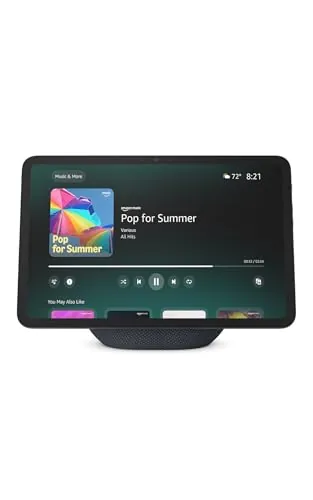
Echo Show 11 (2025) vs Echo Show 15 (2nd Gen): Mounting and TV Setup
For the U.S. Echo Show 11 (2025 release, model E78T24) and Echo Show 15 (2nd Generation, model CP38RE), choose by placement and video controls. Amazon lists a 15.6-inch Full HD Show 15 with wall-mount hardware in the box and a remote for its Fire TV experience. Amazon describes the Show 11’s TV & Videos menu but does not state its screen diagonal, included stand, or wall-mount compatibility. Confirm the exact offer and measure your intended location; streaming services and subscriptions vary.
Read comparison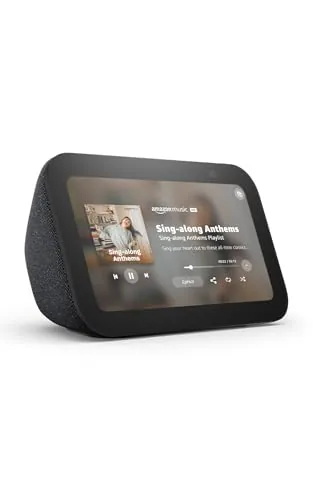
Echo Show 5 (3rd Gen) vs Echo Show 15 (2nd Gen): Personal Screen or Family Hub?
The 5.5-inch Echo Show 5 (3rd Gen) fits the role of a personal screen. The 15.6-inch Echo Show 15 (2nd Gen) adds household widgets and Fire TV. It includes wall-mount hardware, with a tabletop stand sold separately. Decide where the screen will go and who needs to see it.
Read comparison