
Products compared
Ambient Weather
Ambient Weather WS-5000 Ultrasonic Smart Weather Station
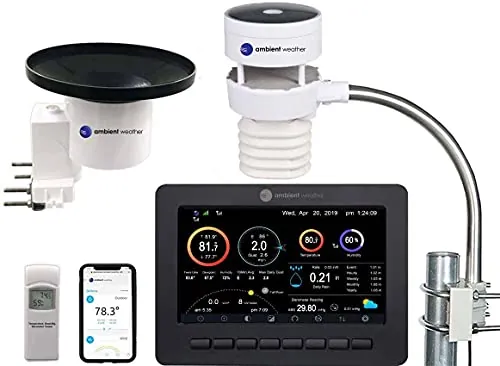
The assigned WS-5000 listing matches the maker's WS-5000 kit: color display tablet, outdoor ultrasonic sensor array, separate rain gauge, and indoor thermo-hygrometer/barometer sensor. The manufacturer's manual lists the parts separately and documents their placement and care.
Model WS-5000
Amazon ASIN B087V6N5WZ
WeatherFlow
WeatherFlow Tempest Weather Station
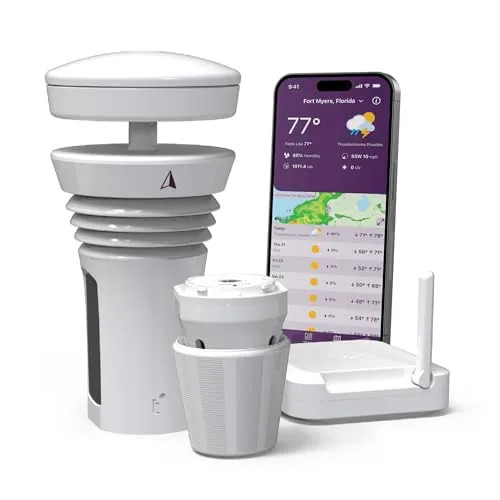
The model compared here is the WeatherFlow Tempest Weather Station. The manufacturer page lists one outdoor sensor, a Wi-Fi hub, a flat base and a pole mount, and says no dedicated display is included. The page also shows T26 imagery and battery information specific to T26 models; check the listing details for the exact Tempest version before relying on them.
Model Tempest Weather Station
Amazon ASIN B0868WY7NY
Differences that matter
What matters most to you?
Choose a priority to see what it changes.
Sources for Outdoor sensor layout and access
Sources for Where you see station readings
Sources for Mounting and siting checklist
Sources for Routine recorded in the product instructions
Start with the outdoor layout you can provide
The WS-5000 is a multi-piece kit: its manual lists an ultrasonic array, a separate rain gauge, an indoor sensor and a display tablet. Ambient says to keep the rain gauge and sensor array accessible and documents cleaning the rain gauge every few months. That makes the WS-5000 a fit to consider when you can plan two reachable outdoor spots.
Tempest's current package listing has one outdoor sensor, a Wi-Fi hub, a flat base and a pole mount. Its siting guide recommends an accessible, open and sunny location. The single integrated outdoor unit avoids planning for a separate rain-gauge location, but it still needs an appropriate site; the sources do not prove easier installation or more representative data.
Pick the screen and data routine you will actually use
WS-5000 includes a powered indoor display tablet. Ambient's manual also documents a Wi-Fi off setting at the console; when Wi-Fi is enabled, the station can upload to Ambient Weather Network. This gives you both a supplied local screen and a documented online path.
Tempest does not include a dedicated screen. The manufacturer directs owners to its app or browser, and says the hub requires a 2.4 GHz Wi-Fi network for continuous uploads and anytime data access. Before buying, check that the hub can join the network you plan to use and that you are comfortable checking readings on a phone or browser.
Measure the site and check the mounting pieces
For WS-5000, sketch where both the array and rain gauge can go and how you will reach them later. Ambient's manual calls for accessible equipment and gives separate installation guidance; the exact layout depends on your own property and mounting choices.
For Tempest, compare the included flat base and pole mount with the intended site. The siting guide recommends open sunlight and access; the Quick Start Guide notes that a standard 1/4-20 camera mount is not included. Confirm the mount you need before checkout rather than assuming it comes in the box.
Product details
Ambient Weather WS-5000 Ultrasonic Smart Weather Station
Choose the WS-5000 if the included local display matters and your mounting plan can accommodate the array and a separate, reachable rain gauge. Its manual says the station can upload through Wi-Fi, which can also be turned off at the console.
- Included station layout
- Display tablet, outdoor ultrasonic sensor array, separate rain gauge, indoor thermo-hygrometer/barometer transmitter; batteries are not included. Source
- Local display and network setting
- Includes a powered display tablet. The WS-5000 manual documents Wi-Fi upload to weather services and a setting to turn Wi-Fi off. Source
- Placement and access
- The maker calls for separate setup of the ultrasonic array and rain gauge, and says to keep the rain gauge and array accessible; its manual instructs cleaning the rain gauge every few months. Source
WeatherFlow Tempest Weather Station
Choose Tempest if one integrated outdoor sensor, included flat-base/pole mounting options, and app/browser viewing fit your setup. The hub needs a 2.4 GHz Wi-Fi network for continuous uploads and anytime data access; Tempest does not include a dedicated display.
- Listed box contents
- Tempest sensor, Wi-Fi hub, flat base and pole mount. Source
- Display and data access
- No dedicated display is included; the manufacturer lists app and browser access to station data and says the hub requires 2.4 GHz Wi-Fi for continuous upload and anytime access. Source
- Placement
- The siting guide recommends an accessible, open location with direct sunlight; the kit lists a flat base and pole mount. Source
Before you buy
Community discussions
Planning where each outdoor sensor will go
Ambient Weather WS-5000 Ultrasonic Smart Weather Station
A WS-5000 owner with a tall house, outbuildings and surrounding trees asked where to put the sensor array and rain gauge.
What to check
Sketch the buildings, trees and the places you can access for maintenance. Compare those locations with the manufacturer’s siting instructions for each sensor.
Moving from a dedicated console to an app
WeatherFlow Tempest Weather Station
A WeatherFlow Tempest buyer described setting it up in the app after using a station with a console in the kitchen.
What to check
Decide where you want to read the measurements. Check which devices the Tempest app runs on and whether the package includes the display you want.
Planning a wall display before ordering
WeatherFlow Tempest Weather Station
A buyer asked what they could use as a wall display for a Tempest. A commenter said they used the Tempest app on a wall-mounted tablet.
What to check
If you want a screen in a fixed location, pick where it will sit and verify that the display you plan to use can show the measurements you care about.
Common questions
Does the WS-5000 have one outdoor sensor or a separate rain gauge?
Its manual lists an ultrasonic sensor array and a separate rain gauge, plus an indoor transmitter and display tablet. Plan for both outdoor pieces and keep the rain gauge accessible for the maker's routine cleaning guidance.Ambient Weather WS-5000 User Manual, Version 1.3
Does Tempest include an indoor display?
No dedicated display is listed in the Tempest kit. The manufacturer says station data is available in its app or browser through a Wi-Fi hub that requires 2.4 GHz Wi-Fi for continuous uploads and anytime access.Tempest Weather Station product page and listed package
Can the WS-5000 console run with Wi-Fi off?
The WS-5000 manual documents a console setting to turn Wi-Fi off. Its local display is part of the kit; the manual does not support using that fact to claim comparative forecast or sensor performance.Ambient Weather WS-5000 User Manual, Version 1.3
What should I check about mounting before ordering?
For WS-5000, plan distinct accessible placement for the array and rain gauge. For Tempest, check whether the included flat base or pole mount fits an open, sunny site. The standard camera mount mentioned in Tempest setup guidance is not included.Ambient Weather WS-5000 User Manual, Version 1.3Siting & Installation for TempestTempest Quick Start Guide
Sources and scope
This is a setup and feature comparison, not a measurement-accuracy, forecast, rainfall, warning, reliability, or installation test. The WS-5000 manual contains different battery-change intervals in its site-survey and maintenance sections, so this guide does not repeat an interval. The current Tempest page shows T26 imagery and gives battery details qualified to T26 models; those claims are not transferred to the selected ASIN. No price, stock, or accuracy ranking is included.