
Pickagu

Anker 140W 4-Port vs Prime 160W: Port Mix and Shared Power

Anker Charger (140W, 4-Port, PD 3.1) with USB-C CableModel A2697 (US product page displays model number B2697)Anker Prime Charger (160W, 3 Ports, Smart Display)Model A2687

The cataloged Anker 140W 4-Port charger (A2697) gives you three USB-C ports plus one USB-A port and publishes specific allocations for two, three, and four connected devices. The Anker Prime 160W (A2687) has three USB-C ports and documents up to 160W total with two or three ports active, but its page does not publish a fixed multi-port split. Choose the 140W model if a USB-A device or its documented port-by-port allocation fits your setup; choose Prime if you need three USB-C connections and want its higher published shared ceiling, then verify the power each host and cable can negotiate.

Choose by what matters to you

Choose Anker Charger (140W, 4-Port, PD 3.1) with USB-C Cable A2697 (US product page displays model number B2697)

The setup includes a USB-A cable/device, or if you want Anker's published watt allocation for each port combination before plugging in. Plan around the listed split: for example, four connected devices are rated 65W + 45W + 12W + 12W, not 140W available to each port.

Check price on Amazon

Choose Anker Prime Charger (160W, 3 Ports, Smart Display) A2687

Three USB-C ports cover your devices and its published 160W total with multiple ports active is useful. Because Anker does not list a fixed split for those multi-port cases, check the laptop/tablet/phone input requirements and the charger's negotiated per-port status for your intended combination.

Check price on Amazon

Keep comparing if your decision depends on a specific laptop's approved charger profile, a guaranteed wattage split across multiple devices, or measured charging time. These pages provide rated limits and selected compatibility notes, not a controlled test of your devices. Confirm the model code and included cable for the assigned 140W listing because Anker's US page and support materials use A2697/B2697 differently.

As an Amazon Associate I earn from qualifying purchases.Affiliate disclosure

Products compared

Anker Charger (140W, 4-Port, PD 3.1) with USB-C Cable · A2697 (US product page displays model number B2697)

Anker

Anker Charger (140W, 4-Port, PD 3.1) with USB-C Cable

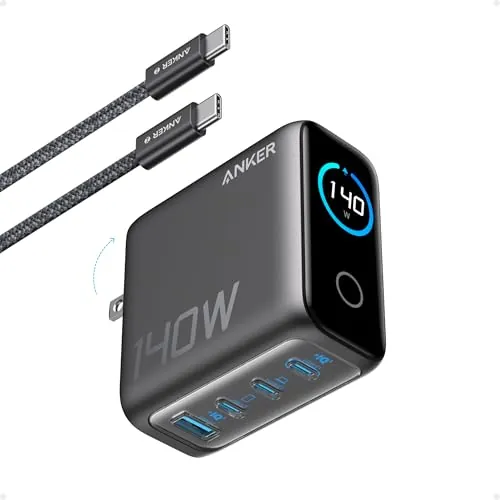
Gray four-port charger with three USB-C ports and one USB-A port. Anker's published allocation chart gives port-specific limits as more devices are connected.

Model A2697 (US product page displays model number B2697)
Amazon ASIN B0DFCH3C4W
Check current price on Amazon
Anker Prime Charger (160W, 3 Ports, Smart Display) · A2687

Anker

Anker Prime Charger (160W, 3 Ports, Smart Display)

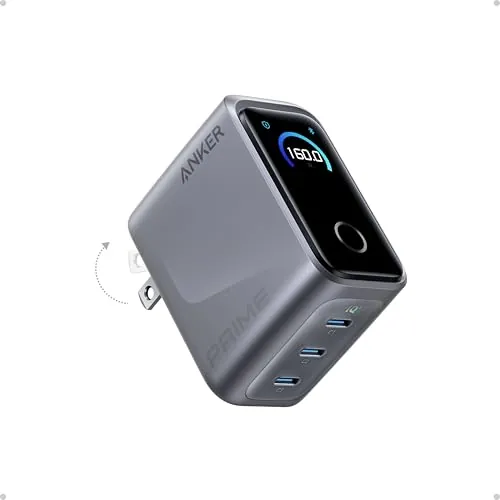
Phantom Gray three-port USB-C charger. Anker specifies up to 160W total with two or three ports active and describes app-connected modes for supported devices.

Model A2687
Amazon ASIN B0F9NK4M7Q

Check current price on Amazon

Differences that matter

What matters most to you?

Choose a priority to see what it changes.

Difference
Anker Charger (140W, 4-Port, PD 3.1) with USB-C Cable
Anker Prime Charger (160W, 3 Ports, Smart Display)
Why it matters
Port mix and what happens when you plug in more devices
Anker Charger (140W, 4-Port, PD 3.1) with USB-C CableThree USB-C plus one USB-A. Published splits include C1+C2 at 70W+70W; C1/C2 plus C3 at 100W+40W; and four ports at 65W+45W+12W+12W (134W total).
Anker Prime Charger (160W, 3 Ports, Smart Display)Three USB-C only. Anker lists 160W total with two or three ports active, but does not publish a fixed split for those multi-port cases.
If one device still uses USB-A, or you need to plan a known multi-device allocation in advance, the 140W chart answers more of the port-combination question. If all devices are USB-C and the combined ceiling is your constraint, Prime's stated 160W ceiling may fit; it does not mean each connected device gets a chosen wattage. Check each device's input limit and the live port allocation.
Sources for Port mix and what happens when you plug in more devices
Single-port ratings, cable, and device negotiation
Anker Charger (140W, 4-Port, PD 3.1) with USB-C CableC1/C2 are each listed up to 140W; Anker says an E-Marker cable is required above 100W and notes some named Dell models may not charge at full speed because of their proprietary protocol.
Anker Prime Charger (160W, 3 Ports, Smart Display)The specification lists up to 150W on one port, while the same page describes consistent 140W single-port output. Anker's special 150W Prime power-bank use requires AI Mode 2.0 and the power bank's included or compatible cable; that cable is not included with this charger.
Before buying for a laptop, check its supported USB-C charging profile, the cable's rating, and whether the chosen port/device combination can negotiate the power you need. A charger's maximum rating alone does not establish the power your device will draw. Avoid relying on the Prime's special power-bank figure as a universal laptop output promise.
Sources for Single-port ratings, cable, and device negotiation
Outlet and travel setup
Anker Charger (140W, 4-Port, PD 3.1) with USB-C CableListed body dimensions are 2.72 × 2.72 × 1.42 in. Anker describes a foldable plug and generous spacing between ports; published charger weight is 9.7 oz.
Anker Prime Charger (160W, 3 Ports, Smart Display)Listed dimensions are 2.56 × 2.05 × 1.38 in, excluding prongs; Anker describes a foldable plug and lists 7.76 oz weight.
Prime has smaller listed body dimensions and lower listed charger weight, while both have foldable plugs. These measurements do not say how either unit will sit in your particular outlet or whether it will block a neighboring socket; measure your outlet area and account for plug orientation before ordering.
Sources for Outlet and travel setup
Display and changing power modes
Anker Charger (140W, 4-Port, PD 3.1) with USB-C CableAnker describes a touchscreen display for power, port status, and temperature. The cited product documentation does not describe the Prime's app-controlled AI/Custom mode workflow for this model.
Anker Prime Charger (160W, 3 Ports, Smart Display)The display shows port power; Anker documents Standard, AI, and Custom modes, with custom modes configurable in the app over Bluetooth. Dynamic allocation is limited to AI Mode 2.0 and supported devices.
If you want to configure the charger's modes through an app, Prime has that documented setup path, with Bluetooth/app and supported-device conditions. If a visible port/status display is enough, compare the exact listing and manual for the first model; do not assume its controls work like Prime's app features.
Sources for Display and changing power modes

Start with the device set, not the 140W or 160W headline

Write down what you will charge together and whether any cable still ends in USB-A. The 140W charger has four ports across USB-C and USB-A; Prime A2687 has three USB-C ports. That port-layout difference can settle the choice before you compare total wattage.

If multiple USB-C devices will share the charger, the 140W model's chart lists the allocation for particular port combinations. Prime's page states a higher 160W total ceiling with two or three ports active but does not publish a fixed split. A larger total does not mean each device receives its own maximum: the charger, cable, device profile, and other connected ports all matter.

Use the output chart as a pre-plug checklist

For the 140W four-port charger, Anker lists C1+C2 at 70W+70W, C1 or C2 with C3 at 100W+40W, and all four ports at 65W+45W+12W+12W. This is useful if you know which device needs the highest negotiated input and can connect it to a compatible port/cable. Keep the two-port chart's maximum values separate from the three- and four-port cases.

Prime A2687 lists up to 160W total with two or three ports active, rather than an allocation table for those cases. Its display can show the power distribution after devices are connected, while custom modes use the app over Bluetooth and dynamic power distribution is limited to AI Mode 2.0 and supported devices. Treat the shown/rated output as setup information, not a charging-time promise.

Check cable, host profile, and outlet before checkout

Anker says an E-Marker cable is required above 100W on the 140W model, and it calls out named Dell models that may not charge at full speed because of a proprietary protocol. For either charger, compare the exact laptop or tablet's USB-C input profile with the chosen port and cable; the charger rating cannot override the device's supported input.

The 140W charger's listed body is 2.72 × 2.72 × 1.42 inches. Prime's listed body is 2.56 × 2.05 × 1.38 inches, with dimensions excluding its prongs. Both pages describe foldable plugs, but those measurements do not guarantee clearance for neighboring outlets. Measure your wall location and confirm what cable ships with the exact Amazon bundle.

The first charger’s model code differs across Anker materials: the U.S. page displays B2697, while the product-page URL, quick-start guide, and support specification use A2697. The product materials describe the 140W four-port charger, but confirm the exact retail offer and physical label if the code matters to your purchase; this does not establish that the two codes are universally interchangeable.

Product details

Anker Charger (140W, 4-Port, PD 3.1) with USB-C Cable

Ports
3 USB-C and 1 USB-A Source
Published four-device allocation
USB-C1 65W + USB-C2 45W + USB-C3 12W + USB-A1 12W; Anker notes four-device total output is 134W. Source
Dimensions and cable note
2.72 × 2.72 × 1.42 in; Anker says an E-Marker cable is required for charging above 100W. Source

Anker Prime Charger (160W, 3 Ports, Smart Display)

Ports and shared ceiling
3 USB-C; 160W maximum total with two or three ports in use. The product page does not give a fixed watt split for those multi-port cases. Source
Published single-port rating
The specifications list up to 150W on one port, while the same page describes consistent 140W single-port output. Confirm the exact device/cable profile rather than treating either figure as guaranteed device draw. Source
Dimensions and setup
2.56 × 2.05 × 1.38 in (Anker says dimensions exclude prongs); foldable plug. Custom modes are configured in the app over Bluetooth. Source

Before you buy

  • Make a list of the devices you plan to connect at the same time and the maximum USB-C input each accepts. Compare that list with the 140W charger's port-combination chart; Prime's 160W multi-port specification is a total ceiling, not a guaranteed split for your devices.
  • If any device uses USB-A, only the 140W four-port model in this pair has that port. If all are USB-C, confirm the number of simultaneous ports and each device's charging profile before preferring Prime's larger shared ceiling.
  • For charging above 100W on the 140W model, Anker says to use an E-Marker cable. Confirm the exact cable rating and that the laptop supports the corresponding USB-C PD profile; device negotiation and proprietary protocols can change the result.
  • Do not treat Prime's 150W single-port spec as a promise of 150W to every laptop: Anker's page also calls 140W its consistent single-port output and ties up-to-150W power-bank charging to a particular Anker power bank, AI Mode 2.0, and a compatible cable.
  • Measure your outlet and nearby socket clearance against the body dimensions and plug orientation. Both chargers have foldable plugs; the measurements do not guarantee either will clear an adjacent plug in your setup.
  • Before ordering the 140W listing, verify the exact ASIN, included cable and model marking: the listing data/support quick-start materials call it A2697, while Anker's US product page displays B2697 under a URL and download naming that use A2697.

Community discussions

Taking fewer chargers and cables when traveling

Anker Charger (140W, 4-Port, PD 3.1) with USB-C Cable

A shopper comparing the Anker 140W four-port and Prime 160W three-port chargers wanted to simplify what they carried in their bag.

What to check

List the devices you want to charge together and the cable each uses. Check the number and types of ports you would actually need.

Original Reddit discussion

Common questions

Does the Prime 160W give 160W to each port when several devices are connected?

No. Anker lists 160W as the total maximum with two or three ports active, and the page does not provide a fixed watt split for those cases. Check your devices' input limits and the displayed allocation for the intended combination.Anker Prime Charger (160W, 3 Ports, Smart Display) — US product page

Which charger has USB-A?

The 140W four-port charger has three USB-C ports and one USB-A port. Prime A2687 has three USB-C ports. If USB-A is required, choose the first only after confirming its exact ASIN and model variant on the listing.Anker Charger (140W, 4-Port, PD 3.1) with USB-C Cable — US product pageAnker Prime Charger (160W, 3 Ports, Smart Display) — US product page

Can either charger make my laptop draw its maximum listed wattage?

That depends on the laptop's supported charging profile, the port allocation when other devices are connected, and the cable. Anker requires an E-Marker cable above 100W for the 140W charger and notes some named Dell models may not charge at full speed; check your exact laptop and cable documentation.Anker Charger (140W, 4-Port, PD 3.1) with USB-C Cable — US product page

Are A2697 and B2697 confirmed interchangeable model numbers?

The reviewed Anker material is inconsistent: the 140W product-page URL and quick-start guide name A2697, the support specification is titled for A2697, but the US product page displays model number B2697. This comparison does not establish a general crosswalk. Check the exact Amazon ASIN, bundle, and label with Anker before relying on the code alone.Anker Charger (140W, 4-Port, PD 3.1) with USB-C Cable — US product pageSpecification of Anker 140W Charger A2697 — Anker Support

Sources and scope

Anker’s model code differs across its U.S. product materials: the U.S. page displays B2697, while the product-page URL, quick-start guide, and support specification use A2697. Confirm the model marking and bundle on the exact retailer listing before purchase; the cited documents do not establish that these codes are interchangeable in every context. Published output ratings are limits, not guaranteed draw on every device. The Prime page lists up to 150W on one port but also describes 140W as its consistent single-port output; its special 150W power-bank case depends on a named Anker power bank, AI Mode 2.0, and a compatible cable. Neither product page establishes clearance for a particular outlet or neighboring plug.
  1. Anker Charger (140W, 4-Port, PD 3.1) with USB-C Cable — US product page
  2. Specification of Anker 140W Charger A2697 — Anker Support
  3. Anker Prime Charger (160W, 3 Ports, Smart Display) — US product page