
Products compared
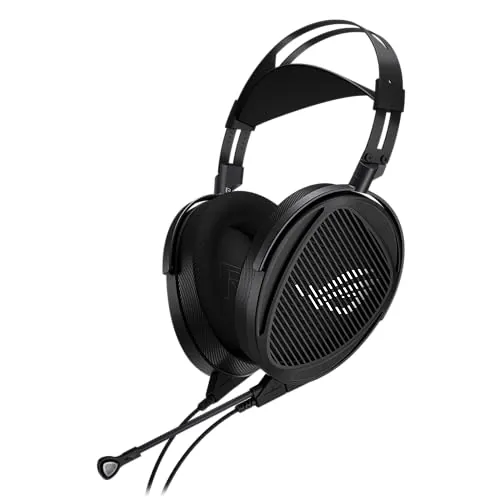
ASUS
ASUS ROG Kithara Gaming Headset (Black)
Black wired ROG Kithara; use ASUS’s exact host table when planning microphone use.
Model A702 ROG KITHARA/BLK
Amazon ASIN B0GG53SPJC
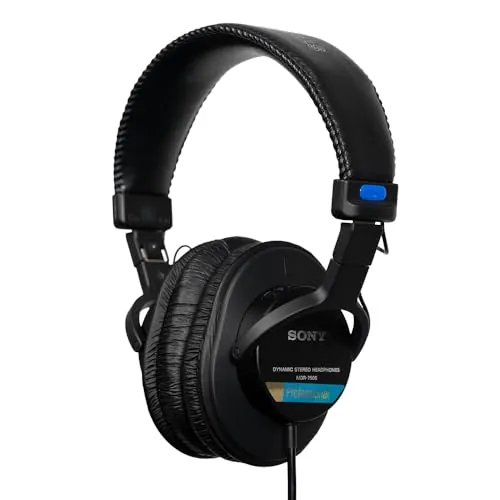
Sony
Sony MDR7506 Professional Headphones
Black wired MDR7506; Sony’s cited specification sheet describes its closed construction and supplied analog connection.
Model MDR7506
Amazon ASIN B000AJIF4E
Differences that matter
What matters most to you?
Choose a priority to see what it changes.
Sources for Open-back or closed earcups
Sources for Microphone and host connection
Start with the room, not a sound ranking
The clearest documented distinction is the earcup construction. ASUS describes the Kithara as open-back and says environmental sound passes through, recommending that it not be used in noisy environments. Sony specifies the MDR7506 as closed. Those facts help narrow the choice by room and construction preference, but they do not quantify how much noise either model blocks or escapes in a particular space.
If you must keep outside sound from passing through the earcups, the MDR7506 is the one in this pair with a closed design in the cited manufacturer documentation. If an open-back arrangement fits the room, the Kithara’s earcup construction may fit that preference. Neither statement substitutes for a listening or isolation test.
Match the cable to the equipment you already own
Kithara’s documented kit centers on a headphone cable with interchangeable 4.4 mm balanced, 3.5 mm and 6.3 mm plugs, and a USB-C-to-dual-3.5 mm adapter. Sony’s cited sheet lists a 3.5 mm stereo connection, a 6.3 mm Unimatch adapter and a 9.8 ft cord. These are concrete differences for someone choosing between a desktop DAC/amp, a standard headphone jack or a USB-C host.
For either product, check the exact output and whether you need the headphone path only or a microphone as well. A 4.4 mm plug, a 6.3 mm adapter or a USB-C adapter describes a connection option; it does not prove a particular sound result or universal compatibility.
For voice chat, verify the mic route separately
ASUS identifies a separate Kithara boom-microphone cable, with separate 3.5 mm audio and mic plugs, and publishes different microphone support by host. On a PC it lists dual 3.5 mm or USB-C; on notebook/mobile, USB-C only; on PlayStation, USB-C only for the mic while controller 3.5 mm is audio only; on Xbox, controller microphone is not supported; on Switch/Switch 2, it lists USB-C. Use the row for your actual device rather than assuming any headset jack carries both signals.
The cited Sony specification sheet is useful for the MDR7506’s closed design and analog connection, but it does not establish microphone behavior or external USB arrangements. If either is a deciding requirement for Sony, confirm it from an applicable exact-model support source before purchase.
Product details
ASUS ROG Kithara Gaming Headset (Black)
- Earcup construction
- Open-back; ASUS says environmental sound passes through and recommends avoiding noisy environments. Source
- Headphone cable plugs
- Interchangeable 4.4 mm balanced, 3.5 mm and 6.3 mm plugs. Source
- Listed mic path
- Separate boom-microphone cable with distinct audio and microphone 3.5 mm plugs; host support varies by connection. Source
Before you buy
Community discussions
Choosing which cable to use at a PC
ASUS ROG Kithara Gaming Headset (Black)
A ROG Kithara owner discussed the supplied leads in the context of connecting the headphones to a PC and an external DAC.
What to check
Match the plug on the supplied lead to the output you use most. Check the exact box contents if you need a second connection.
Living with a coiled cable at a desk
Sony MDR7506 Professional Headphones
A Sony MDR-7506 owner asked about the long coiled cable.
What to check
Measure the route from your seat to the headphone jack and think about where the coil will rest when you move or stand.
Setting up several recording seats
Sony MDR7506 Professional Headphones
A commenter who uses multiple MDR-7506 pairs described using them for studio and podcast recording.
What to check
Count the headphone outputs you have and plan cable routes for each seat before choosing headphones for a group setup.
Common questions
Does the Kithara headphone cable also connect its boom microphone?
ASUS lists a headphone cable with interchangeable plugs and a separate boom-microphone cable with distinct audio and mic plugs. Treat playback and microphone as separate setup checks.ROG Kithara Gaming Headset: US features, connections and host guidanceROG Kithara Gaming Headset: US technical specifications and listed accessories
Will the Kithara microphone work through a controller’s 3.5 mm jack?
Not on the routes ASUS documents: its table says PlayStation controller 3.5 mm is audio only, and Xbox controller microphone is not supported. The table lists USB-C as the microphone route for PlayStation and Switch/Switch 2. Verify the actual device and port.ROG Kithara Gaming Headset: US features, connections and host guidance
Does the MDR7506 specification prove that it has no microphone or cannot use USB audio?
No. The cited Sony sheet establishes the closed design and listed analog package, but it does not settle every microphone or external USB setup. Check an applicable Sony document for that specific use.MDR-7506 Professional Headphones: Sony US specification sheet
Which one isolates more noise?
The sources describe Kithara as open-back and Sony as closed, but this comparison has no measured isolation or leakage results. Choose according to construction and environment rather than an unmeasured isolation ranking.ROG Kithara Gaming Headset: US features, connections and host guidanceMDR-7506 Professional Headphones: Sony US specification sheet
Sources and scope
Manufacturer specifications and connection guidance only; neither model was hands-on tested. This guide does not rank sound quality, soundstage, isolation, leakage, microphone quality, comfort, weight or gaming performance. Sony’s cited specification sheet documents its supplied analog connection but not all microphone or external USB arrangements. Confirm the exact seller package and your host ports before buying.
Related comparisons
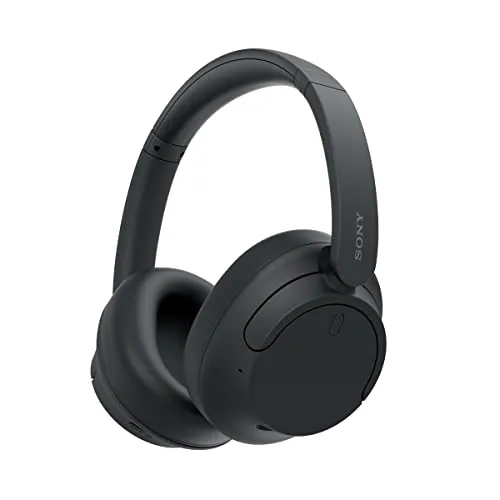
Sony WH-CH720N vs MDR7506: Bluetooth, Cable Modes and Box Contents
Both headphones have an analog listening path, but the operating states differ. WH-CH720N adds Bluetooth, rechargeable USB charging, and noise-canceling/Ambient Sound modes that require power; its supplied cable can still play audio with power off. MDR7506 is a wired analog package with a 3.5 mm/6.3 mm adapter and carry pouch, and Sony says it has no active noise cancellation. Check your source jack, call-control needs, and whether you want to charge the headset.
Read comparison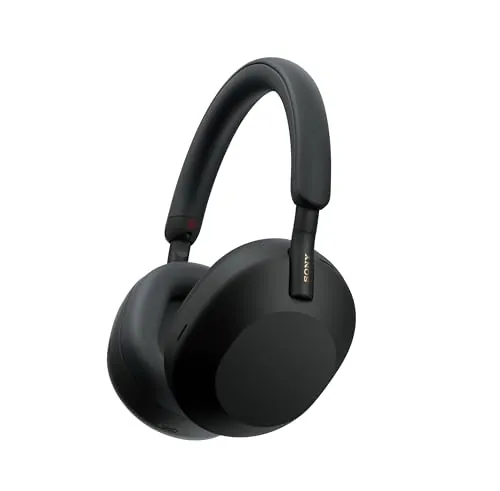
Sony WH-1000XM5 vs WH-1000XM6: Is the Upgrade Worth It for Office Noise?
Sony rates both headphones for up to 30 hours with noise canceling on and 40 hours off, so battery life is not a stated-generation upgrade. RTINGS' current public direct-pair verdict says XM6 reduces mid-range noise such as office chatter and keyboard clacks more effectively, but its softer pads can lose their seal more easily with glasses or small shifts. If your XM5 already handles your commute and calls, the XM6 changes matter most when that office-noise improvement is a problem you will use and the new fit feels secure.
Read comparison