
Products compared
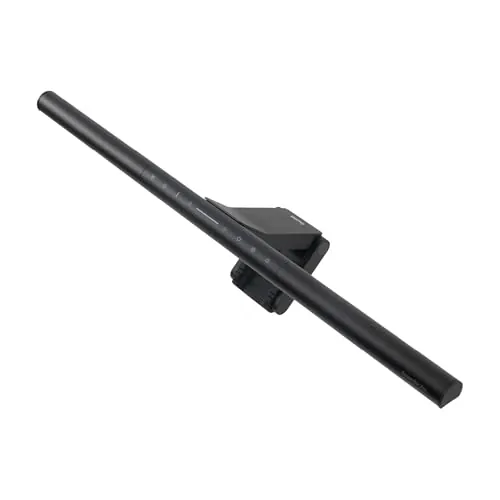
BenQ
BenQ ScreenBar Pro LED Monitor Light Bar (Black)
Black model; BenQ Pro U.S. page specifies USB-C input and a monitor-frame thickness range.
Model ScreenBar Pro
Amazon ASIN B0CZ9P1QW9
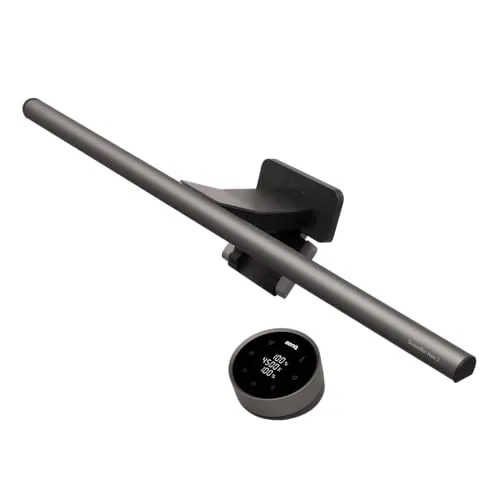
BenQ
BenQ ScreenBar Halo 2 LED Monitor Light Bar (Dark Grey)
Dark Grey model; documented front task light plus tri-zone rear light, with wireless controller with numeric touch display.
Model ScreenBar Halo 2
Amazon ASIN B0DK59YKRS
Differences that matter
What matters most to you?
Choose a priority to see what it changes.
Sources for Front task light and rear illumination
Sources for Where adjustments happen
Sources for Monitor frame, curvature, and camera clearance
Decide whether the wall behind the monitor should be part of the lighting setup
BenQ describes ScreenBar Pro as a front-facing task light with asymmetric optics directed toward the desk. Its U.S. product page does not list a rear light. Halo 2 is the model for which BenQ expressly documents three rear-light zones, alongside front task lighting. If that additional feature is part of your intended layout, Halo 2 has the clearer documented match; this does not establish that one setup will look better in a particular room.
Do not treat the Pro page's silence about rear-facing output as proof of zero light spill. The comparison is about what BenQ explicitly documents for each model, not a measured beam or glare test.
Choose the adjustment layout that fits your desk
ScreenBar Pro keeps its controls on the bar. Halo 2 uses a separate wireless controller with a numeric touch display for brightness and color temperature. Choose a reachable spot on your desk for the Halo 2 controller.
The Halo 2 specification/manual also calls for a rechargeable controller. If you would rather avoid placing or charging a separate control puck, the Pro's integrated-control arrangement is the simpler documented layout.
Measure the frame and inspect the camera area before ordering
The maker-listed ranges overlap but are not identical. Pro specifies a 0.43–6.5 cm frame and Halo 2 specifies 0.43–6 cm; both list 1000R–1800R curved monitors. Use BenQ's instructions to measure the monitor frame where the clamp will rest, and check whether a bevel, rounded top, rear bulge, built-in camera, or cable changes the actual contact and clearance.
Both product pages describe keeping a built-in camera clear and using a webcam mounting accessory. The Pro and Halo 2 user guides list that accessory in their package contents, but each specification page labels it optional. If your setup depends on an external webcam mount, verify the exact offer package and whether the top-center mount conflicts with your existing camera.
Check the USB-C power budget and adapter placement
Pro's U.S. specification lists a 5 V/maximum 1.7 A USB-C input and 8.5 W maximum. Its manual says a direct USB-C source should provide 5 V/2 A for optimized performance and describes using the supplied AC adapter. Halo 2 lists up to 5 V/3 A and 15 W; BenQ says to use the supplied adapter or another source rated at least 5 V/3 A. Its manual warns that USB-A or an underpowered monitor, computer, or hub may cause abnormal operation.
Measure the cable route as well as the monitor fit: BenQ lists 180 cm for Pro and 150 cm for Halo 2. Confirm your adapter/outlet or USB-C port can reach the bar and meet its model's stated input conditions before mounting.
Product details
BenQ ScreenBar Pro LED Monitor Light Bar (Black)
Before you buy
Community discussions
Reaching the controls without touching the light
BenQ ScreenBar Halo 2 LED Monitor Light Bar (Dark Grey)
A designer who had used both a ScreenBar Pro and a Halo 2 preferred placing the Halo 2 controller where it was easy to reach while working.
What to check
Check whether you can reach the bar at the top of your monitor. If you would use a separate controller, reserve a spot near your keyboard or drawing area.
Sharing the monitor’s top edge with a webcam
BenQ ScreenBar Pro LED Monitor Light Bar (Black)
A designer who previously used a ScreenBar Pro described arranging a webcam and monitor light on the same top edge.
What to check
Check the clearance at the top and back of your monitor. Compare the light mount and webcam position before relying on the same attachment point.
Common questions
Does ScreenBar Pro have the same rear light as Halo 2?
BenQ explicitly describes Halo 2's three-zone rear light. The Pro page describes asymmetric front light directed onto the desk but does not specify a rear-light feature. That source gap does not prove that no light reaches behind the monitor.BenQ ScreenBar Pro — U.S. product pageBenQ ScreenBar Halo 2 — U.S. product page
How thick can my monitor frame be?
BenQ lists 0.43–6.5 cm for Pro and 0.43–6 cm for Halo 2. Measure at the clamp's contact point on the top frame and check the bezel shape, curvature, camera and rear housing against the applicable user guide before buying.ScreenBar Pro specification — BenQ U.S.ScreenBar Pro User GuideScreenBar Halo 2 specification — BenQ U.S.ScreenBar Halo 2 User Guide
Can I power Halo 2 from a monitor's USB port?
BenQ specifies 5 V/3 A and advises using the supplied adapter or another USB-C source meeting that rating. The user guide warns that USB-A or a monitor/computer/hub with insufficient output can cause abnormal operation. Check the exact port rating rather than assuming it is adequate.What is the power input requirement for ScreenBar Halo 2?ScreenBar Halo 2 User Guide
Is the webcam accessory included with both exact offers?
BenQ's user guides list a webcam accessory in package contents, while the model specification pages label a webcam accessory as optional. Because the exact B0CZ9P1QW9 and B0DK59YKRS offer boxes are not resolved by those generic page labels, confirm the contents on the exact listing if you need the mount.ScreenBar Pro specification — BenQ U.S.ScreenBar Pro User GuideScreenBar Halo 2 specification — BenQ U.S.ScreenBar Halo 2 User Guide
Sources and scope
This guide compares BenQ's published feature and fit information. It does not measure light output, glare, color rendering, eye comfort, or long-term durability. BenQ's pages and manuals differ on whether the webcam accessory is included or optional; check the exact offer if it matters. A stated monitor range does not guarantee fit with every bezel, camera, cable, or rear housing.
- BenQ ScreenBar Pro — U.S. product page
- ScreenBar Pro specification — BenQ U.S.
- ScreenBar Pro User Guide
- BenQ ScreenBar Halo 2 — U.S. product page
- ScreenBar Halo 2 specification — BenQ U.S.
- ScreenBar Halo 2 User Guide
- Comparing BenQ's Premium Light Bar Lineup
- What is the power input requirement for ScreenBar Halo 2?
- BenQ: Wake and use the Halo 2 wireless controller