
Products compared
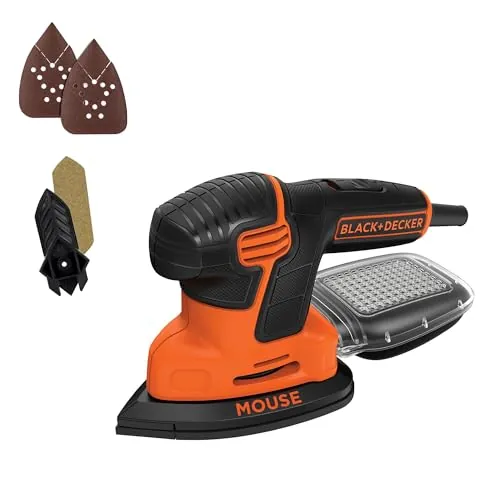
BLACK+DECKER
BLACK+DECKER Detail Sander BDEMS600
BLACK+DECKER’s U.S. product page identifies BDEMS600 and lists a detail sanding pad, finger attachment and dust collector. Its Type 2 manual describes the shape-specific attachment and canister routine; the product listing does not confirm which type is supplied.
Model BDEMS600
Amazon ASIN B00OJWLNMO
SKIL
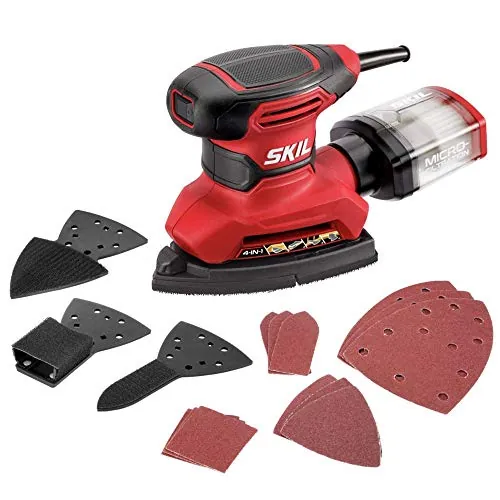
SKIL Multi-Function Detail Sander SR232301
SKIL’s U.S. SR232301 page lists finger, louvre and flexible attachments and 12 sanding sheets. Its manual explains the backing-pad release and corresponding-sheet fit; SKIL describes the flexible attachment as intended for curved surfaces.
Model SR232301
Amazon ASIN B07FDL1TW5
Differences that matter
Recurring louvre or curved-edge detail work
SKIL Multi-Function Detail Sander SR232301 · SKIL lists the louvre and flexible shapes in the exact SR232301 configuration; its flexible piece is described for curved surfaces. Check your workpiece against the supplied attachment rather than assuming every curve fits.
View SR232301 on Amazon (paid link)Sources for Access to corners, louvers and curves
Sources for Changing the attachment
Sources for Sanding sheets and starter quantity
Sources for Dust-box emptying and filter care
Match the attachments to the surfaces you actually have
The BDEMS600 is a pad-and-finger choice for detail areas: BLACK+DECKER lists the detail sanding pad and finger attachment, and its Type 2 manual calls the finger a fine-detail attachment. SKIL lists finger, louvre and flexible shapes for the SR232301; its page describes the flexible piece for curved surfaces, and the manual identifies the special attachments for tight spaces such as louvred panels.
For a project with only corners and narrow details, compare the actual finger and pad geometry with your workpiece. If louvres or rounded edges appear repeatedly, the SKIL set offers a documented shape for those jobs. The pages do not promise that the attachments reach every gap or conform to every curve, so check a sample profile before treating the listed shape as a fit guarantee.
Budget time for the sheet and dust-box routine
These are shape-specific paper systems, not a confirmed shared refill standard. The BDEMS600 Type 2 manual calls for aligning the sheet holes with its pad and using the proper finger sheet. SKIL lists 12 sheets in the SR232301 configuration and specifies hook-and-loop paper; its manual says to align holes on the backing pad or selected attachment. Before buying refills, match the outline and hole pattern for the attachment you plan to use.
Care also differs in the manuals. For BDEMS600 Type 2, the manufacturer says to empty the canister after every 10 minutes of sanding. SKIL says to empty frequently during use, after work and before storage, then knock dust from the microfilter or use fingers or a soft brush; it says not to wash that filter with soap and water. Those instructions help estimate interruptions and cleanup, not comparative dust capture.
Check the exact tool revision and small-workpiece setup
The BLACK+DECKER instruction details in this comparison come from the BDEMS600 Type 2 manual only. The product listing names the BDEMS600 model but does not establish which type will arrive, so confirm the tool label and use the matching instructions. SKIL’s linked manual explicitly names SR232301.
For small parts, SKIL’s manual advises securing the workpiece to a bench or other support. If your project depends on a narrow opening or curved edge, bring a representative piece or profile when checking the attachments. Neither this guide nor the cited documents are comparative tests of surface finish, material removal, dust performance or health outcomes.
Product details
BLACK+DECKER Detail Sander BDEMS600
SKIL Multi-Function Detail Sander SR232301
- Included attachment shapes and sheets
- Finger, louvre and flexible attachments; 12 sanding sheets listed for the SR232301 configuration. Source
- Abrasive and dust-box care
- The manual specifies hook-and-loop sheets with aligned dust holes, frequent canister emptying and dry microfilter cleaning; do not wash the microfilter with soap and water. Source
Before you buy
Community discussions
Matching detail tips and replacement sheets
BLACK+DECKER Detail Sander BDEMS600
In a discussion about reaching a small area, a BDEMS600 owner pointed to the removable tip as something they use for detail work.
What to check
Look at the exact tip sizes in the box and how you would change the sheet. Check which replacement sheets fit each attachment.
Choosing a detail attachment for small corners
SKIL Multi-Function Detail Sander SR232301
A hobbyist with a working random-orbit sander considered adding the SKIL SR232301 for its finger attachment.
What to check
Measure the smallest corner you need to reach. Compare the shape and width of the supplied detail tips with the area and the sheet types you already use.
Common questions
Does the BDEMS600 manual procedure apply to every listing?
No. The cited manual is specifically for BDEMS600 Type 2, and the product listing does not confirm which type will be delivered. Check the tool label and matching manual before following the attachment-change or canister-emptying instructions.BDEMS600 1.2 Amp Electric Detail SanderBDEMS600 Type 2 Instruction Manual
Can I use the included SKIL sheets on the BLACK+DECKER?
The sources do not establish cross-brand sheet interchangeability. Match the outline and dust-hole layout to the exact pad or attachment and follow its manual.BDEMS600 Type 2 Instruction ManualSR232301 Multi-Function Detail Sander Owner’s Manual
Does SKIL’s microfilter need to be washed?
No. The SR232301 manual says to knock excess dust out or use fingers or a soft brush, and specifically says not to wash the microfilter with soap and water.SR232301 Multi-Function Detail Sander Owner’s Manual
Sources and scope
This guide compares manufacturer-listed attachment fit and care instructions. It is not a test of finish quality, dust capture, removal rate, vibration, health outcomes or durability. The BLACK+DECKER manual used here is specifically for BDEMS600 Type 2; the product listing does not establish which type will be delivered. Confirm the tool label and matching manual before relying on Type 2 procedures. SKIL describes its flexible attachment for curved surfaces, but no exact contour or workpiece result is guaranteed.