
Products compared
Bose
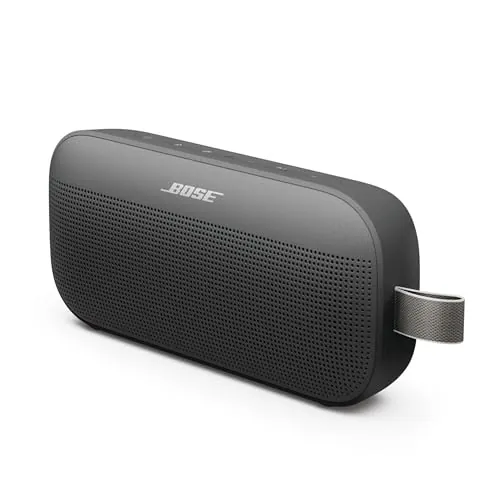
Bose SoundLink Flex Portable Speaker (2nd Gen), Black
The Black second-generation Flex has a nylon utility loop that can be used as a finger loop or attached to a separate carabiner or cord. The exact-generation manual says its Shortcut button links with one other compatible Bose Bluetooth speaker that also has a Shortcut button.
Model 887612-0100
Amazon ASIN B0D6WD2QSQ
JBL
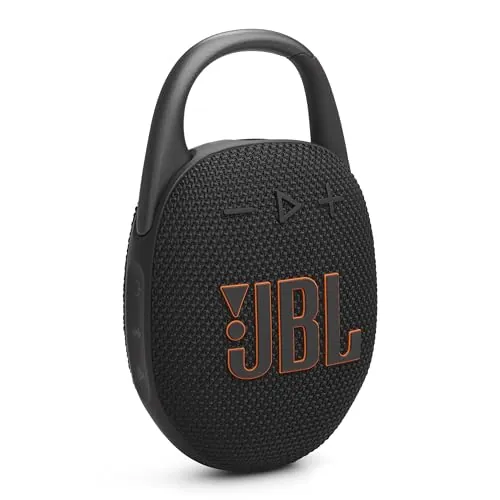
JBL Clip 5, Black
The Black Clip 5 has an integrated opening carabiner. JBL lists a 0.628 lb net product weight. Two Clip 5 speakers can be paired for stereo, or Clip 5 can join multiple JBL Auracast-enabled speakers.
Model JBLCLIP5BLKAM
Amazon ASIN B0CTP56C5R
Differences that matter
What matters most to you?
Choose a priority to see what it changes.
Sources for Attaching the speaker to a bag or carrying it by hand
Sources for Pairing to the speaker you already own
Sources for Controls and connection steps for a speaker group
Sources for What to pack for charging
First check the attachment you will actually use
Flex 2's nylon utility loop is a small fabric fitting, not a built-in gate: Bose's manual describes it as a finger loop or a place to attach a separate carabiner or cord. Clip 5 builds an opening carabiner into its body. If you plan to clip to a backpack or belt loop, try that loop against the Clip 5 opening and check whether a separate clip or cord is already part of your Bose carry kit.
The published product weights also differ: Bose lists Flex 2 at 1.291 lb and JBL lists Clip 5 at 0.628 lb net. Treat those as manufacturer specifications for the speakers, not the mass of a package or a promise about comfort while walking.
Let your existing speaker decide the pairing question
For Flex 2, the exact-generation manual allows one compatible Bose Bluetooth speaker with a Shortcut button as its partner. Two Flex (2nd Gen) units can play separate left and right channels in Stereo mode; if the compatible Bose model is different, the manual limits the pair to Party mode, with both playing in unison.
Clip 5 has two documented paths: pair two Clip 5 units for stereo, or connect multiple JBL Auracast-enabled speakers using Auracast. Do not assume a speaker joins just because its package says Bluetooth. Before buying for a group, write down the other speaker's exact model and check the maker's stated compatibility and mode.
Check the phone setup and the cable before you leave
Bose sets Flex 2's Shortcut button to speaker linking by default. Press it on Flex 2 and then on the compatible Bose speaker; the manual describes voice prompts and a status light. The Bose app can change the assigned shortcut or switch modes.
JBL's printed Clip 5 quick-start guide names JBL Portable for speaker setup and updates. JBL's current U.S. support article lists Clip 5 for migration to JBL ONE and advises users to follow the migration notification. Use the app prompt on your unit rather than relying on the older printed app name alone.
Both makers list a USB cable, but Bose's current box list says USB-C-to-USB-A and explicitly excludes a power adapter. JBL lists a Type C USB cable and lists no adapter in the Clip 5 box contents. Check the selected seller's exact package and pack a suitable USB power source if you need one.
Product details
Bose SoundLink Flex Portable Speaker (2nd Gen), Black
- Carry point and listed weight
- Nylon utility loop; Bose lists the product at 1.291 lb (about 1.3 lb). The manual says the loop works as a finger loop or attaches to a separate carabiner or cord. Source
- Speaker linking
- Links to one other Bose Bluetooth speaker with a Shortcut button; two Flex (2nd Gen) units can play Stereo or Party mode, while different compatible Bose models use Party mode. Source
- Included cable
- The manufacturer lists a USB Type-C to USB Type-A cable; the power adapter is not included. Source
JBL Clip 5, Black
- Built-in attachment and net weight
- Integrated opening carabiner; manufacturer-listed net weight is 0.285 kg / 0.628 lb. Source
- Speaker grouping
- Two Clip 5 speakers support stereo pairing; multiple JBL Auracast-enabled speakers can be linked using Auracast. Source
- Included cable and app update path
- JBL lists a Type C USB cable in the box. The Clip 5 quick-start guide names JBL Portable; JBL support lists Clip 5 for migration to JBL ONE and recommends following the app's migration notification. Source
Before you buy
Community discussions
Comparing carry size with speakers you already own
Bose SoundLink Flex Portable Speaker (2nd Gen), Black
A JBL user tried a SoundLink Flex 2nd Gen beside several of their older JBL speakers. The Flex was close in size to their Flip 5 and substantially smaller than their Charge 5. They compared playback on the same tracks at similar levels.
What to check
Try the loop and clip with your bag or the attachment point you use outdoors. Compare both current sizes after the speaker is mounted.
Common questions
Can a Bose SoundLink Flex 2 link to a JBL Clip 5?
The Flex 2 manual describes linking to one other Bose Bluetooth speaker that has a Shortcut button. JBL documents Clip 5 stereo pairing with another Clip 5 and grouping with Auracast-enabled JBL speakers. The cited manuals do not establish a cross-brand Bose-to-JBL speaker group.SoundLink Flex Portable Speaker (2nd Gen) Owner's GuideJBL Clip 5: U.S. product features, specifications and box contents
Can a Flex 2 pair with another Bose speaker for left/right stereo?
The Bose manual says two speakers of the same model can use Stereo mode or Party mode. If the compatible Bose speakers are different models, it says only Party mode is available. So for the documented left/right setup, plan on a second Flex (2nd Gen).SoundLink Flex Portable Speaker (2nd Gen) Owner's Guide
Does the JBL Clip 5 still use the JBL Portable app?
The Clip 5 quick-start guide names JBL Portable, but JBL's current U.S. migration support lists Clip 5 for JBL ONE and recommends moving when the Portable app sends a migration notification. Follow the notice shown for your device; this page does not claim that every installed unit has already migrated.JBL Clip 5 Quick Start GuidePortable App & Partybox App Migration To JBL ONE App
Do both boxes include a charging cable and wall adapter?
Both manufacturers list a USB charging cable. Bose specifies USB-C-to-USB-A and explicitly says the power adapter is not included. JBL lists a Type C USB cable, but its Clip 5 box-contents list does not name a wall adapter. Confirm the current seller package and pack a compatible power source if needed.SoundLink Flex Portable Speaker (2nd Gen), BlackJBL Clip 5: U.S. product features, specifications and box contents
Sources and scope
This is a source-based comparison of the Black Bose SoundLink Flex Portable Speaker (2nd Gen) and Black JBL Clip 5 using manufacturer pages, manuals and current JBL support. It does not establish which speaker sounds louder or better, lasts longer, is more rugged, or works best in a particular setting. Published product weights are specifications, not a carried-package measurement; the fit of a bag loop, belt loop, carabiner or cord depends on the user's actual hardware. Grouping is limited to each maker's documented compatible products and modes.
Related comparisons
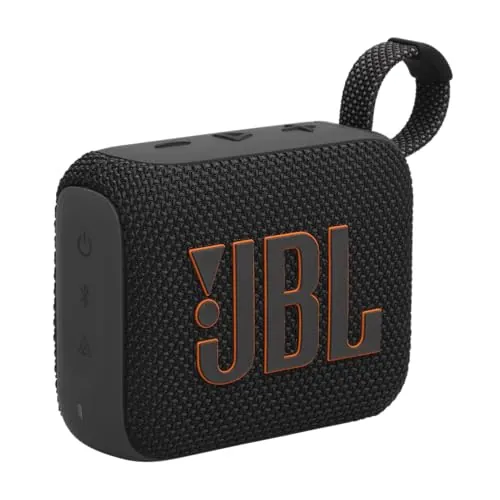
JBL Go 4 JBLGO4BLKAM vs JBL Clip 5 JBLCLIP5BLKAM
This guide covers the exact black US listings: JBL Go 4 (JBLGO4BLKAM, ASIN B0CTNWBT1Z) and JBL Clip 5 (JBLCLIP5BLKAM, ASIN B0CTP56C5R). JBL lists the Go 4 at 190 g and 3.7 × 3.0 × 1.7 in, with an integrated carrying loop; Clip 5 is 285 g and 3.4 × 5.3 × 1.8 in, with a wider integrated carabiner. Advertised playback is up to 7 hours plus 2 hours with Playtime Boost on Go 4 and up to 12 plus 3 hours on Clip 5; JBL says actual playtime varies with volume and audio content. Both list a three-hour charge at 5 V/1 A and support stereo pairing with two matching speakers plus multi-speaker Auracast connections. Pick by how you carry it and whether you need the additional advertised runtime, not by an unsupported sound or water-safety ranking.
Read comparison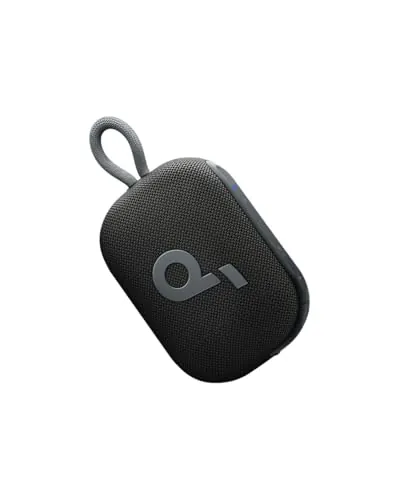
JBL Clip 5 vs Soundcore Select 4 Go: Carrying, Water, and Charging
The exact black US listings are JBL Clip 5 (JBLCLIP5BLKAM, B0CTP56C5R) and soundcore Select 4 Go (A31X1, B0DB1753RZ). Clip 5 has an integrated carabiner and supports stereo with a second Clip 5 plus multi-speaker Auracast connections. Select 4 Go has a built-in strap, is documented to float, and is rated for up to 20 hours at 40% volume in Balanced EQ. Both are IP67-rated, but follow the stated depth/time and port-cover instructions. Select 4 Go's older and newer hardware revisions do not TWS-pair with each other, and the selected ASIN does not reveal its revision.
Read comparison