
Products compared
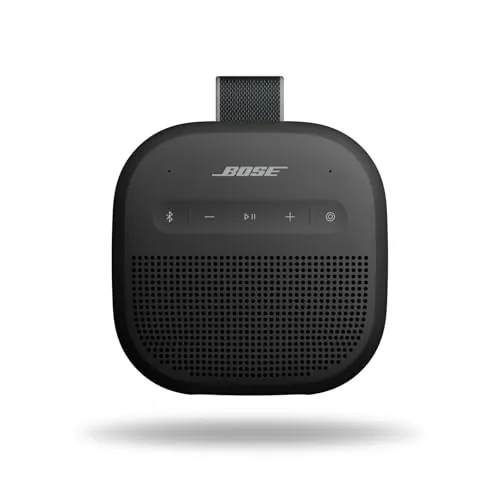
Bose
Bose SoundLink Micro Portable Bluetooth Speaker (2nd Gen), Black
current listing details is the black 2nd-generation SoundLink Micro, part 895098-0100. Bose's current 2nd-gen U.S. page supports generation-level features; it opened with another color selected, so color is identified from the assigned exact listing information rather than inferred from that page.
Model 895098-0100
Amazon ASIN B0FDLD34V5
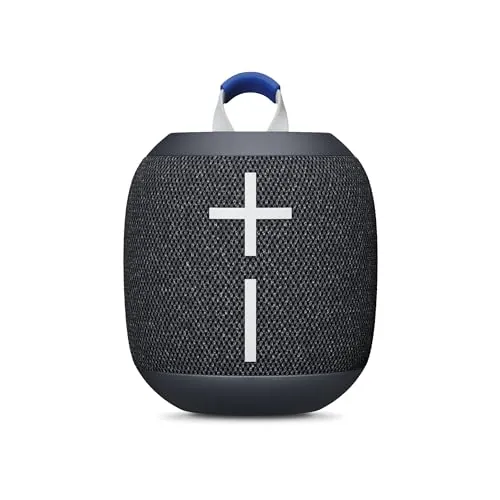
Ultimate Ears
Ultimate Ears WONDERBOOM 4, Black
current listing details is the black WONDERBOOM 4, part 984-001876. Logitech's support specification identifies speaker model SR0192 and documents its dimensions, cable, controls, and two-device multi-host behavior.
Model 984-001876
Amazon ASIN B0BRXJ9WTD
Differences that matter
What matters most to you?
Choose a priority to see what it changes.
Sources for Carry attachment and placement
Sources for USB-C charging and box check
Sources for Body shape and water-related claims
Start with how you carry it
Bose documents a fabric strap on SoundLink Micro (2nd Gen) that a user can replace, with replacement straps sold separately. WONDERBOOM 4 uses a built-in fabric loop. Before buying, look at the strap, hook, or pocket where you expect to put the speaker and compare that attachment style and its opening with the product itself. Neither manufacturer's page guarantees fit on a particular bag or hardware.
Their listed shapes also differ. Bose gives the Micro as 1.693 inches high and 4.094 inches wide and deep. Logitech lists WONDERBOOM 4 at 104 mm high by 95.3 mm in each of the other two dimensions. Measure the actual space and direction you will place it; a portability label alone does not establish fit.
Both switch between two devices; the speaker-linking systems differ
If two source devices share one speaker, both maker documents describe a two-device option. Bose calls its feature multipoint and says the Micro (2nd Gen) can remain connected to two paired sources; Logitech calls WONDERBOOM 4 multi-host and says up to two Bluetooth mobile devices can be connected at once. Bose routes shortcut setup through its app. WONDERBOOM 4 documents button-based playback, volume, Outdoor Boost and Podcast Mode controls, and its support page says no app was available at release.
For two-speaker playback, check the model printed on the speaker you already own. Bose Stereo Mode is limited to two SoundLink Micro (2nd Gen) units; Bose Party Mode has a distinct compatible-speaker list. UE Double Up is documented for a WONDERBOOM 4 with another WONDERBOOM 4 or 3. The sources do not establish cross-brand pairing between Bose and UE.
Check the charging cable and water-related needs
Bose lists a USB-C-to-A charging cable in the SoundLink Micro (2nd Gen) box and says a power adapter is not included. Logitech's exact WONDERBOOM 4 support specification lists a 0.6-meter USB-C charging cable and specifies a 5 V / 2 A or higher adapter. Its cable-inclusion statement conflicts with the current cached listing details, so confirm the black 984-001876 seller bundle before relying on an included lead. Logitech's getting-started instructions also say the charging connector should be clean and dry before charging.
Both makers state IP67 for their assigned models. Bose explicitly says its 2nd-gen Micro sinks; UE says WONDERBOOM 4 floats. Treat these as product specifications, not a side-by-side durability test or an assurance for a particular exposure. If floating or water-related use affects your choice, check the exact product instructions and use conditions before purchasing.
Product details
Bose SoundLink Micro Portable Bluetooth Speaker (2nd Gen), Black
- Carry attachment
- User-replaceable fabric strap; replacement strap sold separately Source
- Source-device and speaker linking
- Multipoint connects two paired source devices at once; Bose app manages the shortcut; Stereo Mode is limited to two SoundLink Micro (2nd Gen) speakers Source
- Included charging items
- USB-C-to-A cable included; power adapter not included Source
Ultimate Ears WONDERBOOM 4, Black
- Carry attachment
- Built-in fabric loop for carrying; check the placement you intend to attach it to Source
- Source-device and speaker linking
- Multi-host connects up to two Bluetooth mobile devices; Double Up works with another WONDERBOOM 4 or WONDERBOOM 3 Source
- Included charging items
- Logitech support specification lists an included 0.6 m USB-C charging cable; power adapter rating is 5 V / 2 A or above Source
Before you buy
Community discussions
Packing a small speaker and the cable it needs
Bose SoundLink Micro Portable Bluetooth Speaker (2nd Gen), Black
A longtime SoundLink Micro owner said they sometimes forgot the original speaker’s Micro-USB cable on trips. They tried a SoundLink Micro 2nd Gen when looking to keep the speaker compact and make packing easier.
What to check
Try the strap or loop on the spot where you will hang it. Check whether the mounting position makes it easy to reach the controls and plug in your cable.
Common questions
Can these speakers pair with each other for stereo?
The manufacturer-described linking systems are separate. Bose Stereo Mode requires two SoundLink Micro (2nd Gen) speakers; Bose Party Mode has a list of compatible Bose models. WONDERBOOM 4 Double Up pairs with another WONDERBOOM 4 or 3. The sources do not document Bose-to-UE speaker linking.SoundLink Micro Portable Speaker (2nd Gen) | Bose U.S.Getting Started - UE WONDERBOOM 4 | Logitech Support U.S.WONDERBOOM 4 | Ultimate Ears U.S.
Can either speaker stay connected to two phones or other source devices?
Yes, both manufacturers document two-device simultaneous connection: Bose calls it multipoint for two paired source devices, and Logitech describes WONDERBOOM 4 multi-host for up to two Bluetooth mobile devices. Bose's page says transitions between paired active sources; Logitech says users can take turns playing from the connected devices.SoundLink Micro Portable Speaker (2nd Gen) | Bose U.S.Getting Started - UE WONDERBOOM 4 | Logitech Support U.S.
Which one has a carry attachment, and is it included?
Bose says the SoundLink Micro (2nd Gen) has a replaceable fabric strap and that replacement straps are sold separately; the speaker itself has the strap. UE describes a handy built-in loop on WONDERBOOM 4. Check the exact retailer box if an extra strap or accessory is important.SoundLink Micro Portable Speaker (2nd Gen) | Bose U.S.WONDERBOOM 4 | Ultimate Ears U.S.
Does the WONDERBOOM 4 charging cable come in the box?
Logitech's WONDERBOOM 4 support specification lists a 0.6 m USB-C charging cable included. The current cached listing details conflicts, so check the exact black 984-001876 retail offer if box contents determine your purchase. Bose's 2nd-gen page lists a USB-C-to-A cable and says the power adapter is not included.Specification - WONDERBOOM 4 | Logitech Support U.S.SoundLink Micro Portable Speaker (2nd Gen) | Bose U.S.
Are both listed as IP67, and does either float?
Both manufacturers state an IP67 rating for these generations. UE says WONDERBOOM 4 floats; Bose explicitly says the SoundLink Micro (2nd Gen) does not float. These are manufacturer statements, not a comparative durability test or a promise for a particular exposure.SoundLink Micro Portable Speaker (2nd Gen) | Bose U.S.WONDERBOOM 4 | Ultimate Ears U.S.
Sources and scope
This is a model-feature comparison based on current U.S. manufacturer pages and support specifications, not a listening, battery, drop, or water test. listing identity confirms Bose part 895098-0100 in Black, while Bose's current family page opened with a different color selected; no color-specific feature difference is inferred. The listing data's WONDERBOOM 4 dimensions/weight and cable-inclusion fields conflict with Logitech's exact-model support specification; this guide uses Logitech's support specification and asks buyers to verify the exact retail box when contents matter. IP ratings and float claims are manufacturer statements, not a guarantee for a particular use or condition.
Related comparisons
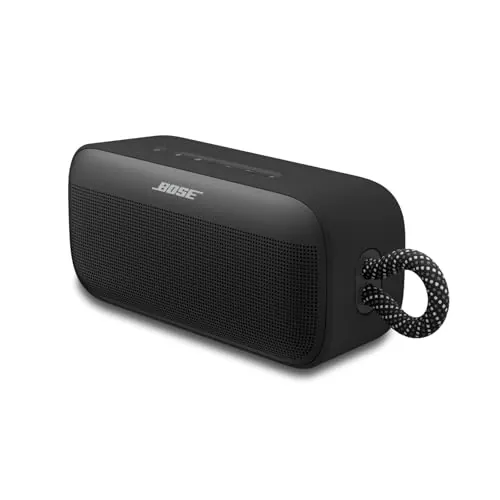
Bose SoundLink Plus vs Ultimate Ears WONDERBOOM 4
Bose SoundLink Plus suits buyers who will use its USB-C phone charge-out, app EQ and larger battery rating. WONDERBOOM 4 is much lighter by listed weight and offers 360-degree coverage with physical Outdoor Boost and Podcast controls. Both are IP67 and float; Bose warns against using it in water.
Read comparison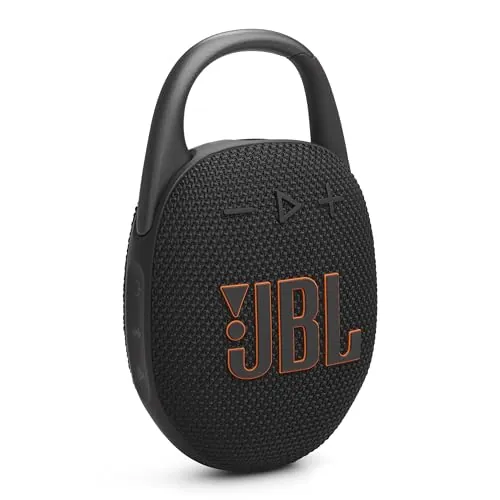
Bose SoundLink Micro (2nd Gen) vs JBL Clip 5: Strap or Carabiner?
This is the black, single-speaker Bose SoundLink Micro (2nd Gen), part 895098-0100, against the black JBL Clip 5, item JBLCLIP5BLKAM. Choose Bose when its rear utility strap and Bose app grouping fit the speakers you already own. Choose JBL when its integrated carabiner suits the bag or belt loop and you want JBL Auracast grouping. Both makers advertise up to 12 hours; JBL lists up to 3 additional Playtime Boost hours, which is a separate mode, not a matched runtime test.
Read comparison