
Products compared
Brother
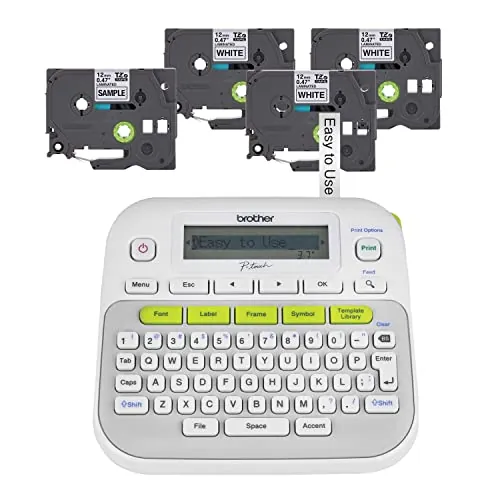
Brother P-touch PT-D210 Label Maker Bundle
White U.S. bundle containing a PT-D210 label maker and one sample plus three additional full-length black-on-white laminated TZe tapes listed at approximately 12 mm; exact lengths of the three extra rolls are not stated.
Model PT-D210BP
Amazon ASIN B09QXZ7ZRD
Brother
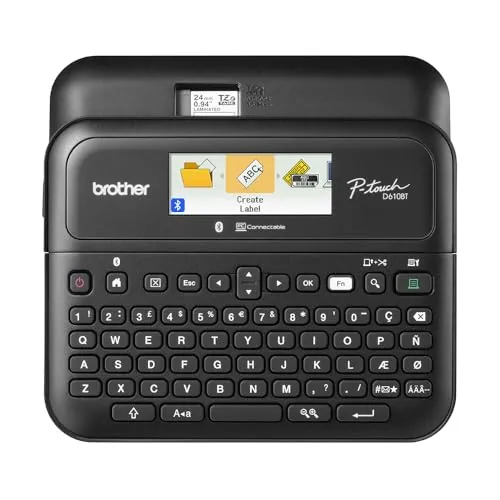
Brother P-touch PT-D610BT Business Professional Connected Label Maker
Black U.S. label maker with an on-device QWERTY keyboard, USB/Bluetooth creation options and automatic cutter.
Model PT-D610BT
Amazon ASIN B0B1KZJXPG
Differences that matter
Sources for Maximum Brother TZe tape width
Sources for Tape supplied in the listed package
Start with the widest cassette you need
Brother's U.S. PT-D210 machine page lists TZe cassettes at 3.5, 6, 9 and 12 mm. Brother's PT-D610BT support specifications list those same widths plus 18 and 24 mm. That means the PT-D210 is not automatically the wrong choice for small labels: both cover the same listed narrow formats. If a job needs 18 or 24 mm tape, PT-D610BT is the one of these two models documented for it.
Before you buy, check a label you already use or sketch the planned text on the target surface. Select the cassette width from that need, then choose the machine. Width is a hard format limit; it does not establish print quality or actual character height. Both models are documented for Brother's TZe cassette family, but verify the specific specialty cassette and intended use before checkout.
Then choose how you want to create and finish labels
Both models support direct keyboard entry: Brother describes shortcut keys and preview on the PT-D210 bundle page and a QWERTY keyboard on PT-D610BT. The PT-D610BT adds PC creation over USB or Bluetooth and mobile creation over Bluetooth, plus an automatic cutter. PT-D210 uses a manual cutter lever. This is a workflow choice, not evidence that one prints better or uses less tape.
For occasional labels typed at the machine, PT-D210BP keeps the process self-contained. For a sequence designed from a computer or phone, or if operating a cutter lever for each job is a drawback, PT-D610BT has the documented connected and automatic-cutting options. Brother notes that software compatibility can vary by operating system, so check supported OS details for your current device before paying for that option.
Use this three-check pre-buy routine
1. Width: write down the widest cassette your label plan requires. Up to 12 mm, either model is listed for the width; at 18 or 24 mm, PT-D610BT is the documented fit among these two.
2. Workflow: decide whether you will type each label on the device, create designs on a computer or phone, and whether an automatic cutter matters. PT-D610BT retains its own keyboard, so you can use it directly without choosing a connected workflow.
3. Box and power: PT-D210BP is the PT-D210 machine plus one sample and three extra full-length tapes listed at about 12 mm; the bundle page does not give the extra rolls' exact lengths. PT-D610BT lists one 24 mm x 4 m sample, an AC adapter and USB cable. The PT-D210 machine uses six AAA batteries or an optional adapter; verify the bundle's precise power accessories on the current listing.
Product details
Brother P-touch PT-D210 Label Maker Bundle
- Machine inside the bundle
- Brother identifies the PT-D210 as the label maker included in PT-D210BP. Source
- Supported TZe widths
- 3.5, 6, 9 and 12 mm; maximum tape width 12 mm. Source
- Bundle tapes
- One approximately 12 mm sample and three additional approximately 12 mm full-length black-on-white laminated TZe tapes; the bundle page does not state the extra rolls' individual lengths. Source
- Entry and cutting
- On-device keyboard and preview; after printing, operate the tape cutter lever. Chain Print requires feeding tape before cutting. Source
- Machine power options
- Six AAA batteries or an optional Brother AD-24 adapter family; the PT-D210 machine page lists batteries and adapter separately from the machine. Confirm PT-D210BP's exact box contents before checkout. Source
Brother P-touch PT-D610BT Business Professional Connected Label Maker
- Supported TZe widths
- 3.5, 6, 9, 12, 18 and 24 mm; maximum tape width 24 mm. Source
- Entry and connections
- Built-in QWERTY keyboard; Brother documents PC creation over USB or Bluetooth and mobile-device creation over Bluetooth. Software compatibility may vary by operating system. Source
- Cutter
- Built-in automatic label cutter. Source
- Listed carton contents
- One 24 mm x 4 m black-on-white laminated TZe sample tape, AC adapter, USB cable and documentation. Source
- Unit dimensions
- Approximately 7.95 in W x 3.42 in H x 7.83 in D. Source
Before you buy
Community discussions
Getting the connected label workflow running on Windows 11
Brother P-touch PT-D610BT Business Professional Connected Label Maker
A PT-D610BT owner reported that Windows 11 showed a driver-unavailable message even after they installed the official Brother driver. They got their printer working after adding it manually with the correct port in their setup.
What to check
Try a batch from your regular computer if you would choose the D610BT for connected design. Compare setup with typing your label directly on the printer.
Common questions
Do I need PT-D610BT to print 12 mm labels?
No. Brother lists 3.5, 6, 9 and 12 mm TZe widths for the PT-D210 machine inside PT-D210BP. PT-D610BT supports those same widths and adds 18 and 24 mm. Pick the wider model only when one of those additional formats or another documented workflow matters.Brother P-touch PT-D210 Easy-to-Use Label Maker, U.S. machine specificationsBrother U.S. PT-D610BT Support Specifications
Is PT-D210BP a different label maker from PT-D210?
Brother describes PT-D210BP as a bundle containing the PT-D210 machine. Use the PT-D210 machine specifications for its supported tape widths and cutter workflow, and the PT-D210BP bundle page for its included sample and extra tapes.Brother PT-D210BP Label Maker BundleBrother P-touch PT-D210 Easy-to-Use Label Maker, U.S. machine specifications
What is listed in each box?
Brother lists one approximately 12 mm sample and three additional approximately 12 mm full-length black-on-white tapes with PT-D210BP; it does not give the three extra rolls' exact lengths on that page. The PT-D610BT carton lists one 24 mm x 4 m sample tape, AC adapter, USB cable and documentation. Check the live retailer listing to confirm the exact retail package.Brother PT-D210BP Label Maker BundleBrother P-touch PT-D610BT Business Professional Connected Label Maker
Can PT-D610BT still be used without a phone or computer?
Yes. Brother documents a built-in QWERTY keyboard on PT-D610BT as well as its connected creation options, so direct on-device entry is available. The connected software's compatibility can vary by operating system; verify your current device before making the app a purchase requirement.Brother P-touch PT-D610BT Business Professional Connected Label MakerBrother PT-D610BT U.S. Connected Label Maker brochure
Sources and scope
This is a source-based feature and package comparison, not a print-quality, speed, durability or tape-cost test. Brother's PT-D210BP page identifies a bundle containing the PT-D210 and lists three additional full-length tapes but does not state those rolls' exact lengths. The current computer and phone operating-system compatibility for PT-D610BT software was not verified; check Brother's supported-OS information before buying for a connected workflow. The listing data links the assigned retail ASINs to these models, while Brother's pages identify the model and package rather than independently confirming the Amazon ASIN selection.
- Brother PT-D210BP Label Maker Bundle
- Brother P-touch PT-D210 Easy-to-Use Label Maker, U.S. machine specifications
- Brother PT-D210 User's Guide, U.S. English edition
- Brother P-touch PT-D610BT Business Professional Connected Label Maker
- Brother U.S. PT-D610BT Support Specifications
- Brother PT-D610BT U.S. Connected Label Maker brochure
Related comparisons
Brother PT-D220 vs PT-D610BT: Tape Width, Typing and Power Setup
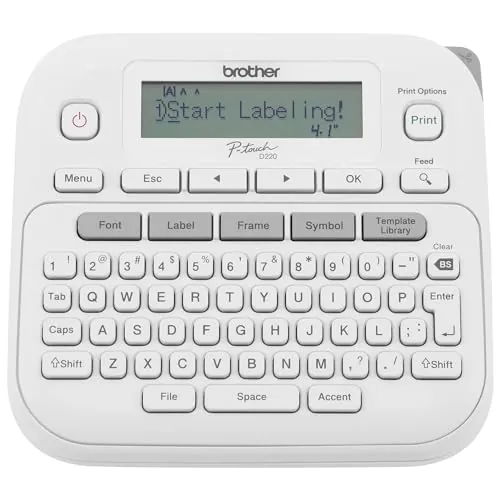
Brother lists the PT-D220 for TZe tape up to 12 mm, with a QWERTY keyboard and up to nine copies. The PT-D610BT supports TZe tapes up to 24 mm, PC or phone label design, an automatic cutter and up to 99 copies. Brother's PT-D610BT product page conflicts about its keyboard: the description says built-in QWERTY, while its spec table says keyboard layout none. If typing directly on the machine matters, verify the exact unit before buying. Power differs too: D220 batteries and AC adapter are sold separately; the D610BT's standard box lists its AC adapter and USB cable.
Read comparisonBrother PT-D210BP vs PT-D220: Tape Bundle, TZe Fit and Keyboard Workflow
These are close, keyboard-operated Brother P-touch label makers. The PT-D210BP is a bundle built around the PT-D210 machine: Brother lists one 12 mm sample tape plus three additional full-length black-on-white TZe tapes. The PT-D220 includes one 12 mm x 4 m sample tape. Both machine families use Brother TZe cassettes in 3.5, 6, 9 and 12 mm widths, use six AAA batteries or a separately purchased compatible AC adapter, and have an on-device QWERTY keyboard and label preview. The PT-D220 lists one more style and one more frame; decide by your actual tape needs and desired design option, not a claim of better print quality.
Read comparison