
Products compared
Brother
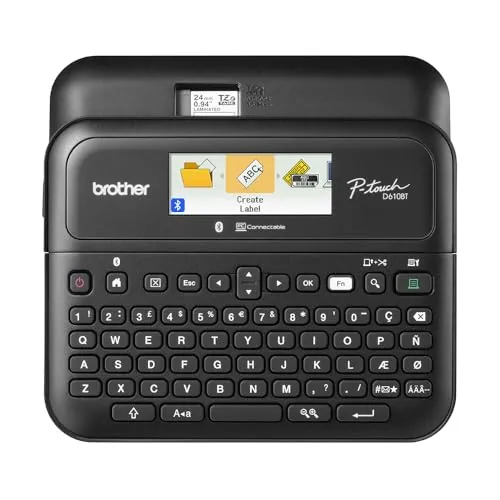
Brother P-touch PT-D610BT Connected Label Maker
U.S. black PT-D610BT model in the listing data; the manufacturer brochure describes the standard box contents. The optional CC-D610 carry case is listed separately.
Model PT-D610BT
Amazon ASIN B0B1KZJXPG
Brother
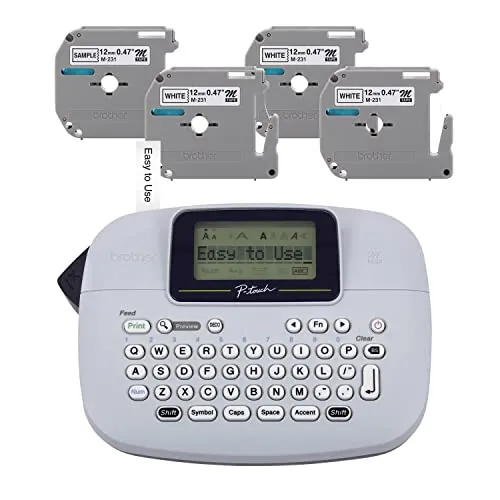
Brother P-touch PT-M95 Label Maker Bundle (PTM95BP, four tapes)
The current listing data identifies this exact ASIN as the PTM95BP four-tape bundle. Brother's previously published U.S. bundle page lists a 12 mm black-on-white sample and three matching full rolls; the exact listing remains unconfirmed; confirm the marketplace box before relying on that accessory count.
Model PT-M95 / PTM95BP bundle
Amazon ASIN B09QXY689D
Differences that matter
What matters most to you?
Choose a priority to see what it changes.
Sources for Designing labels on a computer or phone
Sources for Repeat jobs and cutting
Sources for Saved files during a power change
Start with the tape on your label
Before comparing features, write down the width and material the job requires. Brother lists the PT-D610BT for TZe cassettes from 3.5 to 24 mm, with laminated TZe options. The PT-M95 manual identifies M tape in 9 and 12 mm; the exact PTM95BP bundle capture describes only 12 mm black-on-white non-laminated M rolls. If a label needs an 18 or 24 mm width, the PT-D610BT is the documented option in this pair. If 12 mm non-laminated tape is enough, the PT-M95 bundle stock may suit it.
TZe and M are different cassette families. Buy refills whose package names your exact printer; do not count on using up a box of one model's tape in the other machine. The PTM95BP's four rolls are one tape format in extra quantity, not a sample assortment of widths or colors.
Decide where you want to create labels
PT-D610BT's documentation supports a connected workflow: Brother lists USB and Bluetooth and names P-touch Editor for computers and iPrint&Label for mobile. The guide walks through printing from a computer using USB or Bluetooth and installing the mobile app. The brochure warns that software compatibility can vary by operating system and country, so verify the current support list for your exact phone or computer before buying.
PT-M95's guide describes entering text on its onboard keyboard, previewing it and printing. The sources reviewed for this article do not establish a phone or computer authoring route for PT-M95. If external design is important, treat that as unconfirmed for the PT-M95 and ask Brother about your specific device rather than assuming the PT-D610BT app path carries over.
Match the box and power supply to the workspace
Brother's PT-D610BT brochure lists a 24 mm × 4 m black-on-white laminated TZe sample, AC adapter, USB cable and documentation in the standard carton. Six AA alkaline batteries are not included. The optional CC-D610 carrying case appears in the brochure accessory list with an additional-purchase note, so do not assume it is in the standard box.
For PTM95BP, the prior exact Brother bundle-page earlier product-page information lists one 12 mm × 4 m sample plus three 12 mm × 8 m black-on-white M rolls. The listing data says unit_count 6, which conflicts with that package description; use the exact seller listing to confirm current contents. The PT-M95 guide requires four AAA alkaline cells, but the captured bundle evidence does not confirm whether batteries are supplied.
Check repeat jobs and memory backup
For labels you print again, PT-D610BT lists storage for up to 99 files and an automatic cutter. PT-M95 saves up to three labels and uses a manual cutter lever. If you keep more than three recurring designs on the device, the PT-D610BT has more documented capacity; if a small set and hand-cutting cover the job, the PT-M95 may be sufficient.
Both manuals warn that stored data can clear after power is disconnected: the PT-D610BT guide says after more than two minutes and recommends AA alkaline backup cells when unplugging the adapter; PT-M95's guide says after more than three minutes. Back up important label text outside the machine. These limits are operational details, not a durability or convenience ranking.
Product details
Brother P-touch PT-D610BT Connected Label Maker
Choose the PT-D610BT when your planned labels need TZe widths beyond 12 mm, laminated tape, or Brother's documented computer/mobile design workflow. Its standard brochure package includes an AC adapter and USB cable, while AA batteries are separate. Brother warns that the stored files need backup batteries when adapter power is removed.
- Supported tape family and widths
- Brother TZe tape cassettes in 3.5, 6, 9, 12, 18 and 24 mm widths; the brochure describes TZe laminated tape. Source
- Computer and phone connection
- USB or Bluetooth; Brother lists P-touch Editor for computers and iPrint&Label for mobile devices. Check current OS/app support for the device you plan to use. Source
- Saved label files
- Up to 99 files; the quick guide warns that stored files clear after more than two minutes without power and recommends AA alkaline batteries for memory backup when the adapter is unplugged. Source
- Standard brochure box contents
- One 24 mm × 4 m black-on-white laminated TZe sample, AC adapter, USB cable and documentation; six AA alkaline batteries are not included. The carry case is listed as an additional-purchase accessory. Source
Brother P-touch PT-M95 Label Maker Bundle (PTM95BP, four tapes)
The PT-M95 is a built-in keyboard and manual-cutter workflow for jobs that fit M tape widths of 9 or 12 mm. Its PTM95BP listing is a four-tape bundle, not four tape formats: the earlier exact Brother bundle capture lists four 12 mm black-on-white M rolls. The current source page could not be re-opened, so verify that the exact B09QXY689D offer still contains those rolls; plan for four AAA batteries and check the offer for battery inclusion.
- Compatible tape family and widths
- Brother M series tape in 9 mm and 12 mm widths; the PTM95BP bundle's documented rolls are all 12 mm black-on-white non-laminated M tape. Source
- Power and memory
- The U.S. user guide specifies four AAA alkaline batteries and warns that saved files clear after more than three minutes without power. It does not establish that batteries are included in this exact bundle. Source
- Saved labels and cutter
- Up to three saved labels; printed labels are cut with the manual cutter lever. Source
- PTM95BP tape bundle
- Brother's previously documented U.S. bundle page listed one 12 mm × 4 m sample plus three 12 mm × 8 m black-on-white M rolls. All four tapes are the same width, color combination and non-laminated family; current re-the source details are not independently confirmed. Source
Before you buy
Community discussions
Getting the connected label workflow running on Windows 11
Brother P-touch PT-D610BT Connected Label Maker
A PT-D610BT owner reported that Windows 11 showed a driver-unavailable message even after they installed the official Brother driver. They got their printer working after adding it manually with the correct port in their setup.
What to check
Try sending an example label from the software you intend to use. If you only type one short label at a time, count whether computer setup would save any work.
Common questions
Does the PTM95BP four-tape bundle include four types of tape?
No. The PTM95BP bundle description lists one 12 mm × 4 m black-on-white sample and three matching 12 mm × 8 m rolls. They differ in length, not tape format or color. Confirm the current seller's box contents.PTM95BP Brother U.S. web-exclusive bundle page (prior earlier product-page information; current applicability unconfirmed)
Can I use PT-M95 tape in the PT-D610BT?
The cited Brother sources specify different cassette families: M for PT-M95 and TZe for PT-D610BT. Buy refills marked for the exact model rather than assuming the families are interchangeable.PT-D610BT specifications — United StatesPT-M95 U.S. User's Guide
Can either model print labels designed on my phone or computer?
Brother documents PT-D610BT connections over USB or Bluetooth, with P-touch Editor for computers and iPrint&Label for mobile devices. Check current OS/app support for your exact device. The PT-M95 guide describes its onboard keyboard; the reviewed sources do not confirm external authoring for that model.PT-D610BT U.S. product brochurePT-D610BT U.S. Quick Setup Guide, version 05PT-M95 U.S. User's Guide
Are batteries included with the PT-M95 bundle?
The PT-M95 manual requires four AAA alkaline batteries, but the available package evidence does not establish whether the exact B09QXY689D PTM95BP offer includes them. Check the seller's current box contents before ordering.PT-M95 U.S. User's GuidePTM95BP Brother U.S. web-exclusive bundle page (prior earlier product-page information; current applicability unconfirmed)
Will saved labels stay in memory if I unplug the machine?
Brother warns that the PT-D610BT clears stored files after more than two minutes without power and recommends AA alkaline backup batteries when the adapter is unplugged. The PT-M95 guide warns of clearing after more than three minutes without power. Keep important text backed up separately.PT-D610BT U.S. Quick Setup Guide, version 05PT-M95 U.S. User's Guide
Sources and scope
PT-D610BT uses TZe tape; PT-M95 uses M tape. Brother does not describe the families as interchangeable. The PTM95BP bundle description lists one 12 mm × 4 m black-on-white sample and three 12 mm × 8 m rolls in the same format, but listing details differ on the total item count. Confirm the exact offer's box contents. Check current Brother support for app and operating-system compatibility with your device.
Related comparisons
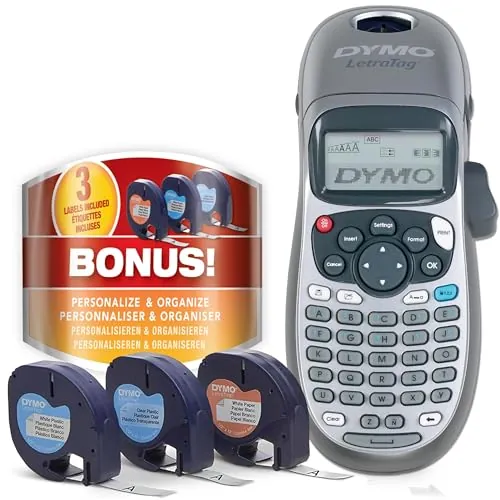
DYMO LetraTag 100H vs Brother PT-M95: Tape Widths, Bundles and Saved Labels
Brother PT-M95 supports 9 mm and 12 mm M tape, while DYMO LetraTag 100H uses 12 mm LT cassettes. Both document two-line labels and saved designs, but the guides list different memory capacities. Check the exact bundle contents before ordering: Brother's PTM95BP page lists four 12 mm tape pieces; DYMO's three-cassette page describes item 2174562 but does not confirm the contents of ASIN B01BD6DRI6.
Read comparison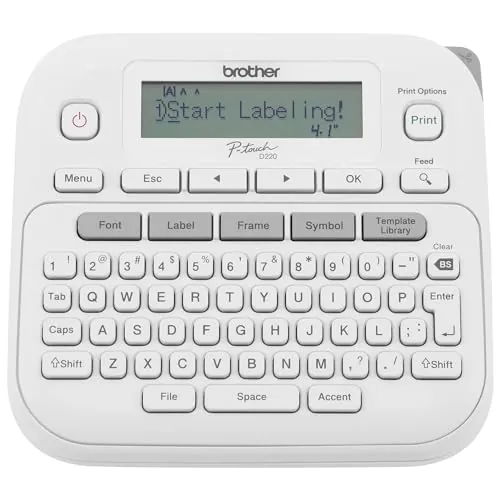
Brother PT-D220 vs PT-D610BT: Tape Width, Typing and Power Setup
Brother lists the PT-D220 for TZe tape up to 12 mm, with a QWERTY keyboard and up to nine copies. The PT-D610BT supports TZe tapes up to 24 mm, PC or phone label design, an automatic cutter and up to 99 copies. Brother's PT-D610BT product page conflicts about its keyboard: the description says built-in QWERTY, while its spec table says keyboard layout none. If typing directly on the machine matters, verify the exact unit before buying. Power differs too: D220 batteries and AC adapter are sold separately; the D610BT's standard box lists its AC adapter and USB cable.
Read comparison