
Products compared
Brother
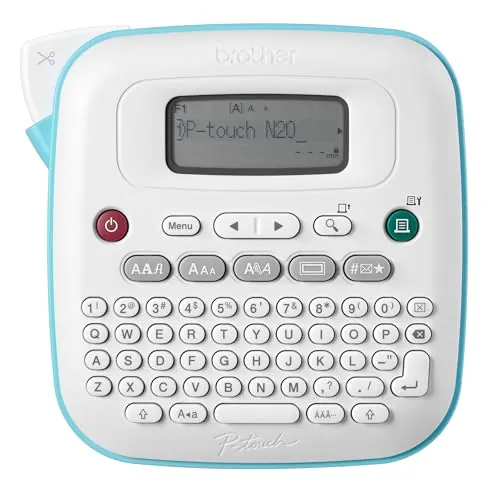
Brother P-touch PT-N20 Personal Desktop Label Maker
US PTN20 label maker. Brother says it is made exclusively for 12 mm Btag cassettes. The listed workflow uses its built-in QWERTY keyboard, 16-character preview display and memory for up to 10 labels. The box lists one Btag-233 sample cassette; six AAA batteries and an optional adapter are separate purchases.
Model PT-N20 (PTN20)
Amazon ASIN B0DFDRSHBJ
Brother
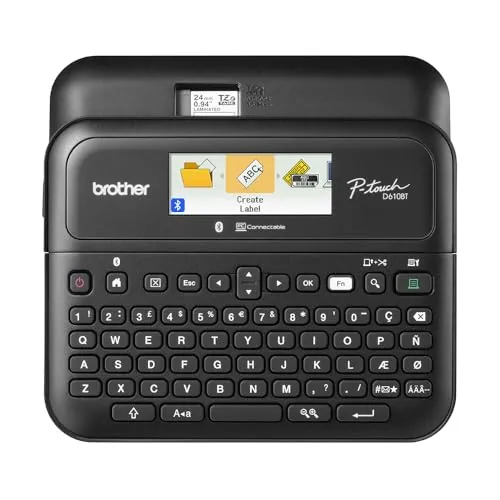
Brother P-touch PT-D610BT Business Professional Connected Label Maker
US PTD610BT. Brother's US specification lists standard TZe cassettes in six widths from 3.5 to 24 mm, USB 2.0 Micro-B and Bluetooth. Brother describes P-touch Editor computer and iPrint&Label mobile workflows; its box list includes a 24 mm x 4 m TZe sample tape, AC power adapter and USB cable.
Model PT-D610BT (PTD610BT)
Amazon ASIN B0B1KZJXPG
Differences that matter
Sources for Tape family and supported width
Sources for Where labels are created and printed
Sources for Power supply for a desk or mobile setup
Sources for Starter supplies and connection accessories in the carton
Start with tape you already own
The PT-N20 is a Btag labeler: Brother says it is made exclusively for 12 mm Btag cassettes. For the PT-D610BT, Brother's US support page lists standard TZe cassettes in six widths from 3.5 to 24 mm. If you already keep rolls on hand, read the cassette code and width before deciding; the cited documentation does not claim that Btag and TZe are cross-compatible.
That range can also simplify new label planning. A 12 mm label requirement can be met by either model's listed media, but the tape family differs; a narrower or wider standard TZe layout is documented for the D610BT and not for the N20. Match media first, then compare the design workflow and box contents.
Choose the authoring workflow and power setup together
Both machines have a built-in QWERTY keyboard, but the D610BT adds Brother-documented software paths: P-touch Editor for a computer and iPrint&Label for mobile devices, connected by Bluetooth; its specification also lists USB Micro-B. The PT-N20 page describes on-device typing and preview and explicitly lists no mobile-device printing app. If you need to create batches or templates on another device, verify the current software support for your OS before selecting the D610BT.
The desk setup differs in the carton. Brother lists an AC adapter and USB cable with the D610BT, plus a 24 mm TZe sample tape. PT-N20's box list has one Btag-233 sample tape; it uses six AAA batteries, and its optional AD-24 adapter is separate. The D610BT uses six AA batteries or the included AD-E001A adapter. Check the current Amazon package against Brother's US listing before purchase.
Product details
Brother P-touch PT-N20 Personal Desktop Label Maker
- Tape system and width
- Brother says the PT-N20 is exclusively for Btag cassettes; the US model-family specification lists standard Btag width as 12 mm. Source
- Create and preview on the machine
- Built-in QWERTY keyboard; 16-character display preview; stores up to 10 labels. Brother lists no mobile-device printing app for PT-N20. Source
- Power
- Six AAA alkaline batteries; optional AC adapter models AD-24ESA-01 or AD-24ESAW-01 are listed for PT-N20/PT-N25BT in Brother's US English support guide. Source
- Box contents
- Brother lists the PT-N20 label maker, one Btag-233 blue-on-white sample tape, quick setup guide and product safety guide. The AC adapter and batteries are not included; Brother lists no USB cable in the carton. Source
Brother P-touch PT-D610BT Business Professional Connected Label Maker
- Tape system and widths
- Brother's US support specification lists standard TZe cassettes at 3.5, 6, 9, 12, 18 and 24 mm. Source
- Computer and mobile workflow
- Brother describes P-touch Editor on a computer and iPrint&Label on Android/iOS mobile devices, with Bluetooth connections; USB 2.0 Micro-B is also listed in the US specification. Source
- Power and interfaces
- Six AA alkaline batteries or AC adapter AD-E001A; Brother lists USB 2.0 Full Speed Micro-B and Bluetooth Classic SPP/iAP2. The AC adapter and USB cable are listed in the carton. Source
- Box contents
- Brother lists the PT-D610BT, one 24 mm x 4 m black-on-white standard laminated TZe sample cassette, AC power adapter, USB cable and documentation. Six AA batteries are not included. Source
Before you buy
Community discussions
Getting the connected label workflow running on Windows 11
Brother P-touch PT-D610BT Business Professional Connected Label Maker
A PT-D610BT owner reported that Windows 11 showed a driver-unavailable message even after they installed the official Brother driver. They got their printer working after adding it manually with the correct port in their setup.
What to check
If you need labels from a PC as well as a wider tape, check supported Windows versions and the connection. Print a label at the width you actually plan to use.
Common questions
Can the PT-N20 print standard TZe tape?
Brother's US PT-N20 product page says it is made exclusively for 12 mm Btag tapes. The PT-D610BT US support specification lists standard TZe widths from 3.5 to 24 mm. The cited pages do not document cross-compatibility, so do not assume existing TZe cassettes will work in PT-N20.Brother PT-N20 Personal Desktop Label Maker, US model PTN20Brother PT-D610BT US Support Specifications
Can I design labels on a computer or phone with both?
Brother documents computer and mobile creation/printing with the PT-D610BT using P-touch Editor and iPrint&Label. For PT-N20, Brother documents its built-in keyboard and preview and lists no mobile-device printing app. Check current software support for your exact device before relying on the D610BT workflow.Brother PT-N20 Personal Desktop Label Maker, US model PTN20Brother PT-D610BT Business Professional Connected Label Maker, US model PTD610BT
What power and connection accessories are included?
Brother lists six AAA batteries and an optional adapter for PT-N20; its US product page does not list batteries, adapter or USB cable as included. PT-D610BT uses six AA batteries or adapter AD-E001A, and Brother lists the adapter and USB cable in its carton contents. Confirm the live marketplace package before ordering.Brother PT-N20 Personal Desktop Label Maker, US model PTN20Brother PT-N20 / PT-N25BT US Support Guide: SpecificationsBrother PT-D610BT Business Professional Connected Label Maker, US model PTD610BTBrother PT-D610BT US Support Specifications
Sources and scope
This guide compares the assigned US listing in order: PT-N20 model PTN20 followed by PT-D610BT model PTD610BT. Brother's manufacturer pages describe the models and box contents, but do not identify the assigned Amazon ASINs; confirm the exact listing, condition and contents at checkout. Claims are limited to Brother's published specifications and product information. No side-by-side testing of print quality, legibility, speed, tape yield, durability or reliability was performed. Confirm the current P-touch Editor/iPrint&Label operating-system support for your specific computer or phone before purchase.
Related comparisons
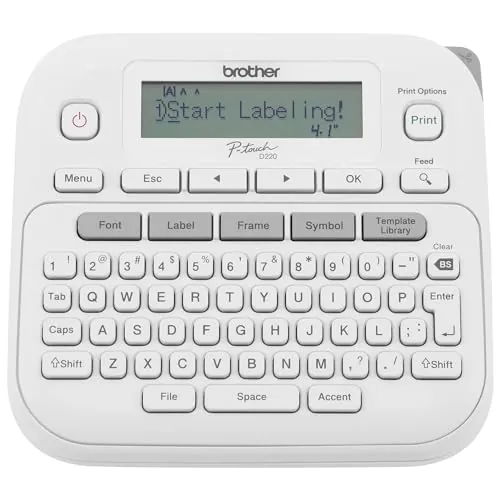
Brother PTD220 vs PT-N20: Tape Fit, Saved Labels and Power Setup
The shared 12 mm maximum does not mean these tape families interchange. Brother lists the PTD220 for TZe tape from 3.5 to 12 mm; PT-N20 is documented for Btag 12 mm tape exclusively. PTD220 also lists up to 30 saved labels and 25 preset templates; PT-N20 lists 10 saved labels, while its current page does not specify template availability. Both models use six AAA batteries or an optional AC adapter, neither included.
Read comparisonBrother PT-D220 vs PT-D610BT: Tape Width, Typing and Power Setup
Brother lists the PT-D220 for TZe tape up to 12 mm, with a QWERTY keyboard and up to nine copies. The PT-D610BT supports TZe tapes up to 24 mm, PC or phone label design, an automatic cutter and up to 99 copies. Brother's PT-D610BT product page conflicts about its keyboard: the description says built-in QWERTY, while its spec table says keyboard layout none. If typing directly on the machine matters, verify the exact unit before buying. Power differs too: D220 batteries and AC adapter are sold separately; the D610BT's standard box lists its AC adapter and USB cable.
Read comparison