
Products compared
CalDigit
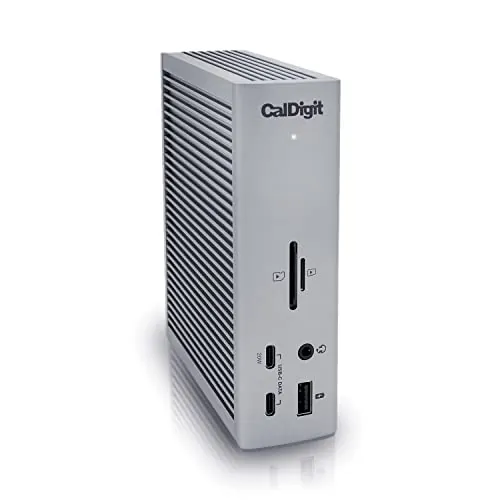
CalDigit Thunderbolt Station 4
The Space Gray TS4-US 500971 configuration. CalDigit lists a built-in DisplayPort 1.4 connector, five 10 Gb/s USB-A ports and up to 98 W of host charging.
Model TS4-US 500971
Amazon ASIN B09GK8LBWS
CalDigit
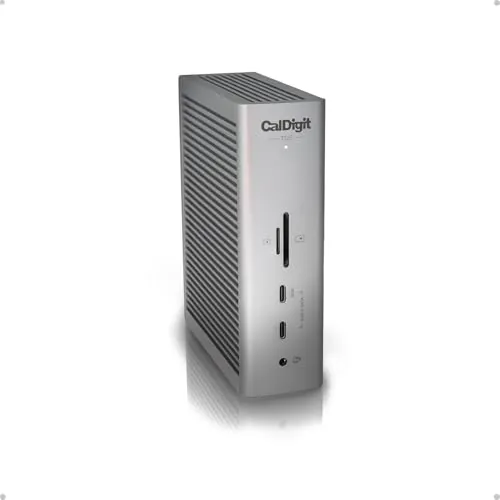
CalDigit Thunderbolt Station 5
The standard Space Gray TS5, not the TS5 Plus. CalDigit lists up to 140 W host charging, three downstream Thunderbolt 5 ports and a different USB-A/display connection layout.
Model TBT5-TS5-US-AMZ
Amazon ASIN B0F2GMPJYB
Differences that matter
What matters most to you?
Choose a priority to see what it changes.
Sources for Host charging ceiling
Sources for Display connection and host limits
Sources for Fast USB-A inventory
Sources for Included power supply and host cable
Sources for Advertised total ports; TS4 page conflict
Start with the laptop’s charging requirement
For an existing TS4 owner, first ask whether the current dock is already delivering enough power for the laptop. CalDigit lists the TS4 at up to 98 W and the standard TS5 at up to 140 W. The latter is useful only when your exact computer can accept the higher level; check the laptop’s USB-C/Thunderbolt charging specification and the cable requirement before buying around the number.
Both packages list an external power supply and a host cable. CalDigit lists a 230 W supply with a 0.8 m Thunderbolt 4 cable for TS4, versus a 240 W supply and 1.0 m braided Thunderbolt 5 cable for standard TS5. Confirm the cable reaches your laptop and do not mistake the standard TS5 for TS5 Plus.
Map the monitor before unplugging the TS4
The TS4 lists one built-in DisplayPort 1.4 socket. The standard TS5 has no built-in DisplayPort socket; CalDigit’s guidance calls for a separately sold USB-C-to-DisplayPort adapter connected to one of its spare Thunderbolt 5 ports. If you use DisplayPort now, reserve that port and count anything else that needs a downstream Thunderbolt connection.
Display capability is host-specific. CalDigit lists TS4 dual-display modes that vary by computer and says TS5 triple-display use requires a compatible M5 Pro or Thunderbolt 5 Windows host; four displays are limited to M5 Max with a daisy-chainable Thunderbolt display. Check the exact laptop, OS, monitors and target modes rather than treating the dock’s generation as a guarantee.
Count peripherals by connector and speed
CalDigit lists five 10 Gb/s USB-A ports and three 10 Gb/s USB-C ports on TS4. The standard TS5 lists one 10 Gb/s USB-A, one USB-A at 480 Mb/s and three 10 Gb/s USB-C ports. Put your actual devices on a list and mark which need the fast USB-A connection; this shows whether the TS5 can serve them directly or whether the change would require an additional hub.
CalDigit’s TS4 page labels the dock 18-port in its overview, but a newer TS4/TS5/TS5 Plus table on that page lists TS4 as 19. The connector inventory is clearer than the conflicting total, so use it to plan a replacement.
Product details
CalDigit Thunderbolt Station 4
- Host charging
- Up to 98 W through a Thunderbolt 4/USB4 host port. Source
- USB data ports
- Three USB-C ports at 10 Gb/s and five USB-A ports at 10 Gb/s. Source
- Display and additional connections
- One DisplayPort 1.4 connector, three Thunderbolt 4 ports, SD and microSD UHS-II readers, 2.5 Gigabit Ethernet and three 3.5 mm audio jacks. Source
- Box contents
- 230 W power supply, power cord, 0.8 m Thunderbolt 4 cable and two rubber feet strips. Source
CalDigit Thunderbolt Station 5
- Host charging
- Up to 140 W from the Thunderbolt 5/USB4 host port; the attached computer must accept the power level it needs. Source
- USB and Thunderbolt ports
- Three downstream Thunderbolt 5 ports at 80 Gb/s, three USB-C ports at 10 Gb/s, one USB-A port at 10 Gb/s and one USB-A port at 480 Mb/s. Source
- Display path
- No built-in DisplayPort socket; CalDigit describes a separately sold USB-C-to-DisplayPort adapter connected to a spare Thunderbolt 5 port. Source
- Box contents
- 240 W power supply, power cord, 1.0 m braided Thunderbolt 5 cable and two rubber feet strips. CalDigit recommends certified 80 Gb/s Thunderbolt 5 cables with 240 W power delivery for optimal compatibility. Source
Before you buy
Community discussions
Matching a dock to the cables on your desk
CalDigit Thunderbolt Station 4
A shopper wanted a Thunderbolt dock for a mix of display, USB and audio cables. A reply pointed to the CalDigit TS4.
What to check
Write down the connectors your displays, accessories and audio gear use. Compare that list with the ports on the exact dock.
Common questions
Will every laptop receive 140 W from the TS5?
No. CalDigit lists up to 140 W at the host port; the computer determines how much it can accept. Check the laptop’s exact charging specification and cable requirement before treating the higher ceiling as useful.Thunderbolt 5 Dock | TS5 | 15 Ports | 140W Charging
Can I connect a DisplayPort monitor directly to the standard TS5?
CalDigit does not list a built-in DisplayPort socket for the standard TS5. Its connection guidance uses a separately sold USB-C-to-DisplayPort adapter on a spare Thunderbolt port, so include that port in your plan.Thunderbolt 5 Dock | TS5 | 15 Ports | 140W Charging
Does the TS5 support more monitors than the TS4?
The answer depends on the host. CalDigit lists TS4 dual-display limits by host and says TS5 triple displays require a compatible M5 Pro or Thunderbolt 5 Windows system; four displays are limited to M5 Max with a daisy-chainable Thunderbolt display. Confirm your exact laptop and monitor modes.Thunderbolt 4 Dock | TS4 | CalDigitThunderbolt 5 Dock | TS5 | 15 Ports | 140W Charging
Is the product here the TS5 Plus?
No. The standard CalDigit TS5 is model TBT5-TS5-US-AMZ. CalDigit lists it with a 240 W power supply and a 1.0 m braided Thunderbolt 5 cable. TS5 Plus is a different model with different ports and power specifications.Thunderbolt 5 Dock | TS5 | 15 Ports | 140W Charging
Sources and scope
Manufacturer specifications only; no dock charging, data-throughput, display-stability, or reliability tests were performed. CalDigit’s TS4 page calls it an 18-port dock in the product overview but lists 19 in its newer TS4/TS5/TS5 Plus table; use the listed connector types rather than treating the total as settled. Host, OS, cable, monitor and adapter capabilities determine actual charging and display behavior.