
Products compared

Canon
Canon PIXMA TR7120 Wireless Multi-Function Home Printer
The white U.S. Canon PIXMA TR7120 is SKU 7178C002. Canon lists print, copy and scan, a flatbed, a 35-sheet ADF, automatic two-sided printing and a 100-sheet cassette. The standard box lists PG-295 black and CL-286 color ink cartridges, documentation and a power cord.
Model TR7120
Amazon ASIN B0FMB4JBJ8
Canon
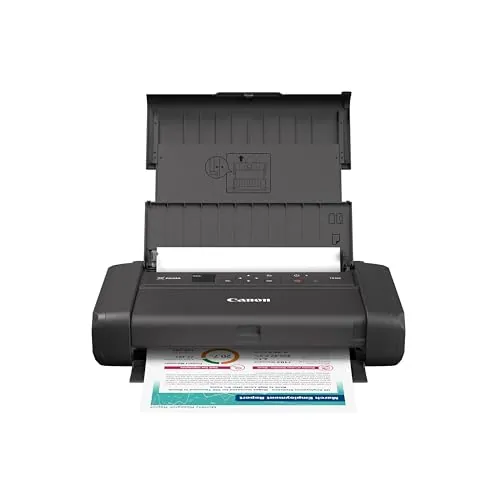
Canon PIXMA TR160 Portable Wireless Printer
The black U.S. Canon PIXMA TR160 is SKU 7069C002. Canon describes it as a wireless print-only printer with a 50-sheet paper tray. The standard box lists PGI-35 BK and CLI-36 CL ink tanks, a print head, USB-C-to-USB-A cable, power cord and documentation; Canon lists the LK-72 battery separately.
Model TR160
Amazon ASIN B0F1Z1VLV6
Differences that matter
What matters most to you?
Choose a priority to see what it changes.
Sources for Paper originals: scan and copy workflow
Sources for Paper loading and desk footprint
Sources for Carrying and battery preparation
Choose by the job you bring to the printer
A stack of paper originals points toward the TR7120. Canon lists it as a print/copy/scan machine with a flatbed and 35-sheet ADF. The ADF can feed one-sided originals for scan/copy jobs, but the manual specifically says it cannot automatically scan both sides of a double-sided original. TR160 is print-only, so keep a separate scanner or phone workflow if you choose it.
The reverse case is a digital document that needs to be printed where you are working. The TR160 is Canon's portable model and weighs about 4.5 lb with its print head and ink tanks installed. That makes it the more practical one to evaluate for a travel bag, while still requiring room for paper, cable and power gear.
Decide how much paper handling you want to do
Canon lists a 100-sheet cassette for TR7120 and automatic two-sided printing. Its TR7100-series manual also describes a two-sided copying mode that places two original pages on opposite sides of one sheet. That copy-output option does not make the feeder an automatic duplex scanner.
TR160 has a 50-sheet paper tray. Its Windows driver labels its two-sided print option as Manual. If you print occasional double-sided handouts from Windows, the option exists, but plan to turn the paper as directed rather than assuming the printer will do both sides unattended. Driver steps vary with host software and OS, so confirm the setup you use.
Check the real desk or carry setup, not only the product name
TR7120 is listed at 13.9 lb, 14.8 × 14 × 8.2 inches closed and 14.8 × 20.2 × 9.5 inches with paper installed. Use the latter dimensions when checking a shelf where paper will remain loaded, and leave additional access space for the feeder, tray and controls.
TR160 is listed at about 4.5 lb with its print head and tanks installed; its approx. 12.7 × 7.3 × 2.6-inch measurements are with trays retracted. Those are not operating clearances. Before committing to mobile use, check the bag with the printer, intended paper, cable and whichever power option you will carry.
Count the power pieces and ink codes before ordering
The TR7120 box list includes a power cord and PG-295 black / CL-286 color cartridges. The TR160 box list includes its power cord, USB-C-to-USB-A cable, print head and PGI-35 BK / CLI-36 CL ink tanks. The sets are different; use the code for the printer you own rather than assuming the cartridges interchange.
The TR160 optional LK-72 battery is sold separately and is not included in the standard package. Canon’s battery guide says it is not charged at purchase and should be charged before use; its USB charging instructions specify at least a 1.5 A charger and warn that some sources may not charge it. The included USB cable is not a battery or proof that a power bank can run the printer. For off-outlet printing, confirm the exact LK-72 kit is included in your purchase and test your setup before travel.
A quick pre-buy checklist
1. Count how often you scan or copy paper originals. Choose TR7120 for those functions; choose TR160 only if another device covers them.
2. If two-sided originals must feed through a scanner automatically, keep looking: TR7120's ADF does not scan both sides automatically, and TR160 has no scanner.
3. If automatic two-sided printing matters, TR7120 lists it; TR160's documented Windows-driver option is manual.
4. Measure shelf and bag space using the stated printer state. TR7120's loaded-paper dimensions and TR160's trays-retracted dimensions should not be mistaken for equal operating envelopes.
5. If printing away from an outlet, plan for the separately sold LK-72 battery and its charging requirements. Check the selected printer SKU and included ink codes before checkout.
Product details
Canon PIXMA TR7120 Wireless Multi-Function Home Printer
- Paper and document handling
- 100-sheet cassette; 35-sheet ADF; flatbed; automatic two-sided printing. ADF does not automatically scan both sides of a double-sided original. Source
- Closed footprint and weight
- 14.8 × 14 × 8.2 inches closed; 14.8 × 20.2 × 9.5 inches with paper installed; 13.9 lb listed weight. Source
- Standard-box ink
- PG-295 black and CL-286 color cartridges. Source
Canon PIXMA TR160 Portable Wireless Printer
- Paper and function
- 50-sheet paper tray; wireless, single-function print-only model. Source
- Portable dimensions and weight
- Approx. 12.7 × 7.3 × 2.6 inches with trays retracted; approx. 4.5 lb with print head and ink tanks installed. Source
- Standard-box ink and connections
- PGI-35 BK and CLI-36 CL ink tanks, print head, USB-C-to-USB-A cable and power cord are listed in the box. The optional LK-72 battery is not included. Source
- Manual two-sided printing
- Canon's Windows printer driver identifies the two-sided option as manual; the driver workflow is OS-specific. Source
Before you buy
Community discussions
A traveler checks whether a TR160 purchase includes a battery
Canon PIXMA TR160 Portable Wireless Printer
A poster expected a portable printer to include a battery and later identified the PIXMA TR160 and its optional LK-72 in a follow-up.
What to check
List the pieces you would need to carry for a job away from your desk, including the optional battery if the location has no outlet.
A traveler needs to print on the same paper they use at home
Canon PIXMA TR160 Portable Wireless Printer
A shopper looking for a compact travel printer wanted ordinary paper and a wireless connection. One reply named the Canon TR160 as an option.
What to check
Check the regular paper sizes you need for trips, where the tray can open and whether you need to scan originals while away.
Common questions
Does the standard TR160 include its battery?
No. Canon lists the optional LK-72 battery as not included, and its U.S. product page says the battery is sold separately. The standard box includes a power cord and USB-C-to-USB-A cable. Canon's LK-72 guide says to charge the battery before use.Canon PIXMA TR160 U.S. product page and standard boxCanon LK-72 battery guide for TR160 series: charging and operating conditions
Can the TR7120 automatically scan both sides of a double-sided original?
No. Canon's TR7100-series manual says a double-sided original cannot be scanned automatically with the ADF. Its two-sided copy mode is a different task: it can put two original pages on opposite sides of one sheet.Canon TR7100 series manual: loading documents in the ADFCanon TR7100 series manual: two-sided copying
Are their included ink tanks interchangeable?
The standard boxes list different ink codes: PG-295 black and CL-286 color for TR7120, versus PGI-35 BK and CLI-36 CL for TR160. Check the printer model and cartridge or tank code when ordering; this guide does not estimate page yield or compare ink cost.Canon PIXMA TR7120 U.S. product page and standard boxCanon PIXMA TR160 U.S. product page and standard box
Sources and scope
This is a source-based feature and setup comparison, not a print-speed, print-quality, reliability or cost-per-page test. Canon documents automatic two-sided printing for the TR7120, but its ADF cannot automatically scan both sides of a double-sided original. The optional LK-72 battery is sold separately and is not included with the standard TR160 package. The listed dimensions use different states (TR7120 closed or with paper installed; TR160 with trays retracted), so check actual desk clearance or packed travel setup. Prices and ink-yield comparisons are omitted.
- Canon PIXMA TR7120 U.S. product page and standard box
- Canon PIXMA TR160 U.S. product page and standard box
- Canon TR160 series manual: dimensions, weight and power specifications
- Canon TR7100 series manual: loading documents in the ADF
- Canon TR7100 series manual: two-sided copying
- Canon TR160 Windows printer driver: two-sided printing is manual
- Canon LK-72 battery guide for TR160 series: charging and operating conditions
- Canon TR160 series manual: carrying the printer