
Products compared
Canon
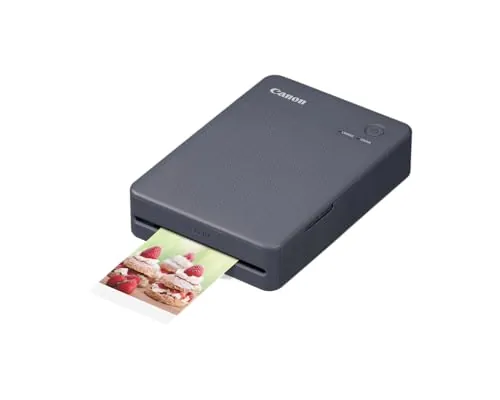
Canon SELPHY QX20 Dark Gray
Printer-only configuration; Canon specifies XS-20L square sticker paper and XC-20L card-size sticker paper.
Model 6752C001
Amazon ASIN B0DGQRQG77
Canon
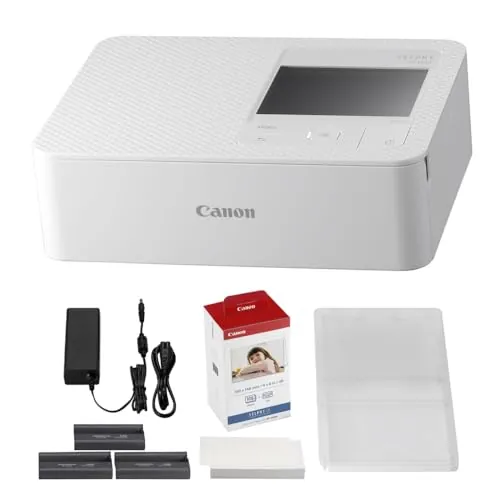
Canon SELPHY CP1500 White with KP-108IN bundle
The selected listing is named as a two-item bundle adding a KP-108IN 108-print ink-and-paper set; Canon's ordinary CP1500 in-box list is a separate base-package description.
Model 5540C002
Amazon ASIN B0CV9P22C8
Differences that matter
What matters most to you?
Choose a priority to see what it changes.
Sources for Photo selection and connection path
Sources for Package and physical placement
Start with the print you actually want
For small adhesive keepsakes, the QX20 accepts two small sticker-paper types: square XS-20L and card-size XC-20L. Canon's manual gives sheet sizes, so do not read those as the finished photo area. The printer-only offer means you should plan to buy the correct QX20 set.
The CP1500 is the better fit when the default job is a postcard-size 4×6 print. It also handles L-size and offers card or square-label formats with its optional cassette. The surprising gotcha is that Canon lists different supplies for the two printer families: CP1500 media is not interchangeable with QX20 XS/XC media.
Match photo selection to your devices
QX20 uses a direct Wi-Fi connection and the SELPHY Photo Layout app on iOS or Android. Its USB-C connection is for charging and it has no memory-card slot. Pick it if your workflow already starts with phone photos and you want the printer's controls to stay simple.
CP1500 can also print from a phone, but Canon adds a 3.5-inch screen, SD-family card slots, USB flash-drive input and a USB-C data path to a computer. If your photos live on a camera card or you want to select them on the printer, check card adapters, drive format and the cable you will need for the host.
Treat portable power and box contents as separate decisions
QX20 has its rechargeable battery built in and charges over USB-C; the charging cable is supplied but Canon does not include a power adapter. The battery is not user-replaceable. That is a straightforward pack-and-charge arrangement, not a claim about how many prints you will get away from an outlet.
CP1500's standard package is AC-first: Canon lists its adapter and AC cable in the box. It can use optional NB-CP2LI or NB-CP2LH batteries, but Canon says USB charging is not supported. The selected white offer is separately identified as a KP-108IN bundle; Canon's ordinary in-box list and this seller bundle are not the same package statement.
A quick pre-buy checklist
1. Pick the print size and whether it needs to be adhesive. 2. Write down the matching Canon media code—XS-20L/XC-20L for QX20; a CP-series set and, for CP1500 card/square labels, PCC-CP400. 3. Decide whether photo selection starts on a phone, removable media or the printer screen. 4. If you will print away from an outlet, account for QX20's built-in battery or CP1500's separately purchased battery option. 5. For CP1500, verify the exact seller listing's KP-108IN contents instead of assuming it is part of every printer box.
Product details
Canon SELPHY QX20 Dark Gray
Canon SELPHY CP1500 White with KP-108IN bundle
- Standard output and other formats
- Postcard-size 4×6, L size, card and square-label media; the card/square-label cassette is optional Source
- Selection and input
- 3.5-inch display, SD-family cards, USB flash drives, computer USB and phone/app printing Source
- Power
- AC power adapter included; NB-CP2LI or NB-CP2LH batteries are separate options; USB does not charge the printer Source
Before you buy
Community discussions
Choosing between postcard prints and a smaller travel kit
Canon SELPHY CP1500 White with KP-108IN bundle
A traveler wanted small prints on photography trips. One reader who had bought a SELPHY QX20 still preferred a smaller printer for their travel setup and discussed the larger CP1500 format.
What to check
Decide on the print size you want to bring home. Compare the printer, tray, supplies and power accessories as a complete kit.
Allowing room for the paper tray when printing journal photos
Canon SELPHY CP1500 White with KP-108IN bundle
A shopper wanted to print journal images and photos from a phone. A CP1500 owner said the paper tray takes up additional space and that they had also considered the QX20.
What to check
Check how much room the printer and its media take up when set up, and decide whether you want sticker-size prints or postcards for the journal.
Common questions
Can the CP1500 make sticker formats too?
Yes. Canon lists card-size and square-label media for the CP1500, but these require its optional PCC-CP400 cassette and CP-compatible media. QX20 XS-20L and XC-20L sets are not compatible with the CP1500.Canon SELPHY CP1500 Product Manual: SpecificationsCanon SELPHY CP1500 Product Manual: Ink and Paper (Sold Separately)
Does the CP1500's USB-C port charge the printer?
No. Canon describes USB Type-C as a data connection for computer or flash-drive use and says USB charging/power is not provided. Use its included AC adapter or a separately sold compatible battery pack.Canon SELPHY CP1500 Product Manual: SpecificationsCanon SELPHY CP1500 White product page and in-box list
Does the QX20 include paper in this selected listing?
The QX20 offer compared here is the dark gray printer-only version. Canon lists XS-20L and XC-20L media separately, so check the seller’s package contents and add the matching set for the format you want.Canon SELPHY QX20 Dark Gray product pageCanon SELPHY QX20 Product Manual: Specifications
Sources and scope
This is a manufacturer-specification and package-fit comparison. It does not compare print quality, color, speed, print life, durability, per-print cost or runtime. The CP1500 offer compared here includes a separate KP-108IN media set; check the seller’s package details before ordering.
- Canon SELPHY QX20 Dark Gray product page
- Canon SELPHY QX20 Product Manual: Specifications
- Canon SELPHY CP1500 White product page and in-box list
- Canon SELPHY CP1500 Product Manual: Specifications
- Canon SELPHY CP1500 Product Manual: Ink and Paper (Sold Separately)
- Canon SELPHY CP1500 Product Manual: Printing over a USB Connection
- Canon U.S.A. announcement: SELPHY CP1500 media and optional cassette
Related comparisons
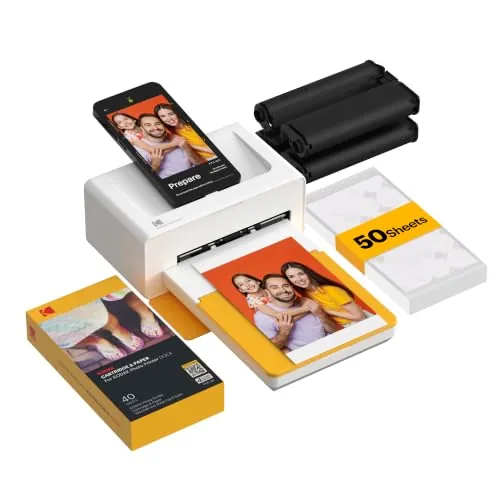
Canon SELPHY CP1500 vs Kodak Dock Plus PD460: Choose by Photo Source and Paper
The white Canon SELPHY CP1500 bundle pairs model 5540C002 with KP-108IN; Canon documents Wi-Fi/AirPrint, computer or USB-drive data input, supported memory cards, and four paper sizes. Kodak’s yellow Dock Plus is the PD460 and its listing names a 50-sheet bundle. Kodak’s maker materials focus on smartphone docking or Bluetooth and 4×6 output. Match the printer to where your photos live, then confirm the exact bundle and refill before checkout.
Read comparison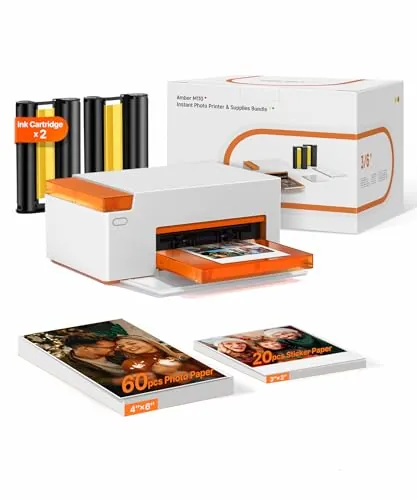
Canon SELPHY CP1500 White + KP-108IN vs Liene Amber M110: Paper and Phone Workflow
The CP1500 White bundle pairs the printer with Canon's KP-108IN 108-print 4×6 photo set and supports direct card, USB and network/app workflows. The exact M110 bundle instead divides its 80 sheets into 60 4×6 photos and 20 3×3 sticky-backed squares, with two cartridges and Bluetooth/app printing. Decide from the refill you will actually use and confirm the exact paper and app support before ordering.
Read comparison