
Pickagu

CORSAIR 3500X RS-R ARGB vs FRAME 4000D RS ARGB: Which Layout Fits Your Build?

CORSAIR 3500X RS-R ARGB Mid-Tower PC CaseModel CC-9011322-WWCORSAIR FRAME 4000D RS ARGB Modular Mid-Tower PC CaseModel CC-9011296-WW

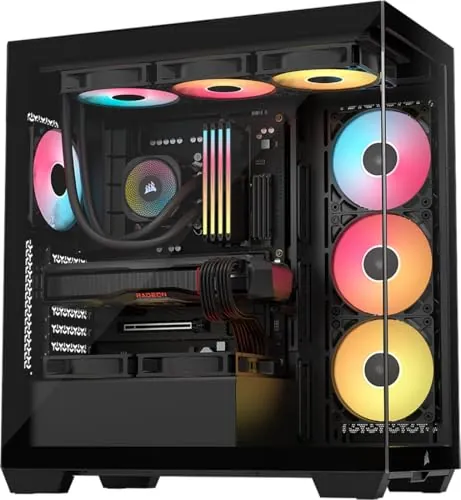
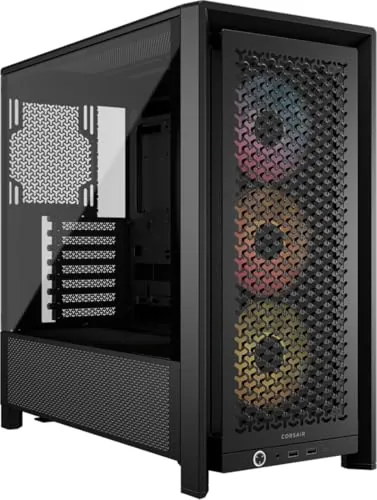
These black Corsair cases fit the same listed motherboard sizes and both list a 170 mm CPU-cooler height. The practical split is layout: 3500X RS-R ARGB gives a wraparound glass view and three reverse-rotor RS120-R ARGB fans; FRAME 4000D RS ARGB uses a steel airflow front and includes three RS120 ARGB fans. Compare radiator position, GPU length and desk footprint against your exact parts before choosing.

Choose by what matters to you

Choose CORSAIR 3500X RS-R ARGB Mid-Tower PC Case CC-9011322-WW

Pick the 3500X RS-R ARGB if its wraparound front-and-side glass is the look you want and your radiator plan uses its documented top or side mounts. Check GPU length carefully: CORSAIR publishes both 410 mm and 425 mm maximums for the 3500X family/model sources used here.

Check price on Amazon

Choose CORSAIR FRAME 4000D RS ARGB Modular Mid-Tower PC Case CC-9011296-WW

Pick the FRAME 4000D RS ARGB if your build calls for a front radiator position, its patterned steel front, or the documented 430 mm GPU length. Both cases list a 170 mm CPU-cooler-height limit, so compare your actual tower cooler and radiator/fan arrangement rather than assuming one case has more CPU-cooler room.

Check price on Amazon

If your planned radiator, GPU, CPU cooler or power supply is close to a published maximum, confirm the exact case revision and the combined component layout with CORSAIR before ordering. The 3500X sources disagree on GPU length, and listed radiator support alone does not establish clearance for a particular card, tubes, memory or fan stack.

As an Amazon Associate I earn from qualifying purchases.Affiliate disclosure

Products compared

CORSAIR 3500X RS-R ARGB Mid-Tower PC Case · CC-9011322-WW

CORSAIR

CORSAIR 3500X RS-R ARGB Mid-Tower PC Case

Black 3500X RS-R ARGB variant with three RS120-R ARGB reverse-rotor fans. The manufacturer lists Mini-ITX, Micro-ATX, ATX and E-ATX boards up to 305 × 277 mm, top and side radiator mounts, and no front radiator position.

Model CC-9011322-WW
Amazon ASIN B0FJ2ZBK8J
Check current price on Amazon
CORSAIR FRAME 4000D RS ARGB Modular Mid-Tower PC Case · CC-9011296-WW

CORSAIR

CORSAIR FRAME 4000D RS ARGB Modular Mid-Tower PC Case

Black FRAME 4000D RS ARGB variant with a 3D-Y airflow steel front and three RS120 ARGB fans. The manufacturer lists the same motherboard sizes and CPU-cooler-height limit as the 3500X, plus a front radiator position and a 430 mm GPU-length limit.

Model CC-9011296-WW
Amazon ASIN B0DFHNV7TK

Check current price on Amazon

Differences that matter

What matters most to you?

Choose a priority to see what it changes.

Difference
CORSAIR 3500X RS-R ARGB Mid-Tower PC Case
CORSAIR FRAME 4000D RS ARGB Modular Mid-Tower PC Case
Why it matters
Desk or shelf footprint
CORSAIR 3500X RS-R ARGB Mid-Tower PC Case3500X RS-R ARGB: 506 mm high × 460 mm long × 240 mm wide; front and side are tempered glass.
CORSAIR FRAME 4000D RS ARGB Modular Mid-Tower PC CaseFRAME 4000D RS ARGB: 486 mm high × 490 mm long × 239 mm wide; 3D-Y patterned steel front and tempered-glass left side.
Measure the available height, depth and width, including room to remove panels and reach front I/O. The 3500X is 24 mm taller; the FRAME 4000D is 30 mm longer; listed widths are nearly the same. These are external dimensions, not a tested placement fit.
Sources for Desk or shelf footprint
Motherboard and CPU-cooler envelope
CORSAIR 3500X RS-R ARGB Mid-Tower PC CaseCORSAIR lists Mini-ITX, Micro-ATX, ATX and E-ATX up to 305 × 277 mm; maximum CPU-cooler height is 170 mm.
CORSAIR FRAME 4000D RS ARGB Modular Mid-Tower PC CaseCORSAIR lists Mini-ITX, Micro-ATX, ATX and E-ATX up to 305 × 277 mm; maximum CPU-cooler height is 170 mm.
On the published board-size and CPU-cooler-height limits, neither has a listed advantage. Check your E-ATX board's exact dimensions and the cooler manufacturer's installed height, including any fan position that raises it.
Sources for Motherboard and CPU-cooler envelope
Radiator location and size
CORSAIR 3500X RS-R ARGB Mid-Tower PC CaseThe 3500X Series guide lists top and side radiator support for 240/280/360 mm, rear 120 mm, and no front position.
CORSAIR FRAME 4000D RS ARGB Modular Mid-Tower PC CaseThe FRAME 4000 Series guide lists front, top and side support for 240/280/360 mm, plus rear 120/140 mm.
If a front-mounted radiator is a fixed requirement, only the FRAME 4000D's published layout lists that position. If you plan top or side mounting, both list 240/280/360 mm options; verify radiator thickness, fans, memory, GPU and tube routing together for your build.
Sources for Radiator location and size
GPU and PSU clearance
CORSAIR 3500X RS-R ARGB Mid-Tower PC CaseThe 3500X product-page Tech Specs say 425 mm maximum GPU length and 180 mm maximum PSU length; its Series guide instead lists 410 mm maximum GPU length.
CORSAIR FRAME 4000D RS ARGB Modular Mid-Tower PC CaseThe FRAME 4000 Series guide lists 430 mm maximum GPU length and 220 mm maximum PSU length.
The 3500X GPU figure is unresolved across CORSAIR sources, so do not treat 425 mm as guaranteed clearance; use 410 mm as a conservative screen and confirm if near the limit. For either case, check the GPU with the selected front/side radiator and fan stack and compare the PSU body plus cable bend space against the exact layout.
Sources for GPU and PSU clearance
Included fans and front connections
CORSAIR 3500X RS-R ARGB Mid-Tower PC CaseThe exact RS-R ARGB guide lists three RS120-R ARGB reverse-rotor fans. CORSAIR lists Type-C, two Type-A and combo audio/mic front connections, but its Type-C generation labels differ between product-page sections.
CORSAIR FRAME 4000D RS ARGB Modular Mid-Tower PC CaseThe exact RS ARGB page lists three RS120 ARGB fans. CORSAIR lists Type-C, two Type-A and combo audio/mic front connections; its product page and guide differ on Type-C generation wording.
Count the three included fans only as part of the named variant; do not assume the same rotor design or lighting orientation. If front-panel USB-C generation matters, check the exact case revision and motherboard header with CORSAIR because its current documentation is inconsistent; no speed conclusion is drawn here.
Sources for Included fans and front connections

Start with where the case and radiator must fit

Measure the placement space before choosing by appearance. CORSAIR lists the 3500X RS-R ARGB at 506 × 460 × 240 mm (H × L × W) and the FRAME 4000D RS ARGB at 486 × 490 × 239 mm. Both list Mini-ITX, Micro-ATX, ATX and E-ATX motherboards up to 305 × 277 mm and a 170 mm CPU-cooler-height limit. Those published envelopes do not replace checking your actual board and installed cooler.

The radiator table may settle the choice sooner: 3500X lists top and side 240/280/360 mm positions, rear 120 mm, and no front position. FRAME 4000D lists front, top and side 240/280/360 mm and rear 120/140 mm. If you require front mounting, the documented layout points to FRAME 4000D. For any position, confirm the radiator and fan stack with GPU, RAM and tube routing; CORSAIR's support list is not a guarantee for every combination.

Check long components against the conflicting 3500X GPU figure

The 3500X sources do not agree on maximum GPU length: its product-page Tech Specs state 425 mm, while its Series guide states 410 mm. Keep that discrepancy visible instead of treating the more generous figure as settled. A card close to 410 mm needs exact-revision confirmation from CORSAIR, particularly if your planned radiator or fans occupy nearby space.

The FRAME 4000 Series guide lists a 430 mm GPU length and a 220 mm PSU length; the 3500X product page lists a 180 mm PSU length. Compare the card, power supply and cable bend with the planned build rather than reading these numbers as measured usable space in every configuration.

Choose the panel style and confirm the exact fan bundle

CORSAIR describes the 3500X with removable front and side tempered-glass panels. Its exact RS-R ARGB variant includes three RS120-R ARGB reverse-rotor fans; the guide's variant table separates this kit from other 3500X editions. The FRAME 4000D RS ARGB instead has a 3D-Y patterned steel front with a glass side panel and three included RS120 ARGB fans. Keep these fan names and kits tied to their exact model numbers; this is not a cooling-performance comparison.

Both maker pages list front USB-C, two USB-A ports and a combo audio/microphone jack. CORSAIR's Type-C generation labels vary across page sections and guides, so verify the exact revision and motherboard header if that distinction matters. No transfer-speed or airflow conclusion follows from the labels here.

Product details

CORSAIR 3500X RS-R ARGB Mid-Tower PC Case

Exterior dimensions (H × L × W)
506 × 460 × 240 mm Source
Included fans
3 × RS120-R ARGB reverse-rotor fans Source
Radiator positions
Top and side: 240/280/360 mm; rear: 120 mm; front: none Source
Board and cooler fit
Mini-ITX, Micro-ATX, ATX, E-ATX up to 305 × 277 mm; CPU cooler height up to 170 mm Source

CORSAIR FRAME 4000D RS ARGB Modular Mid-Tower PC Case

Exterior dimensions (H × L × W)
486 × 490 × 239 mm Source
Included fans
3 × RS120 ARGB fans Source
Radiator positions
Front, top and side: 240/280/360 mm; rear: 120/140 mm Source
Board and cooler fit
Mini-ITX, Micro-ATX, ATX, E-ATX up to 305 × 277 mm; CPU cooler height up to 170 mm; GPU length up to 430 mm Source

Before you buy

  • Write down your motherboard's exact dimensions, CPU-cooler installed height, GPU length, PSU length and the radiator/fan thickness before comparing cases. Both list the same board formats and a 170 mm CPU-cooler-height ceiling.
  • Place your radiator requirement first. The 3500X Series guide lists top and side 240/280/360 mm, rear 120 mm, and no front radiator. The FRAME 4000 guide also lists front 240/280/360 mm and rear 140 mm.
  • Resolve the 3500X GPU discrepancy before purchase if your card approaches 410 mm: CORSAIR's product page says 425 mm while its Series guide says 410 mm. The FRAME 4000 guide lists 430 mm. These maximums do not guarantee clearance in every radiator, fan or cable arrangement.
  • Compare case dimensions with the desk or shelf where it will stand: 3500X is 506 × 460 × 240 mm (H × L × W); FRAME 4000D is 486 × 490 × 239 mm. Leave access for front ports and panel removal.
  • Check the exact included-fan variant: 3500X RS-R ARGB lists three RS120-R reverse-rotor ARGB fans; FRAME 4000D RS ARGB includes three RS120 ARGB fans. This is an inventory and design distinction, not a cooling comparison.
  • If USB-C generation is important, confirm the exact front-I/O revision with CORSAIR and your motherboard header. CORSAIR's product-page and guide wording conflicts; connector presence is documented, but this comparison makes no data-rate claim.

Community discussions

Leaving clearance beside a large graphics card

CORSAIR 3500X RS-R ARGB Mid-Tower PC Case

A buyer considering the Corsair 3500X RS-R asked about fitting a specific large graphics card in the case.

What to check

Check the exact card dimensions and connector location. Compare that space with the manufacturer’s case clearances and requirements for the supplied cable.

Original Reddit discussion

Planning around a graphics-card support bracket

CORSAIR FRAME 4000D RS ARGB Modular Mid-Tower PC Case

A builder using a FRAME 4000D RS ARGB described the space taken up by their support bracket and the nearby motherboard connectors.

What to check

Find the bracket location on the case diagram and compare it with your card and board layout. Check which ports and cable openings you need to reach.

Original Reddit discussion

Common questions

Which case lists a front radiator mount?

The FRAME 4000D RS ARGB Series guide lists front support for 240, 280 and 360 mm radiators. The 3500X Series guide lists no front radiator position. Confirm clearance for your specific radiator, fans, GPU and tubing before buying.CORSAIR 3500X Series Mid-Tower Case — Quick Start GuideCORSAIR FRAME 4000 Series Mid-Tower Case — Quick Start Guide

Do both cases fit the same motherboard sizes and CPU-cooler height?

CORSAIR lists Mini-ITX, Micro-ATX, ATX and E-ATX boards up to 305 × 277 mm for both, and a 170 mm maximum CPU-cooler height for both. Confirm the exact board dimensions and installed cooler height for your parts.3500X RS-R ARGB Mid-Tower PC CaseCORSAIR FRAME 4000 Series Mid-Tower Case — Quick Start Guide

How much GPU clearance does the 3500X RS-R ARGB have?

CORSAIR's 3500X product-page Tech Specs list 425 mm, while the 3500X Series guide lists 410 mm. Because those manufacturer values conflict, treat 410 mm as a conservative screening point and ask CORSAIR to confirm the exact revision if your GPU is near either figure.3500X RS-R ARGB Mid-Tower PC CaseCORSAIR 3500X Series Mid-Tower Case — Quick Start Guide

What fans are included in these exact ARGB versions?

The 3500X RS-R ARGB guide lists three RS120-R ARGB reverse-rotor fans. The FRAME 4000D RS ARGB product page lists three RS120 ARGB fans. Other 3500X and FRAME 4000 editions have different fan bundles, so match the exact model name and SKU on the offer.CORSAIR 3500X Series Mid-Tower Case — Quick Start GuideFRAME 4000D RS ARGB Modular Mid-Tower PC Case

Are the front USB-C ports the same generation?

The connector type is listed for both cases, but CORSAIR's product-page sections and guides do not consistently label its generation. Check the exact case revision and motherboard header with CORSAIR if this matters; no transfer-speed comparison is supported here.3500X RS-R ARGB Mid-Tower PC CaseCORSAIR 3500X Series Mid-Tower Case — Quick Start GuideFRAME 4000D RS ARGB Modular Mid-Tower PC CaseCORSAIR FRAME 4000 Series Mid-Tower Case — Quick Start Guide

Sources and scope

CORSAIR lists 425 mm for the 3500X GPU limit on the product page and 410 mm in the series guide. Check the exact case and component arrangement if your card approaches either figure. Measure GPU, radiator and fan-stack clearance together.

  1. 3500X RS-R ARGB Mid-Tower PC Case
  2. CORSAIR 3500X Series Mid-Tower Case — Quick Start Guide
  3. FRAME 4000D RS ARGB Modular Mid-Tower PC Case
  4. CORSAIR FRAME 4000 Series Mid-Tower Case — Quick Start Guide