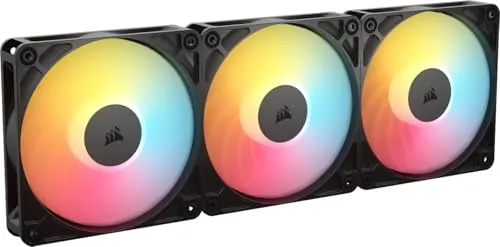
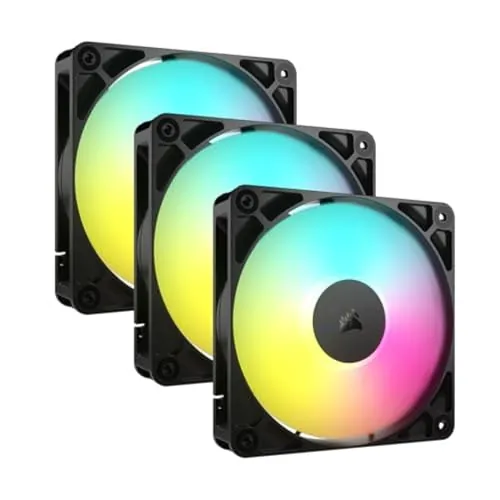
Both exact Corsair kits are black three-packs of 120 mm PWM ARGB fans with daisy-chain 4-pin PWM and +5V ARGB motherboard connections. The difference that changes the build is rotor direction and which side faces the case interior: Corsair says the RS120-R reverse rotor keeps its RGB face visible when mounted as intake. Use the standard RS120 ARGB when that reverse-rotor intake presentation is not needed and its normal orientation matches your airflow plan. Neither choice establishes a cooling or noise advantage in your case.
Choose the RS120-R when the intended position is intake and you want the RGB-lit face visible from inside the case. Corsair states that the reverse rotor is designed for that presentation while retaining the intended airflow direction; this is an orientation choice, not a cooling result.
Choose the standard RS120 ARGB when its normal rotor orientation matches the airflow direction you plan and you do not need the reverse-rotor appearance at intake. Confirm the airflow direction in the exact model documentation before mounting.
If your case position does not accept 120 mm fans, or exact frame depth, radiator/filter clearance, motherboard PWM header, or +5V ARGB support is unknown, verify those constraints first. Neither kit is confirmed for a particular case or board here.
Corsair RS120-R ARGB 120mm PWM Reverse Fans Triple Pack, Black
Three reverse-rotor 120 mm fans; the exact product page does not state frame thickness. Corsair describes the reverse rotor as an intake-oriented way to keep the RGB-lit fan face visible from inside a windowed case. The pack uses daisy-chained 4-pin PWM and +5V ARGB motherboard connections.
Corsair RS120 ARGB 120mm PWM Fans Triple Pack, Black
Three standard-rotor 120 × 25 mm fans, per its exact product page. Corsair's comparison guide identifies RS120 ARGB as the standard counterpart to RS120-R. Its exact triple-pack page lists daisy-chained 4-pin PWM and +5V ARGB motherboard connections.
Corsair RS120-R ARGB 120mm PWM Reverse Fans Triple Pack, Black
Corsair RS120 ARGB 120mm PWM Fans Triple Pack, Black
Why it matters
Rotor direction and visible intake face
Corsair RS120-R ARGB 120mm PWM Reverse Fans Triple Pack, BlackReverse rotor; Corsair says the RGB face remains visible when used as an intake fan.
Corsair RS120 ARGB 120mm PWM Fans Triple Pack, BlackStandard rotor; Corsair names RS120 ARGB as the standard counterpart to RS120-R.
For a windowed side or bottom intake where the lit face should point into the case, RS120-R is the documented feature fit. If the fan's ordinary rotor direction fits the planned airflow, the standard RS120 avoids choosing a reverse rotor for that specific presentation need. Check the exact model’s airflow marking at the intended mount; visible-face preference does not prove better cooling.Sources for Rotor direction and visible intake face
Corsair RS120-R ARGB 120mm PWM Reverse Fans Triple Pack, BlackCorsair lists a 120 mm fan size; the exact product page reviewed does not state frame thickness.
Corsair RS120 ARGB 120mm PWM Fans Triple Pack, Black120 × 25 mm, listed on the exact standard-pack product page.
Both exact pages identify 120 mm fans, but only the standard RS120 page reviewed states 25 mm thickness. Do not assume A’s depth from the family name; verify its exact frame clearance in the listing/manual and compare with the case, radiator and filter at the intended position. No particular case fit is certified here.Sources for Mount size and clearance
Corsair RS120-R ARGB 120mm PWM Reverse Fans Triple Pack, BlackThree fans; daisy-chain connection uses one 4-pin PWM and one +5V ARGB motherboard connector.
Corsair RS120 ARGB 120mm PWM Fans Triple Pack, BlackThree fans; daisy-chain connection uses one 4-pin PWM and one +5V ARGB motherboard connector.
Pack count and connector requirements are shared. Confirm that the board has compatible PWM and 5V ARGB headers and that the planned chain fits the manufacturer's connection guidance; do not confuse a 5V ARGB header with a different lighting connector.Sources for Fan count and motherboard connections
Both source-listed packages provide three fans and the same screw count. Match the full part number on the box or exact offer; RGB software compatibility and other system behavior still depend on the motherboard and case setup.Sources for Exact pack contents
Use the reverse rotor when the intake face is part of the build
Corsair says RS120-R reverse-rotor fans keep their RGB face visible when mounted as intake. That makes the reverse model a fit for a windowed side or bottom intake where the lit side should face into the case.
Corsair's guide names RS120-R and RS120 ARGB as the reverse and standard examples. Choose based on airflow direction and the side you want visible, then confirm the intended direction against the exact model’s airflow marking and the case layout. The RS120-R quick-start guide identifies airflow arrows on that model’s frame. This comparison does not claim that either rotor cools a specific build better.
Both exact packs are listed as 120 mm fans. Corsair’s standard RS120 page states 120 × 25 mm, while the RS120-R exact product page does not state frame thickness in its specs. Check the RS120-R frame dimensions and the case’s available depth at the specific mount, including any radiator, filter or adjacent chassis part.
Corsair lists a daisy-chained 4-pin PWM fan connection and a +5V ARGB lighting connection for both packs. Check your board for the matching headers and consult the motherboard documentation for header limits and software support; these are build requirements, not a reason to prefer one fan orientation.
Verify the part number and count the included hardware
Corsair lists three fans and 12 mounting screws in each exact triple pack. Check that the offer identifies CO-9050196-WW for RS120-R or CO-9050181-WW for standard RS120 ARGB; a similar family name is not enough to establish the sold variant.
Corsair RS120-R ARGB 120mm PWM Reverse Fans Triple Pack, Black
Fan size and pack
Corsair lists a 120 mm fan size; its exact product page does not state frame thickness. The triple pack includes three fans and 12 mounting screws. Source
Orientation
Reverse rotor designed to keep the RGB-lit face visible when installed as intake. Source
Connections
Daisy-chain the pack through one 4-pin PWM and one +5V ARGB motherboard connection. Source
Airflow direction check
The exact RS120-R quick-start guide says arrows on the frame indicate blade-spin and airflow direction. Source
Corsair RS120 ARGB 120mm PWM Fans Triple Pack, Black
Fan size and pack
120 × 25 mm fans; three fans and 12 mounting screws in the exact CO-9050181-WW pack. Source
Orientation
Standard-rotor counterpart to the reverse-blade RS120-R. Source
Connections
Daisy-chain the pack through one 4-pin PWM and one +5V ARGB motherboard connection. Source
Before you buy
Compare part numbers, not only family names: CO-9050196-WW is the black RS120-R reverse-rotor triple pack; CO-9050181-WW is the black standard RS120 ARGB triple pack.
Sketch the intended intake/exhaust direction at each 120 mm mount and note which fan face will be visible through the case. Choose the reverse rotor only where its visible-face benefit matches the layout.
Check the case’s 120 mm mount and surrounding depth at the exact position. The standard RS120 page lists 25 mm thickness; the exact RS120-R page reviewed does not state thickness, so verify A’s frame depth before relying on a tight clearance.
Both packs list one daisy-chained 4-pin PWM and one +5V ARGB motherboard connection for three fans. Confirm matching board headers and follow the board/Corsair limits for your build.
This is a fit and setup guide based on Corsair’s exact U.S. product pages and orientation guide, not a thermal, acoustic or durability test. No exact case, radiator, filter or motherboard was supplied, so check its 120 mm mounting clearance, intended airflow direction, header type and board limits before selecting. Corsair’s published performance ranges are not used to rank these models.