
Products compared
CORSAIR
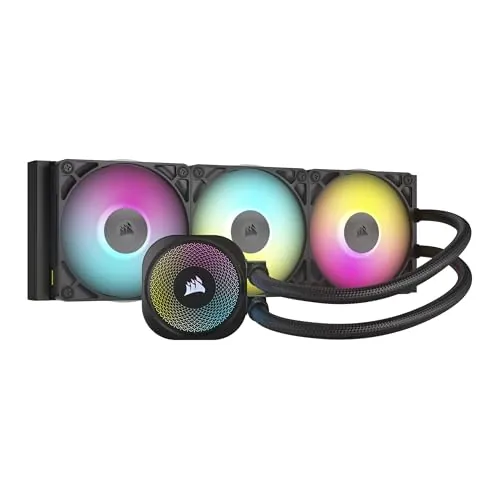
CORSAIR iCUE LINK TITAN 360 RX RGB AIO Liquid CPU Cooler
Black U.S. 360 mm AIO with three pre-installed RX120 RGB fans and an included iCUE LINK System Hub. CORSAIR lists Intel LGA 1851/1700 and AMD AM5/AM4 support. The hub setup guide calls for an internal USB 2.0 motherboard header and dedicated 6-pin PCIe power from the PSU.
Model CW-9061018-WW
Amazon ASIN B0D6BFBLTK
CORSAIR
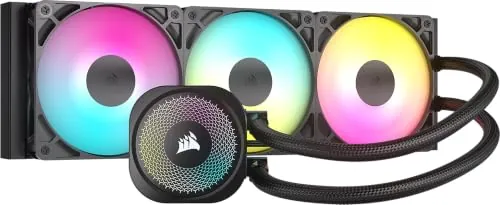
CORSAIR NAUTILUS 360 RS ARGB Liquid CPU Cooler
Black U.S. 360 mm AIO with three pre-installed RS120 ARGB fans. CORSAIR lists the same Intel LGA 1851/1700 and AMD AM5/AM4 support. Its exact-SKU product page describes direct motherboard connections without an additional controller; the linked 240/360 RS ARGB guide covers PWM and ARGB fan connections.
Model CW-9060093-WW
Amazon ASIN B0DF7C4YPQ
Differences that matter
What matters most to you?
Choose a priority to see what it changes.
Sources for CPU socket and case radiator fit
Sources for Motherboard headers and PSU connections
Sources for Control software and lighting path
Sources for Included fans and connection accessories
Quick answer: choose the control path, then check the case
These exact black U.S. models cover the same listed CPU sockets and both use 360 mm radiators. Their practical difference is the wiring and software: the Titan includes an iCUE LINK System Hub powered through internal USB 2.0 and a dedicated PCIe lead; the Nautilus connects its fan group to motherboard PWM and 5 V ARGB headers.
Case fit is a separate question. Confirm the case's radiator location and clearance using the case maker's manual. The Titan's radiator is listed as 396 × 120 × 27 mm; the exact-SKU Nautilus U.S. product page lists a 360 mm radiator and 396 mm product length but not a separate radiator-thickness figure.
Make a three-part fit check before ordering
1. Socket: both product pages list Intel LGA 1851/1700 and AMD AM5/AM4. 2. Case position: check whether your case supports a 360 mm radiator at the top or front and whether the complete radiator-and-fan stack clears RAM, VRM heatsinks, drive cages and tubes. Do not use a generic 360 mm label as a clearance guarantee. 3. Headers and PSU: the Titan adds an internal USB 2.0 header and dedicated PCIe power connection for its hub; the Nautilus uses motherboard PWM and 5 V ARGB connections. Compare this list to your exact board, PSU and case manuals.
The Nautilus product page does not publish a separate radiator thickness in the specs reviewed here. If the available clearance is tight, request that exact dimension from CORSAIR before ordering; this guide does not convert missing data into a fit result.
Pick a control ecosystem and check the included package
The Titan 360 kit lists three RX120 RGB fans, an iCUE LINK System Hub, and the hub's PCIe and USB cables. Its quick-start guide walks through iCUE lighting and cooling setup. The Nautilus 360 kit lists three RS120 ARGB fans plus PWM and ARGB extension leads; CORSAIR says the cooler uses the motherboard maker's software for fan and lighting control. iCUE control for the Nautilus requires the separately sold Commander DUO controller.
A separate CORSAIR guide titled for Nautilus 360 RS ARGB explicitly names another SKU, CW-9061059-WW, and its pump-header instructions differ from the 240/360 guide linked from CW-9060093-WW. Use the exact-SKU product page's linked guide and your motherboard manual; do not transfer a different-SKU wiring diagram.
Product details
CORSAIR iCUE LINK TITAN 360 RX RGB AIO Liquid CPU Cooler
Choose the Titan if you want its included iCUE LINK System Hub and are ready to reserve an internal USB 2.0 header and dedicated PCIe power cable for it. The case still needs a compatible 360 mm radiator position and enough room for the radiator, fans, nearby components, and cable routing.
- CPU socket support
- Intel LGA 1851 / 1700; AMD AM5 / AM4 Source
- Radiator and fan fit inputs
- 360 mm radiator; CORSAIR lists radiator dimensions 396 × 120 × 27 mm and 120 × 25 mm RX120 RGB fans Source
- Included fans and controller
- Three RX120 RGB fans and one iCUE LINK System Hub; hub also uses supplied Link, USB and PCIe cables Source
- Hub connections and software
- Internal USB 2.0 header plus a dedicated 6-pin PCIe PSU power cable; CORSAIR iCUE software Source
CORSAIR NAUTILUS 360 RS ARGB Liquid CPU Cooler
Choose the Nautilus if you prefer fan and lighting control through motherboard headers and the exact board guide matches your available PWM and 5 V ARGB connections. It includes three RS120 ARGB fans and extension leads, but no separate control hub. Verify the radiator's actual case clearance before ordering.
- CPU socket support
- Intel LGA 1851 / 1700; AMD AM5 / AM4 Source
- Radiator and fans
- 360 mm radiator; 396 mm product length listed; three pre-installed RS120 ARGB fans; the reviewed exact-SKU U.S. page does not separately list radiator thickness Source
- Included fan cables
- Three RS ARGB fans, one PWM extension cable, and one ARGB extension cable; no additional controller is required for motherboard control Source
- Motherboard control
- Fan group uses motherboard PWM; ARGB extension connects to a motherboard 5 V ARGB header. The linked family guide shows pump PWM to CPU_FAN; follow the guide linked from the exact SKU page and motherboard manual Source
Before you buy
Community discussions
Checking radiator clearance before replacing a case
CORSAIR iCUE LINK TITAN 360 RX RGB AIO Liquid CPU Cooler
A TITAN 360 RX RGB owner found their old case lacked room and asked how to find a replacement that would fit.
What to check
Check the radiator’s full length and assembled depth against the usable mount area. Include space near the motherboard and where the tubes need to go.
Counting the headers for a cooler
CORSAIR NAUTILUS 360 RS ARGB Liquid CPU Cooler
A Nautilus 360 RS ARGB owner had questions about the different motherboard connections for the fan and pump leads.
What to check
Before ordering, compare the cooler’s connection diagram with the available headers on your board. Verify which cables and accessories come with the exact kit.
Common questions
Do both coolers support the same CPU sockets?
Yes. CORSAIR lists Intel LGA 1851/1700 and AMD AM5/AM4 for both CW-9061018-WW and CW-9060093-WW. Verify the model suffix and the mounting kit in the selected retail box.iCUE LINK TITAN 360 RX RGB AIO Liquid CPU Cooler (CW-9061018-WW)NAUTILUS 360 RS ARGB Liquid CPU Cooler (CW-9060093-WW)
Will either 360 mm model fit my PC case?
That cannot be answered without the case model and mounting location. Both are 360 mm AIOs, but you must check the case's supported radiator length/thickness, fan stack, motherboard and memory clearance, and tube route. The reviewed Nautilus product page does not separately list radiator thickness, so confirm it before a close-clearance build.iCUE LINK TITAN 360 RX RGB AIO Liquid CPU Cooler (CW-9061018-WW)iCUE LINK TITAN 360 RX RGB Technical SpecificationsNAUTILUS 360 RS ARGB Liquid CPU Cooler (CW-9060093-WW)
What motherboard and power connections should I check?
The Titan's included System Hub needs an internal USB 2.0 header and dedicated 6-pin PCIe power from the PSU. The Nautilus fan group uses PWM plus a 5 V ARGB header; its linked guide shows the pump PWM lead to CPU_FAN. Follow the exact SKU guide and your motherboard manual before installing.iCUE LINK TITAN RX RGB AIO CPU Cooler Quick Start GuideNAUTILUS 240 | 360 RS ARGB Quick Start Guide (linked from CW-9060093-WW)
Can I control the Nautilus through iCUE like the Titan?
Not with the Nautilus alone. CORSAIR's guide says it uses motherboard-maker software for fan and lighting control; iCUE control requires the separately sold Commander DUO. The Titan includes an iCUE LINK System Hub and its guide covers iCUE setup.iCUE LINK TITAN RX RGB AIO CPU Cooler Quick Start GuideNAUTILUS 240 | 360 RS ARGB Quick Start Guide (linked from CW-9060093-WW)
Sources and scope
This guide compares official fit, connection, included-hardware, and software documentation for the exact black U.S. SKUs. It does not determine whether either cooler fits a particular case without that case's radiator-clearance chart and a parts-layout check. CORSAIR's Nautilus product page lists a 360 mm radiator and 396 mm product length but does not separately state radiator thickness in the reviewed U.S. specifications. No matched thermal, noise, reliability, or longevity test is used.
- iCUE LINK TITAN 360 RX RGB AIO Liquid CPU Cooler (CW-9061018-WW)
- NAUTILUS 360 RS ARGB Liquid CPU Cooler (CW-9060093-WW)
- iCUE LINK TITAN RX RGB AIO CPU Cooler Quick Start Guide
- NAUTILUS 240 | 360 RS ARGB Quick Start Guide (linked from CW-9060093-WW)
- iCUE LINK TITAN 360 RX RGB Technical Specifications
- NAUTILUS 360 RS ARGB Quick Start Guide (separate SKU CW-9061059-WW named in guide)