
Products compared
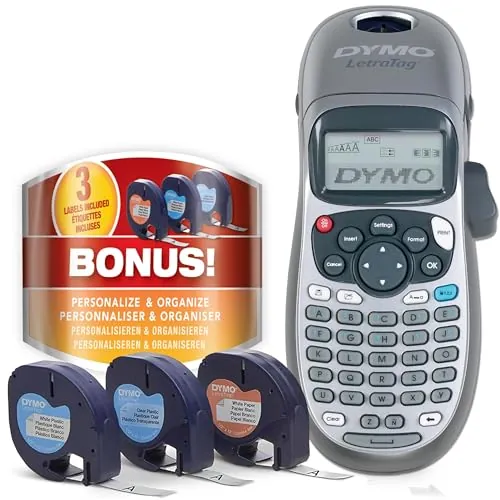
DYMO
DYMO LetraTag 100H+ Silver, item 2174562 three-tape bundle
US Silver bundle. DYMO lists three starter LT cassettes: white paper, white plastic and clear plastic, plus a magnetic holder. Check the exact offer's included parts before checkout.
Model LetraTag 100H+ / LT-100H
Amazon ASIN B01BD6DRI6
Brother
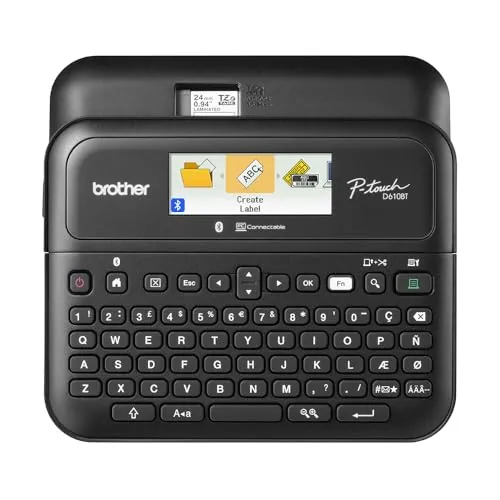
Brother P-touch PT-D610BT, standard black
Standard black machine, not the PT-D610BTVP carrying-case package. Brother lists one 24 mm black-on-white laminated TZe sample tape, an AC adapter, USB cable and documentation in the box.
Model PT-D610BT
Amazon ASIN B0B1KZJXPG
Differences that matter
What matters most to you?
Choose a priority to see what it changes.
Sources for Tape format and width
Sources for Finishing each printed label
Sources for How you compose and send a label
A practical choice starts with the label you need to make
Write the exact text or draw the graphic you plan to print, then measure the flat area where it will go. The DYMO LT-100H guide specifies 12 mm LT cassette stock; Brother's PT-D610BT page lists TZe stock up to 24 mm. This tells you the tape widths each supports, not the final printable height or which output will look better. If a design needs more than 12 mm of tape, the DYMO format does not meet that requirement; if 12 mm is enough, width alone does not settle the choice.
Also check the tape family already in your drawer. The DYMO uses LetraTag LT cassettes; Brother specifies TZe. Treat switching as buying into a different consumable format, then verify the exact width and material code you plan to replenish. The three DYMO starter types help with a first project but do not establish a long-term cost advantage.
Decide whether the cutter step matters in your routine
The DYMO quick guide's first-label sequence has you press Print and then press the cutter button. Brother describes an automatic cutter for PT-D610BT. If you print a few drawer or folder labels now and then, decide whether the manual step is negligible. If you regularly make batches, automatic cutting may better match the workflow you want—but these documents do not measure total job time, tape use or cutting reliability.
Choose how you want to compose labels and check the box contents
The DYMO guide explains entering text and changing fonts and formats using the machine's own keys and display. Brother lists an onboard QWERTY keyboard and also supports creation through P-touch Editor or iPrint&Label over USB or Bluetooth. Those software downloads and device compatibility should be checked against your own computer or phone; Brother notes app support can vary by operating system.
Package details matter too. DYMO identifies Silver item 2174562 and lists three LT cassettes plus a magnetic holder. Brother's standard black PT-D610BT listing includes one 24 mm sample cassette, AC adapter, USB cable and documentation; its brochure lists six AA batteries as not included. The DYMO manual describes battery insertion, but its current bundle included-parts list does not identify a power accessory or battery count, so confirm power contents for the exact offer.
Product details
DYMO LetraTag 100H+ Silver, item 2174562 three-tape bundle
Brother P-touch PT-D610BT, standard black
- Supported tape format
- Brother TZe tapes up to 24 mm (about 1 inch) wide Source
- Connected design options
- Brother describes USB computer connection and Bluetooth printing with P-touch Editor or iPrint&Label; app/software compatibility may vary by operating system Source
- Power listed for this model
- AC adapter included; six AA batteries are an optional, not-included power source Source
Before you buy
Community discussions
A LetraTag 100H owner wants labels for a particular surface
DYMO LetraTag 100H+ Silver, item 2174562 three-tape bundle
A LetraTag LT-100H owner asked for a tape that would adhere to plastic in a freezer after the tapes they had worked better on dry glass.
What to check
Choose the material and width for your surface first. Check that the exact tape is supported by the label maker.
A first-time LetraTag buyer just needs plain household labels
DYMO LetraTag 100H+ Silver, item 2174562 three-tape bundle
A shopper considering the LetraTag 100H and 200B wanted to make simple household labels without adding designs or graphics.
What to check
Decide whether you actually need app-based design for your projects or can do the day-to-day labels entirely at the machine.
A LetraTag buyer checks lettering options and refill choices
DYMO LetraTag 100H+ Silver, item 2174562 three-tape bundle
A shopper comparing a LetraTag 100H with another DYMO line wanted practical differences in keyboard layout, formatting and tape.
What to check
List the label styles you actually need and compare how each device lets you enter, preview and finish them.
Common questions
Will a 24 mm Brother tape print a label twice as tall as a 12 mm DYMO label?
Not necessarily. Those are supported tape-width figures, not a direct comparison of printable area or finished text height. Mock up your intended design and verify the model's usable print area before choosing.LetraTag LT-100H Quick Reference Guide (US)Brother P-touch PTD610BT Business Professional Connected Label Maker
What is included with the DYMO three-tape bundle?
DYMO lists one white plastic, one clear plastic and one white paper LT cassette, plus a magnetic holder, quick-start guide and warranty materials for Silver item 2174562. Its quick guide describes battery setup, while the bundle page's included-parts list does not name a power accessory, so confirm power contents on the exact offer.DYMO LetraTag 100H Plus Handheld Label Maker Bundles, 3 cassettesLetraTag LT-100H Quick Reference Guide (US)
Does the Brother PT-D610BT need a phone or computer?
Brother describes on-device QWERTY entry as well as USB and Bluetooth workflows with its P-touch Editor software or iPrint&Label app. Software/app downloads are required and compatibility may vary by operating system, so check your host device if you plan to use the connected workflow.Brother P-touch PTD610BT Business Professional Connected Label MakerBrother PT-D610BT brochure
Sources and scope
Related comparisons
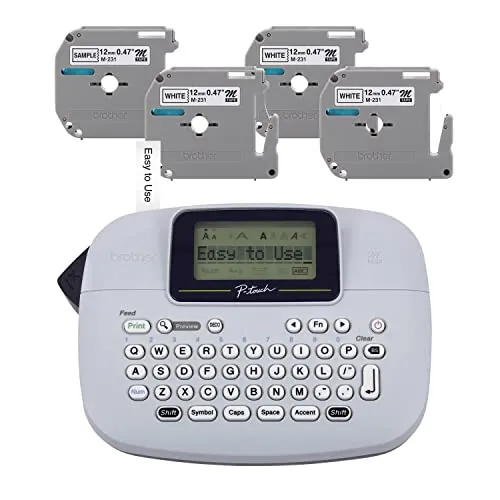
DYMO LetraTag 100H vs Brother PT-M95: Tape Widths, Bundles and Saved Labels
Brother PT-M95 supports 9 mm and 12 mm M tape, while DYMO LetraTag 100H uses 12 mm LT cassettes. Both document two-line labels and saved designs, but the guides list different memory capacities. Check the exact bundle contents before ordering: Brother's PTM95BP page lists four 12 mm tape pieces; DYMO's three-cassette page describes item 2174562 but does not confirm the contents of ASIN B01BD6DRI6.
Read comparison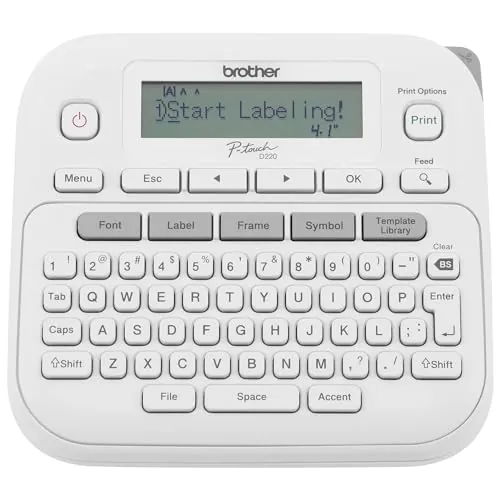
Brother PT-D220 vs PT-D610BT: Tape Width, Typing and Power Setup
Brother lists the PT-D220 for TZe tape up to 12 mm, with a QWERTY keyboard and up to nine copies. The PT-D610BT supports TZe tapes up to 24 mm, PC or phone label design, an automatic cutter and up to 99 copies. Brother's PT-D610BT product page conflicts about its keyboard: the description says built-in QWERTY, while its spec table says keyboard layout none. If typing directly on the machine matters, verify the exact unit before buying. Power differs too: D220 batteries and AC adapter are sold separately; the D610BT's standard box lists its AC adapter and USB cable.
Read comparison