
Products compared
Elgato
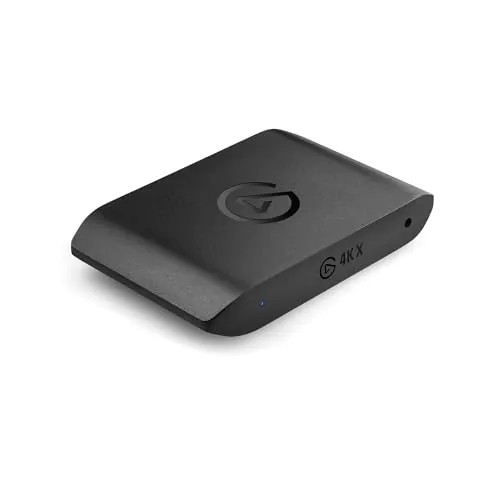
Elgato Game Capture 4K X
Exact 4K X SKU 10GBH9901. HDMI 2.1 input/output with a stereo line-in; supplied USB-C and HDMI cables are listed on Elgato’s U.S. page.
Model 10GBH9901
Amazon ASIN B0CPFWXMBL
AVerMedia
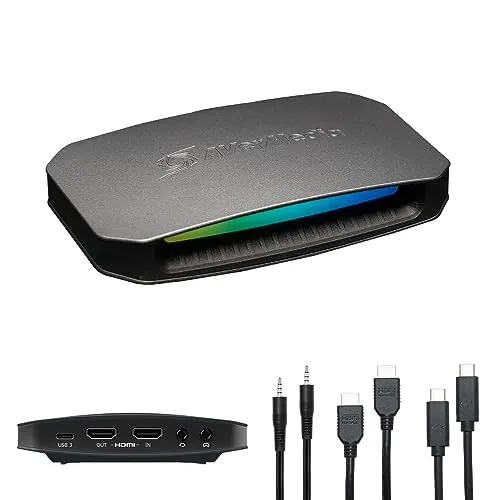
AVerMedia Live Gamer ULTRA 2.1
Exact GC553G2 model. HDMI 2.1 capture card with separate 4-pole headset and gamepad jacks and a listed included 4-pole audio cable.
Model GC553G2
Amazon ASIN B0CGD86HNB
Differences that matter
What matters most to you?
Choose a priority to see what it changes.
Sources for Input/passthrough is not the capture-file mode
Sources for A practical pre-buy mode check
Plan the actual capture path, not only the HDMI headline
Start with two separate requirements: the signal that must reach your display and the format your recording app must receive. Elgato’s matrix marks 4K144 input to 4K144 SDR capture, while its technical page separately lists 2160p144 HDR/VRR passthrough and 2160p144 SDR capture. It also says HDR capture is only available on Windows in the current page; the supported-mode article further explains codec, OS and software constraints.
AVerMedia’s product page likewise lists a 2160p144 HDR/VRR passthrough maximum and a distinct 2160p144 Windows capture ceiling, with 4K144 MJPEG specifically linked to Streaming Center. Its Mac ceiling is 2160p60, and its FAQ gives an Ultra-class M1/M2/M3 plus current firmware condition for 4K60. Those are manufacturer limits, not a same-mode performance test.
Check host ports, software and signal conditions together
Elgato publishes a detailed matrix for input versus capture formats, a separate codec table by USB speed, and a warning that software can change available combinations. Its product page recommends a USB Gen 2 port and says Gen 1 works with reduced capture resolution, while the detailed MJPEG table lists 4K144 at both 5Gbps and 10Gbps. Treat that as a reason to verify your exact app/profile/port combination rather than assuming every setup reaches that mode. Elgato also states 4K X cannot capture a DSC-compressed input; passthrough and capture can behave differently.
AVerMedia specifies USB 3.2 Gen 2 Type-C at 10Gbps, and its current video-format guidance says capture profiles vary with format and USB speed. For a Windows 4K144 plan, confirm Streaming Center and the required firmware; for Mac, use the 4K60 support condition. If your monitor, console or GPU negotiates HDR, VRR or DSC, check the exact manufacturer table for that signal chain before selecting a card.
Choose the audio route your headset actually uses
If your wired headset is connected through a console controller and party chat must also reach the recording, GC553G2 has the clearer maker-documented route: headset to the headset jack, controller to the gamepad jack, then select the card as an audio input in OBS or Streaming Center. Its product page lists an included 4-pole audio cable. Follow the console audio-output settings in AVerMedia’s exact guide; the wiring alone does not guarantee the desired chat mix.
Elgato 4K X’s 3.5mm connection is a stereo line-in, not a microphone port. Elgato’s Chat Link Pro instructions show a controller-audio path to a capture-card analog input and say the headset microphone normally remains routed to the console; a separate computer mic is recommended for the creator’s own voice. Chat Link Pro is not among the 4K X cables listed in the box, so include that extra routing gear in your setup plan if needed.
Product details
Elgato Game Capture 4K X
- HDMI input and passthrough
- The technical page lists HDMI 2.1 input and output, with passthrough up to 2160p144 HDR and VRR among its modes. Source
- Capture profile example
- The supported-mode matrix maps 4K144 input to 4K144 SDR capture; its codec table lists MJPEG 3840×2160 at 144 fps on 5Gbps and 10Gbps USB, while noting software-dependent combinations. Source
- Computer and USB
- U.S. product page lists Windows 10 or newer and macOS 11 / iPadOS 17 or later; it recommends USB Gen 2 and says Gen 1 works with reduced capture resolution. Source
- Audio and included cables
- 3.5mm TRS stereo line-in (not a microphone input); box lists a USB-C-to-C cable and HDMI cable. Source
AVerMedia Live Gamer ULTRA 2.1
- HDMI passthrough versus capture
- AVerMedia lists 2160p144 HDR/VRR passthrough; capture is listed up to 2160p144 on Windows and 2160p60 on macOS, with the 4K144 Windows path identified as MJPEG in Streaming Center. Source
- USB and Windows application
- USB 3.2 Gen 2 Type-C (10Gbps); AVerMedia names Streaming Center for Windows 4K144 MJPEG capture. Source
- Mac capture condition
- Mac capture tops out at 4K60 in AVerMedia’s current guidance; its FAQ says 4K60 requires an Ultra-class M1/M2/M3 Mac and current firmware. Source
- Wired headset and box
- Two 4-pole 3.5mm jacks (headset and gamepad); the product page lists an included 4-pole 3.5mm audio cable. Source
Before you buy
Community discussions
Checking a capture format on a Mac
Elgato Game Capture 4K X
A buyer considering the Elgato 4K X wanted to know whether it could record the video format they wanted on macOS.
What to check
Write down your operating system, capture app and target video format. Check that combination in the exact model’s current support documentation.
Checking separate audio paths for game and chat
AVerMedia Live Gamer ULTRA 2.1
A GC553G2 owner asked how their console, headset and streaming app could handle separate game and chat audio.
What to check
List the audio you want to record and where it comes from. Check the available inputs and which sources the app can select before choosing.
Common questions
Does “4K144” mean either card records every 4K144 signal in every app?
No. Passthrough and capture are separate. Elgato’s mode table maps 4K144 input to 4K144 SDR capture, but says software can change combinations and DSC-compressed signals cannot be captured. AVerMedia lists 4K144 passthrough, while 4K144 MJPEG capture is tied to Streaming Center on Windows. Match the exact input, app, codec and USB path.Elgato Game Capture 4K X — Supported Resolutions and Frame RatesLive Gamer ULTRA 2.1 — GC553G2 product specifications
What should I check for GC553G2 4K60 capture on Mac?
AVerMedia’s support FAQ says 4K60 capture requires an Ultra-class M1/M2/M3 Mac and current GC553G2 firmware. Its product page lists Mac capture up to 2160p60; confirm the actual app and host setup against the current manual.AVerMedia Mac compatibility and GC553G2 capture FAQLive Gamer ULTRA 2.1 — GC553G2 product specificationsLive Gamer ULTRA 2.1 GC553G2 User Manual (2024)
Which card has a documented wired controller-headset party-chat path?
GC553G2’s guide uses its headset and gamepad jacks, a 3.5mm AUX cable, console audio settings and selecting the card as an audio input in OBS or Streaming Center. Elgato 4K X has a stereo line-in, not a mic input; Elgato’s Chat Link guidance describes an analog route and recommends a separate computer microphone for your own voice.How do I use Party Chat during gameplay? (GC553G2)Live Gamer ULTRA 2.1 — GC553G2 product specificationsElgato Game Capture 4K X — Technical SpecificationsElgato Chat Link Pro Cable Troubleshooting
Sources and scope
This guide compares exact-model manufacturer mode tables, system requirements and wiring instructions. It does not report hands-on testing of latency, image quality, audio sync, dropped frames or reliability. Capture combinations depend on input signal, software, operating system, USB connection, codec/format, firmware and display path; verify the exact intended route before purchase.
- Game Capture 4K X (U.S. product page, SKU 10GBH9901)
- Elgato Game Capture 4K X — Technical Specifications
- Elgato Game Capture 4K X — Supported Resolutions and Frame Rates
- Elgato Game Capture 4K X — PlayStation 5 Setup
- Elgato Chat Link Pro Cable Troubleshooting
- Live Gamer ULTRA 2.1 — GC553G2 product specifications
- Live Gamer ULTRA 2.1 GC553G2 User Manual (2024)
- AVerMedia Mac compatibility and GC553G2 capture FAQ
- How do I use Party Chat during gameplay? (GC553G2)