
Products compared
FLIR
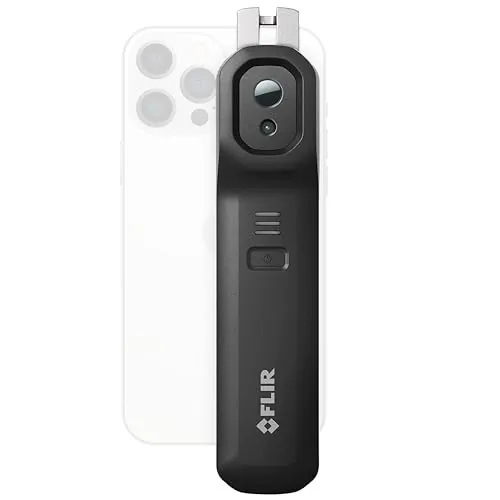
FLIR Edge Pro Wireless Thermal Camera
A wireless camera designed to pair with a supported iOS or Android phone or tablet for viewing and capture; it can also clip to a smart device.
Model 11002-0201
Amazon ASIN B0BLJD6Q5G
FLIR
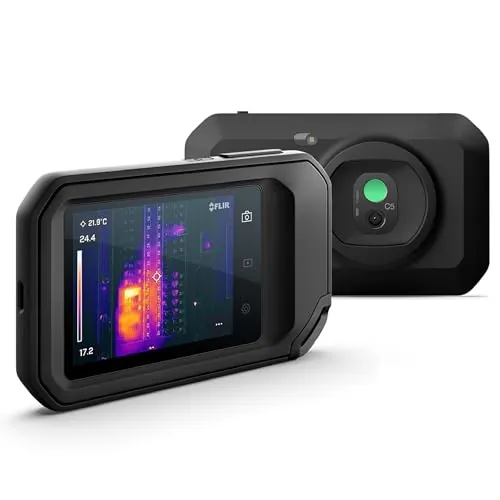
FLIR C5 Compact Thermal Camera
A pocket-form camera with its own 3.5-inch touchscreen and built-in image storage, plus Wi-Fi and FLIR Ignite connectivity.
Model C5 (89401-0202)
Amazon ASIN B0892MZZT1
Differences that matter
What matters most to you?
Choose a priority to see what it changes.
Sources for How you frame and view a target
Sources for Native sensor versus enhanced or display resolution
Sources for Where images are stored
Sources for Published object-temperature ranges
Sources for Battery and recharge planning
Start with the display and capture workflow
FLIR Edge Pro is a wireless camera whose viewing and capture workflow uses a compatible phone or tablet. FLIR says it can clip to a smart device or operate remotely up to 5 m over Wi-Fi; captured images and video save to the mobile device and may be uploaded to FLIR Ignite. That makes device compatibility and where the files need to land the first checks before purchase.
C5 is the more self-contained layout: its model-specific datasheet lists a 3.5-inch capacitive touchscreen, an on-camera gallery and built-in image memory for more than 5,000 image sets. It also supports Wi-Fi and Ignite, but it does not depend on a phone serving as the camera's display.
Read the resolution labels before comparing numbers
Both manufacturers' specifications identify 160 × 120 native thermal resolution for the models in this comparison. Edge Pro also lists 480 × 360 VividIR super resolution; FLIR describes VividIR as image processing that combines multiple images and upscales native resolution. MSX is separate: it adds visible-camera detail to a thermal image. C5's datasheet lists a 640 × 480 display, not a 640 × 480 thermal sensor. These labels describe different parts of the imaging and display path, not a tested image-quality result.
Treat ranges and battery figures as specifications
FLIR lists Edge Pro's object-temperature range in two bands, −20 to 120°C and 0 to 400°C; the C5 datasheet lists −20 to 400°C. The published ranges overlap, but their format should not be turned into a claim about measurement accuracy or what either camera will diagnose. For a planned task, check the exact measurement conditions and instructions that apply.
FLIR also lists approximately 2.5 hours and a 60–90 minute full charge for Edge Pro, compared with 4 hours of operating time and a 2-hour charge for C5. These are separate manufacturer figures with no common test conditions in the reviewed materials. Use them as rough planning references, not a runtime ranking.
A short pre-buy check
For Edge Pro, confirm your exact phone or tablet on FLIR's current compatibility list rather than relying only on the listed minimum operating-system version. Decide whether saving files to that device fits your reporting process. For C5, check that a built-in screen and gallery are useful and separately confirm any Wi-Fi, Ignite account or file-transfer requirements. For either model, match the published temperature range and operating instructions to the task; neither product page is evidence of a diagnosis or inspection result.
Product details
FLIR Edge Pro Wireless Thermal Camera
- Thermal resolution
- 160 × 120 native; FLIR also lists 480 × 360 super resolution using VividIR processing. Source
- Viewing and capture
- Pairs wirelessly with a compatible mobile device; FLIR lists remote operation up to 5 m over Wi-Fi and says images and video save to the mobile device. Source
- Published temperature range
- FLIR lists −20 to 120°C and 0 to 400°C ranges. Source
FLIR C5 Compact Thermal Camera
- Thermal resolution and display
- 160 × 120 IR resolution; separate 640 × 480, 3.5-inch capacitive touchscreen. Source
- Storage and connectivity
- Built-in storage for more than 5,000 image sets; Wi-Fi and FLIR Ignite connectivity are listed. Source
- Published temperature range
- −20 to 400°C (−4 to 752°F). Source
Before you buy
Community discussions
Deciding whether you need live viewing on a phone
FLIR C5 Compact Thermal Camera
A buyer trying several thermal cameras, including the FLIR C5, wanted to see the camera feed on a phone and described using the app for still images.
What to check
List what you need to capture or show at the job site. Check the current documentation for how each camera handles live viewing, saved images and exports.
Checking how a phone-connected camera reconnects
FLIR Edge Pro Wireless Thermal Camera
An owner of a FLIR ONE Edge Pro said their iPhone connected the first time and asked for help reconnecting on a later attempt.
What to check
Check current app and phone compatibility. If possible, try opening the app and reconnecting the camera a second time before relying on that workflow.
Common questions
Does FLIR Edge Pro need a phone or tablet?
FLIR describes Edge Pro as wirelessly connecting to a compatible phone or tablet, with viewing and capture through that device. FLIR lists iOS 17 or later and Android 13 or later but directs buyers to check the exact device on its compatibility list.FLIR Edge Pro
Is Edge Pro's 480 × 360 figure its native sensor resolution?
No. FLIR lists 160 × 120 as native and 480 × 360 as VividIR super resolution. MSX is a separate feature that adds visible-camera details to the thermal image.FLIR Edge Pro
Can I use C5 without using a phone as the display?
C5 has its own 3.5-inch capacitive touchscreen and built-in storage for more than 5,000 image sets. FLIR also lists Wi-Fi and Ignite connectivity, but the camera has its own display and gallery.FLIR C5 (incl. Wi-Fi) datasheet, part 89401-0202
Which published temperature range should I compare?
FLIR lists Edge Pro as −20 to 120°C and 0 to 400°C, and C5 as −20 to 400°C. Those are stated ranges, not a test of accuracy or diagnostic results; confirm the exact measurement conditions relevant to your use.FLIR Edge ProFLIR C5 (incl. Wi-Fi) datasheet, part 89401-0202
Are FLIR's battery figures a direct runtime comparison?
No. FLIR publishes approximately 2.5 hours for Edge Pro and 4 hours for C5, but the reviewed sources do not give common use conditions for a matched runtime test.FLIR Edge ProFLIR C5 (incl. Wi-Fi) datasheet, part 89401-0202
Sources and scope
This is a manufacturer-specification comparison, not a thermal-imaging or inspection test. It does not establish diagnosis accuracy, image-quality superiority, real-world runtime, or phone compatibility beyond FLIR's listed requirements; check the exact phone or tablet against FLIR's compatibility list.