
Pickagu

Zircon MultiScanner A250 vs Franklin ProSensor M210: Modes and Readout

Zircon MultiScanner A250Model 72299 / A250Franklin Sensors ProSensor M210 Stud FinderModel M210

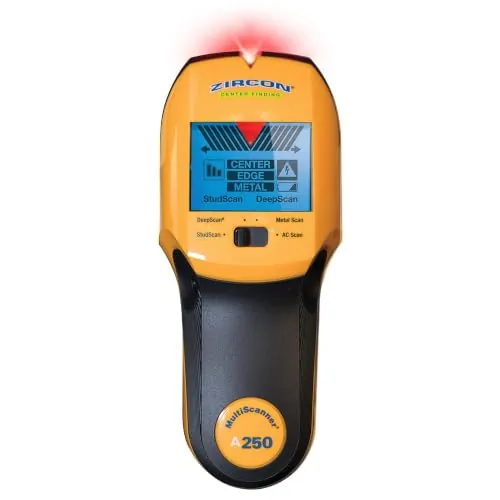
For a DIY wall-scanning purchase, the Zircon MultiScanner A250 offers separately selected StudScan, DeepScan, Metal Scan and AC Scan modes, with an LCD, signal bars and a SpotLite pointer. The Franklin ProSensor M210 uses 13 sensors and a 21-LED readout that its maker says shows stud width; its manual says no calibration is required. These are different workflows, not evidence that either tool is more accurate. Both manufacturers warn that hidden objects can be missed or produce readings.

Choose by what matters to you

Choose Zircon MultiScanner A250 72299 / A250

A separately selected Metal Scan or AC Scan mode is a documented feature you want, along with a mode-and-signal LCD and SpotLite marking cue. Its stated depth limits are tied to different targets and conditions; they are not a guarantee of locating a hidden object.

Check price on Amazon

Choose Franklin Sensors ProSensor M210 Stud Finder M210

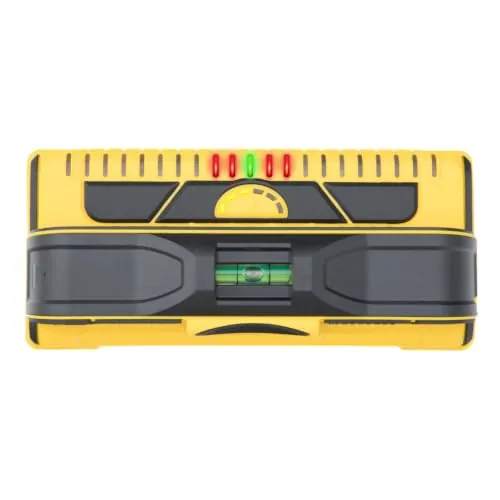
Its wide 21-LED stud-width display and no-calibration start fit the way you want to scan. Franklin lists a live-wire meter too. Its manual says the LEDs respond to density changes rather than identifying an object, so a readout is not proof of what is behind a surface.

Check price on Amazon

If a particular wall material, exact sensing limit or included batteries decide your purchase, check both model manuals for that material and the exact offer’s package list. The published depth figures have different bases and are not a head-to-head accuracy or detection result. Neither product can certify that a wall contains no hidden objects.

As an Amazon Associate I earn from qualifying purchases.Affiliate disclosure

Products compared

Zircon MultiScanner A250 · 72299 / A250

Zircon

Zircon MultiScanner A250

Exact U.S. MultiScanner A250, model 72299. Zircon documents four selectable scan modes, a backlit LCD and SpotLite pointer.

Model 72299 / A250
Amazon ASIN B09CVCKXYG
Check current price on Amazon
Franklin Sensors ProSensor M210 Stud Finder · M210

Franklin Sensors

Franklin Sensors ProSensor M210 Stud Finder

Exact U.S. ProSensor M210; Franklin’s product page names model M210 and lists 13 sensors, 21 LEDs, a built-in bubble level, live-wire meter and pencil caddy.

Model M210
Amazon ASIN B0917VXLDK

Check current price on Amazon

Differences that matter

What matters most to you?

Choose a priority to see what it changes.

Difference
Zircon MultiScanner A250
Franklin Sensors ProSensor M210 Stud Finder
Why it matters
Selectable modes and target labels
Zircon MultiScanner A250Four selected modes: StudScan, DeepScan, Metal Scan, and AC Scan. The product page gives separate stated limits for different targets; its page says to use them in accordance with the A250 instructions.
Franklin Sensors ProSensor M210 Stud FinderThe exact M210 product page describes stud-finding and a live-wire meter; the manual describes density-based detection and does not present these same four selectable modes.
If you specifically want a separate Metal Scan or AC Scan selection, Zircon documents those modes. Franklin also advertises live-wire detection, so this is a control/workflow distinction, not a claim that the M210 has no wire-related feature.
Sources for Selectable modes and target labels
Readout and marking workflow
Zircon MultiScanner A250Backlit LCD reports mode and signal bars; the product page names SpotLite and an illuminated V-marker groove.
Franklin Sensors ProSensor M210 Stud Finder13 sensors feed a 21-LED display; Franklin says the broad readout shows full stud width. The model also lists a bubble level and pencil caddy.
Choose the display and marking cues you prefer to read. The manufacturer descriptions do not demonstrate greater detection accuracy or easier results.
Sources for Readout and marking workflow
Sensing-depth claims and limits
Zircon MultiScanner A250Zircon states mode- and target-specific figures: StudScan up to 3/4 in; DeepScan up to 1 1/2 in; Metal Scan up to 1 1/2 in for copper or 3 in for rebar; AC Scan up to 2 in for live, unshielded wiring. The manufacturer notes environmental and material limits.
Franklin Sensors ProSensor M210 Stud FinderFranklin lists a 1.7 in detection-depth figure; its manual discusses detection through most lath-and-plaster walls up to that stated depth and notes material conditions where detection is not guaranteed.
Do not compare these as equivalent depth tests: the target types and conditions differ. Read the exact manual for your wall material and treat every figure as a manufacturer specification, not a promise to find or identify an object.
Sources for Sensing-depth claims and limits
Calibration, battery and package check
Zircon MultiScanner A250A250 manual describes a calibration step in its StudScan workflow and ACT automatic recalibration. The product page requires one 9V alkaline battery and says it is not included.
Franklin Sensors ProSensor M210 Stud FinderM210 manual says no calibration is required and scanning can begin immediately with its button held; it requires two AA batteries. The cited maker sources do not confirm battery inclusion.
If startup workflow or the battery you keep available matters, compare the documented requirements and check the exact offer’s contents. Do not assume the M210 box contains batteries.
Sources for Calibration, battery and package check

Choose the scan-mode workflow

Zircon’s exact A250 page lists four selections: StudScan, DeepScan, Metal Scan and AC Scan. Its LCD shows mode/signal feedback, with a SpotLite pointer and illuminated V-marker groove for marking. The manual ties each mode to stated target types and depths; those figures vary with conditions and are not a guarantee that a target will be found.

Franklin describes the M210 as a stud finder with a live-wire meter. Its manual says it needs no calibration and that LEDs respond to density changes, not object identity. If an independent Metal Scan or AC Scan selection is important, verify the exact manual feature set rather than assuming the M210 is equivalent or lacks all related sensing. Neither device’s feature list establishes comparative accuracy.

Pick the readout and marking cues

The A250 presents mode and signal-strength information on an LCD and names SpotLite and an illuminated V-marker groove. The M210 has a 21-LED array, which Franklin says shows the full width of studs; the exact model page also lists a built-in bubble level and pencil caddy. Choose the readout and marking layout that makes sense to you, without treating the maker’s description as a measured ease or accuracy result.

Franklin’s manual says the LED pattern can respond to changes in density, including wall irregularities, pipes or wires; it does not identify the material. A display pattern alone therefore cannot tell you what lies behind a surface.

Check wall conditions, batteries and contents

The published depth numbers do not share one target basis: Zircon lists mode-specific limits for studs, metal types and live unshielded wiring, while Franklin lists a 1.7 in figure for the M210. Both manufacturers describe conditions and limits; neither figure is a same-wall comparative result. If your wall is unusual, consult both exact manuals before choosing.

Zircon specifies a 9V alkaline battery not included. Franklin’s M210 manual requires two AA batteries but the cited source does not say if they come in the box. Check the exact package before buying. Both manuals warn that scanners may miss hidden items or produce readings from other features; neither is a wall-clearance certificate.

Product details

Zircon MultiScanner A250

Selectable modes and display
StudScan, DeepScan, Metal Scan and AC Scan; LCD with signal-strength bars, SpotLite pointer and illuminated V marker. Source
Battery and stated dimensions
Requires one 9V alkaline battery, not included; maker lists 7.72 × 3.23 × 1.80 in and 8.13 oz without battery. Source

Franklin Sensors ProSensor M210 Stud Finder

LED readout and calibration
13 sensors and 21 LEDs; maker says the wide readout shows full stud width. The M210 manual says no calibration is required and describes simultaneous LED tracking of stud edges and center. Source
Sensing and power
Maker lists a 1.7 in detection-depth figure; manual says two AA batteries are required. Exact package battery inclusion is not established by the cited manufacturer page/manual. Source

Before you buy

  • Decide whether you want to select named follow-up modes. Zircon lists Metal Scan and AC Scan separately; Franklin also lists live-wire detection, so do not treat this as a simple wire-feature versus no-wire-feature choice.
  • Compare readout style: A250 uses an LCD with mode/signal cues, SpotLite and an illuminated V marker; M210 uses a wide 21-LED array that its maker says displays stud width, plus a built-in bubble level and pencil caddy.
  • Do not compare the depth figures as if they were a matched test. Zircon lists different limits for wood/metal studs, copper/rebar and live unshielded wires. Franklin gives a 1.7 in M210 figure. Each applies under its own maker’s specified conditions.
  • Check batteries and exact package contents. Zircon specifies a 9V alkaline battery not included; Franklin’s M210 manual requires two AA batteries but the cited manufacturer sources do not establish whether the retail box includes them.
  • Both manuals warn that readings can miss hidden objects or correspond to other features. Read the complete exact-model instructions; no scan result here is represented as confirmation that a wall is clear.

Common questions

Does the M210 have live-wire detection?

Yes. Franklin’s exact M210 product page lists a live-wire meter. Its manual also warns that wires or other density changes can illuminate the LEDs and that objects may remain undetected. The feature does not certify what is behind a wall.ProSensor M210 Stud FinderProSensor X2100 & M210 Operating/Safety Instructions

Are the depth numbers directly comparable?

No. Zircon publishes separate mode/target limits, including stud, metal and live unshielded AC wiring; Franklin lists a 1.7 in figure and describes conditions for its M210. These are not measurements from the same target or wall test.MultiScanner A250MultiScanner A250 Instructions (model 72299)ProSensor M210 Stud FinderProSensor X2100 & M210 Operating/Safety Instructions

Which batteries should I check for?

Zircon specifies one 9V alkaline battery and says it is not included. Franklin’s M210 manual requires two AA batteries, but the cited sources do not confirm package inclusion. Check the exact listing contents.MultiScanner A250ProSensor X2100 & M210 Operating/Safety Instructions

Can either scanner prove there is nothing hidden in a wall?

No. Both exact-model manuals warn that objects may be missed or produce readings. Treat these as scanning aids, not as a wall-clearance or safety certification, and follow the complete manufacturer instructions.MultiScanner A250 Instructions (model 72299)ProSensor X2100 & M210 Operating/Safety Instructions

Sources and scope

This guide covers Zircon MultiScanner A250 model 72299 and Franklin Sensors ProSensor M210. Published sensing depths depend on target type, wall construction and manufacturer conditions; the numbers are not matched performance results. The M210 manual says its LEDs respond to density changes and do not identify the object. Both manuals warn that hidden objects may be missed or readings may reflect something other than a stud. This comparison cannot certify a wall as clear or safe. No drilling steps, electrical-safety instructions, detection guarantee, hands-on test or price comparison is provided.

  1. MultiScanner A250
  2. MultiScanner A250 Instructions (model 72299)
  3. ProSensor M210 Stud Finder
  4. ProSensor X2100 & M210 Operating/Safety Instructions