
Products compared
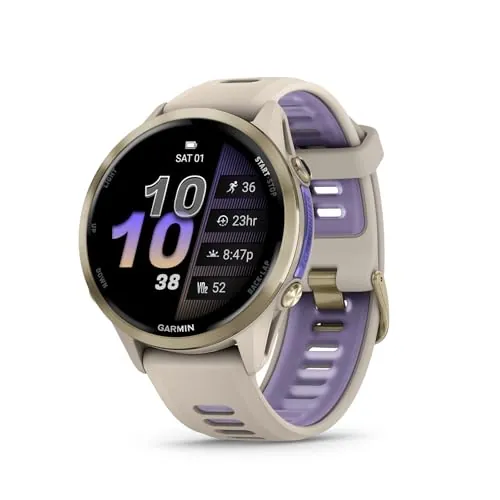
Garmin
Garmin Forerunner 970, 47 mm, Soft Gold Titanium, French Gray/Indigo
The assigned U.S. French Gray/Indigo color configuration, confirmed in the current listing data. Garmin's Forerunner 970 owner manual documents the route, GNSS, control, phone-assistant and charging workflows below.
Model 010-02969-02
Amazon ASIN B0F8QYMD74
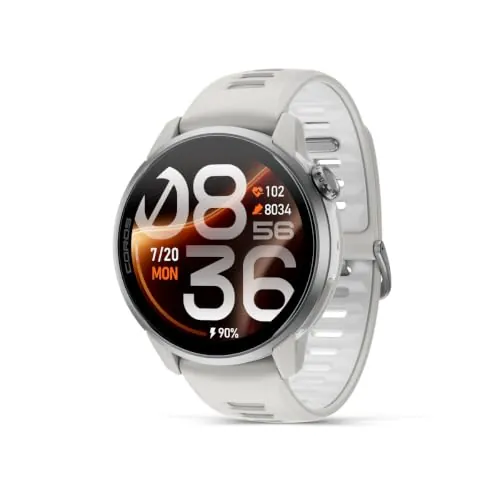
COROS
COROS PACE 4 Pro GPS Sport Watch, White Silicone
The assigned U.S. White Silicone PACE 4 Pro configuration, confirmed in the current listing data. COROS's exact-model setup and support pages document its route library, satellite modes, dial/button controls, voice control and charging adapter.
Model PACE 4 Pro
Amazon ASIN B0HGMV1NNV
Differences that matter
What matters most to you?
Choose a priority to see what it changes.
Sources for Satellite-mode menu
Sources for Physical controls and light
Sources for Voice and phone requirements
Sources for Charging cable and adapter
Start with the route you already use
Both systems document routes prepared through an app. Garmin Explore can create courses, sync them with a compatible Garmin device and download maps for offline access. The Forerunner 970 manual adds a direct watch path: open Map, choose Navigate > Create a Course, name it, add locations, save and choose Do Course. Garmin Map Manager separately offers TopoActive maps; Wi-Fi is required for map downloads, which the manual says wait until the watch is connected to external power.
COROS describes creating a route in the app's Explore page or opening a GPX file there, then syncing a saved route from the Route Library. The PACE 4 Pro setup guide also describes downloading regional maps through the app's Map Manager and selecting a route from an activity's Navigation settings. So the practical split is not app versus no app: it is Garmin's documented on-watch course-building option versus the COROS saved-route library workflow if that is where your routes already live.
Compare the menus, not GPS claims
Garmin's Forerunner 970 manual lets you set satellite systems in an activity's settings and notes that the choice is not available for every activity. Its listed options include GPS Only, All Systems, All + Multi-Band, Auto Select SatIQ and UltraTrac. COROS's current guidance says PACE 4 Pro has High (All Systems), Max (Dual Frequency) and Auto modes, selected from Control Center; the support page warns that mode availability varies by model.
If you change settings before different activities, compare these exact labels in each manual and decide which menu matches your routine. Their descriptions and advertised modes are not a controlled comparison of track accuracy, reception, speed or battery life.
Choose the control and light routine you will reach for
Garmin lists five physical buttons on the Forerunner 970. A quick double press of the upper-left button switches its built-in LED on or off, while two other buttons adjust brightness or color. COROS uses a Digital Dial, Back/Lap button and Action button. Its guide describes a white screen flashlight: select it with the dial, scroll to adjust brightness and press Back to turn it off; it times out after five minutes.
That difference is concrete enough to decide if you specifically want a separate LED and a button shortcut, or prefer the PACE 4 Pro's screen-and-dial operation. It does not tell us which light is more visible in a real setting.
Voice features depend on how your phone is connected
On the Forerunner 970, the manual describes communicating with a compatible phone's voice assistant after connecting over Bluetooth. Voice input and replies use the watch's speaker and microphone; the manual says communication is audible only. COROS Voice Control is initiated with a long press of Action and includes examples such as opening navigation or returning to the start. COROS requires an active phone connection with its app running in the background and currently supports English commands; it says an internet connection is not required.
Before treating either voice feature as part of your workout routine, check that the phone, app and language conditions match your setup. Garmin documents access to the phone assistant; COROS documents watch commands. This is a difference in described task scope, not a universal feature ranking.
Check the watch-side charging connector before a trip
Garmin says the Forerunner 970 comes with a proprietary charging cable and directs users to connect its other end to a USB-C computer port or an AC adapter rated at least 5 W. COROS says the PACE 4 Pro comes with a charging adapter that works with a standard USB-C cable; the cable connects to that adapter after it is attached to the watch.
The watch-end connectors differ, even though each procedure uses USB-C-side power. Check which cable or adapter is already in your kit and what you need to pack. The documents do not provide a comparable charge-time result.
Product details
Garmin Forerunner 970, 47 mm, Soft Gold Titanium, French Gray/Indigo
The current Forerunner 970 manual documents five physical buttons, a dedicated LED flashlight, configurable satellite choices, Garmin Explore route/map workflows, a paired-phone assistant and a proprietary charging cable.
- On-watch course workflow
- The manual documents Map > Navigate > Create a Course, then name the course, add locations, save and choose Do Course. Source
- Charging connection
- Garmin says the watch comes with a proprietary charging cable; its other end connects to a USB-C computer port or AC adapter rated at least 5 W. Source
COROS PACE 4 Pro GPS Sport Watch, White Silicone
The exact-model COROS guide documents a Digital Dial, Back/Lap and Action buttons, app-based route/map workflows, High/Max/Auto satellite settings, a screen-based flashlight, phone-linked voice control and a charging adapter used with a standard USB-C cable.
- Route workflow
- COROS documents route creation in the app's Explore page or GPX import, then syncing a saved route to the watch; regional maps are downloaded through the app's Map Manager. Source
- Charging connection
- COROS says the watch comes with its charging adapter, which works with a standard USB-C cable. Source
Before you buy
Community discussions
Packing the watch charger for a trip
Garmin Forerunner 970, 47 mm, Soft Gold Titanium, French Gray/Indigo
A Forerunner 970 owner used to packing one charger for several devices asked what to carry for their new watch.
What to check
Check the included cable’s connector and decide whether it will work with the charger you already take with you.
Checking how the case sits on a smaller wrist
COROS PACE 4 Pro GPS Sport Watch, White Silicone
A shopper with a 15.5 cm wrist said the COROS PACE 4 Pro’s size was the main thing holding up their decision.
What to check
Compare the exact case measurements and included band’s adjustment range. If you can try it on, see how the case sits when you bend your wrist.
Checking what happens when you leave a saved route
Garmin Forerunner 970, 47 mm, Soft Gold Titanium, French Gray/Indigo
A Forerunner 970 owner using a round-trip course asked how to get an off-course alert after the watch appeared to recalculate their route.
What to check
Check the available route modes and off-course settings. If route behavior matters to you, try them on a familiar route before a trip.
Common questions
Can I create a route using an app on either watch system?
Yes. Garmin's Forerunner 970 manual says Garmin Explore can create courses and sync with a compatible device. COROS documents app Explore route creation or GPX import, followed by syncing a saved route to the PACE 4 Pro. Garmin also documents creating a named course directly on the watch.Forerunner 970 Watch Owner's Manual: Garmin Explore AppForerunner 970 Watch Owner's Manual: Creating and Following a Course on Your WatchSet Up Your COROS PACE 4 Pro
Are the GPS mode menus the same?
No. The Forerunner 970 manual lists GPS Only, All Systems, All + Multi-Band, Auto Select SatIQ and UltraTrac among its activity settings, with availability varying by activity. COROS's current guidance lists High, Max and Auto for PACE 4 Pro. The labels do not support a measured GPS winner.Forerunner 970 Watch Owner's Manual: Satellite SettingsChoosing the Right GPS Mode
What phone setup does voice control need?
Garmin says its phone assistant needs a compatible phone connected by Bluetooth and returns audible communication through the watch. COROS says PACE 4 Pro Voice Control requires an active phone connection with the COROS app running in the background; commands are currently supported in English. Check that these requirements match how you carry and connect your phone.Forerunner 970 Watch Owner's Manual: Using the Phone AssistantVoice Control on COROS Watches
Can I use my existing USB-C cable to charge each one?
COROS says its supplied charging adapter works with a standard USB-C cable. Garmin documents a proprietary cable at the watch end and a USB-C computer port or AC adapter of at least 5 W at the other end. Check which watch-side charging lead you already own or need to pack.Charging Your PACE 4 ProForerunner 970 Watch Owner's Manual: Charging the Watch
Sources and scope
This guide compares published workflows for the exact U.S. models and finishes. It does not test GPS accuracy, route guidance, battery endurance, light visibility, health metrics or comfort. Satellite settings and available options can depend on activity or software; check each model's current manual and phone requirements.
- Forerunner 970 Watch Owner's Manual: Creating and Following a Course on Your Watch
- Forerunner 970 Watch Owner's Manual: Garmin Explore App
- Forerunner 970 Watch Owner's Manual: Managing Maps
- Forerunner 970 Watch Owner's Manual: Satellite Settings
- Forerunner 970 Watch Owner's Manual: Button Functions
- Forerunner 970 Watch Owner's Manual: Using the LED Flashlight
- Forerunner 970 Watch Owner's Manual: Charging the Watch
- Forerunner 970 Watch Owner's Manual: Using the Phone Assistant
- Set Up Your COROS PACE 4 Pro
- Choosing the Right GPS Mode
- Charging Your PACE 4 Pro
- Voice Control on COROS Watches