Products compared
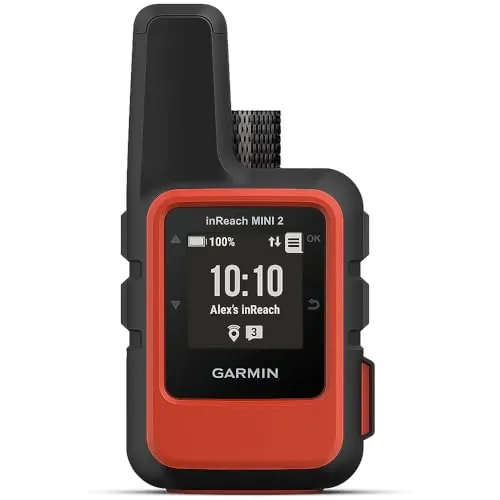
Garmin
Garmin inReach Mini 2 Satellite Communicator
This listing is the Garmin inReach Mini 2, part 010-02602-00.
Model 010-02602-00
Amazon ASIN B09PSKG7C3
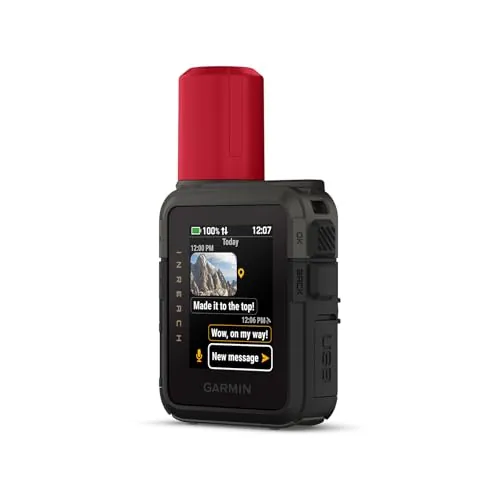
Garmin
Garmin inReach Mini 3 Plus Satellite Communicator
This listing is the Garmin inReach Mini 3 Plus, part 010-03387-10. It is the Plus generation, distinct from the similarly named Mini 3.
Model 010-03387-10
Amazon ASIN B0G4RST8LV
Differences that matter
Sources for Satellite text and check-in workflow
Sources for On-device controls
Sources for Phone, app and satellite-plan setup
Decide whether the message itself needs to change
Mini 2 is built around satellite text, predefined check-ins and button-led menus. Garmin lists a 160-character maximum per text in its Mini 2/Mini 3/Plus comparison. Mini 3 Plus raises that listed limit to 1,600 characters and adds 30-second voice notes. Its manual says voice notes can be sent only to Garmin Messenger accounts.
For a household that mostly sends short check-ins and custom texts, the Plus feature list may not change the routine enough to replace an existing Mini 2. If longer text or recorded voice is a real communication need, compare the actual recipient setup and service plan before deciding.
Separate the photo workflow from on-device messaging
Mini 3 Plus supports satellite photo messages, but Garmin says capture and sending require a compatible paired phone with Garmin Messenger. This is a practical deal-breaker for buyers who specifically want to take and send photos without carrying a phone. Mini 2's satellite feature set stays with text and check-ins.
The app is also part of setup: the manuals for both models specify a unique SMS-capable phone number for Messenger pairing and activation; the Mini 3 series manual says VOIP numbers are not supported. Check that requirement and whether your intended voice-message recipients use Garmin Messenger before paying for Plus voice messaging.
Choose the controls you will actually use
Garmin describes Mini 2 as monochrome and button-operated. Mini 3 Plus pairs a color touchscreen with physical buttons and offers a control to disable touch. Its voice-command feature handles supported device actions, including screen or app functions; Garmin notes that availability varies by language and region. That is different from recording a voice note, and neither feature establishes a measured ease-of-use advantage.
Before choosing, decide whether you want the Mini 2's button-and-menu interaction, Mini 3 Plus touch with buttons retained, or Plus voice commands for supported actions. Both still require an active satellite plan for satellite messaging.
Product details
Garmin inReach Mini 2 Satellite Communicator
Garmin inReach Mini 3 Plus Satellite Communicator
- Satellite text limit
- Up to 1,600 characters per message in Garmin's Mini 2 vs Mini 3/3 Plus comparison Source
- Voice messages
- Up to 30 seconds; Garmin says voice notes can be sent only to Garmin Messenger accounts Source
- Controls
- Color touchscreen and physical buttons; touch controls can be disabled; supported voice commands are available only on Mini 3 Plus Source
- Photo messages
- Taking and sending satellite photos requires a compatible paired smartphone with Garmin Messenger Source
Before you buy
Community discussions
Check satellite plan terms before a trip
Garmin inReach Mini 2 Satellite Communicator
A shopper considering an inReach Mini 2 for a month in Patagonia asked whether their billing region affected use and how pausing or restarting a subscription would work.
What to check
Before choosing your messaging setup, check Garmin’s current plan terms for your billing country, destination and travel dates.
Common questions
Can Mini 3 Plus send a photo if I leave my smartphone behind?
No. Garmin's Mini 3 Plus listing says taking and sending photos requires a compatible paired smartphone running Garmin Messenger. The Plus adds the photo-message feature, but the phone remains part of that workflow.Garmin inReach Mini 3 Plus, part 010-03387-10Garmin comparison: inReach Mini 2, Mini 3 and Mini 3 Plus
Are voice commands the same as recording a voice message?
No. Garmin's Mini 3 Plus manual documents voice commands for actions such as changing screen brightness or opening an app. Voice notes are separately recorded messages and can be sent only to Garmin Messenger accounts. Command availability also varies by language and region.Garmin inReach Mini 3/3 Plus Owner's Manual
Does either model need an active satellite service for satellite texts?
Yes. Garmin's owner manuals require an active satellite subscription for inReach messaging on both models. Both manuals also specify a unique SMS-capable phone number for Garmin Messenger pairing and activation; Garmin says VOIP numbers are unsupported for Mini 3 series activation.Garmin inReach Mini 2 Owner's ManualGarmin inReach Mini 3/3 Plus Owner's Manual
Sources and scope
This guide compares documented messaging and control features only. It does not assess satellite reception, message delivery, battery life, reliability, ease of use, emergency response, or performance in the field. Garmin's manuals describe software and service conditions; plan features and app behavior can change, so confirm current terms for the intended use.
- Garmin comparison: inReach Mini 2, Mini 3 and Mini 3 Plus
- Garmin inReach Mini 2 Owner's Manual
- Garmin inReach Mini 3/3 Plus Owner's Manual
- Garmin inReach Mini 2, part 010-02602-00
- Garmin inReach Mini 3 Plus, part 010-03387-10
- Garmin introduces the inReach Mini 3 Plus: voice, text and photo messaging
- Garmin Messenger app FAQ: supported message types and usage