
Products compared
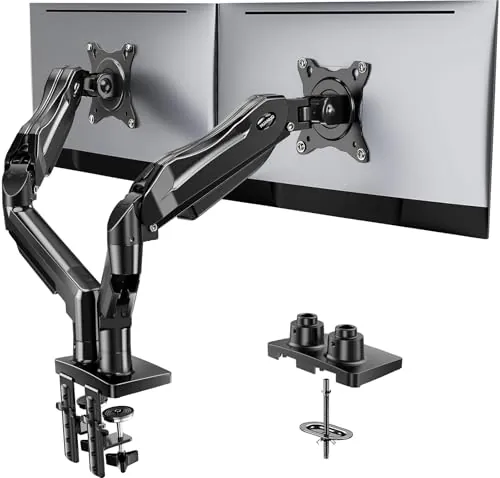
HUANUO
HUANUO FlowLift Dual Monitor Stand HNDS6, Black
Exact assigned black HNDS6 listing. Each display must meet the maker's screen-size, loaded-weight and VESA requirements; both the desk and mounting hardware also need to match the instructions.
Model HNDS6
Amazon ASIN B07T5SY43L
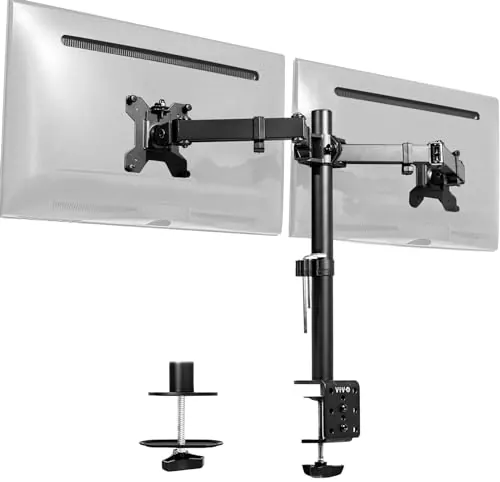
VIVO
VIVO STAND-V002 Dual Monitor Desk Mount, Black
Exact assigned black V002 model, not the larger STAND-V032 or STAND-V038 variants. VIVO lists a 13–30-inch range, 22 lb maximum per monitor, and C-clamp or grommet mounting.
Model STAND-V002
Amazon ASIN B009S750LA
Differences that matter
What matters most to you?
Choose a priority to see what it changes.
Sources for Screen size, mounted load and VESA check
Sources for How screen height is changed
Sources for Reach and layout planning
Check the whole monitor-and-desk fit before comparing movement
First compare each screen against both models' exact size and mounted-weight limits. HNDS6 lists 13–32 inches and 4.4–19.8 lb per arm; its manual says to count monitor accessories in the weight check. STAND-V002's exact V002 variant is 13–30 inches and up to 22 lb per monitor. Its reviewed documents do not say how light a screen may be. Both models list 75 × 75 or 100 × 100 mm VESA patterns.
Then inspect where the base will actually attach: desk thickness and material, a suitable flat edge or permitted grommet hole, underside beams/panels, and space to place both monitors. HUANUO's selected listing says its desk underside must not have obstructing beams or panels, while its Rev06 manual illustrates a spacer for a crossbar; the specific compatibility is unresolved. Do not assume that illustration means a spacer or adaptation is approved. For VIVO, the product page lists 3.25 inches but its linked manual gives 3.3 inches; ask VIVO if your desk is near that range.
Choose how you want to change screen height
After both screens and the desk pass the checks, the main distinction is adjustment workflow. HNDS6 has a counterbalanced arm for each display; its manual describes setting tension for the installed monitor before moving that arm. Certain tension and tilt adjustments use an Allen key.
VIVO's main swivel arm is secured along its center pole at a shared height. Each VESA plate can be leveled up or down by the listed 0.5 inches. That can help align the screens, but is not the same as independently raising and lowering two spring-counterbalanced arms. Neither source establishes a comparative ease, stability or safety result.
Lay out the screens against the mount's listed dimensions
VIVO lists a 17-inch pole, 16 inches of height adjustment along the pole, 29-inch arm span and up to 16-inch extension for STAND-V002. HUANUO's HNDS6 page lists up to 15.75 inches of screen height adjustment. These published figures can narrow a desk-layout check, but they do not show whether two particular monitor housings will collide or reach your desired positions.
Measure screen width and depth, desk depth and the intended center spacing. Compare those measurements with the exact variant's listed reach and range; account for stands or accessories that remain attached. If the arrangement is critical, confirm it with the manufacturer rather than treating a diagonal range as a placement guarantee.
Keep the unresolved desk conditions visible
The desk is part of the fit question, not a detail to check after the mount arrives. For HNDS6, the exact selected listing's crossbar wording and the manual's spacer illustration do not establish whether a specific obstruction works with the shipped base. For V002, the product page and manual disagree slightly on the maximum clamp thickness. If either condition describes your desk, ask the manufacturer using the exact model and photos/measurements before buying.
This guide does not recommend drilling, using an unverified spacer, changing hardware or mounting to a desk surface outside the stated conditions. It does not certify a specific installation.
Product details
HUANUO FlowLift Dual Monitor Stand HNDS6, Black
- Monitor range
- 13–32 inches; 4.4–19.8 lb per arm, with attached monitor accessories included in the manual's weight check; VESA 75 × 75 or 100 × 100 mm. Source
- Height adjustment
- The manual describes separately counterbalanced arms; set tension for each installed monitor before moving it. Certain tension and tilt adjustments use an Allen key. Source
- Desk mounting
- The manufacturer page lists C-clamp and grommet mounting. Confirm the exact desk thickness, material, underside clearance and mounting method against the supplied instructions; the retained exact listing/manual sources differ on an underside crossbar/spacer case. Source
VIVO STAND-V002 Dual Monitor Desk Mount, Black
- Monitor range
- The exact V002 row lists 13–30-inch screens and up to 22 lb per monitor; the reviewed documents do not establish a minimum load. VESA 75 × 75 or 100 × 100 mm. Source
- Height adjustment
- The main arm is secured along a center pole; each VESA plate has a listed 0.5-inch leveling adjustment. Plate leveling is not separate spring-assisted lift. Source
- Desk mounting
- VIVO lists C-clamp or grommet mounting. Its current product page lists a 3.25-inch maximum desktop thickness; its linked V002 manual shows a 3.3-inch clamp limit. Confirm the supplied hardware's requirement with VIVO rather than relying on the disputed boundary. Source
Before you buy
Community discussions
Checking how a dual mount will sit on a standing desk
VIVO STAND-V002 Dual Monitor Desk Mount, Black
In a sit-stand desk discussion, an owner linked the VIVO STAND-V002 and described using it with two 24-inch screens.
What to check
Check where the mount would attach to your exact desk and how much cable slack you need at both sitting and standing heights.
Checking the room needed for an angled second display
VIVO STAND-V002 Dual Monitor Desk Mount, Black
A shopper wanted to angle a second 27-inch screen. A VIVO STAND-V002 owner described room to adjust their two 24-inch screens.
What to check
Measure the full widths of your screens and lay out the angles you want. Check arm reach and nearby wall clearance for your own screens.
Common questions
Can I choose based only on my monitor's diagonal size?
No. Check both screens' size, fully mounted weight, VESA pattern and desired arrangement; then check the desktop thickness, material, edge and underside against the exact model's instructions. Each of those can affect whether installation is possible.HUANUO HNDS6/HNDS6W Instruction Manual, Rev06VIVO Steel Dual Monitor Desk Mount, STAND-V002
Does the VIVO STAND-V002 have a minimum monitor weight?
The reviewed VIVO V002 product page and instructions establish the 22 lb maximum but do not establish a minimum. Do not read an omitted lower limit as proof that any lighter monitor is compatible; confirm with VIVO for your exact setup.VIVO Steel Dual Monitor Desk Mount, STAND-V002VIVO STAND-V002 Series Assembly Manual, Rev2.3
Can I independently raise the two screens on either mount?
HNDS6 documents a separately counterbalanced arm for each monitor, with tension set for the attached load. STAND-V002 fixes the main swivel arm at a shared pole height; VIVO also lists 0.5-inch leveling adjustment at each VESA plate. The latter is not the same as two separate spring-assisted height mechanisms.HUANUO HNDS6/HNDS6W Instruction Manual, Rev06VIVO Steel Dual Monitor Desk Mount, STAND-V002VIVO STAND-V002 Series Assembly Manual, Rev2.3
Which desktop thickness should I use for VIVO STAND-V002?
VIVO's current product page lists 3.25 inches, while the linked V002 manual shows a 3.3-inch clamp limit. Because the official sources differ, confirm the supplied hardware requirement with VIVO if your desk is near that boundary; this guide does not select one limit.VIVO Steel Dual Monitor Desk Mount, STAND-V002VIVO STAND-V002 Series Assembly Manual, Rev2.3
Does the HUANUO HNDS6 manual's crossbar spacer example prove my desk will fit?
No. The retained exact selected-listing wording excludes obstructing underside crossbars or panels, while the HNDS6 manual includes a spacer example. Those sources do not settle that specific desk/hardware combination. Ask HUANUO about the exact desk and supplied hardware; no spacer adaptation or obstructed-desk installation is recommended here.HUANUO HNDS6 Selected US ListingHUANUO HNDS6/HNDS6W Instruction Manual, Rev06
Sources and scope
This comparison uses manufacturer specifications and instructions; there was no hands-on installation, motion, stability, durability or safety test. Published screen size and weight limits do not guarantee that a particular monitor and desk fit. Check each fully mounted monitor's weight including accessories, VESA pattern, desk material/thickness/underside and exact shipped hardware. HUANUO's exact listing and manual differ on how to treat an underside crossbar/spacer; VIVO's product page and manual give different clamp-thickness limits. No adaptation, boundary fit or installation approval is claimed.