
Products compared
Sony
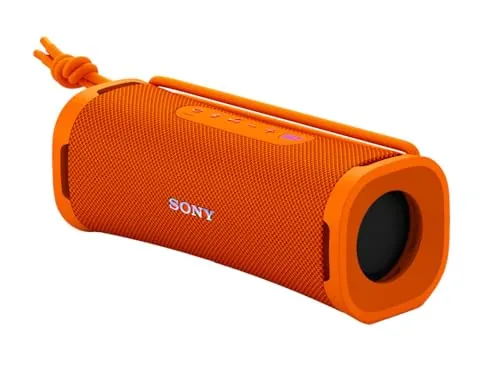
Sony ULT FIELD 1 Wireless Portable Speaker (Orange)
The assigned orange ULT FIELD 1 offer is listed as SRSULT10D.UC. Sony’s U.S. orange page names the ULT FIELD 1 family and a multi-way strap; its support materials identify SRS-ULT10 / ULT FIELD 1 and document Stereo Pair with a second ULT FIELD 1 using Music Center. Sony lists USB-C as charge-only, includes an A-to-C cable and strap, and says an AC adapter is commercially available. The official guide recommends keeping the current speaker software for its listed features.
Model ULT FIELD 1 (listing data suffix SRSULT10D.UC)
Amazon ASIN B0CXKSCY1G
JBL
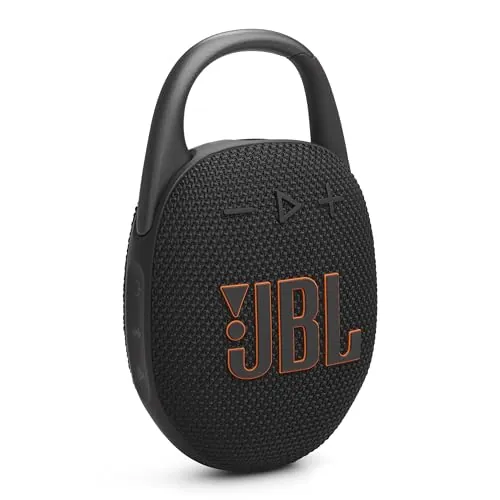
JBL Clip 5 Portable Bluetooth Speaker (Black)
The exact black JBL page identifies item JBLCLIP5BLKAM and lists a fully integrated carabiner with examples such as a backpack or belt loop. JBL documents stereo pairing between two Clip 5 speakers and multi-speaker connection to compatible JBL Auracast-enabled models. Its page lists multi-point connection as supported, but does not specify a source count or switching sequence.
Model JBLCLIP5BLKAM
Amazon ASIN B0CTP56C5R
Differences that matter
What matters most to you?
Choose a priority to see what it changes.
Sources for Attachment format and placement
Sources for Listed body dimensions and mass
Sources for Two-speaker stereo or larger group
Sources for Remembered Bluetooth devices versus multipoint
Sources for Charging port, cable and adapter planning
Start with the attachment you will actually use
The assigned Sony offer is the orange ULT FIELD 1; its U.S. product page identifies that color and lists a multi-way strap. Sony’s help guide says the supplied strap can be length-adjusted and held to carry the speaker, and cautions against pulling hard on it or swinging the speaker. The black JBL Clip 5 uses a different approach: JBL identifies its wide-opening carabiner as integrated and gives a backpack or belt loop as examples.
Measure the loop, strap point or pocket you plan to use and compare the published body dimensions. The attachment descriptions help you match hardware to that location; they do not show which one stays attached more securely in motion.
Choose the group around the speakers you already own
Sony’s ULT FIELD 1 Stereo Pair is a two-speaker setup: the help guide requires two ULT FIELD 1 units, directs you to Sony Music Center to set it up and says to update both speakers’ software. Sony also says its speaker can remember up to eight paired devices, but plays music from one paired device at a time. That is saved-device support, not simultaneous playback from eight sources.
JBL documents stereo pairing between two Clip 5 units or a multi-speaker Auracast connection with compatible JBL speakers. Its quick-start guide points to JBL Portable for speaker configuration and software updates. If you want to add a different speaker model, check the maker’s compatibility information for that exact unit; neither brand’s reviewed instructions establish mixed Sony/JBL stereo pairing.
Plan controls and charging before you leave home
The ULT FIELD 1 has physical power, Bluetooth, play/call, volume and ULT controls. Its USB-C port is for charging only. Sony lists an A-to-C cable and strap in the box; the manual says a commercially available USB AC adapter is used for wall charging. It gives an approximately five-hour reference when using a 1.5 A adapter with the speaker turned off, and notes the supplied cable supports up to 1.5 A. A 3 A adapter requires a suitable 3 A cable.
JBL’s Clip 5 quick-start guide shows its power, Bluetooth, Auracast, play/pause, track-skip and volume controls and recommends JBL Portable for configuration and software updates. JBL lists a Type-C charging cable in the box and gives a three-hour reference at 5 V / 1 A. Because the stated inputs and operating conditions differ, these charge-time numbers are not a comparative speed result.
Product details
Sony ULT FIELD 1 Wireless Portable Speaker (Orange)
- Carry attachment and listed body size
- Sony’s orange page identifies the multi-way strap. U.S. support lists 206 × 77 × 76 mm (W × H × D) and about 650 g; the help guide says use the supplied strap, do not pull it hard or swing the speaker, and allows strap-length adjustment. Source
- Stereo grouping and paired devices
- A Stereo Pair requires two ULT FIELD 1 speakers and setup in Sony Music Center; Sony’s guide says to update each speaker’s software. The guide also says up to eight devices may be paired, but music can play from only one paired device at a time. Source
- Controls, app and charging
- Physical controls include power, Bluetooth, play/call, volume and ULT. USB-C is charge-only. Sony lists an A-to-C cable and strap in the box; its guide calls for a separately available USB AC adapter and gives about 5 hours with a 1.5 A adapter while off. The supplied cable supports up to 1.5 A; a 3 A adapter requires a suitable 3 A cable. Source
JBL Clip 5 Portable Bluetooth Speaker (Black)
- Integrated attachment and listed body size
- JBL identifies the Black item as JBLCLIP5BLKAM and describes a wide-opening integrated carabiner. Published product dimensions are 3.4 × 5.3 × 1.8 in (W × H × D) and net weight is 0.285 kg. Source
- Compatible speaker grouping
- JBL documents stereo pairing between two Clip 5 speakers or multi-speaker connection with JBL Auracast-enabled speakers. Its quick-start guide directs configuration and software updates through JBL Portable. Source
- Controls, app and charging
- The quick-start guide shows power, Bluetooth, Auracast, play/pause, track and volume controls. JBL lists USB-C cable, quick-start guide and warranty/safety sheet in the box; it does not list a wall adapter. The guide gives a 3-hour charging reference at 5 V / 1 A. The product page marks multi-point connection as supported without detailing source count or handoff behavior. Source
Before you buy
Community discussions
Checking whether the clip closes around a handle
JBL Clip 5 Portable Bluetooth Speaker (Black)
A Clip 5 owner using a portable speaker at work described attaching it to a handle and choosing where to keep it close by.
What to check
Compare the two attachments where you plan to carry the speaker. Try placing or removing it without rearranging the bag.
Common questions
Can I make a Sony ULT FIELD 1 and JBL Clip 5 stereo pair together?
The reviewed instructions do not document a cross-brand stereo pair. Sony specifies two ULT FIELD 1 speakers for Stereo Pair, while JBL specifies two Clip 5 units for stereo and compatible JBL Auracast speakers for multi-speaker connection. Confirm exact interoperability before buying for a mixed setup.ULT FIELD 1 Help GuideJBL Clip 5 Black (JBLCLIP5BLKAM)
Does Sony’s support for eight paired devices mean eight can play at once?
No. Sony’s ULT FIELD 1 guide says it can pair with up to eight devices but can play music from only one paired device at a time.ULT FIELD 1 Help Guide
Do I need to pack a wall adapter?
Sony’s product support lists an A-to-C cable and strap, and its guide says to use a commercially available USB AC adapter. JBL’s exact Clip 5 page lists a Type-C cable in the box; its quick-start guide provides charging time at 5 V / 1 A. Check the seller’s exact package if an adapter is important.SRS-ULT10 SpecificationsULT FIELD 1 Help GuideJBL Clip 5 Black (JBLCLIP5BLKAM)JBL Clip 5 Quick Start Guide
Sources and scope
This guide compares documented carry attachments, pairing and charging features; it is not a listening, runtime, water-resistance, retention or durability test. Sony’s U.S. orange product page identifies the ULT FIELD 1 color and product family, while the listing data supplies the selected offer suffix SRSULT10D.UC; the reviewed manufacturer docs do not print that full suffix. Sony’s ULT FIELD 1 guide says up to eight devices may be paired but music plays from one paired device at a time. JBL’s exact black Clip 5 page marks multi-point connection as supported but does not state the number of simultaneously connected sources or a detailed switching behavior. The makers’ Stereo Pair / Auracast instructions do not establish cross-brand stereo pairing. The charging references have different stated conditions and should not be treated as a head-to-head speed test.
Related comparisons
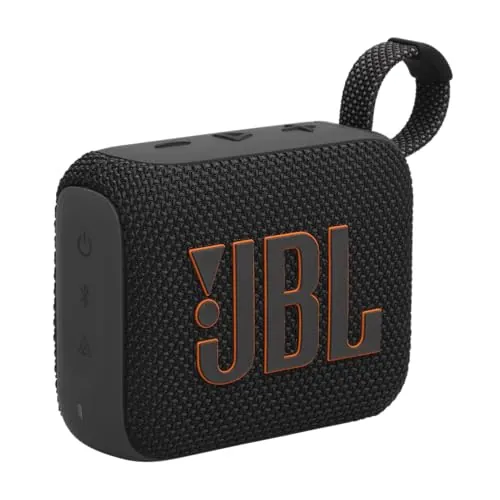
JBL Go 4 JBLGO4BLKAM vs JBL Clip 5 JBLCLIP5BLKAM
This guide covers the exact black US listings: JBL Go 4 (JBLGO4BLKAM, ASIN B0CTNWBT1Z) and JBL Clip 5 (JBLCLIP5BLKAM, ASIN B0CTP56C5R). JBL lists the Go 4 at 190 g and 3.7 × 3.0 × 1.7 in, with an integrated carrying loop; Clip 5 is 285 g and 3.4 × 5.3 × 1.8 in, with a wider integrated carabiner. Advertised playback is up to 7 hours plus 2 hours with Playtime Boost on Go 4 and up to 12 plus 3 hours on Clip 5; JBL says actual playtime varies with volume and audio content. Both list a three-hour charge at 5 V/1 A and support stereo pairing with two matching speakers plus multi-speaker Auracast connections. Pick by how you carry it and whether you need the additional advertised runtime, not by an unsupported sound or water-safety ranking.
Read comparison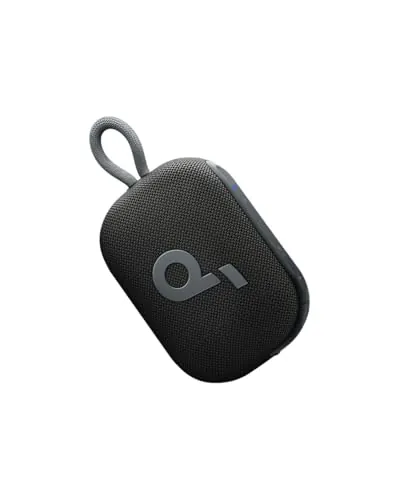
JBL Clip 5 vs Soundcore Select 4 Go: Carrying, Water, and Charging
The exact black US listings are JBL Clip 5 (JBLCLIP5BLKAM, B0CTP56C5R) and soundcore Select 4 Go (A31X1, B0DB1753RZ). Clip 5 has an integrated carabiner and supports stereo with a second Clip 5 plus multi-speaker Auracast connections. Select 4 Go has a built-in strap, is documented to float, and is rated for up to 20 hours at 40% volume in Balanced EQ. Both are IP67-rated, but follow the stated depth/time and port-cover instructions. Select 4 Go's older and newer hardware revisions do not TWS-pair with each other, and the selected ASIN does not reveal its revision.
Read comparison