
Products compared
Kasa Smart
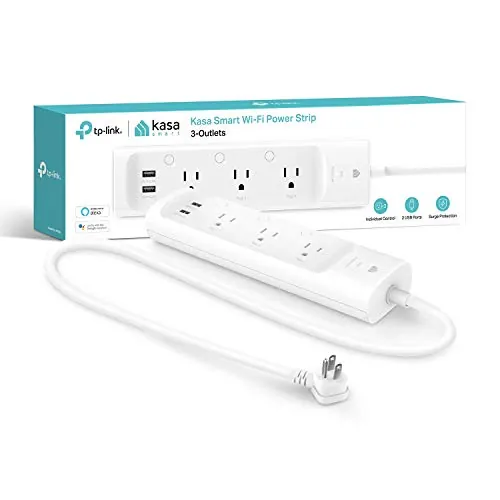
Kasa Smart Wi-Fi Power Strip KP303
Three independently controlled smart AC outlets and two always-on USB ports. Kasa’s current US page and TP-Link’s HS300 US 2.0 datasheet list USB at 5 V and 2.4 A total. The US page lists a 125 V, 60 Hz, 15 A input and 1,875 W total maximum load. Its listed body length is 260 mm.
Model KP303, US version not specified in listing data
Amazon ASIN B083JKSSR5
Kasa Smart
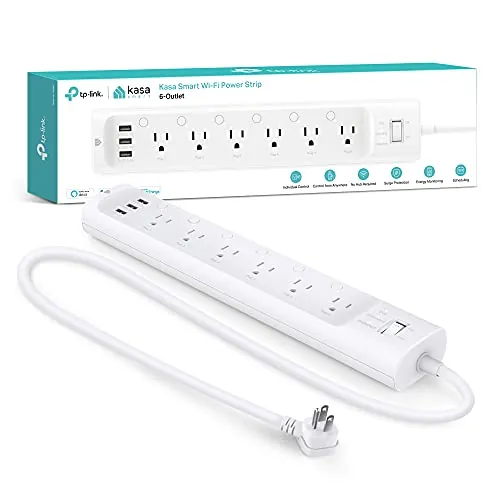
Kasa Smart Wi-Fi Power Strip HS300
HS300 has six independently controlled smart AC outlets and three always-on USB ports. Kasa lists per-outlet energy information in the app. Published HS300 USB specifications vary by revision: the current U.S. product page lists 5 V, 2.4 A per port and 4 A total; the U.S. 2.0 datasheet lists 2.4 A total. Check the version on the unit before planning USB use. The listed body length is 360 mm.
Model HS300, US version not specified in listing data
Amazon ASIN B07G95FFN3
Differences that matter
What matters most to you?
Choose a priority to see what it changes.
Sources for Individually controlled AC outlets
Sources for Body length for desk placement
Choose the outlet count before the feature list
Both are white Kasa strips that require secured 2.4 GHz home Wi-Fi for app use, and both list a 15 A / 1,875 W maximum total AC load. The simpler fit check is the number of devices you need to switch separately: three for KP303 or six for HS300. The HS300 also documents an app energy view for each connected AC outlet.
The KP303 is 260 mm long and HS300 is 360 mm long. Measure the available spot, including room for plugs and the cord route, instead of judging from outlet count alone. These dimensions describe the strip body, not a guaranteed fit for your adapters.
Treat USB output as a revision-specific specification
Both provide always-on USB charging, so these ports are not among the individually switched smart AC outlets. Kasa’s current KP303 page lists two USB ports and 5 V / 2.4 A total. Its linked TP-Link V2.8 datasheet gives the same total and does not specify an individual-port maximum.
For HS300, the current U.S. page lists three USB ports at 5 V, 2.4 A each and 4 A total. The U.S. 2.0 datasheet lists 2.4 A each and 2.4 A total. The retail entry does not specify hardware revision, so check the unit's version if the total USB output matters to your setup. No charging-speed or simultaneous per-port performance is inferred.
Check the app workflow you expect to use
Kasa’s setup guide covers both HS300 and KP303 and describes local and remote app control; the setup uses a secured 2.4 GHz network and TP-Link cloud account. The current product pages also list their Kasa app network requirements. These pages do not promise how app commands or saved schedules behave if Wi-Fi, internet service, an app service, or a particular hardware revision is unavailable.
KP303’s US specifications list three outlet on/off buttons. For HS300 local fallback, consult the manual that matches the actual hardware-version label instead of inferring outage behavior from the app feature description. If app energy readings are your reason to choose, the documented HS300 feature concerns connected devices on smart outlets; USB energy measurement is not specified.
Product details
Kasa Smart Wi-Fi Power Strip KP303
- AC outlets and control
- 3 individually controlled smart outlets; current US page lists three outlet on/off buttons. Source
- USB
- 2 always-on ports; current US page and linked V2.8 datasheet list 5 V, 2.4 A total. Neither separately specifies a per-port maximum. Source
- Body size and input
- 260 × 63.4 × 38.6 mm; 125 V AC, 60 Hz, 15 A, 1,875 W maximum total load. Source
- Network
- Secured 2.4 GHz home Wi-Fi; Kasa app required. Source
Kasa Smart Wi-Fi Power Strip HS300
- AC outlets and metering
- 6 independently controlled smart outlets; Kasa describes individual energy monitoring for connected devices in its app. USB metering is not specified. Source
- USB
- 3 always-on ports. Current Kasa US page: 5 V, 2.4 A each and 4 A total. Linked TP-Link HS300 US 2.0 datasheet: 5 V, 2.4 A each and 2.4 A total. Match the exact hardware-version label to its datasheet. Source
- Body size and input
- 360 × 63.3 × 37.5 mm; 100–125 V AC, 60 Hz, 15 A, 1,875 W maximum total load. Source
- Network
- Secured 2.4 GHz home Wi-Fi; Kasa app required. Source
Before you buy
Community discussions
Checking which ports can be controlled separately
Kasa Smart Wi-Fi Power Strip KP303
A shopper wanted to turn USB-powered items on a shelf on and off separately. A reader suggested the KP303 and later raised whether the controls applied only to its outlets.
What to check
List the plugs and USB ports you need. Check which ports the official documentation says can be switched on the exact model.
Leaving room between adapters on a power strip
Kasa Smart Wi-Fi Power Strip HS300
An HS300 owner set up their strip under the bed and described outlet spacing as part of fitting their adapters and cords.
What to check
Line up the adapters you would plug in and check whether they cover neighboring outlets. Measure the area and cable reach before choosing.
Choosing a strip for a desk routine with voice control
Kasa Smart Wi-Fi Power Strip HS300
A remote worker wanted to control a desk power strip by voice or timer. A reader named the Kasa HS300 they use.
What to check
Check how many outlets you want to control separately and which routines your home-control system supports for the exact strip.
Common questions
Does HS300 USB have a higher shared-current rating than KP303?
The current US pages suggest HS300 is 4 A total versus KP303 at 2.4 A, but TP-Link’s HS300 US 2.0 datasheet lists 2.4 A total. Check the exact hardware label and matching sheet before depending on any shared total. The KP303 sources reviewed give a 2.4 A total and no separate per-port figure.Kasa Smart Wi-Fi Power Strip, 3-Outlets (KP303) — US product pageKasa Smart Wi-Fi Power Strip, 6-Outlets (HS300) — US product pageKP303 (US) V2.8 Datasheet — TP-LinkHS300 US 2.0 Datasheet — TP-Link
Can HS300 report USB energy separately from each AC outlet?
The HS300 product page documents energy monitoring for connected devices, alongside its six smart AC outlets. The sources reviewed do not specify individual energy readings for its always-on USB ports, so treat the documented metering as an AC-outlet feature only.Kasa Smart Wi-Fi Power Strip, 6-Outlets (HS300) — US product pageHS300 US 2.0 Datasheet — TP-Link
What happens to app control if Wi-Fi or internet is unavailable?
Both models specify secured 2.4 GHz home Wi-Fi for Kasa app use. TP-Link’s joint setup page describes local and remote app control, but it does not state an outage guarantee for all hardware revisions. If offline control is decisive, check the manual for the exact label version; the KP303 US page separately lists three outlet on/off buttons.Kasa Smart Wi-Fi Power Strip, 3-Outlets (KP303) — US product pageKasa Smart Wi-Fi Power Strip, 6-Outlets (HS300) — US product pageHow to connect your HS300 KP303 to the home network via Kasa app? — TP-Link USDownload for KP303 — TP-Link US support and hardware versionsDownload for HS300 — TP-Link US support and hardware versions
Sources and scope
This is a source-based feature and fit comparison, not a charging, electrical-protection, or outage test. The tracked listings do not identify their hardware revisions. For HS300 USB output, the current Kasa US page lists 5 V, 2.4 A per port and 4 A total, while TP-Link’s HS300 US 2.0 datasheet lists 5 V, 2.4 A each and total; use the datasheet matching the strip’s label. The current KP303 US page and linked V2.8 datasheet list 5 V, 2.4 A total and do not separately establish a per-port value. Older TP-Link material differs, so no universal per-port ceiling is assigned to an unversioned unit. Reviewed pages document HS300 app energy monitoring but do not specify separate USB readings. No claim is made about app, schedule, or outlet state during an internet or Wi-Fi outage.
- Kasa Smart Wi-Fi Power Strip, 3-Outlets (KP303) — US product page
- Kasa Smart Wi-Fi Power Strip, 6-Outlets (HS300) — US product page
- KP303 (US) V2.8 Datasheet — TP-Link
- HS300 US 2.0 Datasheet — TP-Link
- Download for KP303 — TP-Link US support and hardware versions
- Download for HS300 — TP-Link US support and hardware versions
- How to connect your HS300 KP303 to the home network via Kasa app? — TP-Link US