
Products compared
Amazon
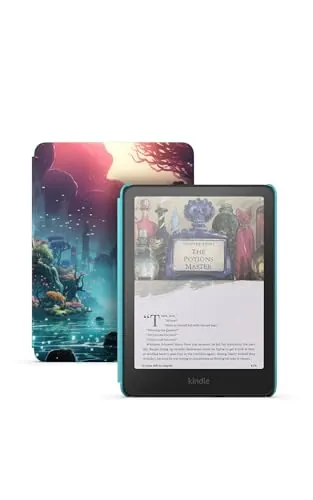
Amazon Kindle Colorsoft Kids 16 GB (Fantasy River)
The exact Fantasy River U.S. bundle is listed with a color-optimized Kids display, a kid-friendly cover and 12 included months of Amazon Kids+.
Model SA58CB
Amazon ASIN B0DZ9G3BHP
Amazon
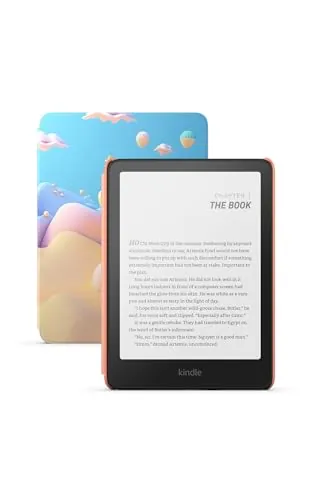
Amazon Kindle Paperwhite Kids 16 GB (Starfish)
The exact Starfish U.S. bundle uses a black-and-white Paperwhite display, includes a kid-friendly cover and lists 6 included months of Amazon Kids+.
Model SA568B
Amazon ASIN B0CFPS7ZY9
Differences that matter
What matters most to you?
Choose a priority to see what it changes.
Sources for Display format and the child’s actual library
Sources for Included Kids+ period and activation timing
Sources for Exact Kids bundle and cover
Sources for Parent profile and library setup
Match the display to the books your child reads
For an illustrated library where colored panels or diagrams are part of the page, the Colorsoft Kids format is the direct match: Amazon describes the exact Kids model as optimized for color reading. If most books are prose or monochrome, do not pay extra solely for a color label; the Paperwhite Kids listing explicitly describes a black-and-white display. These product descriptions support a format choice, not a measured display winner or a claim about learning or reading outcomes.
The exact models matter. The comparison is Fantasy River Colorsoft Kids 16 GB, SA58CB / 53-101081, against Starfish Paperwhite Kids 16 GB, SA568B / 53-034952. Confirm those names and ASINs on the offer page; an adult Kindle or another Kids cover bundle may have different included terms.
Treat Kids+ as an activation decision, not a permanent saving
The two exact U.S. pages captured October 17, 2026 list 12 months of Kids+ with the Fantasy River Colorsoft bundle and 6 months with the Starfish Paperwhite bundle. Both then describe monthly automatic renewal, with cancellation through Parent Dashboard or Customer Service. No monthly fee is repeated here because that is a changeable account offer; check the current displayed fee and renewal wording before activation.
If the household already pays for Kids+, pause before registering the new device. Both exact listings say activation replaces an active Kids+ subscription and begins the device's included period. That can change when the household sees the next renewal, but the page does not promise any permanent savings.
Plan the parent profile before handing over the Kindle
Amazon's Kindle e-reader help describes creating an Amazon Kids child profile from the device's Parental Controls menu, entering the child's profile details and choosing books from the parent's own library to add. Parent Dashboard is available in a browser and mobile app and can manage child-profile settings and content access. Set aside the parent Amazon account and review the current setup screens as part of the handoff.
These are Amazon Kids account and setup considerations shared by compatible Kindle e-readers, not a differentiator that makes one of these two exact bundles categorically better for parental controls.
A practical pre-buy check for these exact offers
Before buying, check the child's current books for color-dependent pages; verify the cover, model and ASIN on the offer; and review the Kids+ trial and account renewal or cancellation terms that Amazon shows for that exact listing. If a subscription is already active, check how device activation affects that account before registering the Kindle.
Product details
Amazon Kindle Colorsoft Kids 16 GB (Fantasy River)
Consider this bundle if color is useful for titles your child actually reads, such as comics or illustrated books. Confirm that the selected offer is the Fantasy River Kids bundle before checkout.
- Reading display format
- Color display; Amazon describes the Kids display as optimized for color reading Source
- Included subscription in the exact bundle listing
- 12 months of Amazon Kids+; monthly automatic renewal is described after the included period Source
- Selected bundle identity
- Fantasy River cover; 16 GB; SA58CB / 53-101081 Source
Amazon Kindle Paperwhite Kids 16 GB (Starfish)
Consider this bundle when a black-and-white reading display matches the child’s library and the shorter included Kids+ period fits the family’s account plan.
Before you buy
Community discussions
A Colorsoft Kids reader uses it for comics
Amazon Kindle Colorsoft Kids 16 GB (Fantasy River)
A new Kindle Colorsoft Kids owner says they enjoy using it for comic books and particularly wanted a paper-like presentation.
What to check
Look at the books you read most. Decide how often you want color illustrations or panels on the device and how often you read plain text.
Common questions
What is the practical difference between these two Kids Kindles?
The exact Colorsoft Kids listing describes a color display optimized for color reading; the exact Paperwhite Kids listing describes a black-and-white display. Match that format to the child’s books. The sources do not establish that either display produces better reading outcomes.Kindle Colorsoft Kids 16 GB (Fantasy River) U.S. product pageKindle Paperwhite Kids 16GB (Starfish) exact U.S. ASIN product page
How much Amazon Kids+ is included with each exact bundle?
The U.S. pages captured October 17, 2026 listed 12 months with Fantasy River Colorsoft Kids and 6 months with Starfish Paperwhite Kids. Both pages described monthly automatic renewal after the included term. Check the live offer and account terms before activation because bundle promotions and fees may change.Kindle Colorsoft Kids 16 GB (Fantasy River) U.S. product pageKindle Paperwhite Kids 16GB (Starfish) exact U.S. ASIN product page
What happens if I already have Amazon Kids+?
Both exact product pages captured October 17, 2026 say activating the device replaces an active Kids+ subscription and starts that device’s included period. Review current account terms before activation if the timing matters.Kindle Colorsoft Kids 16 GB (Fantasy River) U.S. product pageKindle Paperwhite Kids 16GB (Starfish) exact U.S. ASIN product page
Can a parent manage the child’s books and profile?
Amazon’s Kindle e-reader instructions describe setting up an Amazon Kids child profile from Parental Controls and adding books from the parent’s own library. Amazon says Parent Dashboard can manage profile settings and content access. Confirm current setup prompts and account requirements for your device.Create a Child Profile on Your Kindle E-ReaderManage Your Child's Amazon Kids+ experience via Parent Dashboard
How do I verify that the selected Kids bundle is the right one?
Match the exact ASIN and cover on the offer: B0DZ9G3BHP is Fantasy River Colorsoft Kids 16 GB; B0CFPS7ZY9 is Starfish Paperwhite Kids 16 GB. Confirm the displayed bundle terms and availability at checkout.Kindle Colorsoft Kids 16 GB (Fantasy River) U.S. product pageKindle Paperwhite Kids 16GB (Starfish) exact U.S. ASIN product page
Sources and scope
This is a source-based bundle and format comparison, not a screen-quality, reading-outcome or hands-on test. Kids+ terms and offer availability can change, so check the exact offer and account terms before buying or activating. Amazon support identifies Colorsoft Kids as a first-generation device released in 2025, while the exact Amazon product listing calls the selected item a 2024 model. The comparison preserves the exact ASIN, finish and part number without making a year or generation claim for Colorsoft Kids.
Related comparisons
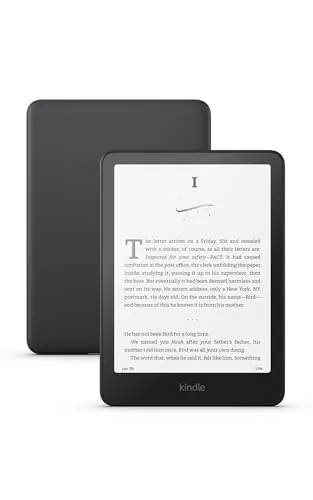
Kindle Paperwhite (2024) vs Paperwhite Kids: Bundle, Ads and VoiceView
This compares two exact US 2024 12th-generation, 16GB listings: the black, ad-supported Kindle Paperwhite (B0CFPJYX7P) and the Starfish Kindle Paperwhite Kids bundle (B0CFPS7ZY9). Both share the Paperwhite platform, while the Kids listing adds a child-friendly cover, six months of Kids+ and a two-year limited warranty. A child profile and parental controls can also be set up on a compatible standard Paperwhite, so the Kids bundle is mainly a convenience and included-content choice. Check the Kids+ renewal, adult-profile ads and VoiceView support before checkout.
Read comparison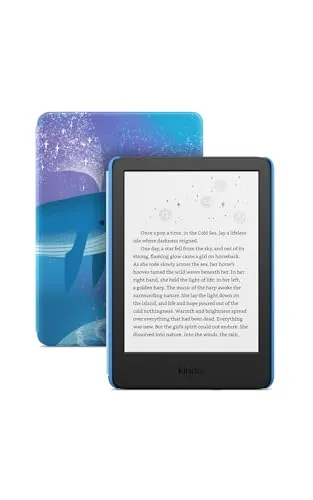
Kindle Kids RS23CV vs 2024 Paperwhite Kids: Screen and Bundle Choice
The 2024 Kindle Kids Space Whale has a 6-inch display. The 2024 Kindle Paperwhite Kids Starfish has a 7-inch display and adjustable warm light. Choose the screen size and light controls you want, then check the cover and current Kids+ terms on the exact offer.
Read comparison