
Products compared
Amazon
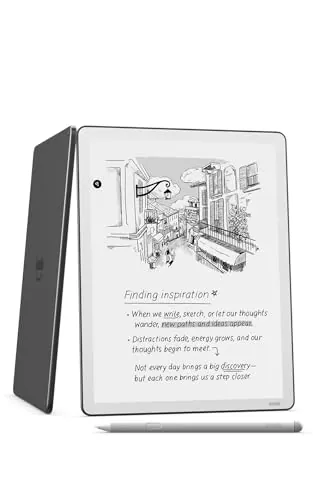
Amazon Kindle Scribe (2025, 11-inch, 32GB)
Graphite, 32GB, front-lit 11-inch monochrome Scribe with pen included on the selected US listing.
Model Kindle Scribe (3rd Generation, 2025 release), PA2MA4
Amazon ASIN B0DVQQGMCZ
Amazon
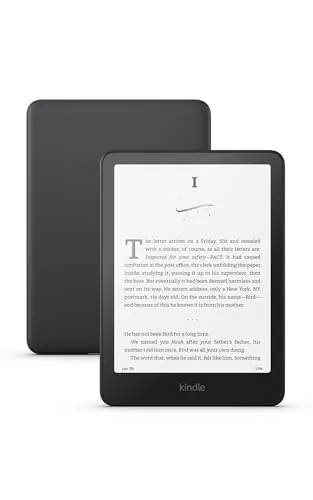
Amazon Kindle Paperwhite (12th Generation, 2024, 16GB)
Black 16GB standard Paperwhite US model; not the Signature Edition.
Model Kindle Paperwhite 12th Generation, SA568B
Amazon ASIN B0CFPJYX7P
Differences that matter
What matters most to you?
Choose a priority to see what it changes.
Sources for Writing directly on reading material
Sources for Personal-document workflow
Sources for Water-resistance documentation
Start with how you annotate
The Scribe's advantage is a different interaction: Amazon's 3rd-generation guide describes writing in Kindle books and creating notebooks, while the Paperwhite guide describes notes and highlights made by selecting text with a finger. That makes Scribe the better feature fit when handwritten marks are part of the task; it does not establish that its reading experience is better for everyone.
If your normal routine is reading a novel and occasionally saving a passage, Paperwhite's touch workflow is documented and its 7-inch display is the more compact choice. If you review study materials or personal documents with a pen, Scribe is the relevant option, subject to the file and transfer limits below.
Test your document path before choosing Scribe
Do not treat “PDF support” as one universal behavior. Amazon's document table is specific to files imported with Send to Kindle, and its guide excludes handwritten on-page PDF annotations for files loaded over USB-C. The support table also excludes some content types, including EPUB comics, manga and children's books, and the pen help page limits Active Canvas to left-to-right horizontal languages.
A useful pre-buy check is to identify one actual file, confirm its file type, and decide whether it will arrive through Send to Kindle or USB-C. Then compare that exact case with Amazon's table. Paperwhite's documented baseline for compatible personal documents is text notes and highlights; it is not a substitute for the Scribe's pen workflow.
Trade the smaller reader for a larger writing surface
Amazon documents an 11-inch display on the redesigned Scribe and a 7-inch display on the standard Paperwhite. The selected 32GB Scribe includes a pen, and the selected 16GB Paperwhite supports touch notes and highlights.
If portability is the reason you are switching, check the case or pocket you plan to use. A diagonal screen measurement alone does not tell you the size of the device with its case.
Treat water resistance as an exact-model check
Amazon's 2024 US Paperwhite announcement describes the standard 16GB model as waterproof. The 3rd-generation Scribe guide points readers to its Safety & Compliance instructions for liquid exposure, but the sources checked here do not state a directly comparable rating. That difference in documentation is not proof that Scribe lacks protection; confirm the exact model's official safety guidance if this will decide your purchase.
Product details
Amazon Kindle Scribe (2025, 11-inch, 32GB)
A larger reading surface with a supported pen workflow: the exact selected listing identifies the Graphite 32GB configuration and included pen, while Amazon's 3rd-generation guide explains where handwriting works and which document-transfer cases are excluded.
- Display and listed body weight
- 11-inch display and about 400 g according to the 2025 announcement for the redesigned Scribe. Source
- Writing workflow
- Amazon's 3rd-generation guide documents pen notes in books and on PDFs imported through Send to Kindle; direct handwriting on PDFs loaded by USB-C is not supported by the guide. Source
Amazon Kindle Paperwhite (12th Generation, 2024, 16GB)
A more compact reading-first option. Its generation-specific guide documents touch notes and highlights, and Amazon's 2024 announcement identifies a 7-inch, waterproof 16GB Paperwhite.
- Display
- 7-inch display on the standard 2024 Paperwhite. Source
- Reading annotations
- The 12th-generation guide documents touch-selected notes and highlights; Amazon's personal-document matrix lists text notes and highlights for other Kindle e-readers. Source
- Water-resistance wording
- Amazon's US 2024 lineup announcement describes the standard 16GB Paperwhite as waterproof. Source
Before you buy
Community discussions
Trying a larger reader before deciding
Amazon Kindle Paperwhite (12th Generation, 2024, 16GB)
A reader moving from a 6-inch 10th-generation Paperwhite worried the 7-inch model would feel bulky. They handled it in a store before deciding to buy it.
What to check
Try holding the larger and smaller reader with the case you plan to use. Check how much of a page you can read at your usual font size.
Common questions
Can I handwrite on a PDF with either Kindle?
Amazon documents direct handwriting on PDFs for the Scribe when imported through Send to Kindle. Its 3rd-generation guide says PDFs loaded by USB-C do not support direct on-page writing. The Paperwhite sources here document touch notes and highlights, not Scribe-style handwriting.Kindle Scribe (3rd Generation) User GuideKindle Personal Document File Types That Support NotesKindle Paperwhite 12th Generation User Guide
Does the Paperwhite support notes if I do not need a pen?
Yes. The 12th-generation Paperwhite guide describes selecting text by touch to create notes and highlights. Amazon's document table also lists text notes and highlights for non-Scribe Kindle e-readers.Kindle Paperwhite 12th Generation User GuideKindle Personal Document File Types That Support Notes
Which one is waterproof?
Amazon's 2024 US announcement describes the standard 16GB Paperwhite as waterproof. The sources checked for this guide do not establish a comparable rating for the 2025 Scribe, so verify its exact Safety & Compliance guidance rather than assuming either result.Amazon Launches Entirely New Kindle Lineup, Including Reimagined Kindle Scribe and First-Ever Color KindleKindle Scribe (3rd Generation) User Guide
Sources and scope
This guide covers the selected 32GB Scribe and standard 16GB Paperwhite. Amazon’s generation-specific guides and launch materials document their displays and annotation features. The reviewed sources do not establish comparable water-resistance ratings for both devices.
- Kindle Scribe (3rd Generation) User Guide
- Kindle Paperwhite 12th Generation User Guide
- Use Your Pen to Handwrite on Books and Personal Documents
- Kindle Personal Document File Types That Support Notes
- Amazon unveils redesigned Kindle Scribe lineup with first-ever color Scribe
- Amazon Launches Entirely New Kindle Lineup, Including Reimagined Kindle Scribe and First-Ever Color Kindle
Related comparisons
Kindle Paperwhite 2024 vs Signature Edition: Is 32GB and Wireless Charging Worth It?
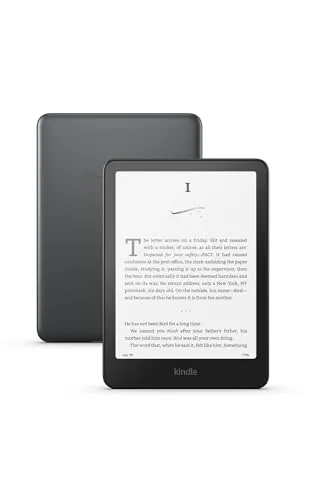
This comparison covers the U.S. Kindle Paperwhite SA568B (Black, 16GB; ASIN B0CFPJYX7P) and Paperwhite Signature Edition SA569P (Metallic Black, 32GB; ASIN B0C8RR4WN3). Signature adds more storage, a light sensor that adjusts brightness automatically and Qi charging with a separately purchased compatible charger. If you mostly read text ebooks, set the light manually and use USB-C, the standard Paperwhite keeps the same 2024 generation basics without extras you may not use.
Read comparison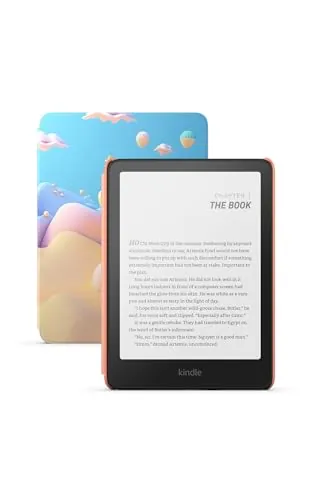
Kindle Paperwhite (2024) vs Paperwhite Kids: Bundle, Ads and VoiceView
This compares two exact US 2024 12th-generation, 16GB listings: the black, ad-supported Kindle Paperwhite (B0CFPJYX7P) and the Starfish Kindle Paperwhite Kids bundle (B0CFPS7ZY9). Both share the Paperwhite platform, while the Kids listing adds a child-friendly cover, six months of Kids+ and a two-year limited warranty. A child profile and parental controls can also be set up on a compatible standard Paperwhite, so the Kids bundle is mainly a convenience and included-content choice. Check the Kids+ renewal, adult-profile ads and VoiceView support before checkout.
Read comparison