
Products compared
Logitech
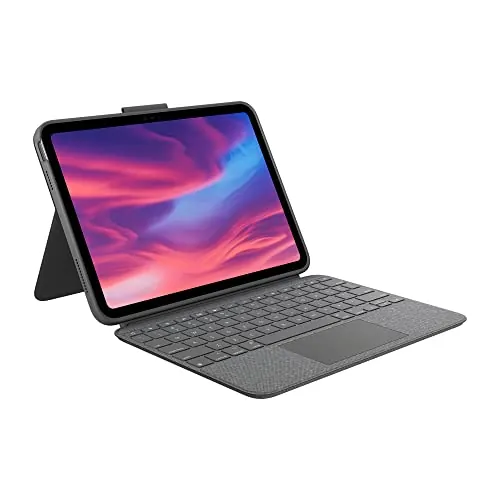
Logitech Combo Touch Keyboard Case for iPad, Oxford Grey
Exact U.S. Logitech selection identified on the manufacturer shop page for iPad (10th generation) and iPad (A16).
Model 920-011433
Amazon ASIN B0BJYR1Z6N

Apple
Apple Magic Keyboard Folio for iPad (A16), US English
Exact U.S. English Apple Magic Keyboard Folio selection for iPad (A16) and iPad (10th generation).
Model MQDP3LL/A
Amazon ASIN B0BJLFH8RC
Differences that matter
What matters most to you?
Choose a priority to see what it changes.
Sources for Exact iPad generation and case SKU
Sources for Keyboard and rear-case arrangement
Sources for Stand and non-typing configurations
Sources for Manufacturer-stated coverage wording
Sources for Smart Connector power and setup
Check the iPad and the exact case SKU first
This comparison is for Logitech Combo Touch part 920-011433 (Amazon ASIN B0BJYR1Z6N) and Apple's US English Magic Keyboard Folio MQDP3LL/A (ASIN B0BJLFH8RC). Logitech's current U.S. product page lists the platform as iPad (10th gen & A16); Apple's U.S. product page lists iPad (A16) and iPad (10th generation).
If you own a different iPad generation or an Air or Pro, check the model name in Settings and start over with a case listed for that exact device. Don't infer a fit from the shared brand or screen size.
Logitech describes Combo Touch as a keyboard case with a detachable backlit keyboard and four use modes: Type, View, Sketch and Read. Apple describes Magic Keyboard Folio as a separate back panel and keyboard that attach magnetically; the back-panel stand remains usable when the keyboard is detached.
Pick the arrangement and viewing workflow you will use
With Combo Touch, the keyboard detaches from its fitted case and Logitech names four activities supported by its adjustable kickstand. If you want one case assembly with the keyboard ready to attach or remove, that is the documented layout. Logitech describes the case as covering the front, back and corners, but this is not evidence of drop performance or superior protection.
With Magic Keyboard Folio, the rear panel and detachable keyboard are separate pieces; both attach magnetically, while the keyboard connects through the Smart Connector. Apple describes a continuously adjustable stand, and its support guide says the iPad can remain propped up after the keyboard is removed. Its product page describes front and back protection. That description does not establish comparative protection or edge outcomes.
Both are listed for the 10th-generation and A16 iPad families and both makers describe Smart Connector power rather than a separately charged keyboard. The choice here is physical arrangement and workflow, not a tested typing, comfort, trackpad or stability winner.
A quick pre-buy check
Before checkout, verify your iPad generation and the printed part number for the keyboard case. For Logitech, match 920-011433; for Apple, match US English MQDP3LL/A. Then picture the routine: will the keyboard normally stay attached to a fitted case, or do you want Apple's separate keyboard and back-panel pieces?
Finally, decide whether the manufacturer-stated case coverage is enough information for your needs. This guide does not test protection; neither front/back/corner wording nor an omitted word establishes a drop or durability result. If that outcome matters, review the product maker's current terms and do not treat these descriptions as a guarantee.
Product details
Logitech Combo Touch Keyboard Case for iPad, Oxford Grey
- Listed iPad compatibility
- iPad (10th gen & A16) Source
- Keyboard and case layout
- Detachable backlit keyboard case; manufacturer names Type, View, Sketch and Read modes Source
- Manufacturer case description
- The page describes the front, back and corners as snug and protected; this is product-description language, not a comparative protection result Source
Apple Magic Keyboard Folio for iPad (A16), US English
- Listed iPad compatibility
- iPad (A16) and iPad (10th generation) Source
- Keyboard and case layout
- Two-piece design: detachable keyboard and protective back panel attach magnetically; adjustable stand; 14-key function row Source
- Connector setup
- Apple says the Smart Connector supplies keyboard power and data; no separate keyboard charge or pairing is needed Source
Before you buy
Community discussions
Trying how each case fits when you remove the keyboard
Logitech Combo Touch Keyboard Case for iPad, Oxford Grey
An iPad A16 owner tried both keyboard cases and described differences in removing the keyboard, getting the tablet in and out and reaching the controls.
What to check
Try your desk setup and a tablet-only task. Check which model fits your exact iPad and how easy it is to switch between those two setups.
Common questions
Do these exact selections fit both the iPad (10th generation) and iPad (A16)?
Yes, both makers' cited U.S. pages list the 10th-generation iPad and the A16 iPad for these selections: Logitech Combo Touch 920-011433 and Apple Magic Keyboard Folio MQDP3LL/A. Check the device model and the part number on the offer before buying.Combo Touch Keyboard Case for iPad, part 920-011433Magic Keyboard Folio for iPad (A16) - US English, MQDP3LL/A
Can the Apple stand still support the iPad without its keyboard attached?
Apple Support says yes: detach the keyboard and use the stand on the back panel to prop up the iPad. Logitech also describes detaching its keyboard for tablet activities, but this comparison does not claim which arrangement is more stable.Set up and use Magic Keyboard Folio for iPad (10th generation)Combo Touch Keyboard Case for iPad, part 920-011433
Do I need to charge or pair either keyboard separately?
The cited Logitech page says Combo Touch pairs and draws power through the iPad Smart Connector. Apple says its Smart Connector carries power and data to the Magic Keyboard Folio, so neither page calls for a separate keyboard charge or pairing routine.Combo Touch Keyboard Case for iPad, part 920-011433Set up and use Magic Keyboard Folio for iPad (10th generation)
Does the Logitech coverage description prove it protects better than the Apple Folio?
No. Logitech describes front, back and corner coverage; Apple describes front and back protection. These product descriptions are not comparative drop or durability test results, and missing wording does not prove a design lacks a feature.Combo Touch Keyboard Case for iPad, part 920-011433Magic Keyboard Folio for iPad (A16) - US English, MQDP3LL/A
Sources and scope
This is an official-feature comparison, not a typing, comfort, stand-stability, durability or protection test. Logitech describes its case as covering the front, back and corners; Apple describes front and back protection. Those product descriptions do not establish which selection offers better real-world protection. Confirm the exact iPad generation and keyboard SKU before purchase.