
Products compared
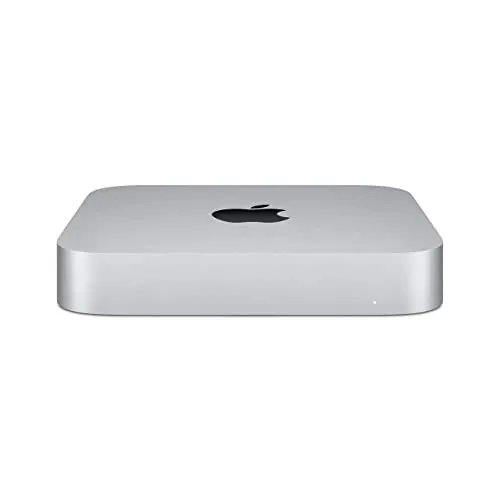
Apple
Apple Mac mini (M1, 2020), Silver, 8GB/256GB — Renewed listing
Renewed silver 2020 Mac mini M1 with 8 GB of unified memory and a 256 GB SSD. Check the exact seller’s warranty and what comes in the box.
Model MGNR3LL/A
Amazon ASIN B08PF2RF76
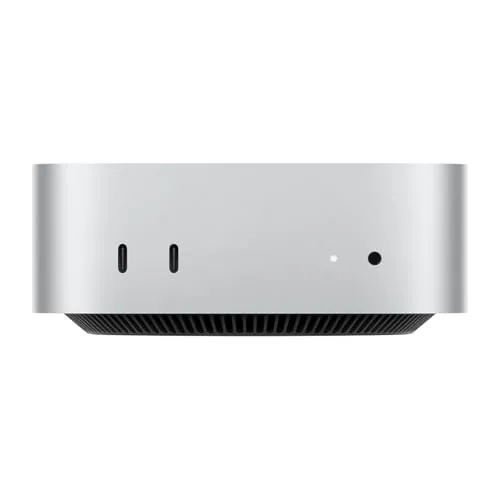
Apple
Apple Mac mini (M4, 2024), Silver, 16GB/256GB — Renewed listing
Renewed silver 2024 Mac mini with the base M4, a 10-core CPU, 16 GB of unified memory and a 256 GB SSD. Check the exact seller’s warranty and what comes in the box.
Model MU9D3LL/A
Amazon ASIN B0DTPPBN95
Differences that matter
What matters most to you?
Choose a priority to see what it changes.
Sources for Chassis footprint and shelf height
Sources for External display plan
Sources for Peripherals and network
Sources for Renewed listing versus Apple factory specification
First confirm which renewed configurations are being compared
This comparison covers two Silver Renewed listings: B08PF2RF76 is titled as a 2020 M1 with 8GB/256GB, and B0DTPPBN95 as a 2024 base M4 with 16GB/256GB. Their part numbers are MGNR3LL/A and MU9D3LL/A. Apple’s model-identification page places these part-number families in the corresponding M1 2020 and Mac mini 2024 generations; Apple’s technical pages describe the original factory specifications. Treat ‘Renewed’ as a condition of the marketplace offer, not an Apple hardware configuration. Apple’s pages do not identify the specific seller, unit grade, inspection, warranty, returns or accessories in either shipment. Check those live offer details before paying.
Treat ‘Renewed’ as a condition of the marketplace offer, not an Apple hardware configuration. The Apple pages do not tell us the specific seller, unit grade, inspection, warranty, returns or what accessories will be in either shipment. Check those live listing details for each ASIN before paying.
Trade the M1’s lower height for the M4’s smaller desk footprint
Apple lists the M1 chassis at 7.7 × 7.7 × 1.4 inches and the 2024 M4 at 5 × 5 × 2 inches. The M4 saves 2.7 inches in both width and depth, while adding 0.6 inch in height. If the computer sits on a crowded surface, compare the smaller base; if it sits under a shelf, the lower M1 chassis may be the more relevant measurement.
Measure the actual surface and opening rather than assuming either unit fits. These are chassis dimensions; they do not establish a particular stand, shelf or cable-route fit.
Match every monitor to one published display mode
The M1 model page lists up to two displays at once: one up to 6K/60Hz over Thunderbolt and one up to 4K/60Hz over HDMI. Apple’s base-M4 page lists three-display arrangements; one listed mode uses two 6K/60Hz Thunderbolt displays plus a third 5K/60Hz Thunderbolt display or a 4K/60Hz HDMI display.
Before choosing, write down the number of screens and each screen’s resolution, refresh rate and input. Match the combination to Apple’s model-specific list, then check the exact monitor, cable and adapter requirements. The display ceiling does not prove that an arbitrary dock or daisy chain will work.
Inventory ports and network before you reuse old peripherals
The M1 lists two Thunderbolt/USB 4 ports, two USB-A ports, HDMI, Gigabit Ethernet and a headphone jack. The 2024 base M4 lists three rear Thunderbolt 4/USB-C ports, two front USB-C ports supporting USB 3, HDMI, Gigabit Ethernet and a headphone jack. If you currently plug several USB-A devices straight into the M1, plan which M4 port each device will use and whether you need a separately bought hub or adapter.
Apple lists Wi-Fi 6 and Bluetooth 5.0 for M1, and Wi-Fi 6E and Bluetooth 5.3 for the 2024 M4. A Wi-Fi feature only matters if your network equipment and location support the relevant mode. Both family specifications list Gigabit Ethernet and an optional 10Gb configuration; do not infer that a renewed seller unit has the optional upgrade from a family page alone.
Check the seller’s accessory list separately from Apple’s factory specs
Apple technical pages describe the original model and factory options; they do not verify these Renewed packages. The M4 factory specification lists a 1.8 m power cord in the box, but that does not confirm that the exact Renewed seller supplies it. For both ASINs, check the current offer’s stated power cord, return window, warranty, condition description, and any cable, adapter, keyboard or mouse you actually need.
A Mac mini is a desktop computer, so include your own display and input-device plan in the desk checklist. Do not count an accessory as included unless that exact seller’s current listing says so.
A quick pre-buy measurement and compatibility worksheet
1. Measure desk width/depth and shelf height. Compare them with 7.7 × 7.7 × 1.4 inches for M1 and 5 × 5 × 2 inches for base M4. 2. Record every monitor’s resolution and intended HDMI or Thunderbolt connection; test the listed model mode against Apple’s support page. 3. Count USB-A peripherals before assuming the base M4’s USB-C ports are enough. 4. Decide whether Wi-Fi or wired Gigabit Ethernet is the intended network path; confirm whether any 10Gb option is present on the exact unit. 5. Review the exact Renewed listing for seller, condition, warranty, return terms and accessories.
Choose the configuration that clears the physical and connection checks you actually need. The published model specs do not answer which renewed unit is in better condition, which seller offers better support, or which model performs faster in your applications.
Product details
Apple Mac mini (M1, 2020), Silver, 8GB/256GB — Renewed listing
- Factory dimensions
- 7.7 × 7.7 × 1.4 inches (width × depth × height). Source
- Published display ceiling
- Up to two simultaneous displays: one up to 6K/60Hz over Thunderbolt and one up to 4K/60Hz over HDMI. Source
- Rear/front connections and wireless
- Two Thunderbolt/USB 4 ports, two USB-A ports, HDMI, Gigabit Ethernet, Wi-Fi 6 and Bluetooth 5.0; Apple lists 10Gb Ethernet as a configurable option for the model family, not a verified feature of this exact renewed unit. Source
Apple Mac mini (M4, 2024), Silver, 16GB/256GB — Renewed listing
- Factory dimensions
- 5 × 5 × 2 inches (width × depth × height). Source
- Published display ceiling
- Apple lists up to three simultaneous displays for base M4 in specified combinations, including two up to 6K/60Hz over Thunderbolt plus a third up to 5K/60Hz over Thunderbolt or 4K/60Hz over HDMI. Source
- Ports and wireless
- Three rear Thunderbolt 4/USB-C ports, two front USB-C ports with USB 3, HDMI, Gigabit Ethernet, Wi-Fi 6E and Bluetooth 5.3. Apple lists optional 10Gb Ethernet for the model family; verify the exact seller unit rather than assuming that option is present. Source
Before you buy
Community discussions
Checking a two-monitor setup before buying
Apple Mac mini (M1, 2020), Silver, 8GB/256GB — Renewed listing
A buyer already had two UHD monitors and was considering a Mac mini M1. They asked which ports they could use to connect both monitors.
What to check
List each monitor’s inputs, resolution and required refresh rate. Check the display limits and documented port combinations for the exact Mac mini you are considering.
Planning desk space for a Mac mini and a PC
Apple Mac mini (M4, 2024), Silver, 16GB/256GB — Renewed listing
An M4 Mac mini owner shared a desk with two monitors and a gaming PC. They used different video inputs for the computers and a USB switch for their keyboard and mouse.
What to check
Check whether your monitors have enough inputs for your computers and plan how you will switch shared peripherals.
Common questions
Does the M4 fit where the M1 fits?
Not necessarily. Apple lists the base M4 at 5 × 5 × 2 inches and the M1 at 7.7 × 7.7 × 1.4 inches. The M4 is smaller across the desk but taller. Measure the opening and available surface; the measurements do not include a fit guarantee or extra operating clearance.Mac mini (M1, 2020) — Tech SpecsMac mini (2024) — Tech Specs
Can both run three external displays?
Apple lists up to two simultaneous displays for the M1. For the base M4, Apple lists up to three in specified modes, including two up to 6K/60Hz over Thunderbolt plus a third up to 5K/60Hz over Thunderbolt or 4K/60Hz over HDMI. Confirm the exact monitor connections, adapters and refresh settings before buying.Mac mini (M1, 2020) — Tech SpecsMac mini (2024) — Tech Specs
Does Apple’s spec page confirm what comes with a Renewed unit?
No. Apple’s technical specifications describe model-family hardware, not what a particular Renewed seller includes or warrants. Check the live listing and seller terms for condition, power cord, any cable or adapter you need, warranty and returns.Mac mini (M1, 2020) — Tech SpecsMac mini (2024) — Tech Specs
Will my USB-A keyboard, storage device or Ethernet setup work as-is?
The M1 page lists two USB-A ports; the base M4 uses USB-C/Thunderbolt, HDMI and Gigabit Ethernet, so a USB-A peripheral may need a separately selected adapter or hub. For wired Ethernet, check the exact renewed unit: Apple lists optional 10Gb configurations, but that does not confirm the feature on a particular seller unit.Mac mini (M1, 2020) — Tech SpecsMac mini (2024) — Tech Specs
Sources and scope
These are Renewed offers. Apple’s specifications describe the original Mac configurations. Check the exact seller’s condition, return terms and included accessories. Match each monitor’s connection and resolution to a supported combination.