
Products compared
Mounting Dream
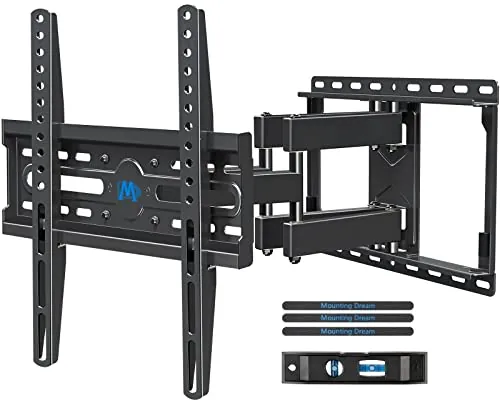
Mounting Dream Full Motion TV Wall Mount
listing data-matched MD2380. The maker page lists a 32–70-inch TV range, VESA up to 400 × 400 mm, swivel and 5° up/15° down tilt. Use the listing-linked manual for the exact package revision; it describes model-specific TV and wall checks. Verify the unit's manual because older MD2380 documentation differs on capacity and wall wording.
Model MD2380
Amazon ASIN B00SFSU53G
Mounting Dream
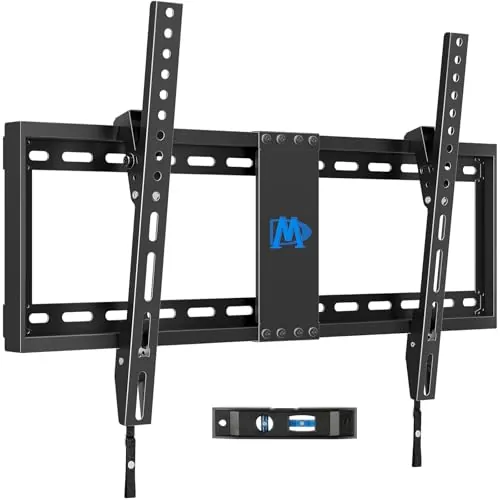
Mounting Dream Tilting TV Wall Mount
listing data-matched MD2268-LK. Mounting Dream lists 37–90-inch TVs, VESA up to 600 × 400 mm, a 1.5-inch low-profile position and 8° forward tilt. Its manual covers this model's TV and wall checks; it does not document swivel. Confirm the exact rear-input and cable access your TV needs at the planned near-wall position.
Model MD2268-LK
Amazon ASIN B00NKYYMAW
Differences that matter
Sources for VESA pattern and TV fit
Sources for Movement versus near-wall placement
Sources for Size, weight and revision-specific capacity
Sources for Wall construction and purchase eligibility
Start with the TV, not the mount's largest number
These are not interchangeable brackets. The MD2380 is the movement-oriented choice; the MD2268-LK is the larger-pattern, near-wall tilt choice. First find the TV maker's exact model documentation and record its VESA spacing, body dimensions, weight and connector locations. Then compare those values with the exact mount manual, not just an advertised diagonal range.
A VESA maximum only says what upper pattern the maker lists. It does not establish that every smaller pattern fits the rail, that the TV's holes are centered or accessible, or that spacers and screw lengths suit the TV. A TV with recessed holes, a curved rear shell or side-facing ports needs its own clearance check.
Choose movement for the room you actually use
If viewers sit in more than one direction, the MD2380 is the model in this pair whose product page describes swivel. Its listed tilt angle is 5° up and 15° down. The page and booklet versions reviewed do not provide a consistent basis for a numeric extension or folded-depth promise, so measure the room around the screen and do not plan around an unsourced reach figure.
If the screen mostly faces one seating area, the MD2268-LK's maker-listed 1.5-inch profile and 8° forward tilt may better match a low-profile setup. That short wall distance can make rear ports harder to reach. Check connector placement, plug shape and the cable path at the angle you plan to use; the specification does not say your TV's plugs will clear.
Resolve the wall and revision questions before checkout
The current MD2380 webpage and its listing-linked booklet do not phrase wall-material eligibility identically; an older MD2380 manual also lists a lower maximum load than the current webpage. That is a reason to identify the exact package revision and use its supplied manual, not a reason to pick whichever number is more convenient. Do not apply the webpage's broader wording to an older unit without confirmation.
For the MD2268-LK, the maker page and exact-model manual list wood studs or solid concrete and say not to mount on drywall alone. These are eligibility statements from product documentation, not a check of your particular building. If your wall construction or TV hardware is uncertain, pause the purchase decision until the mount maker, TV maker or a qualified installer confirms it. This comparison does not explain how to install the mount or calculate structural loads.
Product details
Mounting Dream Full Motion TV Wall Mount
- Maker-listed TV range and pattern ceiling
- 32–70-inch TVs; VESA up to 400 × 400 mm. These limits do not verify a particular TV's hole layout or rear clearance. Source
- Documented movement
- Current product page lists swivel and 5° upward / 15° downward tilt. Exact articulation or extension distance is not stated here because model documents conflict. Source
- Revision and surface check
- Current page lists a 110 lb maximum, while an older model-named manual lists 99 lb. The page and listing-linked manual differ on allowed wall wording; confirm the exact manual supplied with the unit and your TV instructions. Source
Mounting Dream Tilting TV Wall Mount
- Maker-listed TV range and pattern ceiling
- 37–90-inch TVs; VESA up to 600 × 400 mm. Check the TV's exact hole spacing rather than treating the maximum as every pattern below it. Source
- Wall distance and movement
- Product page lists 1.5 inches from the wall and 8° forward tilt; the exact-model manual describes a tilt mount, not swivel. Source
- Documented capacity and wall check
- Maker page and exact-model manual state up to 132 lb and identify wood-stud or solid-concrete mounting; do not treat this as a suitability judgment for a particular wall. Source
Before you buy
Community discussions
Checking which hardware comes with a TV mount
Mounting Dream Full Motion TV Wall Mount
A shopper with the Mounting Dream MD2380 noticed that the hardware pictured in the mount manual differed from what their TV manual specified.
What to check
Compare the hardware requirements for your exact TV with the mount’s included hardware list. Ask the manufacturers to confirm any mismatch before you buy.
Common questions
Does the MD2268-LK swivel like the MD2380?
The MD2380's current product page describes a full-motion mount that swivels. The MD2268-LK is documented as a tilt mount with 8° forward tilt; its manual does not specify swivel. Do not choose it for turning the TV between seats.MD2380 TV Mount — Mounting Dream product pageMD2268-LK user manual (VN-C1)
Will a TV with VESA 600 × 400 mm fit the MD2380?
The MD2380 maker page lists VESA only up to 400 × 400 mm, so the reviewed documentation does not support 600 × 400 mm for it. The MD2268-LK lists up to 600 × 400 mm, but you still need to confirm the actual TV hole pattern, weight, rear shape and exact manual conditions.MD2380 TV Mount — Mounting Dream product pageMD2268-LK TV Mount — Mounting Dream product pageMD2268-LK user manual (VN-C1)
Which mount works on my wall?
The MD2268-LK page/manual identify wood studs or solid concrete and exclude drywall alone. MD2380's current page and listing-linked booklet have a wall-material wording discrepancy, so check the exact included manual for the package you are considering. A model specification cannot verify your wall or installation.MD2380 TV Mount — Mounting Dream product pageMD2380 listing-linked user manual (D1)MD2268-LK TV Mount — Mounting Dream product pageMD2268-LK user manual (VN-C1)
Is the MD2380 rated for 110 lb or 99 lb?
Both numbers appear in model-specific manufacturer material: the current MD2380 product page says up to 110 lb and an older model-named manual says up to 99 lb. The listing-linked booklet is associated with the selected listing, but revisions may differ. Confirm the manual supplied with the exact unit instead of assuming the higher figure applies to every MD2380.MD2380 TV Mount — Mounting Dream product pageMD2380 listing-linked user manual (D1)MD2380 older model-named user manual (B1)
Sources and scope
Published specifications describe supported bounds, not approval of every TV below a maximum diagonal, weight or VESA value. MD2380 documentation is revision-sensitive: its current product page lists 110 lb while an older model-named manual lists 99 lb, and the wall-surface wording differs between the current page and the listing-linked booklet. Check the exact supplied manual and the TV maker's instructions for the specific unit and wall. No numeric MD2380 extension, folded depth or level-adjustment claim is made because model documentation conflicts. MD2268-LK's manual describes tilt but no swivel; a close-to-wall mount can also make rear inputs less accessible, which buyers should assess on their own TV. No installation procedure, structural suitability determination, load-safety guarantee or hands-on fit test is provided.