Products compared
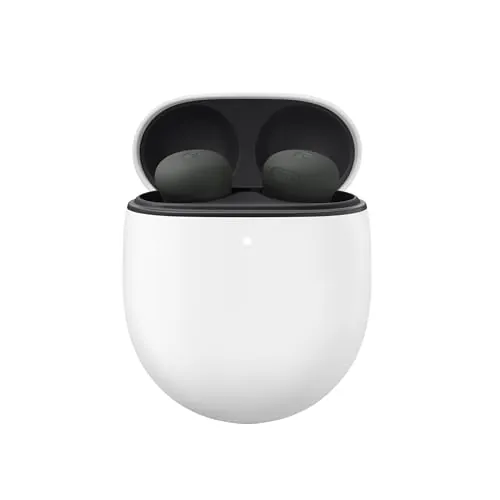
Google Pixel Buds Pro 2
Hazel U.S. version. Google's product specifications list capacitive tap/swipe controls, four eartip sizes and a case with USB-C and Qi-certified wireless charging. The charging case also has case sounds/settings features; no physical case-button claim is made here.
Model GA05762-US
Amazon ASIN B0D79ND3N7
Nothing
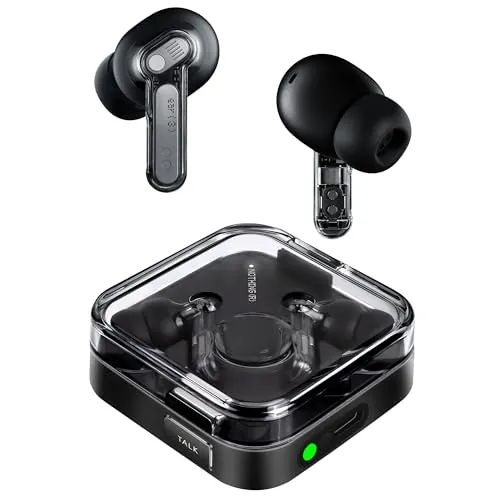
Nothing Ear (3)
Black U.S. listing. Nothing documents pinch-based earbud gestures, a case TALK button for Super Mic and voice-assistant functions, Dual Connection over classic Bluetooth, and wireless charging. Its support instructions say the Nothing X app is needed to configure gesture functions.
Model B173
Amazon ASIN B0FHWM1D2Y
Differences that matter
What matters most to you?
Choose a priority to see what it changes.
Sources for On-ear control routine
Sources for Fit details you can verify before checkout
Start with the gestures you will actually use
Pixel Buds Pro 2 is the documented tap-and-swipe option: Google lists taps for media and calls, swipe volume, and a press-and-hold action that can switch noise-control modes or be customized. Google describes a twist-adjust stabilizer and lists four included tip sizes. Those are features to compare against your own preference, not proof of comfort or secure fit.
Ear (3) is the pinch-control option: Nothing lists single, double and triple pinch, hold, and pinch-and-hold for volume. The support instructions say to configure the gestures in Nothing X. If you want to avoid changing controls in a companion app, verify which default assignments are active for the exact unit before purchase.
Match the switching method to your devices
Google lists Multipoint for Pixel Buds Pro 2 in its store comparison and settings guide. Its separately documented Audio Switch feature applies to Fast Pair devices on Android 8 or newer with Google Play Services and the same Google Account. Check the Multipoint settings and connection priority for your two hosts when that workflow matters.
Nothing documents Ear (3) Dual Connection over classic Bluetooth: with it enabled, the earbuds try to reconnect to the two most recently connected devices, and source priority changes with playback and call state. Nothing X can only connect to one device at once. This answers a different buyer question than Google's same-account Audio Switch, and Nothing's pages reviewed here do not establish Google-style switching behavior.
The Ear (3) case is part of its call-control routine
Nothing's case TALK button controls its Super Mic for calls and voice notes. Away from a call, a long press can start Essential Space on a Nothing phone with that feature installed or a voice assistant on other systems; Nothing says the function can instead be set to no action. With two devices connected, the case microphone may be treated as a third Bluetooth device, so check the documented priority behavior if you plan to use the case control mid-session.
Both manufacturers document wireless case charging. Google specifies USB-C and Qi-certified wireless charging for Pixel Buds Pro 2. Nothing says Ear (3) supports wireless charging and describes wired case charging with the supplied power cable. These are charging options, not a comparison of recharge time or battery endurance.
A practical before-you-buy check
Write down the devices you expect to use: for Google's Audio Switch, verify Android 8+, Google Play Services, Fast Pair and the same Google Account; for Nothing, identify the two Bluetooth hosts and whether the app will need to manage each one. Then decide whether you actually want a button on the case to operate Super Mic or an assistant.
If fit is your deciding factor, check the package's exact tip options and try the shape if you can. Google publishes four eartip sizes and a twist-adjust stabilizer for this Pro 2 model. The Nothing support pages reviewed here do not establish a comparable stabilizer or its exact boxed tip-size count. Neither fact predicts individual comfort, and the absence of a documented detail is not evidence that Ear (3) fits worse.
Product details
Google Pixel Buds Pro 2
Nothing Ear (3)
- Earbud gestures
- Pinch, double pinch, triple pinch, hold, and configurable pinch-and-hold for volume Source
- Case control
- TALK button controls case Super Mic and, depending on host/app setup, voice-assistant or Essential Space behavior Source
- Charging
- Earbuds recharge in the case; Nothing documents wired case charging using the supplied power cable and separate wireless-charging support Source
Before you buy
Community discussions
Finding a slim cover for the Pixel Buds Pro 2 case
Google Pixel Buds Pro 2
A Pixel Buds Pro 2 shopper wanted a slim, non-leather cover with an opening for the case speaker.
What to check
If you plan to add a cover, check the exact case model, speaker opening, material, and how much bulk it adds.
Common questions
Can Pixel Buds Pro 2 stay connected to two devices at once?
Google lists Multipoint for Pixel Buds Pro 2 in its store comparison and settings guide. Follow the current settings instructions for your two hosts. Google’s separate Audio Switch feature applies to compatible Fast Pair devices on Android 8 or newer with Google Play Services and the same Google Account.Change your Google Pixel Buds settingsUse Multipoint and audio switch on Google Pixel Buds 2a and ProGoogle Store Pixel Buds Pro 2 product comparison
How does Nothing Ear (3) handle two connected devices?
Nothing documents Dual Connection over classic Bluetooth and says the earbuds attempt to reconnect to the two most recently connected devices. Its priority rules depend on audio/call state, and the Nothing X app can connect to one device at a time.How do I manage Dual Connection and connection priority on Ear (3)?
Does the Nothing Ear (3) case have a useful button?
Nothing's TALK button can route calls through the case Super Mic; when not in a call, its long-press behavior depends on the connected host and app setup, and it can be configured to do nothing. This documents a function, not a measured microphone result.What can the TALK button on the Ear (3) charging case be used for?
Can I wirelessly charge either case?
Google specifies Qi-certified wireless charging for the Pixel Buds Pro 2 case. Nothing separately states Ear (3) supports wireless charging; its wired charging instructions refer to the supplied power cable. The cited pages do not compare charging speed.Pixel Buds Pro 2 U.S. product specificationsDoes Ear (3) support wireless charging?How do I charge Ear (3)?
Sources and scope
The guide compares published controls, charging and device switching. Google’s store and settings pages list Multipoint for Pixel Buds Pro 2. Check Google’s current setup instructions if connection priority or a specific combination of devices is essential.
- Pixel Buds Pro 2 U.S. product specifications
- Learn controls for Google Pixel Buds
- Change your Google Pixel Buds settings
- Use Multipoint and audio switch on Google Pixel Buds 2a and Pro
- How do I operate the control functions on Ear (3)?
- How do I manage Dual Connection and connection priority on Ear (3)?
- What can the TALK button on the Ear (3) charging case be used for?
- How do I charge Ear (3)?
- Does Ear (3) support wireless charging?
- Nothing Ear (3) U.S. support collection
- Google Store Pixel Buds Pro 2 product comparison