
Products compared
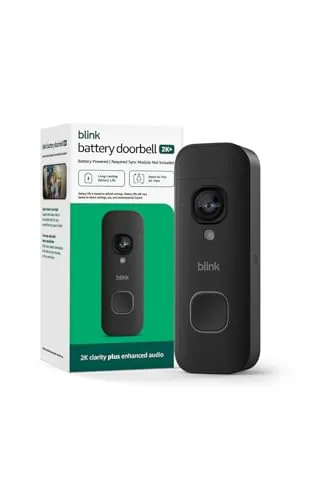
Blink
Blink Battery Doorbell 2K+ Add-On (Black)
This is the Blink Battery Doorbell 2K+ Add-On package; it does not include a Sync Module. Blink's US technical specification identifies model BDM00400U for the US/Canada/Mexico version. Confirm the model and package contents on the offer you select.
Model BDM00400U
Amazon ASIN B0G625WMBN
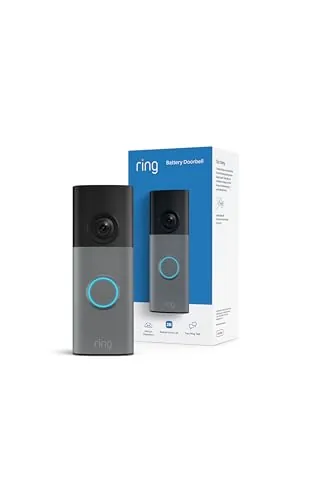
Ring
Ring Battery Doorbell 2K (Speckled Gray)
US product identity is Ring Battery Doorbell 2K in Speckled Gray, model 5DFYA5. The Ring product and setup materials describe Ring app setup and a built-in rechargeable battery.
Model 5DFYA5
Amazon ASIN B0FHJ7TKZM
Differences that matter
What matters most to you?
Choose a priority to see what it changes.
Sources for Bundle and required hub
Sources for Stored clips and ongoing plan
Sources for Optional existing wiring and mechanical chime
Start with the Blink Add-On requirement
The Blink Battery Doorbell 2K+ Add-On is the black BDM00400U model. Blink's technical sheet says this US model requires a compatible Sync Module to function and connect to the Blink app. If you do not already have one, check what the selected package includes and account for the required module before deciding. The doorbell alone is not a complete working Blink system.
Ring's Battery Doorbell 2K has model-specific Ring app setup instructions. The Ring materials reviewed for 5DFYA5 do not state a Blink-style Sync Module prerequisite. This makes existing compatible Blink hardware a meaningful reason to choose the Add-On; buyers starting from zero should compare the complete hardware arrangement, not just the two doorbell names.
Decide where recorded clips should live
Blink gives this model a documented local-storage path without a subscription, but it still depends on the required module and compatible storage media: Blink lists a USB drive with a Sync Module or a MicroSD card with Sync Module XR. Blink's FAQ says cloud storage and smart detection need a Blink plan. Treat module ownership, media and plan as separate parts of the system check.
Ring says a compatible Protect subscription is required to rewatch recorded video. The Ring product page describes a trial, but notes that existing subscribers may not qualify. Check your current account terms before treating any trial as included. The Ring materials reviewed here do not describe a Blink-style local clip-storage path, so this guide does not claim Ring has or lacks every possible storage option.
Choose the maintenance routine, not a claimed battery-life winner
Blink uses three non-rechargeable AA lithium cells. Ring uses a built-in rechargeable lithium-ion battery; Ring says to remove the doorbell and charge it through USB-C, and says the cable is not included. The two routines therefore differ in what you keep on hand and what you do when power runs low.
Blink's FAQ and technical specification list different maximum battery-life estimates, both dependent on settings and usage. Because the manufacturer's own pages are not aligned, no runtime number is repeated and no longer-lasting winner is claimed. Choose by battery type and replenishment routine instead.
Existing wiring can change the chime setup
Both manufacturers document optional connections to existing doorbell wiring and mechanical-chime use for these battery models. Blink lists a US 12–24 VAC range and says its AA batteries remain as backup when the battery doorbell is wired. Ring lists the Battery Doorbell 2K for existing-chime use with its 8–24 VAC range and its exact model safety sheet lists the same AC range.
If your chime matters, check the transformer's label and the exact model's manufacturer instructions before choosing. The ratings and setup rules differ. This article does not provide wiring steps; have an uncertain or uncomfortable electrical job handled by a qualified electrician.
Five checks before you order
1. Identify the Blink Sync Module already in your home, or add the required compatible module to the Blink setup plan. Check the exact Add-On offer to see which devices and storage media are included.
2. Choose local or cloud clips. For Blink local clips, confirm supported module storage and a compatible USB drive or MicroSD card for the correct module. For Ring saved clips, check the compatible Protect plan and your account's trial eligibility.
3. Choose AA replacement versus removing and USB-C charging. If choosing Ring, remember that Ring says the USB-C cable is not included.
4. If keeping the existing chime is important, compare your existing transformer with each maker's model requirements and follow the exact installation guide. Do not use this guide as an electrical procedure.
5. Verify the model and color on the final listing: Blink BDM00400U Black or Ring 5DFYA5 Speckled Gray. Recheck the selected package before checkout.
Product details
Blink Battery Doorbell 2K+ Add-On (Black)
- Power
- Three Energizer AA 1.5 V lithium non-rechargeable batteries; Blink also documents optional existing doorbell wiring with the batteries serving as backup. Source
- Required system component
- A compatible Sync Module is required for the Battery Doorbell 2K+ to function and connect to the Blink app. Source
- Recording choices
- Blink documents local clips without a subscription when used with supported Sync Module USB storage or Sync Module XR MicroSD storage; cloud storage and smart detection require a Blink plan. Source
Ring Battery Doorbell 2K (Speckled Gray)
- Battery routine
- Built-in rechargeable lithium-ion battery; Ring says to remove the doorbell and recharge it using USB-C. The USB-C cable is not included. Source
- App setup
- Ring's model-specific installation guide directs setup through the Ring app. Source
- Recorded video
- Ring says a compatible Ring Protect subscription is required to rewatch recorded video; trial availability may depend on the account's existing subscription. Source
Before you buy
Community discussions
Keeping an existing doorbell chime
Blink Battery Doorbell 2K+ Add-On (Black)
A Blink battery-doorbell user expected their original doorbell chime to work alongside the Blink chime and asked why they only heard the new one.
What to check
Check whether the exact doorbell and your existing chime are compatible. If you choose the Blink Add-On, confirm which Sync Module and chime equipment you already have.
Common questions
Can the Blink Battery Doorbell 2K+ Add-On work without a Sync Module?
No. Blink says a compatible Sync Module is required for the Battery Doorbell 2K+ to function and connect to the Blink app. The BDM00400U Add-On package does not include the module, so check what comes with the exact offer.Battery Doorbell 2K+ Technical Specifications
Can Blink save clips locally without a subscription?
Yes, with supported Sync Module storage. Blink documents a USB drive with a Sync Module and a MicroSD card with Sync Module XR. A compatible module is still required; Blink says cloud storage and smart detection features require a Blink plan.Battery Doorbell 2K+ FAQ
Does Ring require a subscription to replay recorded clips?
Ring says a compatible Protect subscription is required to rewatch recorded videos. Check the current trial and plan terms for your account; Ring's product page notes that the trial may not apply at locations with an existing subscription.Battery Doorbell 2K — Doorbell Camera | Ring
How do the battery routines differ?
Blink uses three AA lithium non-rechargeable batteries. Ring has a built-in rechargeable battery; Ring's guide says to remove the doorbell and charge it with USB-C, and the cable is not included. Manufacturer battery-duration estimates are not compared here.Battery Doorbell 2K+ Technical SpecificationsBattery Doorbell 2K — Doorbell Camera | RingInstalling Battery Doorbell 2K
Can either model use an existing mechanical chime?
Both manufacturers document existing-chime use for these battery doorbells when the supported wiring setup is present. Blink lists 12–24 VAC for the US model; Ring lists Battery Doorbell 2K with an 8–24 VAC transformer range. Check the exact installation instructions or consult an electrician; this comparison gives no wiring steps.Battery Doorbell 2K+ FAQGuidelines for Hardwiring Your Ring Video DoorbellSafety and Compliance for Battery Doorbell 2K
Sources and scope
This is a source-based setup and ownership comparison, not an installation inspection, privacy/security audit or matched video, detection, battery-life or reliability test. Blink's US FAQ and technical page give different upper battery-life estimates, so no runtime figure or longevity ranking is used. Blink identifies BDM00400U as an Add-On; confirm the module and any storage media in the offer you select. Ring's US model identity is supported by model 5DFYA5 official compliance material and the Ring product page. Ring's reviewed product materials describe Protect-based recorded-video review; they do not establish a Blink-style local storage workflow. Check current account plan eligibility, package details and official setup requirements before purchase. No installation or electrical steps are provided.
Related comparisons
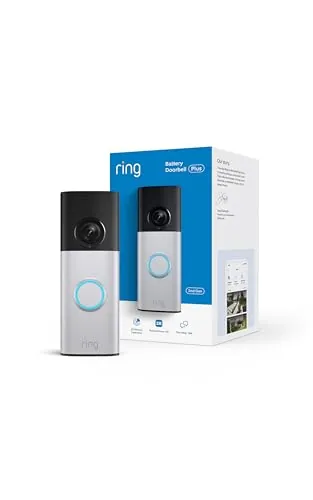
Ring Battery Doorbell 2K vs 2K Plus: Charging, Mounting and Chime Fit
Ring lists the Battery Doorbell 2K and 2K Plus with the same Retinal 2K, up-to-6x zoom and 140° horizontal by 140° vertical field of view. The practical differences are the removable Quick Release Battery Pack and included Corner Kit on the Plus versus a built-in battery on the standard 2K. Check your mounting angle, existing chime wiring, app and video-history needs before choosing; Ring requires a subscription to review saved recordings, but says Live View and answering alerts work without one.
Read comparison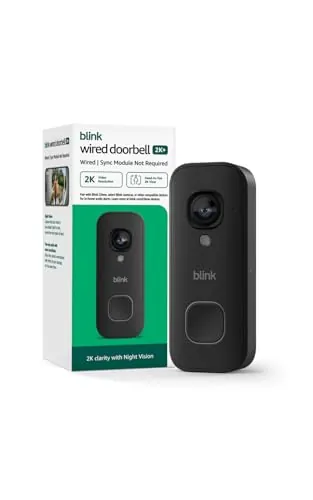
Blink Battery Doorbell 2K+ vs Wired Doorbell 2K+: power, chime and Sync Module needs
The US Battery Doorbell 2K+ (BDM00400U) requires a compatible Sync Module and runs on three non-rechargeable AA lithium cells, with optional chime wiring. The Wired Doorbell 2K+ (BDM00500U) runs on compatible AC wiring or Blink’s separate plug-in adapter. It has no battery fallback and cannot ring an existing mechanical chime.
Read comparison