
Products compared
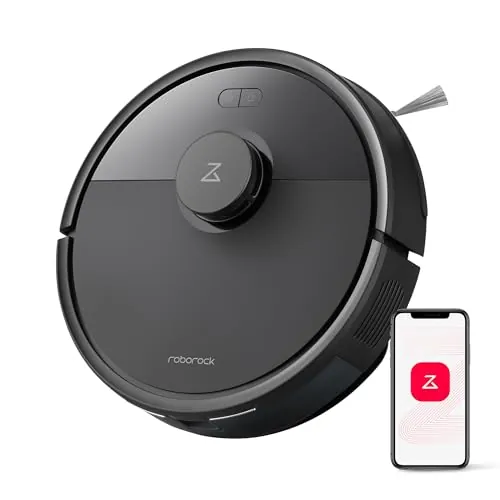
Roborock
Roborock Q7 L5
Vacuum-and-mop package with Charging Dock
Model Q7 L5 (RRA0TAC)
Amazon ASIN B0F334DN9J
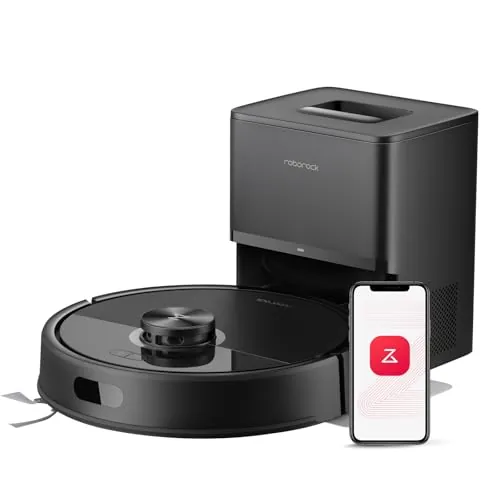
Roborock
Roborock Q7 M5+
Vacuum-and-mop package with Auto-Empty Dock
Model Q7 M5+ (RRA0TCP)
Amazon ASIN B0DWX69JVG
Will the Q7 dock fit your space?
Measure the open floor from the wall to the first obstacle. The check assumes the dock is against the wall, centered in the open width, on a hard and level floor.
RRA0TAC
Roborock Q7 L5
- Dock body · W × D × H
- 6.3 × 2.76 × 3.98 in
- Clear floor · W × D
- Over 45.67 × 61.81 in
RRA0TCP
Roborock Q7 M5+
- Dock body · W × D × H
- 8.35 × 7.01 × 10.2 in
- Clear floor · W × D
- Over 47.72 × 66.06 in
Each manual asks for more than 50 cm to either side and more than 150 cm from the dock’s front face. The calculated floor size includes the dock body. Check outlet, cord routing and access to the lid or bin separately.
Differences that matter
If you want fewer trips to empty the bin
Roborock Q7 M5+ · The Q7 M5+ package includes an Auto-Empty Dock and bag.
View Q7 M5+ on Amazon (paid link)Sources for Dock and dust handling
Sources for Published suction specification
Sources for Mop care
What should you measure and set up before buying?
Before choosing between these two exact packages, map the dock location and the chores you will actually do. The L5 (robot model RRA0TAC) has a Charging Dock; the M5+ (RRA0TCP) adds a bagged Auto-Empty Dock. Both still need hands-on mop care, and the M5+ dock does not empty after every possible return to base.
| Your check | Roborock Q7 L5 | Roborock Q7 M5+ | Before you buy |
|---|---|---|---|
| Match the box to the dock you mean to buy | Q7 L5, RRA0TAC: the listed package includes a Charging Dock. Plan to remove and empty the robot's combined dustbin/water-tank unit yourself. | Q7 M5+, RRA0TCP: the listed package includes an Auto-Empty Dock and disposable dust bag. It transfers dry dust after eligible cleaning runs; the robot still has its own dustbin and water-tank combo unit. | Before checkout, compare the product name, robot model code and included dock on the box/listing. A Q7 name alone does not tell you which dock is in the package. |
| Measure the whole dock zone, including the robot's approach | The L5 Charging Dock is 6.29 × 2.75 × 3.98 inches. Its manual calls for a hard, flat position against a wall, at least 0.5 m clear on both sides and 1.5 m in front; keep the cord tidy and the dock locator unobstructed. | The M5+ Auto-Empty Dock is 8.3 × 7.0 × 10.2 inches. Its manual gives the same side and front clearance and hard, flat placement guidance, so allow for the bigger dock body as well as that open approach zone. | Tape out the dock body and clearances at the intended outlet. The robot footprints are nearly the same, but checking robot dimensions alone misses the larger M5+ station and its required approach space. |
| Treat M5+ auto-empty as a feature to configure and verify | The L5 has no auto-empty dock in this package. After cleaning, empty its bin yourself; its manual says the dustbin and water tank are one removable combo unit. | The M5+ auto-empties after cleaning when it returns to the dock, but the manual says it will not trigger if it returns without cleaning, while DND is active, auto-empty is disabled in the app, or the dust bag is missing. The default DND window is 22:00–08:00. | During setup, install the bag, confirm auto-empty is enabled in the app, and run a cleaning task that returns to the dock outside DND. If an expected empty does not happen, check those conditions and clear any blocked filter, air duct, inlet or bin before treating it as a fault. |
| Write down the mopping chores before choosing the dock upgrade | Before the first mop run, Roborock says to vacuum the floors at least three times. For a mop run, fill the combo tank, dampen and wring the cloth, and attach the mop mount. Afterward, empty unused water, wash and air-dry the cloth; empty the combined dustbin/tank as needed. | The same first-mop preparation and after-mop water and cloth care apply. Auto-empty handles dry dust only; it does not refill the tank, wash the cloth or dry it. The M5+ also adds bag checks and replacement when full. | Estimate your own frequency of bin emptying and mopping separately. Choose the M5+ for the dust-bin task it automates only if you still accept the water, cloth, brush and filter routine; the L5 keeps manual bin emptying in that routine too. |
Which should you choose?
The only open spot is a narrow hallway alcove
Measure both dock bodies in place before deciding; the L5 is the more plausible fit if its smaller station and the manual's approach clearances all fit. If neither clearance envelope fits, neither dock is a good match for that location.
The L5 Charging Dock is much narrower and shallower than the M5+ Auto-Empty Dock, while both manuals require at least 0.5 m on either side and 1.5 m in front. The auto-empty feature does not remove the need for the approach space used to dock.
Before ordering Mark the footprint and side/front clearances with tape, include the outlet and cord path, and confirm the locator will not be blocked. Do not decide from the robot's similar dimensions.
You schedule most cleaning overnight and expect a dust transfer each time
The M5+ can skip auto-empty when the robot returns during DND; its manual lists a default 22:00–08:00 DND period. Shift the cleaning time or adjust DND if an auto-empty after the run matters. The L5 requires manual bin emptying regardless of the schedule.
The M5+ manual explicitly says there is no auto-empty after a return without cleaning or after a return in DND; it also lists disabled auto-empty and a missing bag as reasons it may not empty. A return-to-dock alone is not a guarantee of dust transfer.
Before ordering Before relying on the routine, verify the app's auto-empty setting and bag installation, then try one scheduled run that finishes outside DND and observe the dock cycle.
Product details
Roborock Q7 L5
The Q7 L5 package pairs the vacuum-and-mop robot with a compact charging dock. It leaves dust-bin emptying to the owner and still requires water-tank and mop-cloth care when mopping.
- Dock included
- Charging Dock; manual dust-bin emptying Source
- Published suction rating
- 8,000 Pa (manufacturer specification; not a comparative cleaning result) Source
- Robot and dock dimensions
- Robot: 12.79 × 12.79 × 3.89 in; Charging Dock: 6.29 × 2.75 × 3.98 in Source
- Included wet-cleaning parts
- Mop module, mop cloth, moisture-proof mat, and Charging Dock are listed in the box Source
Roborock Q7 M5+
The Q7 M5+ adds bagged dust collection to a vacuum-and-mop robot. The taller, deeper dock reduces routine dust-bin handling, while mop washing and tank care remain manual.
- Dock included
- Auto-Empty Dock with a 2.7 L bag; Roborock rates the bag for up to seven weeks under its test conditions Source
- Published suction rating
- 10,000 Pa (manufacturer specification; not a comparative cleaning result) Source
- Robot and dock dimensions
- Robot: 12.8 × 12.8 × 3.9 in; Auto-Empty Dock: 8.3 × 7.0 × 10.2 in Source
- Included wet-cleaning parts
- Mop module, mop, moisture-proof mat, and Auto-Empty Dock are listed in the box Source
Before you buy
Community discussions
How can I test whether the Q7 M5+ dock is emptying?
Roborock Q7 M5+
An owner found a full robot bin and could not find a manual Empty control in their app. Roborock’s manual describes auto-emptying after the robot returns from cleaning.
What to check
Install the dock bag, enable auto-empty, and watch the dock after a short cleaning run outside Do Not Disturb hours.
What should I check where the Q7 M5+ moves from rugs to wood?
Roborock Q7 M5+
An owner with several rugs reported seeing debris fall when the robot moved onto hard flooring. The owner planned to test a suggestion in the replies.
What to check
If your rooms have a similar layout, try a short run from a rug onto wood with an empty bin and inspect the transition afterward.
Can a second Roborock reuse the Q7 M5+ map?
Roborock Q7 M5+
An owner considering a second robot asked about reusing the first robot’s map and controlling both in one app. A respondent described using one app with separate maps. Roborock documents multi-level maps for the Q7 M5+.
What to check
If you want both robots to use the same room divisions or no-go zones, confirm map sharing or import for the exact two models you plan to use.
Common questions
What should I check if the M5+ returns to its dock but does not auto-empty?
Check that the run included cleaning, auto-empty is enabled in the app, the return was outside DND, and the dock's dust bag is installed. The manual also lists blockages in the filter, air duct, bag, suction inlet, air inlet or robot dustbin as causes to check. It does not say that every manual return or charge-only return should start emptying.Roborock Q7 Series Manual (Q7 M5+ model RRA0TCP)
Does the Q7 L5 vacuum and mop?
Yes. Its exact product page documents vacuum-and-mop operation and three water-flow levels.
Does the M5+ still need maintenance?
Yes. Its manual documents water and mop-cloth care, routine brush and filter care, and dust-bag replacement when full.
Sources and scope
No independent bilateral test was opened. The suction values are manufacturer specifications and do not establish which model cleans better. No live prices are included.
Related comparisons
Roomba 105 Vac Q352020 vs Roborock Q7 M5+
Both packages document automatic dust emptying. The Q352020 is the vacuum-only Roomba 105 Vac kit; the Q7 M5+ includes wet-cleaning hardware and its associated care.
Read comparison
Roborock Q7 M5+ vs Q10 S5+: Which Features Fit Your Floors?
Both exact US models list 10,000 Pa suction, LiDAR mapping, dual anti-tangle hardware, and a RockDock Plus dust-emptying dock. The Q10 S5+ adds VibraRise 2.0 with carpet-aware mop lifting and Reactive Tech obstacle avoidance; the Q7 M5+ is the smaller, lighter robot with simpler adjustable-water mopping. Neither published feature list proves better cleaning in a matched test.
Read comparison