
Pickagu

Roku Select Series 24R2E5 vs 32R3E5: Screen Fit, Resolution and Mounting

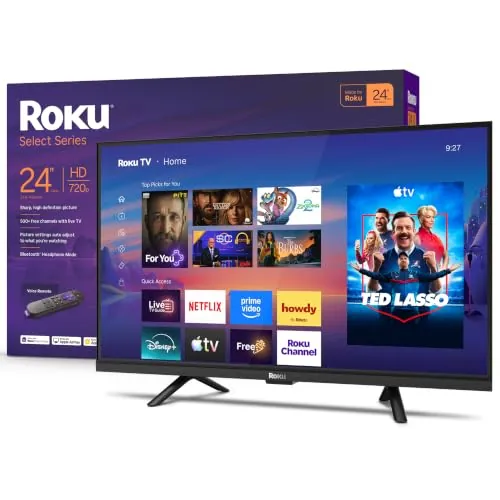
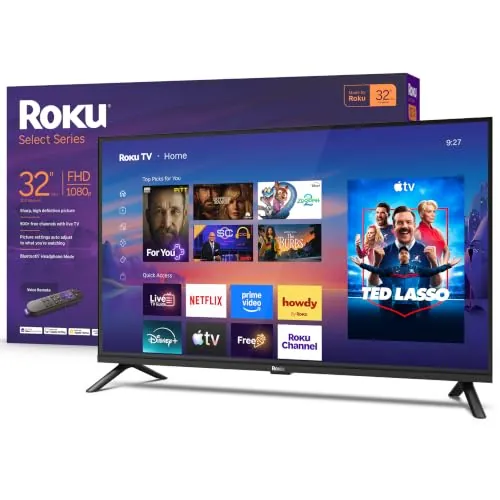
Roku Select Series HD 24-inch TVModel 24R2E5Roku Select Series Full HD 32-inch TVModel 32R3E5

The exact 24R2E5 is a 23.6-inch 720p HD set; the 32R3E5 is a 31.5-inch 1080p Full HD set. Roku lists their outer body dimensions and 200 × 200 mm VESA patterns, but the support table does not give the tabletop foot span. For a stand, measure the furniture and the feet with the TV assembled; for a wall mount, match the VESA pattern and the different model-specific screw sizes. Roku lists the same series port set for both, so confirm the exact port labels and positions before routing cables.

Choose by what matters to you

Choose Roku Select Series HD 24-inch TV 24R2E5

Choose the 24R2E5 when its smaller 23.6-inch screen class and listed body width better suit the room or furniture, and 720p HD meets your stated need. For tabletop setup, do not assume the 21.1-inch listed body width equals the space occupied by its feet; confirm the assembled stand's contact span and depth.

Check price on Amazon

Choose Roku Select Series Full HD 32-inch TV 32R3E5

Choose the 32R3E5 when your space can accommodate its 31.5-inch screen class and you specifically want the listed 1080p Full HD format. Its listed body is wider and taller, and its wall-mount screw specification differs from the 24-inch model. This is a published-specification choice, not a claim about perceived picture quality.

Check price on Amazon

Keep comparing if you need 4K, independent picture-quality measurements, or a confirmed tabletop footprint before buying for a tight surface. Roku lists the 24R2E5 as 720p HD and the 32R3E5 as 1080p Full HD, but the support chart does not give their stand-foot spans. Measure the assembled stand before purchase.

As an Amazon Associate I earn from qualifying purchases.Affiliate disclosure

Products compared

Roku Select Series HD 24-inch TV · 24R2E5

Roku

Roku Select Series HD 24-inch TV

Black U.S. 2026 Select Series model; 23.6-inch diagonal and 720p HD per Roku's current product information and TV Finder.

Model 24R2E5
Amazon ASIN B0FV57SCBF
Check current price on Amazon
Roku Select Series Full HD 32-inch TV · 32R3E5

Roku

Roku Select Series Full HD 32-inch TV

Black U.S. 2026 Select Series model; 31.5-inch diagonal and 1080p Full HD. Keep it distinct from the 32R2E5 HD sibling.

Model 32R3E5
Amazon ASIN B0FV42FCHD

Check current price on Amazon

Differences that matter

What matters most to you?

Choose a priority to see what it changes.

Difference
Roku Select Series HD 24-inch TV
Roku Select Series Full HD 32-inch TV
Why it matters
Screen class and listed resolution
Roku Select Series HD 24-inch TV24-inch class, 23.6-inch diagonal; 720p HD (24R2E5).
Roku Select Series Full HD 32-inch TV32-inch class, 31.5-inch diagonal; 1080p Full HD (32R3E5).
The 32R3E5 is the option if you specifically want the higher listed pixel format and the larger screen class. That does not establish that it will look sharper in every room or at every distance. Do not confuse it with Roku's 32R2E5, which the Finder labels HD.
Sources for Screen class and listed resolution
Roku-listed body dimensions (H × W × D)
Roku Select Series HD 24-inch TV12.6 × 21.1 × 2.7 inches; 4.6 lb.
Roku Select Series Full HD 32-inch TV16.6 × 28.2 × 2.7 inches; 7.5 lb.
Use the listed width and height to screen a shelf opening, then measure the complete assembled TV for tabletop placement: Roku's support chart does not state the foot-to-foot support span or stand depth. Leave the exact table footprint unassumed.
Sources for Roku-listed body dimensions (H × W × D)
Wall-mount pattern and screw specification
Roku Select Series HD 24-inch TV24R2E5: 200 × 200 mm VESA; M4 × 10 mm screw size and hole depth listed; approx. 4.6 lb.
Roku Select Series Full HD 32-inch TV32R3E5: 200 × 200 mm VESA; M6 × 10 mm screw size and hole depth listed; approx. 7.5 lb.
The same VESA spacing does not mean the same hardware. Match the exact model's screw specification and the mount's supported load; check the TV's exact manual and mount instructions before installation.
Sources for Wall-mount pattern and screw specification
Listed input/output set
Roku Select Series HD 24-inch TVRoku's Select Series page lists 2 HDMI + 1 HDMI ARC, composite, cable/antenna and USB-A inputs, plus optical output.
Roku Select Series Full HD 32-inch TVThe same series-level list applies to the 32R3E5 family entry; confirm the physical port labels/positions on this exact model for a tight cable plan.
If your setup depends on a specific source, ARC connection or cable route, check the rear-panel diagram for the exact model before mounting. Roku presents this port list at series level rather than a separate per-model table in the page reviewed.
Sources for Listed input/output set

Confirm the suffix before you compare resolution

Roku's current TV Finder calls 24R2E5 a 24-inch HD TV and 32R3E5 a 32-inch Full HD TV. The 32R3E5 is listed at 1080p Full HD, while the 24R2E5 is listed at 720p HD. Roku also has a 32R2E5 HD sibling, so the 32-inch size by itself is not enough to identify the Full HD model.

Use resolution as a stated format preference, not proof that one screen will look better in every seat. This comparison has no matched picture-quality test or validated viewing-distance threshold.

Measure the table with the stand installed

Roku's support chart lists 24R2E5 at 12.6 × 21.1 × 2.7 inches and 32R3E5 at 16.6 × 28.2 × 2.7 inches (height × width × depth). These figures help screen the opening and panel envelope, but Roku does not give the legs' outer span or their complete tabletop contact area in the chart.

Before ordering for a tight console, check that the actual stand feet land fully on the usable surface. Compare the outer width between the legs and the front-to-back contact area with the space you have; leave room for plugs and cables. Do not use the advertised screen diagonal or body width as the stand footprint.

Wall mounting: same pattern, model-specific screws

Roku lists 200 × 200 mm VESA spacing for both exact E5 models. The support table gives different screw specifications: M4 × 10 mm for 24R2E5 and M6 × 10 mm for 32R3E5, with approximate weights of 4.6 and 7.5 pounds respectively. Check the exact TV and mount instructions and load rating; the shared hole spacing does not make their hardware identical.

Plan connections before routing cables

Roku's Select Series product page lists two HDMI plus HDMI ARC, composite, cable/antenna and USB-A inputs, with optical output. The list is shared at series-page level rather than presented as separate port-position drawings for these two exact models. If you depend on a specific input or a tight cable bend, confirm the exact rear panel and leave access for the plug before mounting.

Product details

Roku Select Series HD 24-inch TV

Exact screen and resolution
23.6-inch diagonal, 24-inch class; HD (720p) Source
Listed dimensions and wall mounting
Roku support lists 12.6 × 21.1 × 2.7 inches (H × W × D), 200 × 200 mm VESA, 4.6 lb, and M4 × 10 mm screw size/hole depth Source

Roku Select Series Full HD 32-inch TV

Exact screen and resolution
31.5-inch diagonal, 32-inch class; Full HD (1080p) Source
Listed dimensions and wall mounting
Roku support lists 16.6 × 28.2 × 2.7 inches (H × W × D), 200 × 200 mm VESA, 7.5 lb, and M6 × 10 mm screw size/hole depth Source

Before you buy

  • Read the full model code before checkout: 32R3E5 is the Full HD option here; Roku also lists a 32R2E5 Select Series HD model. A 32-inch size label alone does not settle the resolution.
  • For a tabletop, measure the available surface and check the actual stand legs: compare the feet's outer span and front-to-back contact area with the usable furniture surface. The Roku support chart gives TV dimensions, not a numeric stand-foot footprint.
  • For a wall mount, both exact models use 200 × 200 mm VESA, but Roku lists M4 × 10 mm screws for 24R2E5 and M6 × 10 mm for 32R3E5. Confirm your mount's load rating and the supplied/required screw details for the exact TV.
  • Roku lists the port set on a Select Series page. If a particular HDMI/ARC, composite, antenna, USB-A or optical connection is essential, confirm the exact TV's rear-panel layout and leave cable bend/access space before mounting.

Common questions

Is the Roku Select Series 32R3E5 HD or Full HD?

Roku’s TV Finder labels the 32R3E5 as a 32-inch Full HD model. Roku also lists the 32R2E5 as a separate 32-inch HD model, so check the final model suffix rather than relying on screen size alone.Find which Roku TV to buy – Roku TV Finder

What size table do I need for the included legs?

Roku's wall-mount specification table gives body dimensions, but it does not give the stand legs' outer span or full tabletop contact footprint. Measure the actual stand with legs attached and make sure every contact point sits on the usable surface; do not treat the TV body width as the foot span.How to choose a wall mount for your TVRoku Select Series HD TVs: product details, inputs and model list

Can I use the same screws for a wall mount on both models?

Roku lists a 200 × 200 mm VESA pattern for both, but the support table specifies M4 × 10 mm for 24R2E5 and M6 × 10 mm for 32R3E5. Follow the exact TV and mount instructions; matching VESA spacing alone does not establish screw compatibility.How to choose a wall mount for your TV

Do the TVs have different connections?

Roku's current Select Series page lists the shared series connections as 2 HDMI + 1 HDMI ARC, composite, cable/antenna and USB-A, with optical output. It does not give a separate port-position diagram in that text for each exact model, so verify the rear panel if connection location matters to your setup.Roku Select Series HD TVs: product details, inputs and model list

Sources and scope

This is a specification and placement guide, not a picture-quality test. Roku's support chart gives model-specific body dimensions and wall-mount details but does not list the tabletop support footprint between the legs. Verify the assembled stand's width and depth for a tight surface fit. The Select Series port list is presented at series level; check the rear labels on the exact model when a particular input or port location is essential.
  1. Roku Select Series HD TVs: product details, inputs and model list
  2. How to choose a wall mount for your TV
  3. Find which Roku TV to buy – Roku TV Finder