Products compared
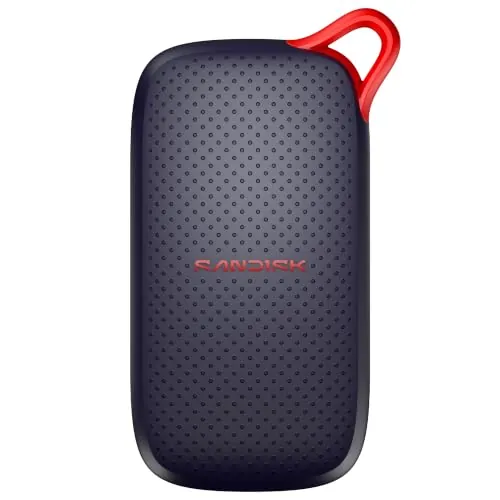
SanDisk
SanDisk Portable SSD V3 1TB
U.S. 1TB Portable SSD V3; model code checked against the official product page.
Model SDSSDE31-1T00-G25
Amazon ASIN B0H4H1SNMY
Samsung
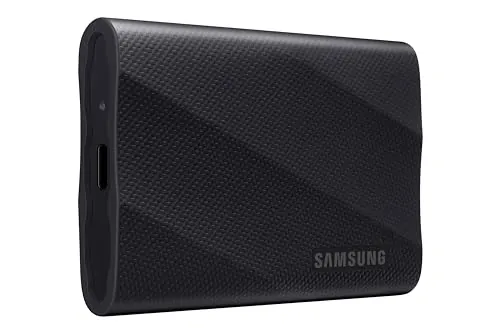
Samsung Portable SSD T9 1TB
U.S. black 1TB T9; manufacturer datasheet model code MU-PG1T0B/AM.
Model MU-PG1T0B/AM
Amazon ASIN B0CHFSWM2P
Differences that matter
What matters most to you?
Choose a priority to see what it changes.
Sources for USB interface and maker-rated ceiling
Sources for Cable contents documented by the makers
Sources for Published body dimensions
Sources for Exact 1TB model code
Start with the host port, not the speed number
SanDisk specifies USB 3.2 Gen 2 for the 1TB V3 and lists up to 1,000 MB/s sequential read. Samsung specifies USB 3.2 Gen 2x2 for the T9 and lists up to 2,000 MB/s read and 1,950 MB/s write. These are manufacturer maximums under specified test conditions, not a head-to-head result or a promise for your computer. Samsung also says host, cable and system environment affect transfer speed.
Before deciding, find the exact USB mode in the computer or tablet specification. A USB-C port can support different USB generations; its shape alone does not show that it supports Gen 2x2. If it does not, the T9's listed interface ceiling does not describe the performance you should expect. The sources reviewed here do not establish real transfer rates for your device or workload.
Choose the cable path you need
Samsung's T9 datasheet lists both a USB Type-C-to-C and USB Type-C-to-A cable with its 1TB model code MU-PG1T0B/AM. That gives the package a documented cable option for a compatible USB-A host as well as USB-C, although the host port still determines the supported connection mode.
SanDisk's official 1TB product page lists the drive under In The Box but does not enumerate a cable in the page text. That is not enough to say a cable is absent from every retailer or regional package. If the listing's cable matters to your setup, check the exact seller contents; otherwise include a compatible cable in your purchase plan.
Check carry dimensions and exact 1TB codes
The SanDisk family datasheet lists a 45 × 85 × 10 mm body and 33.2 g; it cautions that exact weight can vary by capacity. Samsung lists the T9 at 88 × 60 × 14 mm and 122 g. On these listed dimensions, the SanDisk body is smaller. This can help when a drive needs to fit a small pocket or case, but these figures do not establish durability or handling performance.
Confirm the exact capacity before checkout: the SanDisk page names SDSSDE31-1T00-G25 for 1TB, while the T9 datasheet names MU-PG1T0B/AM. Seller titles can shorten model strings, so compare the detail page's model code and package contents with your intended connection.
A short pre-buy check
1. Confirm the computer's port generation and connector from its official specification. 2. Decide whether you need a C-to-C or C-to-A cable. 3. Match the product code to the 1TB capacity. 4. Check the drive's published dimensions against your storage pocket, with cable clearance in mind. 5. For a phone, tablet, console, or app-specific workflow, verify the host maker's current external-drive and file-system requirements; this comparison does not establish a universal format or app workflow.
Product details
SanDisk Portable SSD V3 1TB
Choose by port support and the exact cable bundle rather than the maximum-read figure alone. SanDisk lists the 1TB model as SDSSDE31-1T00-G25; its family sheet gives the smaller listed body dimensions in this pair.
- Capacity and model
- 1TB; SDSSDE31-1T00-G25 Source
- Interface
- USB 3.2 Gen 2; USB-C connector Source
- Manufacturer maximum sequential read
- Up to 1,000 MB/s; actual results depend on host and usage conditions Source
- Family-sheet dimensions and weight
- 45 × 85 × 10 mm; 33.2 g listed for SDSSDE31 family; exact weight may vary by capacity Source
Samsung Portable SSD T9 1TB
The T9's Gen 2x2 interface and two documented cable types matter only when they match the host and the buyer's connection routine. The maker's maximum figures are not a guarantee for a particular computer or workload.
- Capacity and model
- 1TB; MU-PG1T0B/AM Source
- Interface
- USB 3.2 Gen 2x2 (20Gbps) Source
- Manufacturer maximum sequential figures
- Up to 2,000 MB/s read and 1,950 MB/s write; host, cable and system dependent Source
- Listed dimensions and weight
- 88 × 60 × 14 mm; 122 g Source
- Listed cables
- USB Type-C-to-A cable and USB Type-C-to-C cable Source
Before you buy
Community discussions
A MacBook M4 buyer asks whether a Thunderbolt 4 cable changes T9 transfers
Samsung Portable SSD T9 1TB
A buyer asks whether connecting a Samsung T9 to a MacBook M4 with a Thunderbolt 4 cable would transfer files faster than a regular USB-C cable. The post does not specify T9 capacity or item code and does not report an answer confirmed by testing.
What to check
Check the exact T9 interface, MacBook port, and cable specification together. The cable's Thunderbolt label alone does not confirm the drive's negotiated connection or transfer rate; use an environment-equivalent test if actual speed is decisive. This is a T9-family question, not evidence specific to the 1TB package.
Common questions
Does USB-C mean the T9 will run at USB 3.2 Gen 2x2 speed?
No. USB-C describes the connector shape. Samsung specifies USB 3.2 Gen 2x2 for the drive; check the host specification for that exact interface and treat the listed ceilings as maker maxima, not a transfer guarantee.Samsung Portable SSD T9 data sheet
Which 1TB model has a documented USB-A cable in the box?
Samsung's T9 datasheet lists a USB-C-to-A cable and a USB-C-to-C cable for MU-PG1T0B/AM. SanDisk's 1TB page lists the drive in its in-box text without enumerating a cable; check the seller's exact package before ordering.SanDisk Portable SSD V3 1TB product specificationsSamsung Portable SSD T9 data sheet
Is the SanDisk smaller?
By the makers' published dimensions, yes: the SanDisk SDSSDE31 family sheet lists 45 × 85 × 10 mm, while Samsung lists 88 × 60 × 14 mm for the T9. These are listed dimensions, not a handling or toughness test.SanDisk Portable SSD family datasheetSamsung Portable SSD T9 data sheet
Sources and scope
Manufacturer specifications and box-content documentation only. No hands-on transfer test, independent benchmark, file-system comparison or historical price analysis was performed.