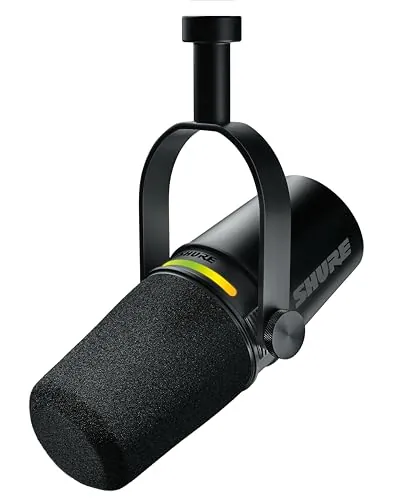
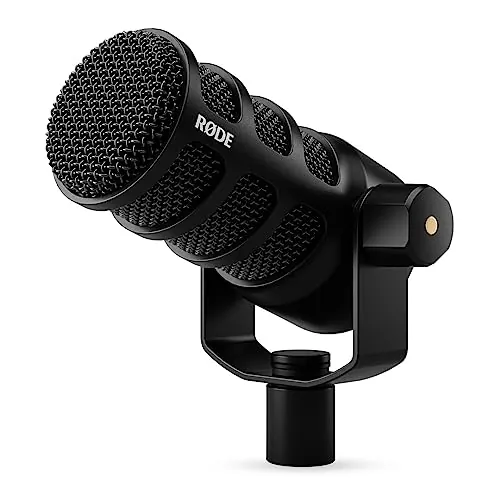
The Shure MV7+ and RØDE PodMic USB share USB-C and XLR connections, so the connector list alone does not choose a winner. Shure documents a touch-panel mute and lock; RØDE has a physical headphone-level knob, whose mic-mute action depends on Connect or UNIFY over USB. On XLR, both rely on the analog signal path; use your interface or mixer for mic mute unless Shure’s touch behavior is confirmed in your exact chain.
Choose by what matters to you
Choose Shure MV7+ Podcast Microphone, Black MV7+-K
Your USB workflow benefits from a touch-panel mic mute and lock. If you plan to record over XLR, Shure’s guide does not specify whether that touch control silences the analog output, so plan an interface/mixer mute unless you confirm your exact setup.
Choose RØDE PodMic USB Dynamic Broadcast Microphone, Black PODMICUSB
You prefer a physical headphone-level knob and are comfortable with its mute conditions: Connect or UNIFY is needed for the knob to mute the mic over USB; over XLR, use the interface or mixer. Both models offer USB-C and XLR, so those shared connections are not a reason to favor one.
If simultaneous USB-and-XLR earlier product-page information, a particular boom-arm adapter, or an exact in-box cable/mount is essential, confirm the precise signal routing and package for the assigned SKU with the manufacturer or seller before purchase. The reviewed sources do not settle simultaneous earlier product-page information or every box accessory.
RØDE PodMic USB Dynamic Broadcast Microphone, Black
Why it matters
Shared USB-C and XLR routes
Shure MV7+ Podcast Microphone, BlackUSB-C and XLR; the MV7+ guide calls XLR a passive analog output and says software settings do not affect it.
RØDE PodMic USB Dynamic Broadcast Microphone, BlackUSB-C and XLR; RØDE says the XLR connection carries analog audio without digital device information or metadata.
Either can fit a USB desk setup or an XLR interface/mixer in principle, but their USB software behavior does not carry across as a feature of the analog route. The sources do not confirm simultaneous capture from both outputs on either mic.Sources for Shared USB-C and XLR routes
Shure MV7+ Podcast Microphone, BlackThe MV7+ guide documents LED-panel touch mute and a lock setting; it does not specify whether touch mute silences analog XLR.
RØDE PodMic USB Dynamic Broadcast Microphone, BlackThe PodMic USB has a physical headphone-level knob. RØDE says Connect/UNIFY is needed for the knob to mute the mic over USB; without those apps it mutes headphone monitoring only.
For USB, choose the touch-panel control or knob/app workflow you prefer. For XLR, plan to mute at the interface or mixer unless the Shure panel behavior is confirmed in your exact chain.Sources for Mic mute and physical controls
Shure MV7+ Podcast Microphone, BlackThe Shure guide documents a headphone output and a monitor-mix setting for microphone and computer audio.
RØDE PodMic USB Dynamic Broadcast Microphone, BlackThe PodMic USB product page documents a headphone output and physical level knob.
A buyer who wants to adjust the monitoring mix at the mic should review Shure’s guide; one who wants a physical headphone-level control can consider RØDE’s knob. This describes controls, not monitored sound or latency results.Sources for Headphone monitoring
Shure MV7+ Podcast Microphone, BlackShure’s USB settings are not applied to its analog XLR output; exact included mounting adapters and cables should be checked against the MV7+-K offer.
RØDE PodMic USB Dynamic Broadcast Microphone, BlackRØDE software detection/features require USB; its support material describes XLR as analog. Confirm included mount, adapters and cables on the exact PODMICUSB offer.
Before ordering, match the intended computer/app or interface route and verify the exact arm thread/adapter and box contents; the sources do not support a blanket arm-compatibility or accessory-package guarantee.Sources for Host, mount and package checks
Both the MV7+ and PodMic USB offer USB-C and XLR. The distinguishing question is how the USB features interact with that route: Shure says software settings do not affect its passive analog XLR output, and RØDE says XLR carries no digital device information for its software. Neither reviewed source set confirms simultaneous capture through both connections.
For a USB setup, check the app and control you want. For XLR, plan an interface or mixer and treat its mute and routing as the relevant hardware workflow.
Shure documents touch-to-mute on the MV7+ LED panel and a lock setting, alongside a headphone output and monitor-mix setting. Its guide does not say whether that touch mute silences analog XLR.
RØDE gives the PodMic USB a physical headphone-level knob, but the mute result changes with the route: Connect or UNIFY lets the knob mute mic and monitoring over USB; without those apps the knob mutes monitoring only. Over XLR, RØDE directs mic mute to the interface or mixer.
If your setup depends on a boom arm, adapter, cable or stand, verify those pieces against the exact MV7+-K or PODMICUSB offer and your host/interface. The cited documentation supports the signal paths and controls but does not guarantee compatibility with every arm or establish every exact-offer accessory.
USB-C and XLR; Shure describes the XLR output as passive analog and says software settings do not affect it. Source
Panel and monitoring
LED-panel touch mute with a lock setting; headphone output and monitor-mix controls are described in the guide. Source
RØDE PodMic USB Dynamic Broadcast Microphone, Black
Connections and software path
USB-C and XLR; RØDE says its software cannot detect the mic over XLR because XLR carries analog audio without digital device information. Source
Headphone control and mute
Physical headphone-level knob; RØDE says its mic-mute action requires Connect or UNIFY over USB, while over XLR mute at the interface or mixer. Source
Before you buy
Both assigned models have USB-C and XLR. Treat those connectors as shared fit; do not assume both outputs record at once.
If choosing MV7+ over XLR, plan a mute control at the interface/mixer unless you verify touch mute in your exact chain; Shure’s guide does not specify its effect on analog XLR.
If choosing PodMic USB, install/use Connect or UNIFY if you need the knob to mute the microphone over USB. Without the apps, RØDE says the knob mutes headphone monitoring only.
Check the exact MV7+-K or PODMICUSB offer for mount adapters and included cables. Confirm host/app requirements for your chosen USB route and use the interface/mixer’s supported XLR inputs for analog routing.
Does the PodMic USB headphone knob mute the microphone?
RØDE says it mutes both mic and headphone monitoring when used with Connect or UNIFY. Without those apps it mutes headphone monitoring only; over XLR, mute at the interface or mixer.How to Mute the PodMic USB
Can I use the MV7+ touch mute over XLR?
Shure documents touch mute and separately says software settings do not affect the passive analog XLR output, but its guide does not state whether the touch control silences XLR. Use interface/mixer mute unless you confirm the behavior in your own route.MV7+ Podcast Microphone User Guide
This is a feature-fit guide based on official product/support materials, not a sound-quality or recording test. Both microphones have USB-C and XLR, but the sources do not establish simultaneous capture through both outputs. Shure’s guide does not say whether touch mute silences analog XLR; RØDE documents the PodMic USB knob’s USB software dependency. The reviewed source set does not settle every mount adapter or package item for the exact retail offers, so confirm those before ordering.