
Products compared
Sonos
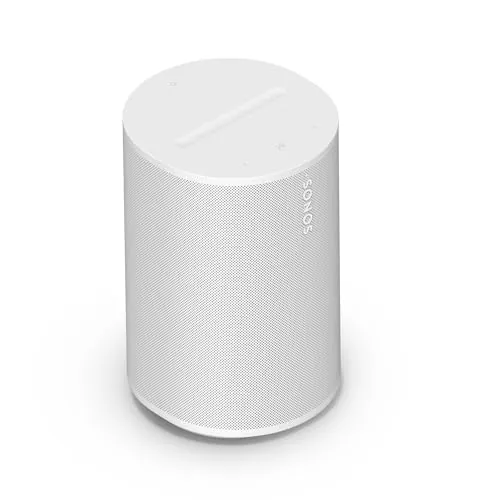
Sonos Era 100 (White)
U.S. white, standard Era 100 listing (not Era 100 SL); one speaker. Exact retailer identity snapshot lists model E10G1US1.
Model E10G1US1
Amazon ASIN B0BW2LVJ4P
Amazon
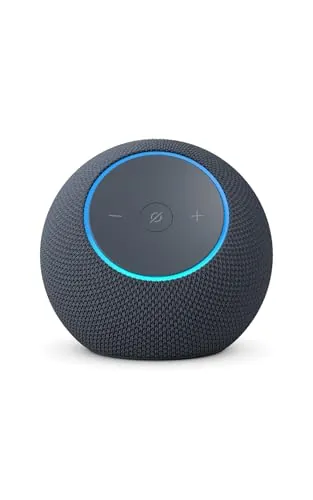
Amazon Echo Dot Max (Graphite)
Graphite U.S. single-speaker listing; Amazon safety information identifies Echo Dot Max model MA49CA.
Model MA49CA
Amazon ASIN B0D6SX8VLQ
Differences that matter
Sources for First setup and controlling app
Sources for Audio source and wired input
Start with the app and home system you want to extend
The product identities in this comparison are the white standard Sonos Era 100 (E10G1US1) and the Graphite Amazon Echo Dot Max (MA49CA). Sonos lists both Sonos Voice Control and Amazon Alexa for Era 100; its app and Wi-Fi are part of initial setup. Echo Dot Max uses the Alexa app, internet/Wi-Fi and an Amazon account.
That makes app/account fit the first practical check. If other rooms are already in Sonos, the Era 100 can use the Sonos app for grouping and room control. If routines and smart-home devices are already managed in Alexa, Echo Dot Max has a documented path through that app. Alexa also appears on the Sonos product page, so treat the difference as setup workflow and listed features, not an exclusive assistant claim.
Match the audio source and input before you buy
Era 100 documents Wi-Fi streaming, Bluetooth and Apple AirPlay 2. A wired turntable or other 3.5 mm source is possible with the Sonos Line-In Adapter and an auxiliary cable, both sold separately; Sonos says this line-in connection is not intended for TV.
Amazon’s Alexa help documents linking supported music services and selecting a default in the Alexa app. If you need wired input or AirPlay, verify that route for the exact Echo Dot Max before buying; this comparison does not confirm either capability.
Plan how audio reaches other rooms
If you already have Sonos speakers, Sonos documents a useful Era 100 route: set it up on Wi-Fi, pair the phone over Bluetooth, then group the Era 100 with other Sonos products in the app. It must stay grouped while sharing the Bluetooth audio.
Amazon says video-content audio does not play in Alexa Multi-Room Music groups. These are distinct within-brand workflows; confirm with both makers if you need Era 100 and Echo Dot Max to play together in one group, since this guide does not establish cross-brand grouping.
Check smart-home routine requirements
Amazon lists Echo Dot Max as a device with Presence Detection and describes routines that can start when an Echo detects someone nearby. Amazon also lists Echo Dot Max (2025 release) for Matter. For a practical check, write down the exact routine trigger and the Matter device category, then confirm current support in Alexa for your region and account.
Amazon lists Echo Dot Max as Matter-compatible but does not confirm a Thread border-router role here. If your setup needs that function, verify it for the exact model before buying. Sonos’s listed assistant options also do not establish whether it supports other smart-home integrations; check current product details if one is essential.
Verify the exact listing and accessories
The white retailer listing B0BW2LVJ4P is standard Era 100, model E10G1US1. Sonos presents Era 100 SL separately and describes it as without voice control. If voice control matters, confirm the product name and ASIN rather than relying on a broad “Era 100” search result.
Amazon’s official safety information identifies Echo Dot Max model MA49CA. Amazon’s setup instructions call for its power adapter. The Amazon detail pages are cited only to verify the exact retail identity; current seller, package and offer details should still be checked on the selected listing.
Product details
Sonos Era 100 (White)
- Setup and voice options
- Initial use requires a nearby outlet, internet/Wi-Fi and the latest Sonos app on a compatible device. Sonos lists Sonos Voice Control and Amazon Alexa for Era 100, with voice-service availability varying by country and language. Source
- Audio paths
- Sonos lists Wi-Fi streaming, Bluetooth 5.3 and Apple AirPlay 2. A 3.5 mm wired source requires the separately sold Sonos Line-In Adapter and auxiliary cable. Source
- Bluetooth room grouping
- After Wi-Fi and Sonos-app setup, Era 100 Bluetooth audio can be grouped with other Sonos products; the speaker must stay grouped for sharing to continue. Source
Amazon Echo Dot Max (Graphite)
- Setup requirements
- Amazon setup instructions call for the Alexa app, Wi-Fi/internet, an Amazon account and the included power adapter. Source
- Presence-triggered routines
- Amazon lists Echo Dot Max among Echo devices with Presence Detection and describes routines that can start when the device detects someone nearby. Source
- Matter role
- Amazon lists Echo Dot Max (2025 release) as a Matter-compatible Echo. Verify the exact Matter device category and connection requirements for your smart-home device. Source
Before you buy
Community discussions
Planning a projector source in a Sonos home
Sonos Era 100 (White)
An owner with two Sonos Five speakers added an Era 100 when planning how to use a projector with their existing Sonos rooms.
What to check
List the sources and speakers you want to use together. Check the current ways the exact devices can connect and how you would start playback.
Planning controls for a multi-room gym setup
Sonos Era 100 (White)
A Sonos owner put four Era 100 speakers in a home gym and wanted an easier way to select the two groups for playback.
What to check
If you listen in multiple spaces, check how you would choose which speakers play together in the app you intend to use.
Common questions
Is this the Sonos Era 100 or Era 100 SL?
The white listing ASIN B0BW2LVJ4P is standard Era 100, model E10G1US1. Sonos lists Sonos Voice Control and Alexa for standard Era 100 and presents Era 100 SL separately as a model without voice control. Check the name and ASIN before checkout.Sonos Era 100 (White) — U.S. product page and specifications
Can Era 100 Bluetooth audio play through other Sonos rooms?
Sonos lists Era 100 among the products that can share Bluetooth audio when grouped with other Sonos products. It must first be set up and connected to Sonos over Wi-Fi, and it needs to remain grouped for the sharing to continue.Pair Sonos Era 100 with Bluetooth — Sonos SupportShare Bluetooth audio with your Sonos system — Sonos Support
Does Echo Dot Max support presence routines and Matter?
Amazon’s Alexa support page lists Echo Dot Max for Presence Detection routines, and Amazon’s developer documentation lists Echo Dot Max (2025 release) as Matter-compatible. Check that the routine and your specific Matter device category are supported for your account, app and region.How Do Alexa Occupancy Routines Work? — Amazon Alexa SupportConnect Your Device to Alexa with Matter — Amazon Alexa Developer Docs
Can either speaker be called the better-sounding option here?
No. This guide did not run a matched listening test or measure loudness, bass or room coverage. Choose by the documented app, input, routine and grouping workflows instead.Sonos Era 100 (White) — U.S. product page and specificationsHow to Set Up Your Echo Dot Max — Amazon Alexa Support
Sources and scope
This guide compares documented setup and feature workflows only; neither speaker was handled or tested. It makes no listening, loudness, bass, room-coverage or reliability comparison. Alexa features overlap across the products, so an unlisted feature is not treated as absent. Voice-service availability varies by country, language, account and terms. Amazon documents Echo Dot Max as Matter-compatible, but this guide cannot confirm a Thread border-router role. Check the exact devices, apps and streaming services supported in your region before purchase.
- Sonos Era 100 (White) — U.S. product page and specifications
- Control Sonos with Amazon Alexa — Sonos Support
- Pair Sonos Era 100 with Bluetooth — Sonos Support
- Share Bluetooth audio with your Sonos system — Sonos Support
- How to Set Up Your Echo Dot Max — Amazon Alexa Support
- How Do Alexa Occupancy Routines Work? — Amazon Alexa Support
- Connect Your Device to Alexa with Matter — Amazon Alexa Developer Docs
- Safety and Compliance Information for Echo Dot Max — Amazon
- About Music Streaming Services and Alexa — Amazon Alexa Support
- Play Music with Multiple Alexa Devices — Amazon Alexa Support
Related comparisons
Echo Dot 5th Gen vs Echo Dot Max: Size, Smart Home and Audio Setup
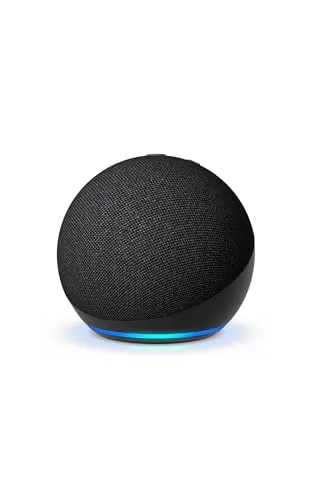
Echo Dot (5th Generation) C2N6L4 has one front-firing speaker. Echo Dot Max MA49CA has a two-way layout and a built-in smart-home hub that Amazon documents for compatible Zigbee, Matter and Thread devices. Both use Wi-Fi setup and an external adapter. Start with the devices you want to control and the available outlet, then check the exact unit’s fit.
Read comparison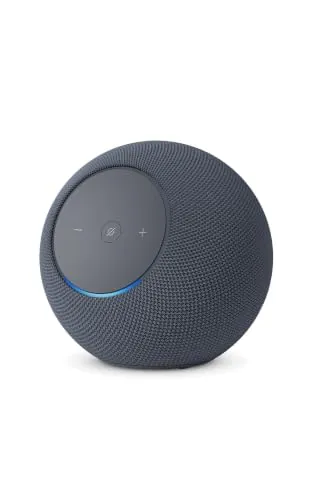
Echo Studio (2025) vs Echo Dot Max: Shelf Fit and Fire TV Setup
Amazon lists the Echo Dot Max as the smaller of these two Graphite, single-speaker models. Both use an included power adapter, Alexa app and Wi-Fi setup, support Bluetooth pairing, and appear in Amazon's current Alexa Home Theater compatibility list. Check the exact Fire TV and speaker configuration before adding either model; the compatibility list does not itself prove that a Studio and Dot Max can be mixed in one group.
Read comparison