
Products compared
Soundcore
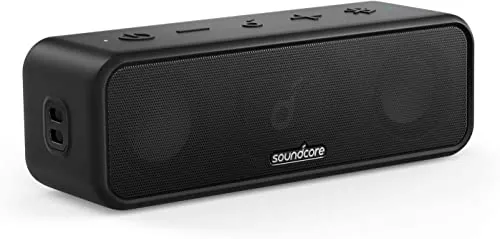
Soundcore 3 Bluetooth Speaker (Black)
Single black Soundcore 3, model A3117. Soundcore lists USB-C charging, app EQ and PartyCast for compatible speakers, and says this model has no AUX-in.
Model A3117
Amazon ASIN B08BCHKY52
Soundcore
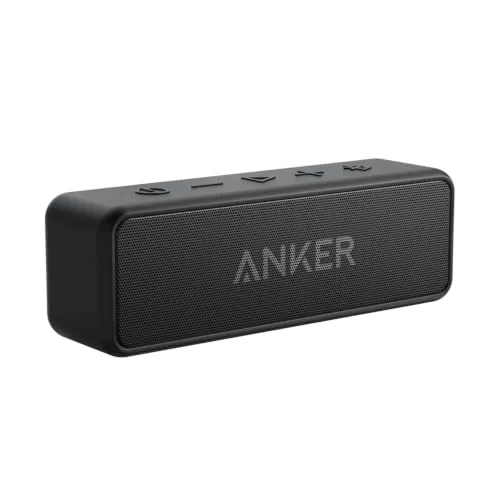
Soundcore 2 Portable Speaker (Black)
Single black Soundcore 2, model A3105. The A3105 documentation cited here lists Micro-USB charging and AUX-in. Because Soundcore 2 revisions exist, check the physical port and exact seller unit before ordering.
Model A3105
Amazon ASIN B01MTB55WH
Differences that matter
What matters most to you?
Choose a priority to see what it changes.
Sources for Connect a wired audio source
Sources for Use the charging cable you already have
Sources for Adjust sound or link additional speakers
Sources for Add a second Soundcore 2
Start with the source you need to connect
If a record player, older laptop, or other source must feed the speaker over a 3.5 mm cable, Soundcore 2 is the straightforward documented option: Soundcore lists AUX-in on that model and none on Soundcore 3. Soundcore 3's USB-C connection is listed for charging, not as a wired audio input. Check the source's output and make sure you have the appropriate cable; the reviewed sources do not establish that an AUX cable is included in either selected Amazon package.
If the source will be Bluetooth, compare charging instead. Soundcore 3 uses USB-C and Soundcore 2 uses Micro-USB. That can determine which cable you carry or leave by a desk, but it says nothing by itself about charge time, battery life, or sound performance.
Pick the controls and linking method you expect to use
Soundcore 3 adds app EQ controls and PartyCast. The current U.S. Soundcore 3 page describes four EQ presets or a custom setting and says PartyCast links compatible soundcore speakers. If you already own a speaker you want to add, check its exact model against the PartyCast compatibility information before choosing; the brand name alone is not a compatibility list.
Soundcore describes Soundcore 2 as lacking app support and using TWS to pair two speakers. These are different linked-speaker options; the available manufacturer information does not establish cross-system pairing.
Check the Soundcore 2 revision before planning a pair
Soundcore says its newer Soundcore 2 revision is functionally identical to the older revision apart from the Bluetooth chip, but the two revisions cannot TWS-pair with one another. It identifies Bluetooth 6.0 as the new version; its serial guidance says character seven is C for the new revision and 0 or 1 for the old one.
The black A3105 retail listing does not identify which revision an individual unit will be. If you plan to buy a second Soundcore 2, check both serials with Soundcore before relying on TWS. If you will use one speaker by AUX or Bluetooth, this revision question does not settle the choice.
What these specifications cannot decide
These sources answer which documented inputs, controls, and pairing workflows each model offers. They do not establish which speaker sounds better in a room, how long either will play at your volume, or how reliably a multi-speaker setup will behave in your environment. Use a controlled comparison of the exact versions if one of those outcomes is the deciding factor.
Product details
Soundcore 3 Bluetooth Speaker (Black)
This is the option to shortlist when USB-C charging, app EQ, or the PartyCast workflow fits your setup. PartyCast is explicitly limited to compatible speakers; the feature name alone does not establish compatibility with every Soundcore model.
- Charging connection
- USB-C; the manufacturer describes it as a recharging connection. Source
- Wired audio input
- No AUX-in, according to Soundcore's direct Soundcore 2 versus Soundcore 3 comparison. Source
- App controls and speaker linking
- Soundcore lists selectable or custom EQ in its app and PartyCast linking with compatible Soundcore speakers. Source
Soundcore 2 Portable Speaker (Black)
This is the documented fit when you need AUX-in or the Micro-USB charging connection. Soundcore 2 is not listed with Soundcore-app support in the maker comparison. The exact revision in the selected retail ASIN is not established by that comparison.
- Charging connection
- Micro-USB, according to Soundcore's direct model comparison and charging guide. Source
- Wired audio input
- AUX-in, according to Soundcore's direct Soundcore 2 versus Soundcore 3 comparison. Source
- Two-speaker setup
- Soundcore lists two-speaker TWS; its support page says old and new A3105 versions cannot TWS-pair with each other. Source
Before you buy
Community discussions
Laptop shopper weighs the Soundcore 2’s auxiliary input
Soundcore 2 Portable Speaker (Black)
A shopper comparing Soundcore 2 and Soundcore 3 for laptop use says an AUX input matters for their setup.
What to check
Check the input on the exact revision you plan to buy and make sure it matches your laptop’s audio output.
Common questions
Can I use Soundcore 3 with a 3.5 mm AUX cable?
No AUX-in is listed for Soundcore 3 in Soundcore's direct comparison, while Soundcore 2 is listed with AUX-in. If a wired 3.5 mm input is essential, the documented fit here is Soundcore 2.The Main Differences Between Soundcore 2 and Soundcore 3 Speaker
Does Soundcore 3's USB-C port connect laptop audio?
The manufacturer describes the port as a USB-C charging connection. The sources checked do not document USB audio input, so do not buy it on the assumption that a USB cable will carry computer audio.Soundcore 3 Bluetooth Speaker Black (A3117 family page)
Can any two Soundcore 2 speakers pair in TWS?
Soundcore says old and new Soundcore 2 revisions cannot TWS-pair with each other. Its identification guidance uses Bluetooth 6.0 and the seventh serial character to distinguish revisions. Confirm both units before buying the second speaker.What are the differences between the two versions of Soundcore 2?How to tell whether Soundcore 2 is the new or old version
Are PartyCast and Soundcore 2 TWS the same pairing system?
No. Soundcore's comparison describes PartyCast for Soundcore 3 and two-speaker TWS for Soundcore 2. Check the compatibility list for the exact speakers you plan to connect; the sources do not establish cross-compatibility between these systems.The Main Differences Between Soundcore 2 and Soundcore 3 SpeakerSoundcore 3 Bluetooth Speaker Black (A3117 family page)
Sources and scope
This comparison covers black Soundcore 3 A3117 (ASIN B08BCHKY52) and black Soundcore 2 A3105 (ASIN B01MTB55WH). Soundcore’s comparison and support pages describe model families; the selected Soundcore 2 listing does not establish which Bluetooth revision an individual retail unit has. Check both serials before planning a two-speaker TWS pair. USB-C is documented here as charging, not USB audio input. No listening, runtime, durability or connection-performance test was performed, and no sound-quality winner is claimed.
- The Main Differences Between Soundcore 2 and Soundcore 3 Speaker
- Soundcore 3 Bluetooth Speaker Black (A3117 family page)
- Soundcore 2 Portable Speaker, U.S. product page
- How to Turn On and Charge the Speaker
- What are the differences between the two versions of Soundcore 2?
- How to tell whether Soundcore 2 is the new or old version
- Guide to Locating the Serial Number of Soundcore Speakers
Related comparisons
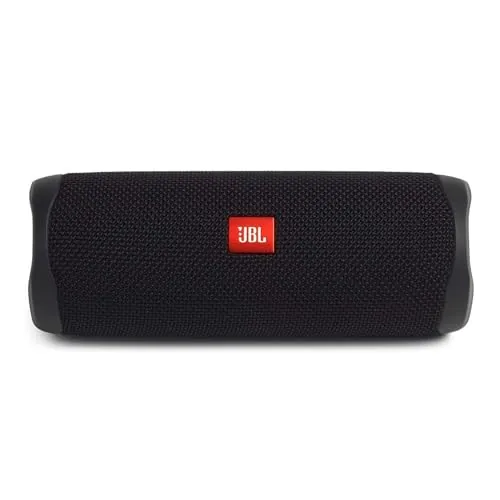
Soundcore 2 vs JBL Flip 5: AUX, PartyBoost and Charging
Soundcore 2 is the fit when you need an analog AUX input; JBL Flip 5 is the fit for an existing compatible PartyBoost group. Before buying a second Soundcore 2, verify that both units are the same hardware revision. These differences do not establish a sound-quality or runtime winner.
Read comparison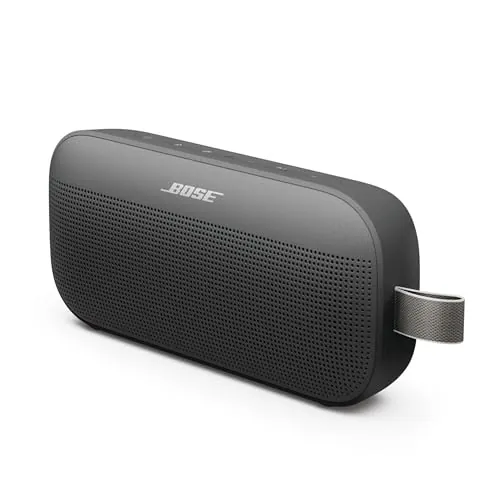
Bose SoundLink Flex (2nd Gen) vs Soundcore 2 A3105: Which Setup Fits?
The Bose SoundLink Flex (2nd Gen) has an official USB-C-to-A cable in the box and a documented two-source connection flow. Soundcore 2 A3105 uses a different documented speaker-linking path, but its old and new hardware revisions cannot TWS-pair with each other. Check the exact Soundcore unit label and connector before planning a second-speaker setup; neither source set proves an audible or battery-life winner.
Read comparison