Products compared
SteelSeries
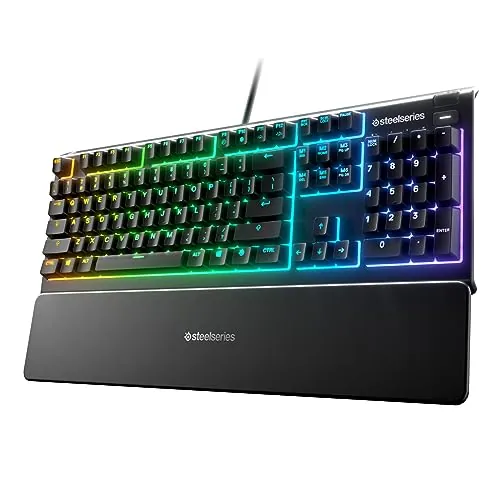
SteelSeries Apex 3 Gaming Keyboard - Black
Black, English (USA), full-size configuration; do not substitute the Apex 3 TKL variant.
Model 64812
Amazon ASIN B07ZGDPT4M
Logitech G
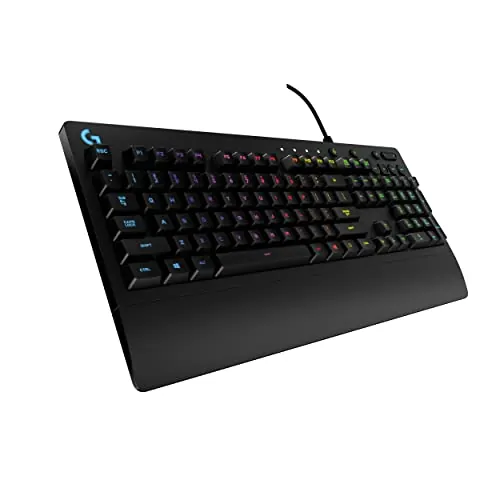
Logitech G213 Prodigy RGB Gaming Keyboard - Black
Black G213 Prodigy keyboard. Logitech’s current U.S. product page displays code 920-008083; verify the model and package for an offer labeled 920-009284.
Model 920-009284
Amazon ASIN B07QGHK6Q8
Differences that matter
What matters most to you?
Choose a priority to see what it changes.
Sources for Wrist-rest construction
Sources for Media-control layout
Sources for Lighting zones and configuration
Sources for Configuration scope
Choose the wrist-rest setup that fits your desk
The SteelSeries U.S. page configured to black, English (USA), full size describes a wrist rest that attaches magnetically. Logitech describes the G213 Prodigy palm rest as integrated and lists two-level angle adjustment. Decide whether you want to detach or reposition a rest, or keep it built into the keyboard; no comfort advantage is established.
Keep the exact configuration in view. SteelSeries offers the Apex 3 TKL separately, but this comparison covers the full-size option. The G213 offer here is labeled 920-009284, while Logitech’s current U.S. page displays 920-008083; verify the seller’s exact model and package before purchase.
Match the physical controls to how you use media
Apex 3 combines a clickable metal roller with media keys for volume and playback. G213 lists separate playback, mute, volume and skip buttons. If you use a keyboard to adjust music or video while working or gaming, choose the arrangement you can recognize and reach without changing your routine; the feature list does not show a speed or reliability winner.
For lighting and key customization, SteelSeries support directs users to connect Apex 3 and configure it through GG's Engine/PRISM path. Logitech says G HUB can customize the G213's five LIGHTSYNC zones and assign key functions. Confirm current software support for your host before depending on those options.
Check package identity before placing the order
The listed products are SteelSeries Apex 3 part 64812, black and full-size, and Logitech G213 part 920-009284. SteelSeries offers an Apex 3 TKL separately. Logitech’s current U.S. G213 page displays product code 920-008083. The available information does not establish whether the Logitech offer and page describe the same package, so confirm the exact seller model and included items before ordering.
Product details
SteelSeries Apex 3 Gaming Keyboard - Black
- Wrist-rest arrangement
- SteelSeries describes a magnetic wrist rest with magnetic attachment; the rest is presented as an Apex 3 feature. Source
- Physical media controls
- Clickable metal roller plus media keys for volume and playback-related controls. Source
- Lighting zones
- Customizable 10-zone RGB on the full-size Apex 3; Apex 3 TKL is a different configuration and is excluded. Source
- Lighting software path
- SteelSeries support describes configuration in GG under Engine/PRISM with the keyboard connected to a computer. Source
Logitech G213 Prodigy RGB Gaming Keyboard - Black
- Wrist-rest arrangement
- G213 Prodigy has an integrated palm rest and two-level angle adjustment. Source
- Physical media controls
- Dedicated buttons for play, pause, mute, volume and skip. Source
- Lighting zones and software
- Logitech lists five customizable LIGHTSYNC zones and G HUB for RGB and key-function customization on the G213 Prodigy page. Source
Before you buy
Community discussions
Keeping a playback key in reach while working
SteelSeries Apex 3 Gaming Keyboard - Black
Someone who switches between work and personal computers chose an Apex 3 because their work laptop lacked the playback key they used to pause music before calls.
What to check
Check where each keyboard puts play/pause and volume controls, and whether you can reach them comfortably with your usual keyboard and wrist-rest setup.
Common questions
Can I remove the wrist rest from either keyboard?
SteelSeries describes the Apex 3 wrist rest as magnetically attachable. Logitech describes the G213 Prodigy rest as integrated; the available product material does not describe it as detachable.Apex 3 US — Black, English (USA), Full SizeG213 Prodigy Gaming Keyboard — U.S. product page
Do the media controls work the same way?
No. Apex 3 uses a clickable metal roller and media keys; G213 lists individual play, pause, mute, volume and skip buttons. The comparison does not test which is quicker or more dependable.Apex 3 US — Black, English (USA), Full SizeG213 Prodigy Gaming Keyboard — U.S. product page
Do I need the configuration apps to type?
The cited support pages describe software paths for lighting and extra customization, but do not establish that either app is required for basic keyboard input. Check current host support if those custom settings matter to you.Apex 3 RGB configurationG213 Prodigy Gaming Keyboard — U.S. product page
Is this the Apex 3 TKL?
No. This comparison covers the black, English (U.S.), full-size Apex 3, part 64812. Apex 3 TKL is a separate, smaller configuration; check the exact listing.Apex 3 US — Black, English (USA), Full SizeSteelSeries keyboard feature comparison
Sources and scope
No hands-on test supports claims about comfort, typing feel, noise, latency or durability. The G213 offer considered here is identified as part 920-009284, while Logitech’s current U.S. G213 page displays 920-008083. The available information does not confirm whether the offer and page describe the same package. Verify the exact seller model and included parts.