
Products compared
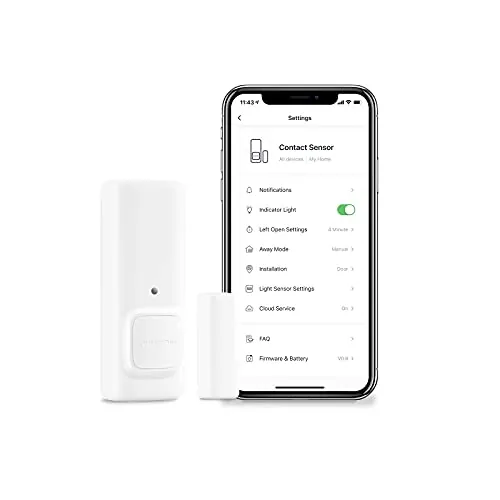
SwitchBot
SwitchBot Contact Sensor
White contact sensor for the SwitchBot app and ecosystem.
Model W1201500
Amazon ASIN B094XZ8H5H
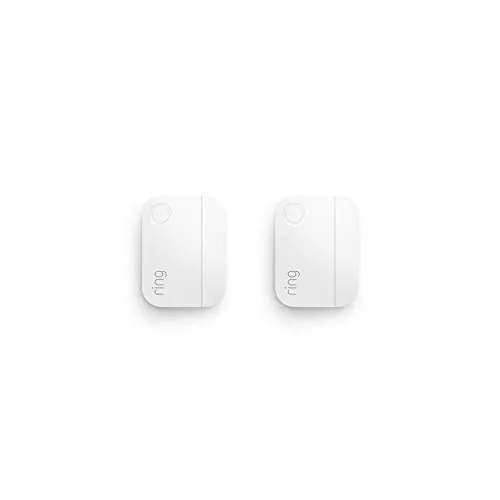
Ring
Ring Alarm Contact Sensor (2nd Gen), 2-Pack
Ring’s U.S. product page confirms this second-generation configuration includes two contact sensors. Use it with Ring Alarm or Alarm Pro.
Model 53-023663
Amazon ASIN B07ZB2RNTW
Differences that matter
What matters most to you?
Choose a priority to see what it changes.
Sources for Phone-alert conditions
Start with the system you already own
These are not equivalent stand-alone app sensors. SwitchBot's U.S. guide starts by pairing Contact Sensor inside the SwitchBot app with phone Bluetooth. Its current notification instructions add the important requirement: a SwitchBot hub product must be in the app for Contact Sensor push notifications. SwitchBot lists Hub Mini, Hub 2, Hub Mini Matter Enabled and Hub 3, and says to place the hub within Bluetooth range of the sensor.
Ring's Contact Sensor (2nd Gen) is part of Ring Alarm. Ring requires an Alarm or Alarm Pro system and says to configure the Base Station before adding the sensor in the Ring app. If you already use Ring Alarm, check that your system and account setup meet the current requirement; if you do not, include the Base Station hardware in your purchase decision.
Separate local system behavior from phone notifications
For SwitchBot, the current support instructions describe the hub and app notification settings as part of enabling push notifications. Do not assume that an app pairing over Bluetooth by itself provides the away-from-home behavior you want; plan around the hub requirement and verify the notification setting in your account.
For Ring, the sensor connects to an Alarm or Alarm Pro system. Ring's U.S. plan page says a compatible subscription allows self-monitoring phone alerts to the account and Shared Users. Without a subscription, the Alarm siren sounds when triggered, but digital notifications are not sent. That is a feature and service distinction, not a claim about response time or monitoring effectiveness. Review current plan terms separately; this article does not state a plan price.
Measure the closed frame and battery access
Before ordering, measure the actual closed door or window at the intended mounting point, note whether the frame has a lip or offset, and reserve access for a later battery change. SwitchBot's W1201500 page lists the sensor at 70.5 × 25.5 × 23 mm and the magnet at 35 × 12 × 12.5 mm. Its U.S. sliding-door article says to align their bottom edges and keep them within 30 mm for that installation. Ring lists a 2.09 × 1.12 × 0.55-inch sensor, asks for a gap no greater than 1 inch and calls for 1/2 inch of clearance to slide the sensor open.
Ring also describes offset and angled mounting and a slim magnet for some frame shapes. Those options may help with a particular geometry, but they are not a guarantee that it will fit your door. SwitchBot's within-30-mm instruction is specific to the described sliding-door installation; it is not a matched test of maximum sensing distance against Ring's specification.
Check pack quantity and future battery access
The Ring 53-023663 listing is a two-pack, while the U.S. Ring support page gives technical specifications for one Contact Sensor. Each sensor uses two CR2032 cells, so plan for two cells per device and confirm the exact two-pack before ordering. The package can cover separate openings, provided each location meets the maker's fit guidance.
SwitchBot's U.S. battery article lists two AAA alkaline cells for Contact Sensor. Ring's support specification says up to three years for its CR2032 pair depending on use and notes cold can shorten life. SwitchBot's Japan W1201500 page gives a typical life under a stated daily use pattern at 25°C. Since the stated conditions differ, use the battery type and service access to plan upkeep rather than reading those figures as a head-to-head battery-life result.
Product details
SwitchBot Contact Sensor
- Phone setup and notifications
- SwitchBot's U.S. setup guide uses the SwitchBot app and phone Bluetooth to pair. Its current notification guide says a SwitchBot hub product is needed for Contact Sensor push notifications. Source
- Sensor and magnet dimensions
- 70.5 × 25.5 × 23 mm sensor; 35 × 12 × 12.5 mm magnet, as listed on SwitchBot's Japan W1201500 page. Source
- Battery type
- Two AAA alkaline batteries for Contact Sensor, per SwitchBot's U.S. battery guidance. Source
Ring Alarm Contact Sensor (2nd Gen), 2-Pack
- System requirement
- Ring says Contact Sensor (2nd Gen) requires Ring Alarm or Ring Alarm Pro, sold separately. Source
- Size and battery
- Sensor listed at 2.09 × 1.12 × 0.55 inches; two included CR2032 cells, with life stated as up to three years depending on usage. Source
- Mounting and battery access
- Ring's U.S. installation guidance calls for no more than a 1-inch sensor-to-magnet gap and 1/2 inch of clearance to slide the sensor open for battery service. Source
Before you buy
Community discussions
Checking the clearance on a deeper door frame
Ring Alarm Contact Sensor (2nd Gen), 2-Pack
A homeowner asked about sensor fit after replacing a door and frame. A reply pointed them to Ring’s second-generation contact sensor guide.
What to check
Compare the available flat space on the door and frame with the maker’s dimensions and clearance requirements for both pieces.
Common questions
Can either sensor send phone alerts without its hub or base station?
The cited SwitchBot support article says a SwitchBot hub product is needed for Contact Sensor push notifications. Ring says its second-generation Contact Sensor requires Ring Alarm or Alarm Pro. Ring's U.S. plan page further says no-subscription self-monitoring does not send digital notifications, even though the siren sounds when the Alarm is triggered.How to Enable Push Notifications for SwitchBot Contact SensorContact Sensor (2nd Gen), U.S. specificationsWhich Ring Alarm Plan Is Right for You? (U.S.)
Does the Ring listing cover one opening or two?
The selected listing B07ZB2RNTW is titled as a Ring Alarm Contact Sensor 2-Pack (2nd Gen). Because marketplace offers can change or be misselected, verify that the seller page still identifies the two-pack and model 53-023663 before checkout. Ring's sensor specification page describes an individual Contact Sensor, so its dimensions and battery requirement apply per sensor.Contact Sensor (2nd Gen), U.S. specificationsRing U.S. 2-Pack Alarm Window and Door Contact Sensor (2nd Generation)
Which one fits a narrow or uneven door frame?
There is no measured fit winner here. Ring's guide documents offset or angled placement, a slim magnet option, a 1-inch maximum gap and 1/2 inch of service clearance. SwitchBot's U.S. article gives alignment and within-30-mm guidance for sliding-door installation; the exact W1201500 dimensions are on SwitchBot Japan's page. Measure your frame and follow the applicable model instructions before selecting either one.Tips for Installing Contact Sensor (2nd Gen)How to Install the SwitchBot Contact Sensor on a Sliding DoorSwitchBot Contact Sensor (W1201500), Japan manufacturer specifications
Are their battery-life claims directly comparable?
No. Ring says its two CR2032 cells may last up to three years depending on use and cold can shorten life. SwitchBot's W1201500 Japan page gives a typical estimate with a specified daily activity pattern and 25°C condition. Those conditions are not a matched test, so choose by battery format and access rather than a claimed winner.Contact Sensor (2nd Gen), U.S. specificationsSwitchBot Contact Sensor (W1201500), Japan manufacturer specifications
Sources and scope
This guide compares documented setup, alert prerequisites, package identity and fit-planning information for the assigned U.S. retailer offer. It does not test sensing, notifications, range, reliability, alarm response or security effectiveness. SwitchBot's exact W1201500 dimensions and usage figures come from its Japan product page; they do not establish U.S. package or warranty details. The available SwitchBot and Ring mounting statements are instructions for different contexts, not a controlled comparison of maximum detection gaps.
- How to set up Contact Sensor
- How to Enable Push Notifications for SwitchBot Contact Sensor
- SwitchBot Contact Sensor (W1201500), Japan manufacturer specifications
- How to Install the SwitchBot Contact Sensor on a Sliding Door
- What Batteries Should I Use With My SwitchBot Devices?
- Contact Sensor (2nd Gen), U.S. specifications
- Tips for Installing Contact Sensor (2nd Gen)
- Which Ring Alarm Plan Is Right for You? (U.S.)
- Ring U.S. 2-Pack Alarm Window and Door Contact Sensor (2nd Generation)