
Products compared
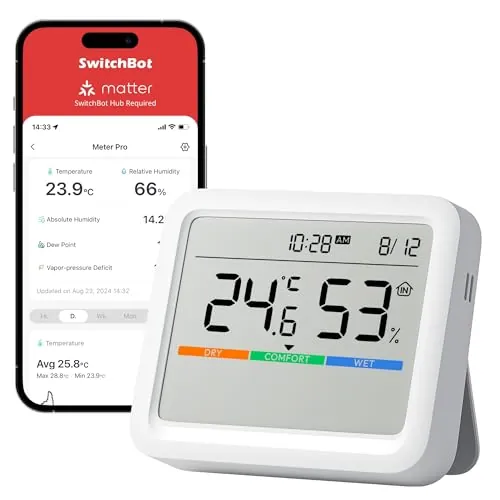
SwitchBot
SwitchBot Meter Pro
U.S. single-meter listing; the standard Meter Pro, not the separate Meter Pro CO2 Monitor.
Model W4900000
Amazon ASIN B0DBVCTW6N
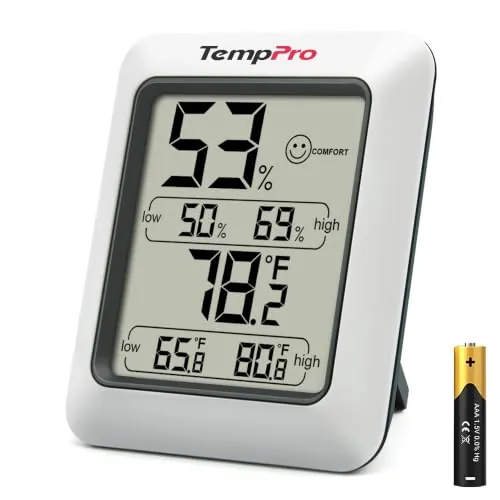
TempPro
TempPro TempAir CORE TP50
U.S. single-meter listing; confirm that the selected retailer option is one TP50, since the maker also offers multi-packs.
Model TP50
Amazon ASIN B01H1R0K68
Differences that matter
What matters most to you?
Choose a priority to see what it changes.
Sources for Checking from another room or away from home
Sources for Reading recent changes
Sources for Mounting at the intended spot
Sources for Battery to keep on hand
Choose the monitoring route before the meter
If you need a phone notification when you are away, SwitchBot documents that route for Meter Pro with a separately purchased Hub, an app connection, and configured alert ranges. The product also supports a local sound-and-screen alert setting, which is distinct from remote phone delivery. Treat the hub and setup as part of the decision, not as an included feature of the single meter.
TP50 is for nearby checking: TempPro says it requires you to be close enough to read it, and its model table lists no wireless technology or transmission range. If that matches your routine, it avoids planning a connected notification setup. Neither statement guarantees that a notification will arrive in every environment.
Decide where you want to read the history
TempPro says the TP50 display keeps daily temperature and humidity highs and lows alongside current readings. That makes the screen itself the check-in point. SwitchBot lists a 4-second collection interval, 68 days of local storage, and two years of app cache, and describes exporting data. These are different ways to review readings; they do not prove that one meter measures more accurately.
Before buying, ask whether you want a quick daily-extreme check on the device or an app/export workflow with a longer stated storage window. The official TP50 product page and its support article disagree about calibration and tolerance, so those figures are left out of the recommendation.
Check the mounting surface and box variant
SwitchBot lists tabletop or wall placement and an adjustable stand for Meter Pro. TempPro lists three TP50 positions: tabletop stand, magnetic back, and hanging mount. Try the intended location before deciding: confirm that a magnetic surface is suitable, that the display will be visible, and that you can reach the meter for its normal checks.
The target pair is a single W4900000 Meter Pro and a single TP50. SwitchBot separately names W4900010 as the CO2 Monitor, while TempPro's page offers several pack counts. Recheck the selected model and quantity in the retailer listing rather than assuming a family name or product-page default identifies the same package.
Product details
SwitchBot Meter Pro
The standard W4900000 Meter Pro combines temperature and humidity with time/date and comfort information on its display. SwitchBot documents a configured phone-alert route, but it depends on a separately purchased Hub and app setup.
- Remote alert requirement
- A separately purchased SwitchBot Hub and app alert setup are required for smartphone notifications. Source
- Data collection and storage
- 4-second collection interval; 68 days of local storage and 2 years of app cache are listed by SwitchBot. Source
- Placement and power
- Tabletop or wall placement with an adjustable stand; powered by 2 included AA batteries. Source
TempPro TempAir CORE TP50
TP50 is a nearby-check meter: its maker documents current readings, daily high/low display, and a three-level comfort indicator. It lists tabletop, magnetic, and hanging placement and does not list a wireless connection for this model.
- Readings
- Temperature and humidity are updated every 10 seconds; the display shows daily high and low readings. Source
- Wireless listing
- The maker's TP50 comparison table lists wireless technology and transmission range as N; its product page says remote checking requires being nearby. Source
- Placement and power
- Tabletop stand, magnetic back, or hanging mount; powered by 1 AAA battery. Source
Before you buy
Community discussions
A preference for high and low readings on the screen
TempPro TempAir CORE TP50
A reader in a room-thermometer discussion preferred the TP50 because the device shows maximum and minimum temperatures on its screen.
What to check
If you want high and low readings without opening an app, compare the TP50 screen routine with the SwitchBot setup and choose the display workflow that fits the room.
Common questions
Can the single SwitchBot Meter Pro send phone alerts by itself?
No. SwitchBot's alert guide says smartphone notifications require a Hub. Add the Meter Pro in the app, set the alert ranges, and enable the alert route you want. Its local sound-and-screen alert setting is separate from phone notifications.SwitchBot Meter Pro Alert Conditions Feature
Does TP50 show daily highs and lows, or only the current reading?
TempPro says TP50 displays daily high and low temperature and humidity readings as well as current measurements. It describes the TP50 as a nearby-check device and lists no wireless technology for this model.TempPro TempAir CORE TP50 Digital Indoor Thermometer and Humidity Gauge
Is the SwitchBot Meter Pro in this comparison the CO2 model?
No. The SwitchBot model table identifies this Meter Pro as W4900000; Meter Pro CO2 Monitor W4900010 is a separate model.SwitchBot API device model names
Which one is more accurate or calibratable?
No accuracy winner is established. TempPro’s current TP50 product page and TP50 support article conflict on tolerance and calibration, and this comparison has no controlled test of the units. Ask TempPro to clarify the exact TP50 revision if those specifications affect your purchase.TempPro TempAir CORE TP50 Digital Indoor Thermometer and Humidity GaugeTP50 Accuracy
Sources and scope
This is a source-based feature-fit comparison, not a hands-on test. TempPro's current TP50 product page and its TP50 support article conflict on stated temperature/humidity tolerance and whether calibration is possible; this guide excludes both claims as purchase advantages. No accuracy, readability, battery-life, alert-delivery, or reliability winner is established. The comparison covers only one standard SwitchBot Meter Pro W4900000 and one TP50, not the CO2 model or multi-packs.