Products compared
TP-Link
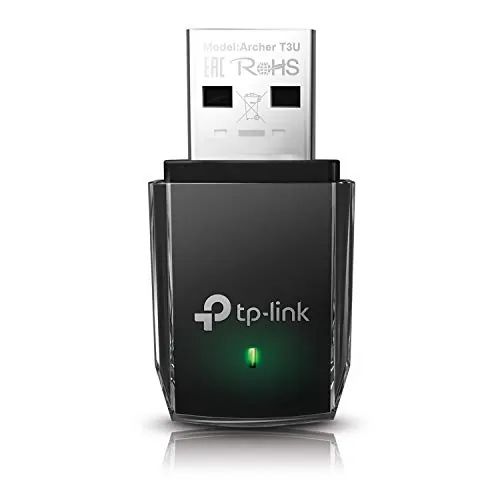
TP-Link Archer T3U AC1300 Mini USB Wi-Fi Adapter
TP-Link Archer T3U. The retail listing does not identify its hardware revision; check the revision-specific support information for your operating system.
Model Archer T3U
Amazon ASIN B07P6N2TZH
TP-Link
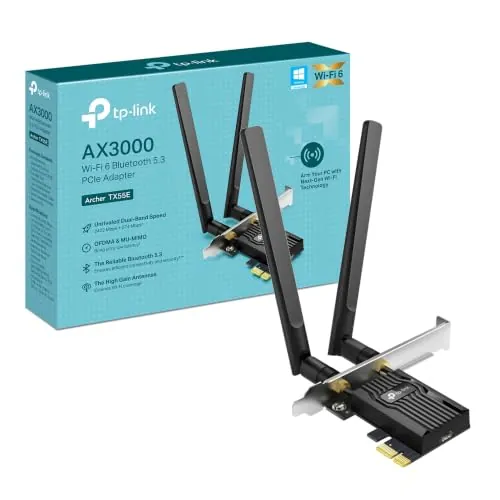
TP-Link Archer TX55E AX3000 Wi-Fi 6 Bluetooth 5.2 PCIe Adapter
TP-Link Archer TX55E. The retail listing does not identify its hardware revision; check the version before relying on operating-system support. Bluetooth requires the included internal USB cable and a motherboard F_USB header.
Model Archer TX55E
Amazon ASIN B0B1NRGDQ4
Differences that matter
Sources for Wireless standard and feature fit
Sources for Operating-system and driver verification
Start with the computer you will install it in
The Archer T3U uses an external USB 3.0 port. TP-Link describes it as a mini adapter and its setup flow uses the computer’s USB port. The Archer TX55E is an internal PCIe card; its maker lists both standard and low-profile brackets and two external antennas. So the first question is not which label has the larger number: is this going into a laptop or a desktop with a slot and room for an expansion card?
If you want one adapter that can be unplugged and moved between compatible computers, the USB form factor gives you that option. If the target desktop has an appropriate free PCIe slot and you are comfortable checking the case bracket and card clearance, the TX55E adds an internal Wi-Fi 6 adapter. These are installation trade-offs, not claims about which connects better.
Check the motherboard before choosing TX55E
The TX55E’s Wi-Fi connection is on the PCIe card, but TP-Link documents Bluetooth through a separate internal USB cable. The cable connects the card to a motherboard F_USB header; TP-Link warns Bluetooth will not work if that connection is missing or incorrect. Confirm the header and case clearance in your motherboard and case documentation before choosing TX55E for Bluetooth.
TP-Link lists a low-profile bracket as included, in addition to the standard bracket. That helps identify a case-fit question, but it does not prove every small-form-factor PC has space for the card, antenna mounts or an available slot. Check your own chassis and board layout.
Match the OS and Wi-Fi standard to the exact revision
TP-Link lists the T3U as 802.11ac Wi-Fi 5, with U.S. product-page OS information that includes Windows and Mac OS X. Its support site shows separate T3U V1 and V1.60 entries. For example, the V1 download page lists Windows 10/11 and a separate Mac driver for Mac OS X 10.9–10.13. Do not assume those specific downloads apply to the exact retail unit until its hardware version is known.
The TX55E product page lists Wi-Fi 6 and Windows 10/11 64-bit only. TP-Link’s support selector lists multiple TX55E hardware revisions; the V1 page has a Windows 10/11 64-bit driver. Check the device revision and current driver page before purchasing, especially if your PC runs another operating system. The page’s rated Wi-Fi figures are physical rates, not test results, and Wi-Fi 6 functions such as OFDMA, MU-MIMO and 160 MHz require matching router support.
Pre-buy compatibility checklist
1. Identify whether the host is a laptop or desktop and confirm an available USB port or compatible PCIe slot.
2. For TX55E, measure expansion-card and antenna clearance, confirm the case bracket type, and check for a motherboard F_USB header if Bluetooth is required.
3. Check the exact hardware revision on the retail unit or packaging, then verify TP-Link has a driver for the computer’s OS. Do not infer support from a related T3U Plus, TX50E or other nearby model.
4. Check that the router supports the wireless features you expect to use, and do not treat maximum physical link rates as a promised connection speed.
Product details
TP-Link Archer T3U AC1300 Mini USB Wi-Fi Adapter
- Host connection
- USB 3.0 external adapter; TP-Link lists the T3U as a compact mini adapter. Source
- Wireless standard
- TP-Link lists dual-band 802.11ac (Wi-Fi 5), with up to 867 Mbps at 5 GHz and 400 Mbps at 2.4 GHz as physical link rates, not expected internet or file-transfer speeds. Source
- OS/driver check
- The U.S. product page lists Windows and Mac OS X system support; TP-Link’s revision selector separates T3U V1 and V1.60 downloads. Check the exact hardware label and driver listing for your operating system. Source
TP-Link Archer TX55E AX3000 Wi-Fi 6 Bluetooth 5.2 PCIe Adapter
- Host connection and fit
- Internal PCIe adapter with two external antennas; TP-Link lists standard and low-profile brackets. Check for a free compatible PCIe slot and whether the included bracket fits the case. Source
- Wireless and Bluetooth standards
- TP-Link lists Wi-Fi 6 (802.11ax) on 2.4 and 5 GHz plus Bluetooth 5.2. Its Wi-Fi features require corresponding router support; the standards do not guarantee a particular result. Source
- Bluetooth installation
- Bluetooth uses an included cable from the adapter to the motherboard’s F_USB header; TP-Link says Bluetooth will not work if that cable is not connected correctly. Source
Before you buy
Community discussions
Checking the case space for an internal adapter
TP-Link Archer TX55E AX3000 Wi-Fi 6 Bluetooth 5.2 PCIe Adapter
A first-time PC builder considered the Archer TX55E and wanted to know whether its antenna connections and bracket would fit their case.
What to check
Check your case’s bracket space and free slots for the TX55E. If you prefer a USB adapter, check which external port you can leave available.
Common questions
Can the Archer TX55E add Bluetooth just by fitting it in a PCIe slot?
No. TP-Link’s TX55E documentation describes a separate included cable from the card to the motherboard’s F_USB header and states Bluetooth will not work without the cable connected correctly. The Wi-Fi card uses PCIe; check for the separate header if Bluetooth matters.Archer TX55E AX3000 Wi-Fi 6 Bluetooth 5.2 PCIe Adapter — TP-Link U.S.Archer TX55E V1.26 User Guide — TP-Link
Which adapter works with my operating system?
TP-Link provides revision-specific support pages for both the T3U and TX55E. Its TX55E page lists Windows 10/11 64-bit. The retail listings do not state which hardware revision ships, so check the version and operating-system support for the unit you plan to buy.Download for Archer T3U — TP-Link U.S. SupportDownload for Archer TX55E — TP-Link U.S. SupportArcher TX55E AX3000 Wi-Fi 6 Bluetooth 5.2 PCIe Adapter — TP-Link U.S.
Will the TX55E deliver faster Wi-Fi than the T3U?
The published standards differ—Wi-Fi 6 for TX55E and Wi-Fi 5 for T3U—but the maker specifications do not establish actual throughput, range or latency in your computer and network. Confirm that your router supports the desired feature and treat the listed link rates as specifications, not a result guarantee.Archer T3U AC1300 Mini Wireless MU-MIMO USB Adapter — TP-Link U.S.Archer TX55E AX3000 Wi-Fi 6 Bluetooth 5.2 PCIe Adapter — TP-Link U.S.Archer TX55E V1.26 User Guide — TP-Link
Sources and scope
This compares manufacturer-listed features and computer fit; it is not a Wi-Fi throughput, range, latency, or Bluetooth performance test. Retail listings identify the T3U and TX55E model families but do not show the hardware revision in each package. Check the exact revision and operating-system support before buying. If choosing the TX55E for Bluetooth, confirm that your desktop has a free PCIe slot, enough case-bracket clearance, and an F_USB header.
- Archer T3U AC1300 Mini Wireless MU-MIMO USB Adapter — TP-Link U.S.
- Download for Archer T3U — TP-Link U.S. Support
- Download for Archer T3U V1 — TP-Link U.S. Support
- Archer TX55E AX3000 Wi-Fi 6 Bluetooth 5.2 PCIe Adapter — TP-Link U.S.
- Download for Archer TX55E — TP-Link U.S. Support
- Download for Archer TX55E V1 — TP-Link U.S. Support
- Archer TX55E V1.26 User Guide — TP-Link