
Products compared
TP-Link
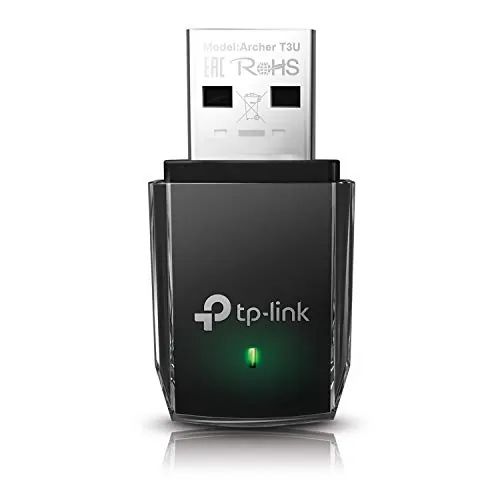
TP-Link Archer T3U AC1300 Mini Wireless MU-MIMO USB Adapter
TP-Link Archer T3U, black. The U.S. product page lists 802.11a/b/g/n/ac, USB 3.0, and an internal antenna. The retail listing does not state which hardware revision ships; check the revision-specific support information for your operating system.
Model Archer T3U
Amazon ASIN B07P6N2TZH
TP-Link
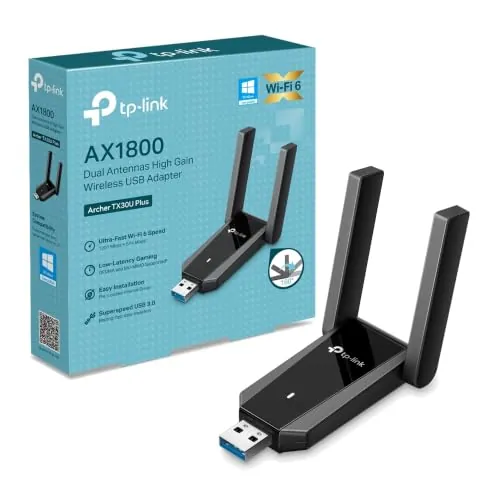
TP-Link Archer TX30U Plus AX1800 Dual-Antenna USB Wi-Fi Adapter
TP-Link Archer TX30U Plus, black. TP-Link lists 802.11ax alongside earlier standards, two adjustable, foldable dual-band antennas, and Windows 10/11 support. The retail listing does not identify its hardware revision; confirm the matching support information for your operating system.
Model Archer TX30U Plus
Amazon ASIN B0FJT8JWBG
Differences that matter
What matters most to you?
Choose a priority to see what it changes.
Sources for Wireless standard and router fit
Sources for Adapter form and antenna placement
Sources for USB and operating-system check
Sources for Hardware revision and matching driver
Match the wireless standard to your access point
TP-Link lists the Archer T3U with 802.11a/b/g/n/ac. The Archer TX30U Plus page adds 802.11ax, or Wi-Fi 6, to its listed standards. That makes the Plus the documented choice when 802.11ax support is specifically needed, but only if the access point and client support the corresponding features. Check the router’s model and specifications before paying for a standard it cannot use.
The pages also list AC1300 and AX1800 classes and band rates. Those are physical link-rate specifications, not a prediction of internet speed. TP-Link explicitly says actual throughput and coverage vary with the network, access point and environment; no matched adapter test is available here.
Choose the body and antenna style for the host position
TP-Link lists the T3U as a mini USB adapter with an internal antenna measuring 40.5 × 19.72 × 10.29 mm. The TX30U Plus has two high-gain dual-band antennas that adjust and fold; its listed dimensions are 43 × 13.5 × 78.1 mm. The T3U is shorter, while the Plus is longer and has external antennas that can be repositioned.
Before ordering, look at the USB ports on the actual computer and where the adapter will sit. Check for neighboring devices, the case or desk surface, and room to adjust or fold the Plus antennas. The product dimensions describe the adapter, not clearance on every laptop or desktop; neither model is established as having better reception in a particular room.
Check the hardware revision and driver before buying
TP-Link’s U.S. support pages offer V1 and V1.60 selections for both models and say hardware-version availability varies by region. The displayed V1.6 driver entries list Windows 10/11, but they do not show which revision a particular retail package contains. Check the package or adapter label and confirm the operating-system support for that version.
Use this order of checks: confirm the offer’s exact model name; confirm the operating system on the target computer; then match the hardware-version label on the adapter to the corresponding current TP-Link driver. If you cannot establish the revision before purchase, treat compatibility as unconfirmed until the received unit can be checked. This avoids transferring a support claim from another hardware version or a similarly named adapter.
Pre-buy check: router, port, and revision
Write down the router’s supported wireless standards and the host computer’s operating system. If you need 802.11ax, check that the access point supports the specific Wi-Fi 6 features you expect to use; otherwise, the T3U’s listed 802.11a/b/g/n/ac standards may fit the planned network. This is a protocol and feature check, not a promise of throughput.
Compare the adapter’s physical shape with the USB ports on your computer: the T3U has a compact body and internal antenna, while the TX30U Plus has a longer body with two adjustable, foldable antennas. Then check the exact hardware revision and operating-system support for the unit being sold.
Product details
TP-Link Archer T3U AC1300 Mini Wireless MU-MIMO USB Adapter
- Listed wireless standards
- IEEE 802.11a/b/g/n/ac; TP-Link labels it AC1300 class. Published link rates are physical-layer figures, not measured throughput. Source
- Antenna and size
- Internal antenna; 40.5 × 19.72 × 10.29 mm (W × D × H) per TP-Link. Source
- USB and revision support
- USB 3.0 interface. TP-Link US support page has V1 and V1.60 selectors; match the received revision to its current driver and the host OS. Source
TP-Link Archer TX30U Plus AX1800 Dual-Antenna USB Wi-Fi Adapter
- Listed wireless standards
- IEEE 802.11a/b/g/n/ac/ax; TP-Link lists up to 1201 Mbps on 5 GHz and 574 Mbps on 2.4 GHz as dynamic physical rates. These are not measured application speeds. Source
- Antennas and size
- Two high-gain dual-band antennas that adjust and fold; 43 × 13.5 × 78.1 mm (W × D × H) per TP-Link. Source
- Host and revision support
- TP-Link US model page lists Windows 10/11. US support page has V1 and V1.60 selectors; confirm the unit revision and matching current driver. Wi-Fi 6 features also require corresponding access-point support. Source
Before you buy
Community discussions
Checking the TX30U Plus against a Windows-and-Linux laptop setup
TP-Link Archer TX30U Plus AX1800 Dual-Antenna USB Wi-Fi Adapter
A laptop shopper considering the Archer TX30U Plus wanted one adapter for Windows 11 and Debian.
What to check
Confirm support for both operating systems on the exact adapter revision you plan to order.
Common questions
Does the TX30U Plus automatically make my connection faster?
No. TP-Link lists 802.11ax and AX1800 physical link-rate specifications for the TX30U Plus, but states real throughput and coverage are not guaranteed and depend on the access point, network and environment. This guide contains no speed test.Archer TX30U Plus AX1800 Dual Antennas High Gain Wireless USB Adapter — TP-Link US product page
Will Wi-Fi 6 features work with any router?
No. TP-Link says Wi-Fi 6 features such as OFDMA, MU-MIMO and 1024-QAM require the access point and client to support the corresponding features. Check the router’s own documentation before choosing the TX30U Plus for that reason.Archer TX30U Plus AX1800 Dual Antennas High Gain Wireless USB Adapter — TP-Link US product page
How do I know which driver to use?
TP-Link provides separate support pages for different hardware versions and says availability can vary by region. Check the version on the packaging or adapter, then confirm that the matching support page lists your operating system. The retail listing does not identify which revision ships.Archer T3U Download and hardware-version selector — TP-Link US SupportArcher TX30U Plus Download and hardware-version selector — TP-Link US Support
Is the TX30U Plus the same as a TX30U or TX20U Plus?
This guide compares the Archer T3U with the Archer TX30U Plus. TP-Link has separate pages for similarly named adapters, so check the full model name on the listing before buying.Archer TX30U Plus AX1800 Dual Antennas High Gain Wireless USB Adapter — TP-Link US product pageArcher TX30U Plus Download and hardware-version selector — TP-Link US Support
Sources and scope
This U.S.-market guide compares TP-Link’s listed specifications for the Archer T3U and Archer TX30U Plus. Retail listings identify the model names but do not show the hardware revision in each package. TP-Link provides version-specific support pages; confirm the exact revision and operating-system support before relying on compatibility. Wi-Fi 6 features require a compatible router and client. Published link rates are specifications, not measured internet speed, latency, stability, or coverage.
- Archer T3U AC1300 Mini Wireless MU-MIMO USB Adapter — TP-Link US product page
- Archer T3U Download and hardware-version selector — TP-Link US Support
- Archer TX30U Plus AX1800 Dual Antennas High Gain Wireless USB Adapter — TP-Link US product page
- Archer TX30U Plus Download and hardware-version selector — TP-Link US Support