
Products compared
TP-Link
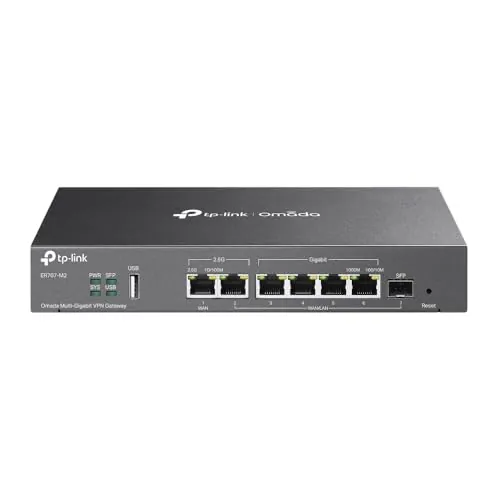
TP-Link Omada ER707-M2 Multi-Gigabit VPN Gateway
The U.S. listing identifies ER707-M2 but not its hardware revision. TP-Link's versioned U.S. documentation lists one fixed 2.5G WAN, one 2.5G WAN/LAN, four Gigabit RJ45 WAN/LAN ports and one Gigabit SFP WAN/LAN port. Verify the unit revision and matching feature table before depending on a version-specific function.
Model ER707-M2
Amazon ASIN B0C238XMVV
TP-Link
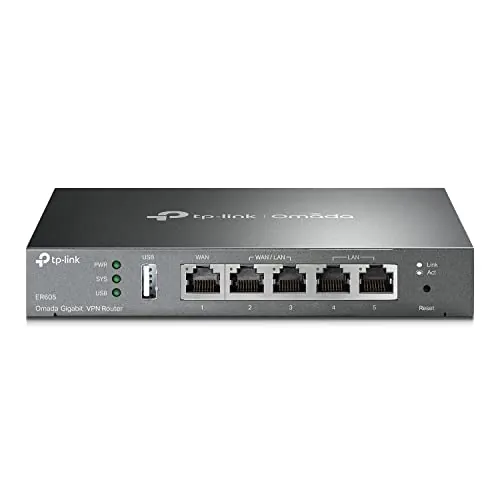
TP-Link Omada ER605 Gigabit VPN Router
The U.S. listing identifies ER605 but does not state its hardware version. TP-Link's U.S. V1 and V2 pages show different fixed and assignable port roles. Check the VER X.X marking on the exact unit's label before assigning WAN/LAN ports or relying on a version-specific feature description.
Model ER605
Amazon ASIN B08QTXNWZ1
Differences that matter
I need a 2.5G Ethernet path or a Gigabit SFP WAN/LAN option.
TP-Link Omada ER707-M2 Multi-Gigabit VPN Gateway · The ER707-M2 US interface table lists these interfaces; the ER605 V1/V2 interface tables list Gigabit RJ45 port layouts.
View ER707-M2 on Amazon (paid link)Sources for 2.5G and SFP links in the plan
Sources for ER605 hardware version changes the port map
Sources for Plan WAN roles rather than counting ports alone
Translate the port headline into a cable map
ER707-M2's US specification lists one fixed 2.5G WAN, one 2.5G WAN/LAN port, four Gigabit RJ45 WAN/LAN ports and one Gigabit SFP WAN/LAN port. The second 2.5G socket is configurable, not a second fixed WAN. The page's 'up to six WAN ports' wording refers to using supported WAN/LAN ports for WAN roles; it does not mean six permanently dedicated WAN sockets.
ER605 stays in the Gigabit family, but the fixed-versus-configurable map depends on the hardware version. V1 lists one fixed WAN, one fixed LAN and three configurable WAN/LAN ports. V2 lists one fixed WAN, two fixed LAN and two configurable WAN/LAN ports. Use the exact version page that matches the unit you will receive.
Confirm the ER605 version before deciding it fits
The product listing identifies ER605 but does not state V1, V2, V2.20 or V2.30. TP-Link says its hardware version appears as a VER X.X marking on the label underneath or behind the device. If your network needs a particular number of dedicated LAN sockets or assignable WAN/LAN ports, ask the seller for the revision or verify the physical unit before purchase.
The ER707-M2 product family also has separate revision documentation (V1, V1.20 and V1.30). The model name alone does not specify which unit ships, so use the matching page and firmware list for version-sensitive requirements.
Decide how you want to administer the gateway
TP-Link's ER707-M2 V1 table and ER605 V1/V2 tables list Omada App and Cloud Access with a compatible controller requirement. The versioned pages name the OC200, OC300, Omada Cloud-Based Controller and Omada Software Controller. A marketing overview that mentions the app should not be treated as proof that every app/cloud feature works without a controller.
TP-Link's mode guide says standalone setup is managed through Web UI; once a router is adopted by a controller, it cannot also be managed through Web UI. Some functions differ by mode. If you already run an Omada site, check the current compatibility list for the exact hardware version and firmware; if you want a single standalone router, plan around the Web UI and confirm the function you require is available in that mode.
Run this pre-order check on your own layout
1. List each physical connection: internet handoff, switch uplink, local wired devices and any SFP module. 2. Note the required link rate and whether each port must be WAN, LAN or assignable. 3. Compare that map with the page for the router's exact hardware version. 4. Mark whether the intended management feature needs standalone Web UI or an Omada controller. This turns a port-count headline into a compatibility check without assuming an untested network result.
ER707-M2's 2.5G and SFP paths are useful only if a planned peer and configuration can use them. If every connection is Gigabit RJ45, compare the ER605 revision's actual port roles and any controller-mode requirements before paying for unused interfaces.
Product details
TP-Link Omada ER707-M2 Multi-Gigabit VPN Gateway
- Documented physical interfaces
- US ER707-M2 V1 documentation lists 1 × 2.5G RJ45 WAN, 1 × 2.5G RJ45 WAN/LAN, 4 × Gigabit RJ45 WAN/LAN and 1 × Gigabit SFP WAN/LAN. The 2.5G pair is not two fixed WAN ports. Source
- Omada management scope
- The US V1 specification lists Omada App and Cloud Access, each requiring an OC300, OC200, Omada Cloud-Based Controller or Omada Software Controller. Check hardware revision and firmware before depending on version-sensitive functions. Source
TP-Link Omada ER605 Gigabit VPN Router
- Port roles vary by hardware version
- US V1 lists 1 fixed Gigabit WAN, 1 fixed Gigabit LAN and 3 changeable Gigabit WAN/LAN ports. US V2 documentation lists 1 fixed Gigabit WAN, 2 fixed Gigabit LAN, 2 changeable Gigabit WAN/LAN ports and USB 2.0. Source
- Revision and controller check
- TP-Link says the physical hardware version is printed on the device label. The ER605 V1 and V2 US specification tables list Omada App and Cloud Access with a compatible controller requirement. Source
Before you buy
Community discussions
Checking the ER605 version on the label
TP-Link Omada ER605 Gigabit VPN Router
An ER605 buyer received version 1.6 and wanted to understand how it related to the other revisions listed by TP-Link.
What to check
Look for the hardware version on the listing or box. If a particular port layout matters, check the documentation for that version.
Common questions
Does the ER707-M2 have two fixed 2.5G WAN ports?
TP-Link's US V1 table lists one fixed 2.5G RJ45 WAN and one 2.5G RJ45 WAN/LAN port. The second port can serve different roles, so the listing phrase 'dual 2.5G WAN ports' should not be read as two permanently assigned WAN sockets. Check the exact revision and role settings before mapping cables.ER707-M2 V1 - Omada Multi-Gigabit VPN Gateway - TP-Link US
Are ER605 WAN and LAN assignments the same on every revision?
No. TP-Link US V1 lists one fixed WAN, one fixed LAN and three configurable WAN/LAN ports. V2 lists one fixed WAN, two fixed LAN and two configurable WAN/LAN ports. Confirm the hardware version marked VER X.X on the actual unit label before planning the connections.ER605 V1 - Omada Gigabit VPN Router - TP-Link USER605 V2 - Omada Gigabit VPN Router - TP-Link USHow to find the hardware version on a TP-Link device - TP-Link US
Can I use Omada App or Cloud Access with no controller?
The versioned US specification tables for ER707-M2 V1 and ER605 V1/V2 list App/Cloud Access with a requirement for a compatible Omada controller. TP-Link's mode guide distinguishes standalone Web UI management from controller-managed operation. Check the exact revision and firmware for the function you need; the product overview alone is not a controller-compatibility guarantee.ER707-M2 V1 - Omada Multi-Gigabit VPN Gateway - TP-Link USER605 V1 - Omada Gigabit VPN Router - TP-Link USER605 V2 - Omada Gigabit VPN Router - TP-Link USDifferences Between Standalone Mode and Controller Mode on Business router - Omada US Support
Does a 2.5G port guarantee a faster internet or VPN result?
No. It is a documented link interface rating, not a matched test of the router in your network. ISP plan, endpoint, switch, cable, configuration and VPN settings can all affect results. This guide does not rank throughput or security performance.ER707-M2 V1 - Omada Multi-Gigabit VPN Gateway - TP-Link USER605 V1 - Omada Gigabit VPN Router - TP-Link USER605 V2 - Omada Gigabit VPN Router - TP-Link US
Sources and scope
This guide compares the U.S. TP-Link ER707-M2 and ER605 product identities. The available product listings identify the model families but do not establish the hardware revision or firmware of the physical units. TP-Link's U.S. documentation is versioned: ER605 V1 and V2 have different fixed and configurable port layouts; the ER707-M2 page also exposes V1, V1.20 and V1.30 documentation. Use the listed interfaces as a topology-planning aid and verify the revision on the exact item or unit label. No controlled throughput, VPN speed, coverage, reliability or security comparison is claimed.
- ER707-M2 V1 - Omada Multi-Gigabit VPN Gateway - TP-Link US
- ER605 V1 - Omada Gigabit VPN Router - TP-Link US
- ER605 V2 - Omada Gigabit VPN Router - TP-Link US
- How to find the hardware version on a TP-Link device - TP-Link US
- Differences Between Standalone Mode and Controller Mode on Business router - Omada US Support