
Products compared
TP-Link
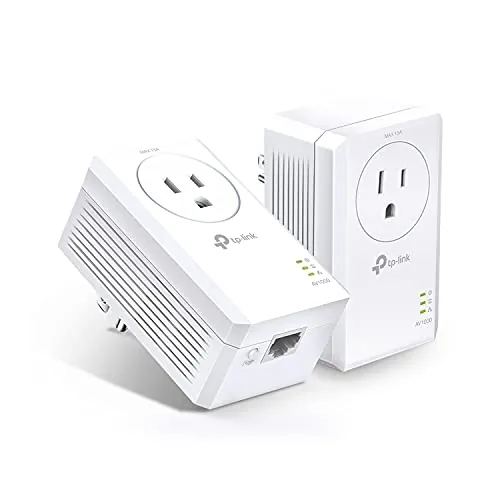
TP-Link TL-PA7017P KIT AV1000 Gigabit Passthrough Powerline Starter Kit
US passthrough starter kit; the Amazon listing data identifies the exact KIT model, while the retail hardware revision remains unobserved.
Model TL-PA7017P KIT
Amazon ASIN B08M13B8B6
TP-Link
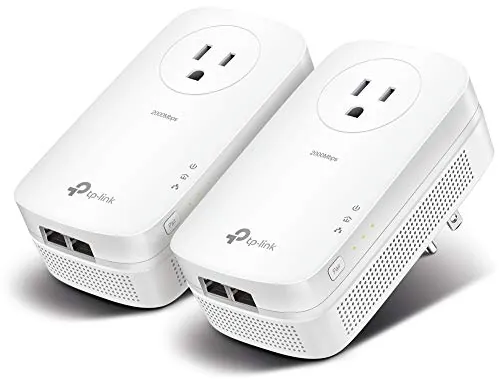
TP-Link TL-PA9020P KIT AV2000 2-Port Gigabit Passthrough Powerline Starter Kit
US two-port passthrough starter kit; the Amazon listing data identifies the exact KIT model, while the retail hardware revision remains unobserved.
Model TL-PA9020P KIT
Amazon ASIN B01H74VKZU
Differences that matter
What matters most to you?
Choose a priority to see what it changes.
Sources for Ethernet connections at the adapter
Sources for Adapters and Ethernet cables listed in each kit
Count destination ports, not adapters in the name
Both manufacturer pages list a two-adapter starter kit. In the standard layout, one adapter connects to a router LAN port and the other sits by the device that needs Ethernet. The PA7017P has one Gigabit port per adapter; the PA9020P has two. The second model therefore helps when a TV and console, or two desk devices, share one remote adapter location. It does not add a second remote location by itself.
Cable count is easy to miss: each kit lists two Ethernet cables. A router-to-adapter link uses one. If you plug two devices directly into the PA9020P remote unit, the full route needs three cables, so plan one more. The PA7017P has only one remote Ethernet port; a second wired endpoint there needs additional connection hardware, such as a switch.
Check outlet placement before choosing the kit
Before ordering, identify a wall outlet beside the router and another at the intended wired-device location. The US guides show an adapter at the router and a second at the destination; their setup guidance says to plug powerline adapters directly into wall outlets rather than power strips, extension cords or surge protectors. Both products include an integrated AC pass-through socket, so the adapter's wall position can still provide an outlet for another plug.
TP-Link's PA7017P V4 and PA9020P V4 guides describe a same-circuit setup. Their product-page footnotes also caution that wiring, interference, traffic and other conditions affect powerline results. Use the exact hardware revision's regional manual and do not assume these pages certify a particular home's path. If the electrical layout is unknown, ask TP-Link or a qualified networking professional before relying on powerline for a required connection.
Keep AV1000 and AV2000 in perspective
AV1000 and AV2000 are not promised payload speeds at a laptop, TV or game console. TP-Link describes the PA9020P figure as a theoretical maximum physical-layer rate and says actual speed can be limited by electrical wiring, noise, traffic and Ethernet/network conditions. The PA7017P page likewise says physical signal rates are not guaranteed throughput or range. Neither model's label predicts the rate your outlets will deliver, and this comparison contains no in-home speed or reliability test.
That makes the practical choice straightforward: pick the PA7017P for one direct remote Ethernet connection, or the PA9020P for two at the same adapter, after checking the documented placement conditions. If a minimum speed is mandatory, these specifications cannot establish that powerline meets it.
Product details
TP-Link TL-PA7017P KIT AV1000 Gigabit Passthrough Powerline Starter Kit
- Ethernet ports per adapter
- 1 Gigabit Ethernet port Source
- Pass-through outlet
- Integrated AC power socket on each adapter Source
- Listed kit contents
- 2 TL-PA7017P adapters and 2 Ethernet cables Source
- Powerline rate label
- AV1000; TP-Link describes maximum signal rate as a physical rate, not guaranteed throughput Source
TP-Link TL-PA9020P KIT AV2000 2-Port Gigabit Passthrough Powerline Starter Kit
- Ethernet ports per adapter
- 2 Gigabit Ethernet ports Source
- Pass-through outlet
- Integrated AC power socket on each adapter Source
- Listed kit contents
- 2 TL-PA9020P adapters and 2 Ethernet cables Source
- Powerline rate label
- AV2000; TP-Link describes 2000 Mbps as a theoretical maximum physical-layer rate Source
Before you buy
Community discussions
Leaving space at the outlet next to the adapter
TP-Link TL-PA9020P KIT AV2000 2-Port Gigabit Passthrough Powerline Starter Kit
A TL-PA9020P KIT owner noticed that the adapter body overlapped part of the neighboring outlet.
What to check
Measure the available space around the outlet and compare the adapter’s dimensions with the plugs you already use nearby.
Common questions
Does the TL-PA9020P KIT deliver twice the usable speed because it says AV2000?
No. TP-Link defines the PA9020P's 2000 Mbps as a theoretical maximum physical-layer rate and says actual data speed varies with wiring, electrical noise, traffic and Ethernet/network limits. The label is not a measured comparison with the PA7017P or a guarantee for your house.TL-PA7017P KIT | AV1000 Gigabit Passthrough Powerline Starter KitTL-PA9020P KIT | AV2000 2-Port Gigabit Passthrough Powerline Starter Kit
Can the PA9020P connect two devices in two different rooms?
The two-port adapter adds two Ethernet jacks where that adapter is plugged in; the listed KIT contains two adapters total. In the normal router-to-destination arrangement, that means one remote adapter location. Reaching an additional location would require a separately planned powerline endpoint and compatible setup, which this comparison does not establish for a particular home's wiring.TL-PA9020P KIT | AV2000 2-Port Gigabit Passthrough Powerline Starter Kit
Do both adapters preserve an outlet for another appliance?
Yes. TP-Link lists an integrated AC pass-through power socket on each model. That socket preserves an AC outlet at the adapter position; it is not an Ethernet port. Follow the exact model guide for placement and connected-load instructions.TL-PA7017P KIT | AV1000 Gigabit Passthrough Powerline Starter KitTL-PA9020P KIT | AV2000 2-Port Gigabit Passthrough Powerline Starter Kit
Will either kit work on outlets in different circuits?
The cited TP-Link US V4 guides instruct a same-circuit setup, and the PA9020P page recommends the same electrical circuit for better performance. TP-Link also says actual powerline throughput and range vary with wiring and environmental conditions. These sources do not establish the result for your home's outlets; check the applicable hardware-revision manual and ask TP-Link or a qualified networking professional if uncertain.TL-PA7017P (US) V4 User GuideTL-PA9020P V4 User Guide: Powerline SetupTL-PA7017P KIT | AV1000 Gigabit Passthrough Powerline Starter KitTL-PA9020P KIT | AV2000 2-Port Gigabit Passthrough Powerline Starter Kit
Sources and scope
This is a source-based comparison of TP-Link's US model pages and US V4 documentation. The hardware revision and exact retail package attached to each Amazon ASIN are not visible in the listing data, so confirm the label and matching regional instructions on the box. The published AV figures are theoretical physical-layer rates; no home-specific speed, circuit compatibility, coverage, latency, reliability or safety result is established. The mains-path notes describe TP-Link's setup guidance and do not certify a home's wiring.
- TL-PA7017P KIT | AV1000 Gigabit Passthrough Powerline Starter Kit
- TL-PA9020P KIT | AV2000 2-Port Gigabit Passthrough Powerline Starter Kit
- TL-PA7017P (US) V4 User Guide
- TL-PA9020P V4 User Guide: Powerline Setup
- TP-Link US Download Center: TL-PA7017P V4 and regional revision notes
- TP-Link US Download Center: TL-PA9020P KIT V4 and available hardware versions