
Products compared
TP-Link
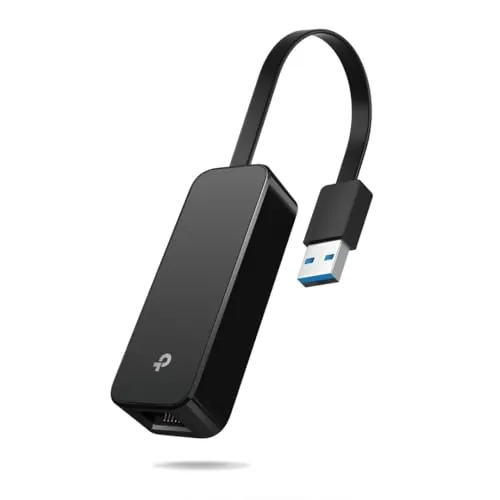
TP-Link UE306 USB 3.0 to Gigabit Ethernet Network Adapter
Compact USB-A Ethernet adapter. The retail offer identifies the model as UE306 but does not specify its hardware revision.
Model UE306
Amazon ASIN B09GRL3VCN
Belkin
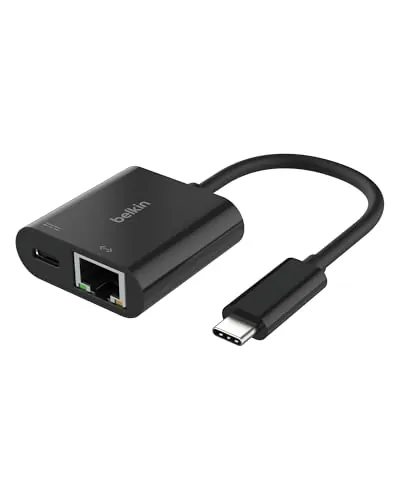
Belkin Connect USB-C to Ethernet + Charge Adapter 100W
Black USB-C adapter with a tethered host cable, one Gigabit Ethernet port and a separate USB-C PD input. A charger is not listed in the box.
Model INC019btBK
Amazon ASIN B0D3FRMNW5
Differences that matter
What matters most to you?
Choose a priority to see what it changes.
Sources for Laptop-side plug and OS setup
Sources for Charging while Ethernet is connected
Start with the port on your laptop
The UE306 is a USB-A adapter; the INC019btBK's tethered host lead is USB-C. Both provide one RJ45 Gigabit Ethernet connection, so this choice is primarily about the laptop-side plug and charging plan, not a supported speed advantage.
Check UE306 operating-system support by hardware revision, not just by the product name. TP-Link's U.S. product page lists Windows, Linux and Switch; its support page provides revision-specific driver downloads, including macOS packages for V2.60. The retail listing does not identify the revision, so if Mac use matters, check the adapter label and matching OS driver.
Decide whether charging must pass through the Ethernet adapter
UE306's TP-Link specifications list a USB host interface and an RJ45 port, with no charging input in the package or interface list. Plan to use the laptop's own charging connection separately.
Belkin routes Ethernet and USB-C PD through the same host cable and provides a distinct PD input. You supply the charger: Belkin recommends 65W (not included) and documents up to 53W pass-through while the adapter is doing its other functions. Check your laptop's own power requirement; do not read the product's 100W pass-through rating as a promise of 100W delivered to the laptop.
What both specifications do—and do not—tell you
The makers list 10/100/1000 Mbps Ethernet for both adapters. That is the port rating, not a measurement of your internet connection. TP-Link and Belkin both list one Ethernet adapter in the box; neither listed package includes the Ethernet cable to your router or switch.
Product details
TP-Link UE306 USB 3.0 to Gigabit Ethernet Network Adapter
- Host connector
- USB Type-A, USB 3.0 Source
- Ethernet port
- One 10/100/1000 Mbps RJ45 port Source
- Operating-system notes
- US page lists Nintendo Switch, Windows 11/10/8.1/8/7 and Linux; the support page has revision-specific driver downloads including macOS for V2.60 Source
- Listed box contents
- Adapter and Quick Installation Guide Source
Belkin Connect USB-C to Ethernet + Charge Adapter 100W
- Host connector
- Tethered USB-C cable Source
- Ethernet port
- One Gigabit Ethernet port, supporting 10/100/1000 Mbps Source
- Charging arrangement
- USB-C PD 3.0 pass-through input; Belkin recommends a separate 65W charger, not included, for up to 53W pass-through while other adapter functions are used Source
- Listed box contents
- One INC019 adapter; charger is not included Source
Before you buy
Community discussions
Checking which USB port can serve an Ethernet adapter
TP-Link UE306 USB 3.0 to Gigabit Ethernet Network Adapter
A laptop owner with spare USB 3.0 ports asked about adding an Ethernet adapter. A reply suggested the TP-Link UE306.
What to check
Check the physical USB port on your device and whether using it would leave enough room for your other plugs.
Common questions
Does the Belkin INC019 include a charger?
No. Belkin lists one INC019 adapter in the package and says its recommended 65W charger is not included.Belkin Connect USB-C to Ethernet + Charge Adapter 100W (INC019) FAQs
Does '100W' mean the Belkin sends 100W to my laptop?
No. Belkin describes up to 100W USB-C PD 3.0 pass-through. Its 65W charger example delivers up to 53W while other adapter functions are in use, and Belkin says the result depends on device requirements.Belkin Connect USB-C to Ethernet + Charge Adapter 100W (INC019) FAQs
Will the TP-Link UE306 work with my Mac?
TP-Link's current support page offers macOS drivers for UE306 hardware version V2.60, but the selected Amazon listing does not reveal which revision ships. Check the physical revision and its matching TP-Link download page rather than assuming plug-and-play support.Download for UE306: hardware versions and revision-specific driversUE306 | USB 3.0 to Gigabit Ethernet Network Adapter
Sources and scope
This guide compares the exact named adapter models using current manufacturer documentation, not hands-on tests. The TP-Link UE306 retail listing does not identify its hardware revision; TP-Link provides revision-specific downloads, so verify the adapter label and matching driver for your operating system. TP-Link lists Mac drivers for UE306 V2.60, while its U.S. product-page supported-systems list does not include macOS. General macOS claims in third-party listings do not establish plug-and-play behavior for an unknown revision. Both makers list Gigabit Ethernet, but those ratings do not predict actual network throughput. Belkin's 100W figure is a maximum USB-C PD pass-through specification, not power guaranteed to the host; Belkin's stated 65W-charger example is up to 53W while other adapter functions are in use, with actual delivery dependent on device requirements.
- UE306 | USB 3.0 to Gigabit Ethernet Network Adapter
- 2025 SOHO Product Guide: Ethernet Network Adapter Product Range
- Download for UE306: hardware versions and revision-specific drivers
- Belkin Connect USB-C to Ethernet + Charge Adapter 100W (INC019btBK)
- Belkin Connect USB-C to Ethernet + Charge Adapter 100W (INC019) FAQs