
Products compared
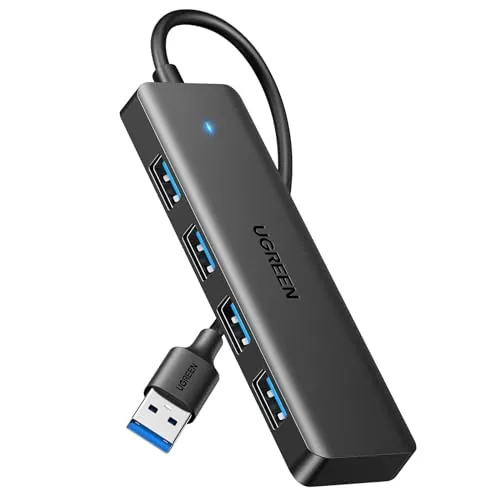
UGREEN
UGREEN USB 3.0 Hub 25851, 4-Port USB-A
Black U.S. retailer offer; exact-SKU UGREEN manufacturer page reviewed is Australia-region
Model 25851
Amazon ASIN B0CD1BHXPZ
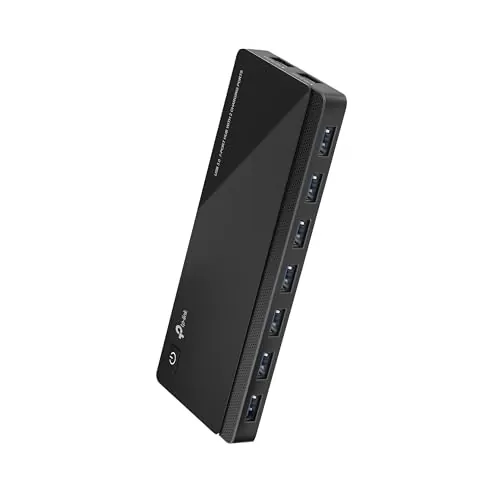
TP-Link
TP-Link UH720 USB 3.0 7-Port Hub with 2 Charging Ports
Black U.S. retailer offer; check the underside label for hardware revision before relying on adapter behavior
Model UH720 (hardware revision not identified by listing data)
Amazon ASIN B00SCX6I8A
Differences that matter
What matters most to you?
Choose a priority to see what it changes.
Sources for Host-side connection
Sources for Downstream port roles
Sources for Physical placement
Count data connections separately from charging ports
UGREEN's page for SKU 25851 describes one USB-A connection expanding to four USB-A ports for peripherals. TP-Link documents seven data-transfer ports on UH720 plus two separate charging-only ports. The two side charging ports should not be counted as data connections.
Before buying, write down how many devices need data and how many only need charging. If your data-device count is four or fewer, the UGREEN layout may be sufficient; choose the UH720 layout when you specifically need its additional documented data connections and separate charge-only ports. This does not predict actual transfer speed or charging behavior with any particular device.
Check host connector and desk power before settling the hub
The UGREEN page describes a USB-A connection to the host. TP-Link's UH720 V1 page lists a USB 3.0 Micro-B input and an included power adapter. Check the ports on your computer and the cable in the offer package; connector shape alone does not guarantee device compatibility.
UH720 power depends on hardware revision. TP-Link says V1 requires the adapter while V2/V3 can be used without it, and its U.S. support page lists revisions through V5.60. Identify the revision on the exact unit rather than inferring it from 'UH720.' The exact 25851 UGREEN page reviewed is Australia-region and leaves the U.S. package's power arrangement and adapter contents unstated.
Use dimensions to plan placement, not performance
UGREEN lists the 25851 at 0.4 inches thick and 33 g. TP-Link's U.S. V1 page lists UH720 at 6.5 × 2.6 × 0.7 inches and describes a package with a power adapter and one-meter USB cable. That supports a physical placement and cable-route check for the documented revision, not a claim about how well either hub handles your setup.
If you want UH720's desk layout but are trying to limit outlet use, first identify the revision and its exact package. If you need a compact unit without an external power brick, do not assume the UGREEN page proves that; confirm the U.S. offer's power arrangement before purchase.
Product details
UGREEN USB 3.0 Hub 25851, 4-Port USB-A
The 25851's documented case for a small setup is its four USB-A expansion ports and a thin, light published profile. The reviewed manufacturer page does not establish whether the U.S. ASIN's box includes a separate adapter or how that exact package is powered.
TP-Link UH720 USB 3.0 7-Port Hub with 2 Charging Ports
UH720's clear purchase distinction is port role: seven data connections plus two dedicated charging ports. Its power setup is revision-dependent, so the model name alone is not enough to decide whether your exact unit must stay on an outlet.
- Downstream port roles
- TP-Link distinguishes seven USB data ports from two separate charging-only ports Source
- Host-side connector on V1 page
- USB 3.0 Micro-B input; compare with your available host connection and the cable in the exact package Source
- External power
- The U.S. V1 page lists an included adapter; official FAQ says V1 requires it and V2/V3 can be used without it. Other listed revisions need their own documentation check. Source
Before you buy
Community discussions
Choose a place that keeps the hub usable
TP-Link UH720 USB 3.0 7-Port Hub with 2 Charging Ports
A home-office owner who keeps a TP-Link UH720 on their desk asked where else they could put it.
What to check
Mark a spot where the ports will stay within reach. Check how far the cables must run to your computer and devices.
Common questions
Does the UH720 have nine data ports?
No. TP-Link distinguishes seven data-transfer ports from two separate charging-only ports. Count the roles separately when planning your setup.UH720 V1 | USB 3.0 7-Port Hub with 2 Charging Ports
Can every UH720 be used without its power adapter?
Do not assume so from the model name. TP-Link says V1 must use its power adapter and V2/V3 may be used without it; its support page lists additional hardware revisions. Identify the exact revision and check its guide before planning an adapter-free setup.General Questions About TP-Link USB Hub (FAQ 3368)Download for UH720 | Hardware revision selector
Does UGREEN 25851 include an adapter or run without one?
The UGREEN page reviewed identifies SKU 25851 and its port layout, but does not state the power arrangement or adapter contents for the U.S. Amazon package. Confirm that exact package if power setup is decisive.UGREEN USB 3.0 Hub, SKU 25851 (Australia-region manufacturer page)
Which hub has faster real-world transfers or charging?
This guide does not measure transfer or charging rates. Published USB 3.0 labels and charging-port descriptions do not establish which setup will be faster with your computer and devices.UGREEN USB 3.0 Hub, SKU 25851 (Australia-region manufacturer page)UH720 V1 | USB 3.0 7-Port Hub with 2 Charging Ports
Sources and scope
Product A is the U.S. Amazon retailer offer for model 25851, while the exact-SKU UGREEN manufacturer page reviewed is Australia-region; it confirms the 25851 port layout and physical-profile claims but not the U.S. box or power architecture. Product B's ASIN identifies UH720 but not its hardware revision. TP-Link publishes multiple revisions and says adapter behavior varies for some; do not assume the selected offer is V1, V2/V3, V4 or V5. No real-world transfer, charging, device compatibility or reliability tests were performed.