
Products compared
UGREEN
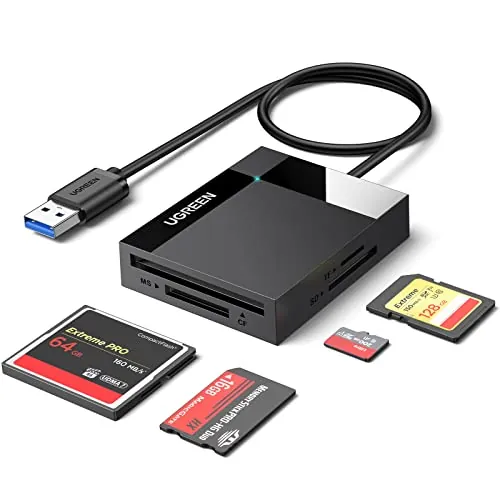
UGREEN 4-in-1 USB 3.0 SD/TF Card Reader
Black U.S. SKU 30333 with an attached USB-A 3.0 lead and separate SD, TF, CF and MS card paths. UGREEN’s U.S. gallery identifies MS PRO and MS PRO-HG on the MS path.
Model 30333
Amazon ASIN B01ARAH6O0
Apple
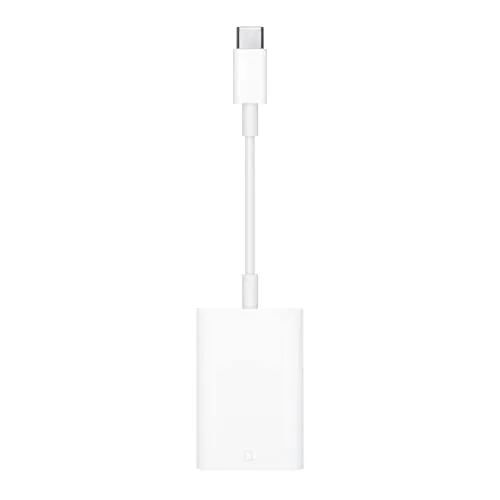
Apple USB-C to SD Card Reader
Apple USB-C reader with a full-size SD card path. Apple states UHS-II speeds, backward compatibility with other SD cards and adapters, and a design intended not to block other ports. The exact product page lists supported Mac, iPad and iPhone models; check your host model there.
Model MW653AM/A
Amazon ASIN B0D7FSCFPM
Differences that matter
What matters most to you?
Choose a priority to see what it changes.
Sources for Host model and import workflow
Sources for Reach and neighboring-port clearance
Start with your host port, not a speed label
UGREEN 30333 uses an attached USB-A 3.0 lead. Apple MW653AM/A uses USB-C, and Apple names compatible Mac, iPad and iPhone models. Check the exact port and host model before buying.
Apple advertises UHS-II support, while UGREEN's product title identifies USB 3.0. Those are interface descriptions, not a head-to-head copy test. Card type, reader, host and software all matter, so this guide does not turn either label into an actual speed promise.
Use the card marking to choose the slot
The UGREEN U.S. 30333 gallery shows separate SD, TF, CF and MS slots and identifies MS PRO and MS PRO-HG on its Memory Stick path. That extra card range matters if your collection includes those formats and the host has USB-A. The gallery does not prove every subtype or storage capacity, so check the exact card label against the diagram.
Apple's MW653AM/A is an SD reader, with UHS-II support and backward compatibility for other SD cards and adapters. If you have microSD, Apple does not show a separate TF slot; use an appropriate SD adapter. Apple does not list direct CF or Memory Stick apertures.
Check the reach around your camera and computer
An attached lead can help position the UGREEN reader near your card. Confirm its reach if the USB-A port is hard to access.
Apple says its direct USB-C reader is designed not to block other ports. Its product page gives no cable length and this comparison has not tested clearance with device cases, docks or adjacent accessories. If your setup is crowded, check the actual host layout before relying on a physical-fit assumption.
Make the purchase choice from a short compatibility check
Write down three things before ordering: the host model, the host port, and the card marking. For an Apple USB-C Mac, iPad or iPhone, check Apple's product-specific model list and confirm the card is SD or has an appropriate SD adapter. For UGREEN, confirm a USB-A 3.0 port and a match for the needed SD, TF, CF or listed MS slot.
If your requirement is USB-C plus direct CF, TF or Memory Stick insertion, neither reader documents that combination. Choose a different exact model only after confirming both its host connector and the card slot you need.
Product details
UGREEN 4-in-1 USB 3.0 SD/TF Card Reader
Apple USB-C to SD Card Reader
- Host and card interface
- USB-C connector; designed for SD cards, with UHS-II support and backward compatibility for other SD cards and adapters. Source
- Host model check
- Apple's exact product page lists compatible Mac, iPad and iPhone models; verify the exact device instead of treating every USB-C host as supported. Source
- Port placement
- Apple says the reader is designed not to block the host's other ports. Source
Before you buy
Community discussions
Match the reader plug to the phone you will use
Apple USB-C to SD Card Reader
A shopper wanted to move photos from a camera card to a USB-C iPhone. In the discussion, a USB-C iPhone user linked Apple’s MW653AM/A reader as the one they use.
What to check
Check the shape of your phone’s port and the size of the card you need to insert. Confirm the exact reader supports that combination.
Common questions
Can the Apple MW653AM/A reader take a microSD card directly?
Apple describes this as an SD card reader and says it works with SD cards and adapters. For a microSD card, use an appropriate microSD-to-SD adapter; the Apple page does not list a separate TF/microSD slot.USB-C to SD Card Reader — Apple MW653AM/A
Does UGREEN 30333 support Memory Stick?
The exact U.S. product gallery shows a separate MS slot and labels MS PRO and MS PRO-HG. Match your card to the markings shown; this does not establish support for every Memory Stick subtype or capacity.UGREEN 30333 U.S. gallery: card-family labelsUGREEN 30333 U.S. gallery: plug and separate slots
Does a USB-C port guarantee Apple reader compatibility?
No. Apple publishes a model-specific compatibility list for this reader. Check the exact Mac, iPad or iPhone model rather than relying on the connector alone.USB-C to SD Card Reader — Apple MW653AM/A
Which one transfers cards faster?
This guide does not establish a real-world speed winner. Apple's UHS-II support and UGREEN's USB 3.0 label describe interface support; actual transfer speed depends on the card, host, files and workflow and was not measured here.USB-C to SD Card Reader — Apple MW653AM/AUGREEN 4-in-1 USB 3.0 card reader, SKU 30333 (European manufacturer listing)
Sources and scope
The U.S. product page for UGREEN 30333 Black now points to a category page. The retained U.S. gallery and UGREEN’s European page for SKU 30333 document the connector and card paths. The current U.S. lead length and exact host support are unverified. Apple’s U.S. MW653AM/A page lists compatible Apple hosts. Transfer speed and app behavior depend on the actual device and card.
Related comparisons
UGREEN 30333 vs 50706: Card Slots, USB Plugs and Desk Fit
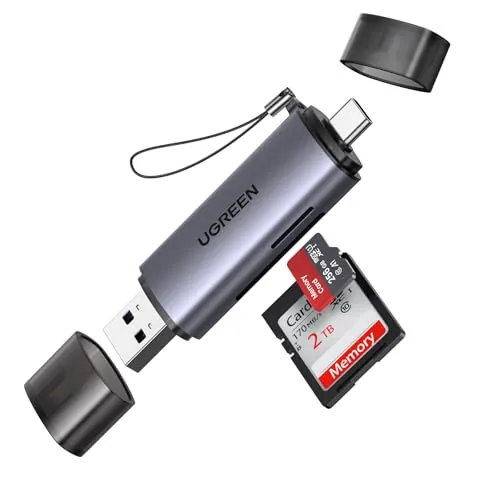
The UGREEN 30333 (B01ARAH6O0, black) is a four-slot reader with a USB-A connection and support for listed SD, microSD, CompactFlash and Memory Stick formats. The UGREEN 50706 (B07D1J88CF, Deep Gray) has SD and microSD slots plus USB-A and USB-C plug options. Match the card labels and host ports first, then measure cable reach or direct-plug clearance at the actual device.
Read comparisonUGREEN 50706 vs Apple MW653AM/A: SD Card Reader Fit and Workflow
The UGREEN 50706 suits a workflow that needs its listed USB-A option or direct SD and microSD access at the same time. Apple’s MW653AM/A suits a USB-C host and SD cards for which you want the maker to explicitly list UHS-II support. Check your exact host connector, card type, and mobile-device requirements first. These are published feature differences, not transfer-speed results.
Read comparison